


1、点击添加属性值按钮input增加属性并且 自动聚焦
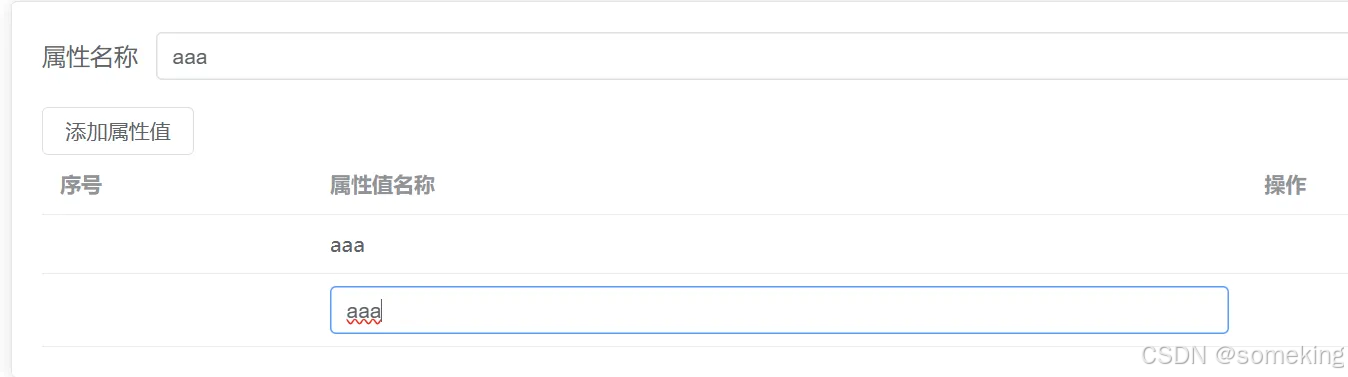
2、基础代码 HTML 使用 :ref="(value)=>value" value属性是当前实例对象
<template>
      <el-button :disabled="form.state ? false : true" @click="handleadd"
        >添加属性值</el-button
      >
      <el-table :data="tabledata" style="width: 100%">
        <el-table-column label="序号" width="180" />
        <el-table-column label="属性值名称">
          <template #default="{ row, $index }">
            <el-input
              v-if="row.flag"
              v-model="row.name"
              @blur="blurcheck(row, $index)"
              :ref="(value)=>arr[$index]=value"
            ></el-input>

            <div v-else @click="divclick(row, $index)">{{ row.name }}</div>
          </template>
        </el-table-column>
        <el-table-column label="操作" />
      </el-table>
</template>
3、基础代码 js部分 实现思路 使用一个空数组,把每次if出现的input对象添加进入,对应的下标是 表格默认插槽解构出来的$index属性,#default="{ row, $index }" , <input :ref="(value)=>arr[$index]=value"> ;js通过操作数据:arr.value[index].focus() 进行自动聚焦,这个index是方法传入的$index
const handleadd = () => {
  tabledata.value.push({ name: form.value.state, flag: true });
  nextTick(()=>{
    arr.value[tabledata.value.length-1].focus()
  })
};
// 表单失去焦点按钮
const blurcheck = (row, index) => {
  if (row.name.trim() == "") {
    // 空值直接删除
    tabledata.value.splice(index, 1);
    return;
  }
  let result = tabledata.value.find((item) => {
    if (item != row) {
      return item.name === row.name;
    }
  });
  if (result) {
    // 重复直接删除
    tabledata.value.splice(index, 1);
    alert("属性值不能重复");
    return;
  }

  row.flag = false;
};

// 聚焦业务
let arr = ref([]);

// 点击div按钮
const divclick = (row, index) => {
  row.flag = true;
  nextTick(() => {
    console.log(arr.value[index]);
    arr.value[index].focus()
  });
};





 扫一扫
扫一扫


 1701
1701

 被折叠的 条评论
为什么被折叠?
被折叠的 条评论
为什么被折叠?
 到【灌水乐园】发言





