#(1)七段数码管的绘制.py

#(2)导入库模块
from turtle import *
from random import *
import time

#(3)绘制单短间隔
def drawGap():
    penup()
    fd(5)


#(4)绘制单段数码管
def drawLine(draw):
    drawGap()
    if draw:
        pendown()
    else:
        penup()
    fd(20)
    drawGap()
    right(90)


#(5)根据数字绘制七段数码管
def drawDight(dight):
    pencolor(random(),random(),random())      #随机获取一种颜色
    drawLine(True) if dight in [2,3,4,5,6,8,9] else drawLine(False)     #用第1段的数字
    pencolor(random(),random(),random())
    drawLine(True) if dight in  [0,1,3,4,5,6,7,8,9] else drawLine(False) #用第2段的数字
    pencolor(random(),random(),random())
    drawLine(True) if dight in [0,2,3,5,6,8,9]  else drawLine(False)     #用第3段的数字
    pencolor(random(),random(),random())
    drawLine(True) if dight in [0,2,6,8]else drawLine(False)    #用第4段的数字
    left(90)                                 #将画笔旋转90度进入第五段
    pencolor(random(),random(),random())
    drawLine(True) if dight in [0,4,5,6,8,9] else drawLine(False)           #用第5段的数字
    pencolor(random(),random(),random())
    drawLine(True) if dight in [0,2,3,5,6,7,8,9] else drawLine(False)   #用第6段的数字
    pencolor(random(),random(),random())
    drawLine(True) if dight in [0,1,2,3,4,7,8,9]  else drawLine(False)   #用第7段的数字
    left(180)
    penup()
    fd(20)
#(6)获得要输出的数字
def drawData(date):
    for i in date:
        if i =='-':
            write('年',font=("幼圆",40,"normal"))
            fd(30)
        elif i=='=':
            write('月',font=("楷体",30,"normal"))
            fd(30)
        elif i=='+':
            write('日',font=("华文彩云",40,"normal"))
            fd(30)
        elif i=='$':
            write('时',font=("楷体",30,"normal"))
            fd(40)
        elif i=='#':
            write('分',font=("华文彩云",40,"normal"))
            fd(40)
        elif i=='?':
            write('秒',font=("华文彩云",40,"normal"))
            fd(40)
        else:
            drawDight(eval(i))


#(7)主函数(设置画布与画笔等)
def main():
    setup(1350,350)
    speed(100)
    penup()
    fd(-300)
    pensize(5)
    drawData(time.strftime('%Y-%m=%d+%H$%M#%S?',time.localtime()))
    hideturtle()
    done()

#(8)调用主函数
main()
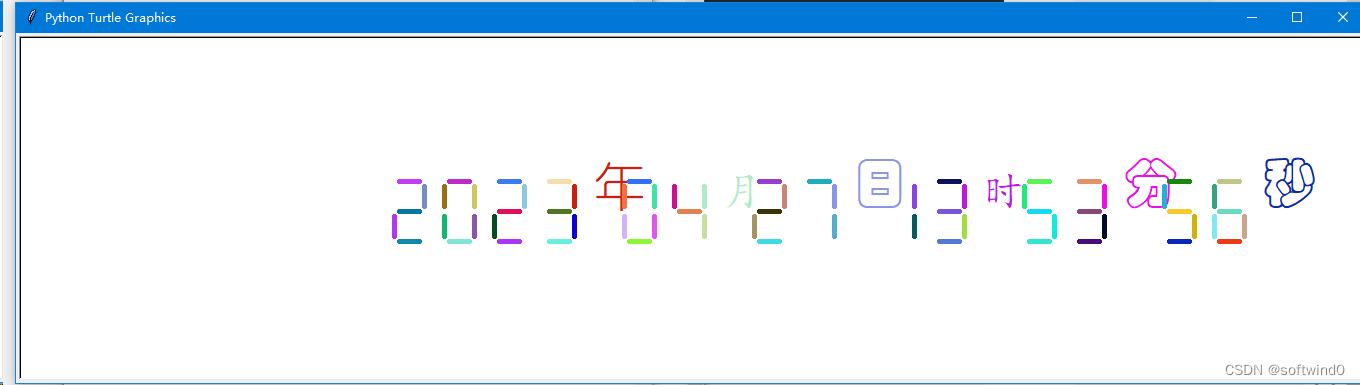


 该Python程序利用turtle库绘制七段数码管,并根据当前时间动态显示年月日时分秒,颜色随机,各个段落的显示由drawLine函数控制,drawData函数处理时间格式并调用drawDight绘制数码管。






 扫一扫
扫一扫


 591
591

 被折叠的 条评论
为什么被折叠?
被折叠的 条评论
为什么被折叠?
 到【灌水乐园】发言





