



1.初步感受Jupyter Notebook
Jupyter Notebook
官网地址:Jupyter Notebook
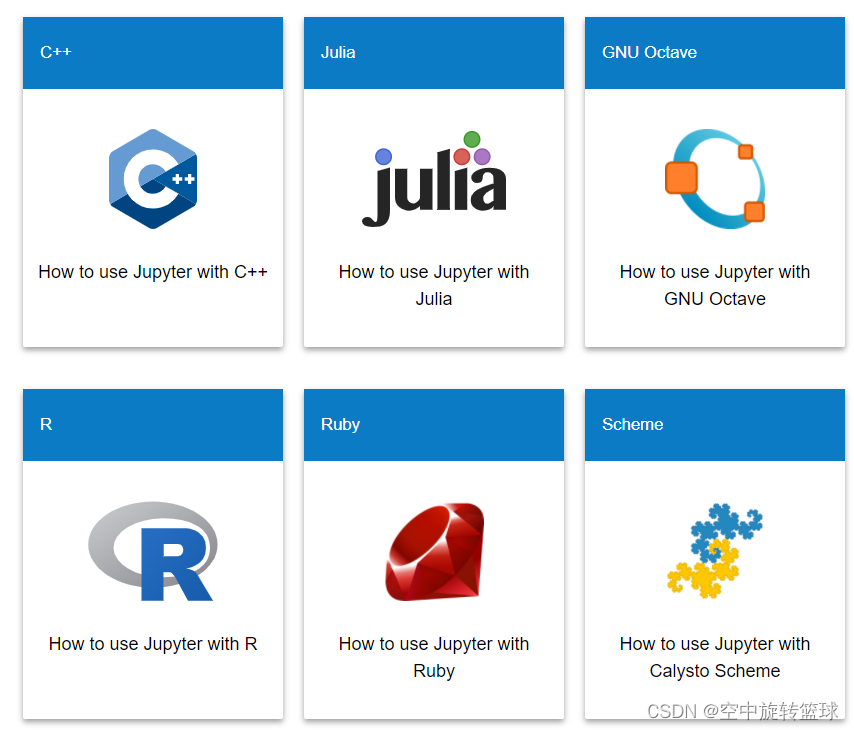
Jupyter Notebook(此前被称为 IPython notebook)是一个交互式笔记本,支持运行 40 多种编程语言。
Jupyter Notebook 的本质是一个 Web 应用程序,便于创建和共享程序文档,支持实时代码,数学方程,可视化和 markdown。 用途包括:数据清理和转换,数值模拟,统计建模,机器学习等等 。
Jupyter Notebook: The Classic Notebook Interface
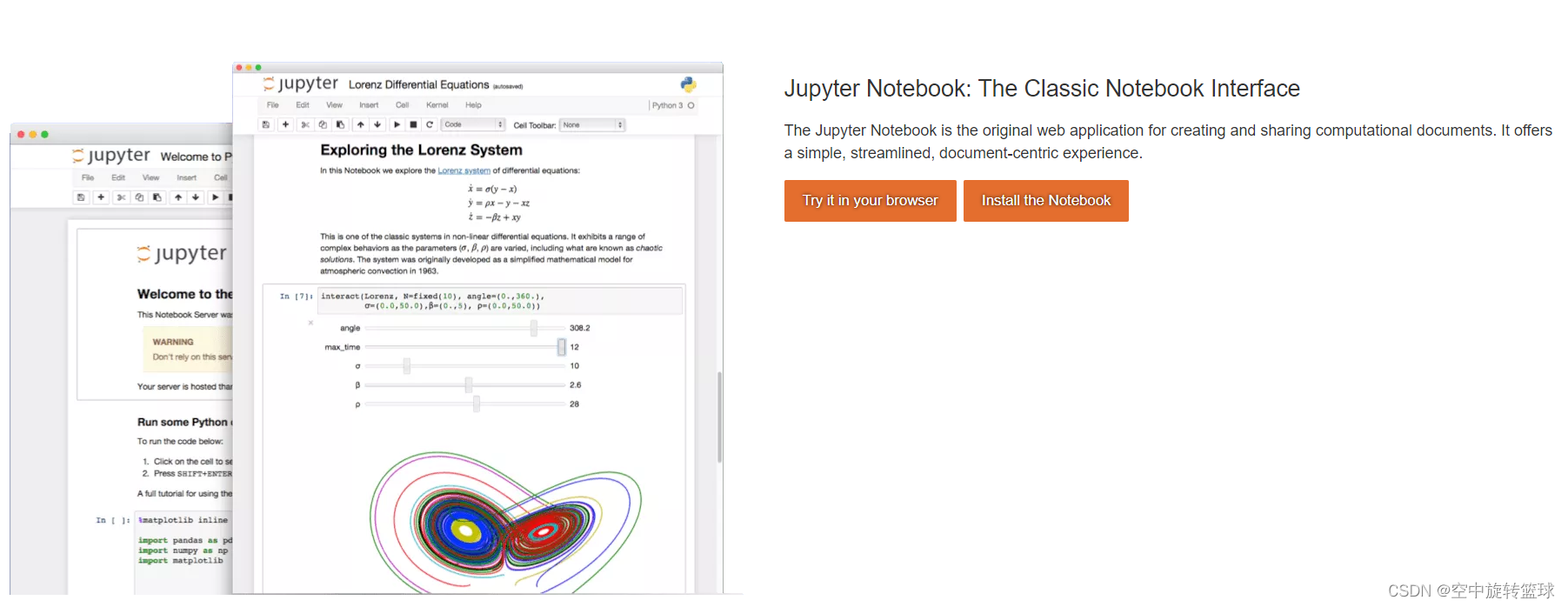
Try it your Browser可以使用本地浏览器预览效果
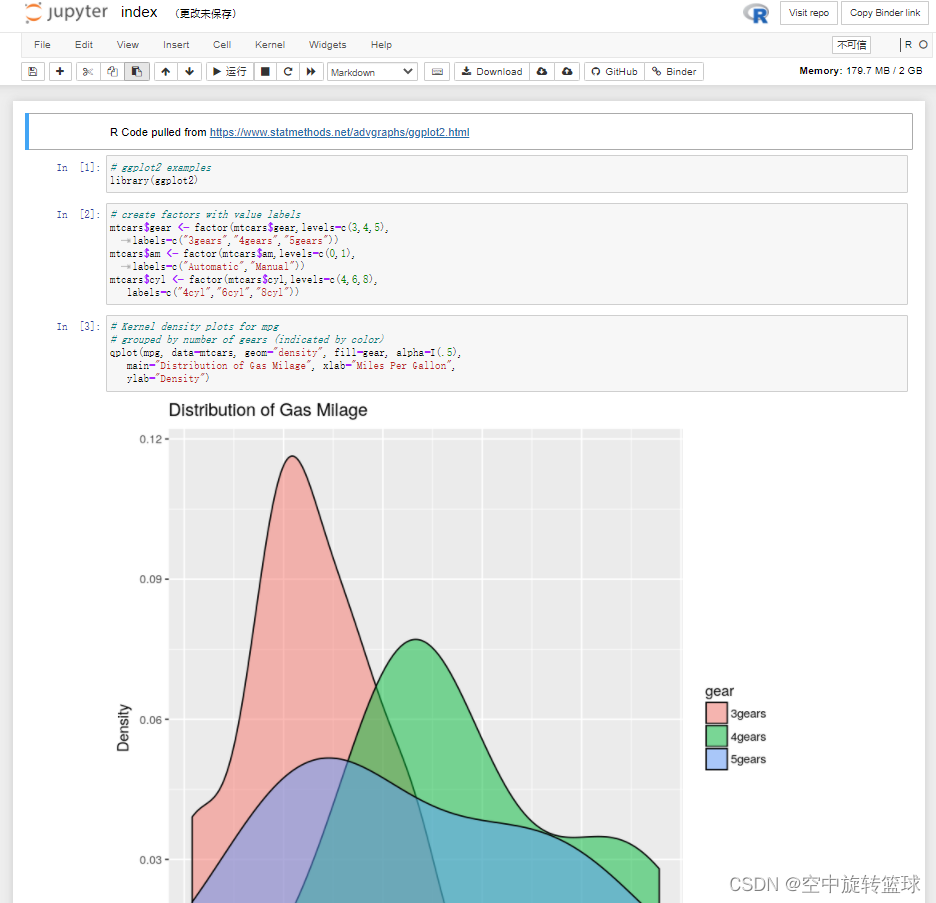
首先打开一个R语言的浏览器界面如下
2.Jupyter Notebook安装
使用pip安装
首先使用’win+r’ 输入cmd 打开命令提示行
使用cd命令定位到python编译器路径下,一般默认路径为:
C:\Users\Administrator\AppData\Local\Programs\Python\Python37\Scripts
输入命令:cd C:\Users\Administrator\AppData\Local\Programs\Python\Python37\Scripts
输入命令:pip install jupyter
刚使用就报错了,如下:
ERROR: Exception:
Traceback (most recent call last):
  File "d:\pythonproject\venv\lib\site-packages\pip\_internal\cli\base_command.py", line 180, in _main
    status = self.run(options, args)
  File "d:\pythonproject\venv\lib\site-packages\pip\_internal\cli\req_command.py", line 204, in wrapper
    return func(self, options, args)
  File "d:\pythonproject\venv\lib\site-packages\pip\_internal\commands\install.py", line 319, in run
    reqs, check_supported_wheels=not options.target_dir
  File "d:\pythonproject\venv\lib\site-packages\pip\_internal\resolution\resolvelib\resolver.py", line 128, in resolve
    requirements, max_rounds=try_to_avoid_resolution_too_deep
  File "d:\pythonproject\venv\lib\site-packages\pip\_vendor\resolvelib\resolvers.py", line 473, in resolve
    state = resolution.resolve(requirements, max_rounds=max_rounds)
  File "d:\pythonproject\venv\lib\site-packages\pip\_vendor\resolvelib\resolvers.py", line 341, in resolve
    name, crit = self._merge_into_criterion(r, parent=None)
  File "d:\pythonproject\venv\lib\site-packages\pip\_vendor\resolvelib\resolvers.py", line 172, in _merge_into_criterion
    if not criterion.candidates:
  File "d:\pythonproject\venv\lib\site-packages\pip\_vendor\resolvelib\structs.py", line 139, in __bool__
    return bool(self._sequence)
  File "d:\pythonproject\venv\lib\site-packages\pip\_internal\resolution\resolvelib\found_candidates.py", line 143, in __bool__
    return any(self)
  File "d:\pythonproject\venv\lib\site-packages\pip\_internal\resolution\resolvelib\found_candidates.py", line 129, in <genexpr>
    return (c for c in iterator if id(c) not in self._incompatible_ids)
  File "d:\pythonproject\venv\lib\site-packages\pip\_internal\resolution\resolvelib\found_candidates.py", line 30, in _iter_built
    for version, func in infos:
  File "d:\pythonproject\venv\lib\site-packages\pip\_internal\resolution\resolvelib\factory.py", line 272, in iter_index_candidate_infos
    hashes=hashes,
  File "d:\pythonproject\venv\lib\site-packages\pip\_internal\index\package_finder.py", line 879, in find_best_candidate
    candidates = self.find_all_candidates(project_name)
  File "d:\pythonproject\venv\lib\site-packages\pip\_internal\index\package_finder.py", line 824, in find_all_candidates
    page_candidates = list(page_candidates_it)
  File "d:\pythonproject\venv\lib\site-packages\pip\_internal\index\sources.py", line 134, in page_candidates
    yield from self._candidates_from_page(self._link)
  File "d:\pythonproject\venv\lib\site-packages\pip\_internal\index\package_finder.py", line 783, in process_project_url
    html_page = self._link_collector.fetch_page(project_url)
  File "d:\pythonproject\venv\lib\site-packages\pip\_internal\index\collector.py", line 512, in fetch_page
    return _get_html_page(location, session=self.session)
  File "d:\pythonproject\venv\lib\site-packages\pip\_internal\index\collector.py", line 422, in _get_html_page
    resp = _get_html_response(url, session=session)
  File "d:\pythonproject\venv\lib\site-packages\pip\_internal\index\collector.py", line 137, in _get_html_response
    "Cache-Control": "max-age=0",
  File "d:\pythonproject\venv\lib\site-packages\pip\_vendor\requests\sessions.py", line 555, in get
    return self.request('GET', url, **kwargs)
  File "d:\pythonproject\venv\lib\site-packages\pip\_internal\network\session.py", line 449, in request
    return super().request(method, url, *args, **kwargs)
  File "d:\pythonproject\venv\lib\site-packages\pip\_vendor\requests\sessions.py", line 542, in request
    resp = self.send(prep, **send_kwargs)
  File "d:\pythonproject\venv\lib\site-packages\pip\_vendor\requests\sessions.py", line 655, in send
    r = adapter.send(request, **kwargs)
  File "d:\pythonproject\venv\lib\site-packages\pip\_vendor\cachecontrol\adapter.py", line 53, in send
    resp = super(CacheControlAdapter, self).send(request, **kw)
  File "d:\pythonproject\venv\lib\site-packages\pip\_vendor\requests\adapters.py", line 449, in send
    timeout=timeout
  File "d:\pythonproject\venv\lib\site-packages\pip\_vendor\urllib3\connectionpool.py", line 696, in urlopen
    self._prepare_proxy(conn)
  File "d:\pythonproject\venv\lib\site-packages\pip\_vendor\urllib3\connectionpool.py", line 964, in _prepare_proxy
    conn.connect()
  File "d:\pythonproject\venv\lib\site-packages\pip\_vendor\urllib3\connection.py", line 359, in connect
    conn = self._connect_tls_proxy(hostname, conn)
  File "d:\pythonproject\venv\lib\site-packages\pip\_vendor\urllib3\connection.py", line 506, in _connect_tls_proxy
    ssl_context=ssl_context,
  File "d:\pythonproject\venv\lib\site-packages\pip\_vendor\urllib3\util\ssl_.py", line 432, in ssl_wrap_socket
    ssl_sock = _ssl_wrap_socket_impl(sock, context, tls_in_tls)
  File "d:\pythonproject\venv\lib\site-packages\pip\_vendor\urllib3\util\ssl_.py", line 474, in _ssl_wrap_socket_impl
    return ssl_context.wrap_socket(sock)
  File "C:\Users\RS001\AppData\Local\Programs\Python\Python37\lib\ssl.py", line 423, in wrap_socket
    session=session
  File "C:\Users\RS001\AppData\Local\Programs\Python\Python37\lib\ssl.py", line 827, in _create
    raise ValueError("check_hostname requires server_hostname")
ValueError: check_hostname requires server_hostname
即“ValueError: check_hostname requires server_hostname”错误,这个由于系统使用了代理引起的,停止使用就好了。
关掉代理继续执行结果如下(我的地址放在D盘了):
D:\pythonProject\venv\Scripts>pip install jupyter notebook
Collecting jupyter
  Downloading jupyter-1.0.0-py2.py3-none-any.whl (2.7 kB)
Collecting notebook
  Downloading notebook-6.5.2-py3-none-any.whl (439 kB)
     |████████████████████████████████| 439 kB 15 kB/s
Collecting ipywidgets
  Downloading ipywidgets-8.0.4-py3-none-any.whl (137 kB)
     |████████████████████████████████| 137 kB 16 kB/s
Collecting ipykernel
  Downloading ipykernel-6.16.2-py3-none-any.whl (138 kB)
     |████████████████████████████████| 138 kB 15 kB/s
Collecting jupyter-console
  Downloading jupyter_console-6.5.0-py3-none-any.whl (23 kB)
Collecting qtconsole
  Downloading qtconsole-5.4.0-py3-none-any.whl (121 kB)
     |████████████████████████████████| 121 kB 21 kB/s
Collecting nbconvert
  Downloading nbconvert-7.2.9-py3-none-any.whl (274 kB)
     |████████████████████████████████| 274 kB 13 kB/s
Collecting Send2Trash>=1.8.0
  Downloading Send2Trash-1.8.0-py3-none-any.whl (18 kB)
Requirement already satisfied: tornado>=6.1 in d:\pythonproject\venv\lib\site-packages (from notebook) (6.1)
Requirement already satisfied: jinja2 in d:\pythonproject\venv\lib\site-packages (from notebook) (3.0.3)
Collecting jupyter-core>=4.6.1
  Downloading jupyter_core-4.12.0-py3-none-any.whl (89 kB)
     |████████████████████████████████| 89 kB 25 kB/s
Collecting nbformat
  Downloading nbformat-5.7.3-py3-none-any.whl (78 kB)
     |████████████████████████████████| 78 kB 21 kB/s
Collecting nbclassic>=0.4.7
  Downloading nbclassic-0.5.1-py3-none-any.whl (10.0 MB)
     |████████████████████████████████| 10.0 MB 34 kB/s
Collecting prometheus-client
  Downloading prometheus_client-0.16.0-py3-none-any.whl (122 kB)
     |████████████████████████████████| 122 kB 59 kB/s
Collecting jupyter-client>=5.3.4
  Downloading jupyter_client-7.4.9-py3-none-any.whl (133 kB)
     |████████████████████████████████| 133 kB 79 kB/s
Collecting terminado>=0.8.3
  Downloading terminado-0.17.1-py3-none-any.whl (17 kB)
Collecting pyzmq>=17
  Downloading pyzmq-25.0.0-cp37-cp37m-win_amd64.whl (992 kB)
     |████████████████████████████████| 992 kB 99 kB/s
Collecting argon2-cffi
  Downloading argon2_cffi-21.3.0-py3-none-any.whl (14 kB)
Collecting nest-asyncio>=1.5
  Downloading nest_asyncio-1.5.6-py3-none-any.whl (5.2 kB)
Requirement already satisfied: ipython-genutils in d:\pythonproject\venv\lib\site-packages (from notebook) (0.2.0)
Requirement already satisfied: traitlets>=4.2.1 in d:\pythonproject\venv\lib\site-packages (from notebook) (5.0.5)
Requirement already satisfied: entrypoints in d:\pythonproject\venv\lib\site-packages (from jupyter-client>=5.3.4->notebook) (0.3)
Collecting tornado>=6.1
  Downloading tornado-6.2-cp37-abi3-win_amd64.whl (425 kB)
     |████████████████████████████████| 425 kB 86 kB/s
Collecting python-dateutil>=2.8.2
  Using cached python_dateutil-2.8.2-py2.py3-none-any.whl (247 kB)
Collecting pywin32>=1.0
  Downloading pywin32-305-cp37-cp37m-win_amd64.whl (12.2 MB)
     |████████████████████████████████| 12.2 MB 467 kB/s
Collecting jupyter-server>=1.8
  Downloading jupyter_server-1.23.5-py3-none-any.whl (346 kB)
     |████████████████████████████████| 346 kB 409 kB/s
Collecting notebook-shim>=0.1.0
  Downloading notebook_shim-0.2.2-py3-none-any.whl (13 kB)
Collecting traitlets>=4.2.1
  Downloading traitlets-5.9.0-py3-none-any.whl (117 kB)
     |████████████████████████████████| 117 kB 344 kB/s
Requirement already satisfied: packaging in d:\pythonproject\venv\lib\site-packages (from jupyter-server>=1.8->nbclassic>=0.4.7->notebook) (21.3)
Collecting anyio<4,>=3.1.0
  Downloading anyio-3.6.2-py3-none-any.whl (80 kB)
     |████████████████████████████████| 80 kB 341 kB/s
Collecting pywinpty
  Downloading pywinpty-2.0.10-cp37-none-win_amd64.whl (1.4 MB)
     |████████████████████████████████| 1.4 MB 204 kB/s
Collecting websocket-client
  Downloading websocket_client-1.5.1-py3-none-any.whl (55 kB)
     |████████████████████████████████| 55 kB 228 kB/s
Collecting sniffio>=1.1
  Using cached sniffio-1.3.0-py3-none-any.whl (10 kB)
Requirement already satisfied: idna>=2.8 in d:\pythonproject\venv\lib\site-packages (from anyio<4,>=3.1.0->jupyter-server>=1.8->nbclassic>=0.4.7->notebook) (2.10)
Requirement already satisfied: typing-extensions in d:\pythonproject\venv\lib\site-packages (from anyio<4,>=3.1.0->jupyter-server>=1.8->nbclassic>=0.4.7->notebook) (4.0.1)
Requirement already satisfied: markupsafe>=2.0 in d:\pythonproject\venv\lib\site-packages (from nbconvert->jupyter) (2.0.1)
Requirement already satisfied: pygments>=2.4.1 in d:\pythonproject\venv\lib\site-packages (from nbconvert->jupyter) (2.9.0)
Collecting tinycss2
  Downloading tinycss2-1.2.1-py3-none-any.whl (21 kB)
Requirement already satisfied: bleach in d:\pythonproject\venv\lib\site-packages (from nbconvert->jupyter) (4.1.0)
Collecting nbclient>=0.5.0
  Downloading nbclient-0.7.2-py3-none-any.whl (71 kB)
     |████████████████████████████████| 71 kB 95 kB/s
Collecting defusedxml
  Downloading defusedxml-0.7.1-py2.py3-none-any.whl (25 kB)
Requirement already satisfied: importlib-metadata>=3.6 in d:\pythonproject\venv\lib\site-packages (from nbconvert->jupyter) (4.5.0)
Collecting jupyterlab-pygments
  Downloading jupyterlab_pygments-0.2.2-py2.py3-none-any.whl (21 kB)
Collecting mistune<3,>=2.0.3
  Downloading mistune-2.0.5-py2.py3-none-any.whl (24 kB)
Collecting pandocfilters>=1.4.1
  Downloading pandocfilters-1.5.0-py2.py3-none-any.whl (8.7 kB)
Collecting beautifulsoup4
  Downloading beautifulsoup4-4.11.2-py3-none-any.whl (129 kB)
     |████████████████████████████████| 129 kB 149 kB/s
Requirement already satisfied: zipp>=0.5 in d:\pythonproject\venv\lib\site-packages (from importlib-metadata>=3.6->nbconvert->jupyter) (3.4.1)
Collecting jsonschema>=2.6
  Downloading jsonschema-4.17.3-py3-none-any.whl (90 kB)
     |████████████████████████████████| 90 kB 125 kB/s
Collecting fastjsonschema
  Downloading fastjsonschema-2.16.2-py3-none-any.whl (22 kB)
Requirement already satisfied: attrs>=17.4.0 in d:\pythonproject\venv\lib\site-packages (from jsonschema>=2.6->nbformat->notebook) (21.2.0)
Requirement already satisfied: importlib-resources>=1.4.0 in d:\pythonproject\venv\lib\site-packages (from jsonschema>=2.6->nbformat->notebook) (5.2.0)
Collecting pkgutil-resolve-name>=1.3.10
  Downloading pkgutil_resolve_name-1.3.10-py3-none-any.whl (4.7 kB)
Collecting pyrsistent!=0.17.0,!=0.17.1,!=0.17.2,>=0.14.0
  Downloading pyrsistent-0.19.3-cp37-cp37m-win_amd64.whl (62 kB)
     |████████████████████████████████| 62 kB 129 kB/s
Requirement already satisfied: six>=1.5 in d:\pythonproject\venv\lib\site-packages (from python-dateutil>=2.8.2->jupyter-client>=5.3.4->notebook) (1.15.0)
Collecting argon2-cffi-bindings
  Downloading argon2_cffi_bindings-21.2.0-cp36-abi3-win_amd64.whl (30 kB)
Collecting cffi>=1.0.1
  Using cached cffi-1.15.1-cp37-cp37m-win_amd64.whl (179 kB)
Collecting pycparser
  Using cached pycparser-2.21-py2.py3-none-any.whl (118 kB)
Collecting soupsieve>1.2
  Downloading soupsieve-2.3.2.post1-py3-none-any.whl (37 kB)
Requirement already satisfied: webencodings in d:\pythonproject\venv\lib\site-packages (from bleach->nbconvert->jupyter) (0.5.1)
Requirement already satisfied: psutil in d:\pythonproject\venv\lib\site-packages (from ipykernel->jupyter) (5.8.0)
Requirement already satisfied: matplotlib-inline>=0.1 in d:\pythonproject\venv\lib\site-packages (from ipykernel->jupyter) (0.1.2)
Collecting debugpy>=1.0
  Downloading debugpy-1.6.6-cp37-cp37m-win_amd64.whl (4.8 MB)
     |████████████████████████████████| 4.8 MB 113 kB/s
Requirement already satisfied: ipython>=7.23.1 in d:\pythonproject\venv\lib\site-packages (from ipykernel->jupyter) (7.25.0)
Requirement already satisfied: pickleshare in d:\pythonproject\venv\lib\site-packages (from ipython>=7.23.1->ipykernel->jupyter) (0.7.5)
Requirement already satisfied: prompt-toolkit!=3.0.0,!=3.0.1,<3.1.0,>=2.0.0 in d:\pythonproject\venv\lib\site-packages (from ipython>=7.23.1->ipykernel->jupyter) (3.0.19)
Requirement already satisfied: backcall in d:\pythonproject\venv\lib\site-packages (from ipython>=7.23.1->ipykernel->jupyter) (0.2.0)
Requirement already satisfied: colorama in d:\pythonproject\venv\lib\site-packages (from ipython>=7.23.1->ipykernel->jupyter) (0.4.4)
Requirement already satisfied: jedi>=0.16 in d:\pythonproject\venv\lib\site-packages (from ipython>=7.23.1->ipykernel->jupyter) (0.18.0)
Requirement already satisfied: setuptools>=18.5 in d:\pythonproject\venv\lib\site-packages (from ipython>=7.23.1->ipykernel->jupyter) (57.0.0)
Requirement already satisfied: decorator in d:\pythonproject\venv\lib\site-packages (from ipython>=7.23.1->ipykernel->jupyter) (5.0.9)
Requirement already satisfied: parso<0.9.0,>=0.8.0 in d:\pythonproject\venv\lib\site-packages (from jedi>=0.16->ipython>=7.23.1->ipykernel->jupyter) (0.8.2)
Requirement already satisfied: wcwidth in d:\pythonproject\venv\lib\site-packages (from prompt-toolkit!=3.0.0,!=3.0.1,<3.1.0,>=2.0.0->ipython>=7.23.1->ipykernel->jupyter) (0.2.5)
Collecting widgetsnbextension~=4.0
  Downloading widgetsnbextension-4.0.5-py3-none-any.whl (2.0 MB)
     |████████████████████████████████| 2.0 MB 74 kB/s
Collecting jupyterlab-widgets~=3.0
  Downloading jupyterlab_widgets-3.0.5-py3-none-any.whl (384 kB)
     |████████████████████████████████| 384 kB 74 kB/s
Collecting prompt-toolkit!=3.0.0,!=3.0.1,<3.1.0,>=2.0.0
  Downloading prompt_toolkit-3.0.36-py3-none-any.whl (386 kB)
     |████████████████████████████████| 386 kB 64 kB/s
Requirement already satisfied: pyparsing!=3.0.5,>=2.0.2 in d:\pythonproject\venv\lib\site-packages (from packaging->jupyter-server>=1.8->nbclassic>=0.4.7->notebook) (2.4.7)
Collecting qtpy>=2.0.1
  Downloading QtPy-2.3.0-py3-none-any.whl (83 kB)
     |████████████████████████████████| 83 kB 52 kB/s
Installing collected packages: traitlets, pywin32, pyrsistent, pkgutil-resolve-name, tornado, pyzmq, python-dateutil, pycparser, nest-asyncio, jupyter-core, jsonschema, fastjsonschema, soupsieve, nbformat, jupyter-client, cffi, tinycss2, sniffio, pywinpty, pandocfilters, nbclient, mistune, jupyterlab-pygments, defusedxml, beautifulsoup4, argon2-cffi-bindings, websocket-client, terminado, Send2Trash, prompt-toolkit, prometheus-client, nbconvert, argon2-cffi, anyio, jupyter-server, debugpy, notebook-shim, ipykernel, widgetsnbextension, qtpy, nbclassic, jupyterlab-widgets, qtconsole, notebook, jupyter-console, ipywidgets, jupyter
  Attempting uninstall: traitlets
    Found existing installation: traitlets 5.0.5
    Uninstalling traitlets-5.0.5:
      Successfully uninstalled traitlets-5.0.5
  Attempting uninstall: tornado
    Found existing installation: tornado 6.1
    Uninstalling tornado-6.1:
      Successfully uninstalled tornado-6.1
ERROR: Could not install packages due to an OSError: [WinError 5] 拒绝访问。: 'd:\\pythonproject\\venv\\lib\\site-packages\\~ornado\\speedups.cp37-win_amd64.pyd'
Check the permissions.

WARNING: You are using pip version 21.1.2; however, version 23.0 is available.
You should consider upgrading via the 'd:\pythonproject\venv\scripts\python.exe -m pip install --upgrade pip' command.
大部分都下载成功了,后面有点的问题出现。
我们可以看到,需要安装的库很多,具体包括:
Installing collected packages: traitlets, pywin32, pyrsistent, pkgutil-resolve-name, tornado, pyzmq, python-dateutil, pycparser, nest-asyncio, jupyter-core, jsonschema, fastjsonschema, soupsieve, nbformat, jupyter-client, cffi, tinycss2, sniffio, pywinpty, pandocfilters, nbclient, mistune, jupyterlab-pygments, defusedxml, beautifulsoup4, argon2-cffi-bindings, websocket-client, terminado, Send2Trash, prompt-toolkit, prometheus-client, nbconvert, argon2-cffi, anyio, jupyter-server, debugpy, notebook-shim, ipykernel, widgetsnbextension, qtpy, nbclassic, jupyterlab-widgets, qtconsole, notebook, jupyter-console, ipywidgets, jupyter
有的可能系统已经有合适的版本,就跳过安装了,在安装tornado出现一下错误:
ERROR: Could not install packages due to an OSError: [WinError 5] 拒绝访问。: 'd:\\pythonproject\\venv\\lib\\site-packages\\~ornado\\speedups.cp37-win_amd64.pyd'
问题原因:升级的时候忘记关PyCharm,导致pip被占用,关掉重新输入pip install jupyter notebook就好了。
D:\pythonProject\venv\Scripts>pip install jupyter notebook
Collecting jupyter
  Using cached jupyter-1.0.0-py2.py3-none-any.whl (2.7 kB)
Collecting notebook
  Using cached notebook-6.5.2-py3-none-any.whl (439 kB)
Collecting ipywidgets
  Using cached ipywidgets-8.0.4-py3-none-any.whl (137 kB)
Collecting jupyter-console
  Using cached jupyter_console-6.5.0-py3-none-any.whl (23 kB)
Collecting ipykernel
  Using cached ipykernel-6.16.2-py3-none-any.whl (138 kB)
Collecting qtconsole
  Using cached qtconsole-5.4.0-py3-none-any.whl (121 kB)
Collecting nbconvert
  Using cached nbconvert-7.2.9-py3-none-any.whl (274 kB)
Collecting nest-asyncio>=1.5
  Using cached nest_asyncio-1.5.6-py3-none-any.whl (5.2 kB)
Requirement already satisfied: jinja2 in d:\pythonproject\venv\lib\site-packages (from notebook) (3.0.3)
WARNING: Retrying (Retry(total=4, connect=None, read=None, redirect=None, status=None)) after connection broken by 'ReadTimeoutError("HTTPSConnectionPool(host='pypi.org', port=443): Read timed out. (read timeout=15)")': /simple/jupyter-core/
Collecting jupyter-core>=4.6.1
  Using cached jupyter_core-4.12.0-py3-none-any.whl (89 kB)
Collecting nbclassic>=0.4.7
  Using cached nbclassic-0.5.1-py3-none-any.whl (10.0 MB)
Collecting jupyter-client>=5.3.4
  Using cached jupyter_client-7.4.9-py3-none-any.whl (133 kB)
Requirement already satisfied: ipython-genutils in d:\pythonproject\venv\lib\site-packages (from notebook) (0.2.0)
Collecting Send2Trash>=1.8.0
  Using cached Send2Trash-1.8.0-py3-none-any.whl (18 kB)
Collecting terminado>=0.8.3
  Using cached terminado-0.17.1-py3-none-any.whl (17 kB)
Collecting pyzmq>=17
  Using cached pyzmq-25.0.0-cp37-cp37m-win_amd64.whl (992 kB)
Collecting prometheus-client
  Using cached prometheus_client-0.16.0-py3-none-any.whl (122 kB)
Requirement already satisfied: traitlets>=4.2.1 in d:\pythonproject\venv\lib\site-packages (from notebook) (5.9.0)
Requirement already satisfied: tornado>=6.1 in d:\pythonproject\venv\lib\site-packages (from notebook) (6.2)
Collecting nbformat
  Using cached nbformat-5.7.3-py3-none-any.whl (78 kB)
Collecting argon2-cffi
  Using cached argon2_cffi-21.3.0-py3-none-any.whl (14 kB)
Requirement already satisfied: entrypoints in d:\pythonproject\venv\lib\site-packages (from jupyter-client>=5.3.4->notebook) (0.3)
Collecting python-dateutil>=2.8.2
  Using cached python_dateutil-2.8.2-py2.py3-none-any.whl (247 kB)
Requirement already satisfied: pywin32>=1.0 in d:\pythonproject\venv\lib\site-packages (from jupyter-core>=4.6.1->notebook) (305)
Collecting jupyter-server>=1.17.0
  Using cached jupyter_server-1.23.5-py3-none-any.whl (346 kB)
Collecting notebook-shim>=0.1.0
  Using cached notebook_shim-0.2.2-py3-none-any.whl (13 kB)
Collecting pywinpty
  Using cached pywinpty-2.0.10-cp37-none-win_amd64.whl (1.4 MB)
Collecting anyio<4,>=3.1.0
  Using cached anyio-3.6.2-py3-none-any.whl (80 kB)
Collecting websocket-client
  Using cached websocket_client-1.5.1-py3-none-any.whl (55 kB)
Requirement already satisfied: packaging in d:\pythonproject\venv\lib\site-packages (from jupyter-server>=1.17.0->nbclassic>=0.4.7->notebook) (21.3)
Collecting sniffio>=1.1
  Using cached sniffio-1.3.0-py3-none-any.whl (10 kB)
Requirement already satisfied: idna>=2.8 in d:\pythonproject\venv\lib\site-packages (from anyio<4,>=3.1.0->jupyter-server>=1.17.0->nbclassic>=0.4.7->notebook) (2.10)
Requirement already satisfied: typing-extensions in d:\pythonproject\venv\lib\site-packages (from anyio<4,>=3.1.0->jupyter-server>=1.17.0->nbclassic>=0.4.7->notebook) (4.0.1)
Requirement already satisfied: markupsafe>=2.0 in d:\pythonproject\venv\lib\site-packages (from nbconvert->jupyter) (2.0.1)
Collecting pandocfilters>=1.4.1
  Using cached pandocfilters-1.5.0-py2.py3-none-any.whl (8.7 kB)
Requirement already satisfied: importlib-metadata>=3.6 in d:\pythonproject\venv\lib\site-packages (from nbconvert->jupyter) (4.5.0)
Requirement already satisfied: bleach in d:\pythonproject\venv\lib\site-packages (from nbconvert->jupyter) (4.1.0)
Collecting jupyterlab-pygments
  Using cached jupyterlab_pygments-0.2.2-py2.py3-none-any.whl (21 kB)
Collecting mistune<3,>=2.0.3
  Using cached mistune-2.0.5-py2.py3-none-any.whl (24 kB)
Collecting nbclient>=0.5.0
  Using cached nbclient-0.7.2-py3-none-any.whl (71 kB)
Collecting tinycss2
  Using cached tinycss2-1.2.1-py3-none-any.whl (21 kB)
Requirement already satisfied: pygments>=2.4.1 in d:\pythonproject\venv\lib\site-packages (from nbconvert->jupyter) (2.9.0)
Collecting defusedxml
  Using cached defusedxml-0.7.1-py2.py3-none-any.whl (25 kB)
Collecting beautifulsoup4
  Using cached beautifulsoup4-4.11.2-py3-none-any.whl (129 kB)
Requirement already satisfied: zipp>=0.5 in d:\pythonproject\venv\lib\site-packages (from importlib-metadata>=3.6->nbconvert->jupyter) (3.4.1)
Collecting fastjsonschema
  Using cached fastjsonschema-2.16.2-py3-none-any.whl (22 kB)
Collecting jsonschema>=2.6
  Using cached jsonschema-4.17.3-py3-none-any.whl (90 kB)
Requirement already satisfied: pyrsistent!=0.17.0,!=0.17.1,!=0.17.2,>=0.14.0 in d:\pythonproject\venv\lib\site-packages (from jsonschema>=2.6->nbformat->notebook) (0.19.3)
Requirement already satisfied: pkgutil-resolve-name>=1.3.10 in d:\pythonproject\venv\lib\site-packages (from jsonschema>=2.6->nbformat->notebook) (1.3.10)
Requirement already satisfied: importlib-resources>=1.4.0 in d:\pythonproject\venv\lib\site-packages (from jsonschema>=2.6->nbformat->notebook) (5.2.0)
Requirement already satisfied: attrs>=17.4.0 in d:\pythonproject\venv\lib\site-packages (from jsonschema>=2.6->nbformat->notebook) (21.2.0)
Requirement already satisfied: six>=1.5 in d:\pythonproject\venv\lib\site-packages (from python-dateutil>=2.8.2->jupyter-client>=5.3.4->notebook) (1.15.0)
Collecting argon2-cffi-bindings
  Using cached argon2_cffi_bindings-21.2.0-cp36-abi3-win_amd64.whl (30 kB)
Collecting cffi>=1.0.1
  Using cached cffi-1.15.1-cp37-cp37m-win_amd64.whl (179 kB)
Collecting pycparser
  Using cached pycparser-2.21-py2.py3-none-any.whl (118 kB)
Collecting soupsieve>1.2
  Using cached soupsieve-2.3.2.post1-py3-none-any.whl (37 kB)
Requirement already satisfied: webencodings in d:\pythonproject\venv\lib\site-packages (from bleach->nbconvert->jupyter) (0.5.1)
Requirement already satisfied: matplotlib-inline>=0.1 in d:\pythonproject\venv\lib\site-packages (from ipykernel->jupyter) (0.1.2)
Requirement already satisfied: psutil in d:\pythonproject\venv\lib\site-packages (from ipykernel->jupyter) (5.8.0)
Collecting debugpy>=1.0
  Using cached debugpy-1.6.6-cp37-cp37m-win_amd64.whl (4.8 MB)
Requirement already satisfied: ipython>=7.23.1 in d:\pythonproject\venv\lib\site-packages (from ipykernel->jupyter) (7.25.0)
Requirement already satisfied: setuptools>=18.5 in d:\pythonproject\venv\lib\site-packages (from ipython>=7.23.1->ipykernel->jupyter) (57.0.0)
Requirement already satisfied: decorator in d:\pythonproject\venv\lib\site-packages (from ipython>=7.23.1->ipykernel->jupyter) (5.0.9)
Requirement already satisfied: prompt-toolkit!=3.0.0,!=3.0.1,<3.1.0,>=2.0.0 in d:\pythonproject\venv\lib\site-packages (from ipython>=7.23.1->ipykernel->jupyter) (3.0.19)
Requirement already satisfied: backcall in d:\pythonproject\venv\lib\site-packages (from ipython>=7.23.1->ipykernel->jupyter) (0.2.0)
Requirement already satisfied: pickleshare in d:\pythonproject\venv\lib\site-packages (from ipython>=7.23.1->ipykernel->jupyter) (0.7.5)
Requirement already satisfied: colorama in d:\pythonproject\venv\lib\site-packages (from ipython>=7.23.1->ipykernel->jupyter) (0.4.4)
Requirement already satisfied: jedi>=0.16 in d:\pythonproject\venv\lib\site-packages (from ipython>=7.23.1->ipykernel->jupyter) (0.18.0)
Requirement already satisfied: parso<0.9.0,>=0.8.0 in d:\pythonproject\venv\lib\site-packages (from jedi>=0.16->ipython>=7.23.1->ipykernel->jupyter) (0.8.2)
Requirement already satisfied: wcwidth in d:\pythonproject\venv\lib\site-packages (from prompt-toolkit!=3.0.0,!=3.0.1,<3.1.0,>=2.0.0->ipython>=7.23.1->ipykernel->jupyter) (0.2.5)
Collecting widgetsnbextension~=4.0
  Using cached widgetsnbextension-4.0.5-py3-none-any.whl (2.0 MB)
Collecting jupyterlab-widgets~=3.0
  Using cached jupyterlab_widgets-3.0.5-py3-none-any.whl (384 kB)
Collecting prompt-toolkit!=3.0.0,!=3.0.1,<3.1.0,>=2.0.0
  Using cached prompt_toolkit-3.0.36-py3-none-any.whl (386 kB)
Requirement already satisfied: pyparsing!=3.0.5,>=2.0.2 in d:\pythonproject\venv\lib\site-packages (from packaging->jupyter-server>=1.17.0->nbclassic>=0.4.7->notebook) (2.4.7)
Collecting qtpy>=2.0.1
  Using cached QtPy-2.3.0-py3-none-any.whl (83 kB)
Installing collected packages: pyzmq, python-dateutil, pycparser, nest-asyncio, jupyter-core, jsonschema, fastjsonschema, soupsieve, nbformat, jupyter-client, cffi, tinycss2, sniffio, pywinpty, pandocfilters, nbclient, mistune, jupyterlab-pygments, defusedxml, beautifulsoup4, argon2-cffi-bindings, websocket-client, terminado, Send2Trash, prompt-toolkit, prometheus-client, nbconvert, argon2-cffi, anyio, jupyter-server, debugpy, notebook-shim, ipykernel, widgetsnbextension, qtpy, nbclassic, jupyterlab-widgets, qtconsole, notebook, jupyter-console, ipywidgets, jupyter
  Attempting uninstall: python-dateutil
    Found existing installation: python-dateutil 2.8.1
    Uninstalling python-dateutil-2.8.1:
      Successfully uninstalled python-dateutil-2.8.1
  Attempting uninstall: prompt-toolkit
    Found existing installation: prompt-toolkit 3.0.19
    Uninstalling prompt-toolkit-3.0.19:
      Successfully uninstalled prompt-toolkit-3.0.19
Successfully installed Send2Trash-1.8.0 anyio-3.6.2 argon2-cffi-21.3.0 argon2-cffi-bindings-21.2.0 beautifulsoup4-4.11.2 cffi-1.15.1 debugpy-1.6.6 defusedxml-0.7.1 fastjsonschema-2.16.2 ipykernel-6.16.2 ipywidgets-8.0.4 jsonschema-4.17.3 jupyter-1.0.0 jupyter-client-7.4.9 jupyter-console-6.5.0 jupyter-core-4.12.0 jupyter-server-1.23.5 jupyterlab-pygments-0.2.2 jupyterlab-widgets-3.0.5 mistune-2.0.5 nbclassic-0.5.1 nbclient-0.7.2 nbconvert-7.2.9 nbformat-5.7.3 nest-asyncio-1.5.6 notebook-6.5.2 notebook-shim-0.2.2 pandocfilters-1.5.0 prometheus-client-0.16.0 prompt-toolkit-3.0.36 pycparser-2.21 python-dateutil-2.8.2 pywinpty-2.0.10 pyzmq-25.0.0 qtconsole-5.4.0 qtpy-2.3.0 sniffio-1.3.0 soupsieve-2.3.2.post1 terminado-0.17.1 tinycss2-1.2.1 websocket-client-1.5.1 widgetsnbextension-4.0.5
WARNING: You are using pip version 21.1.2; however, version 23.0 is available.
You should consider upgrading via the 'd:\pythonproject\venv\scripts\python.exe -m pip install --upgrade pip' command.
继续输入:jupyter notebook
或者在浏览器地址栏输入:localhost:8888/tree
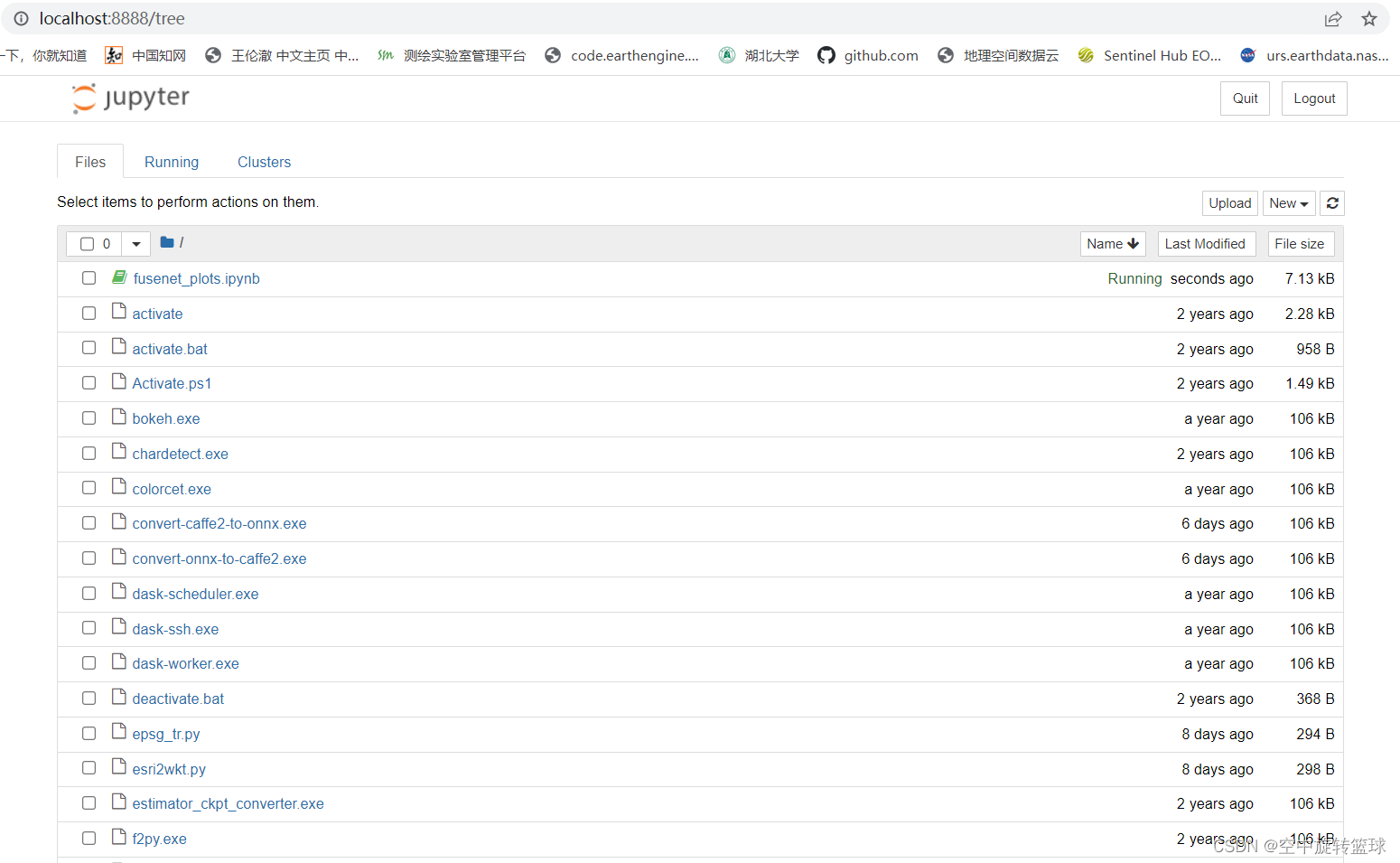
点击upload按钮,上传对应的ipynb文件,上传成功后点击打开
点击run按钮,即可开始运行代码。
3.Jupyter Notebook测试
按照上面提示的,我们上传一个项目文件,可以在github上下载一个文件上传测试。
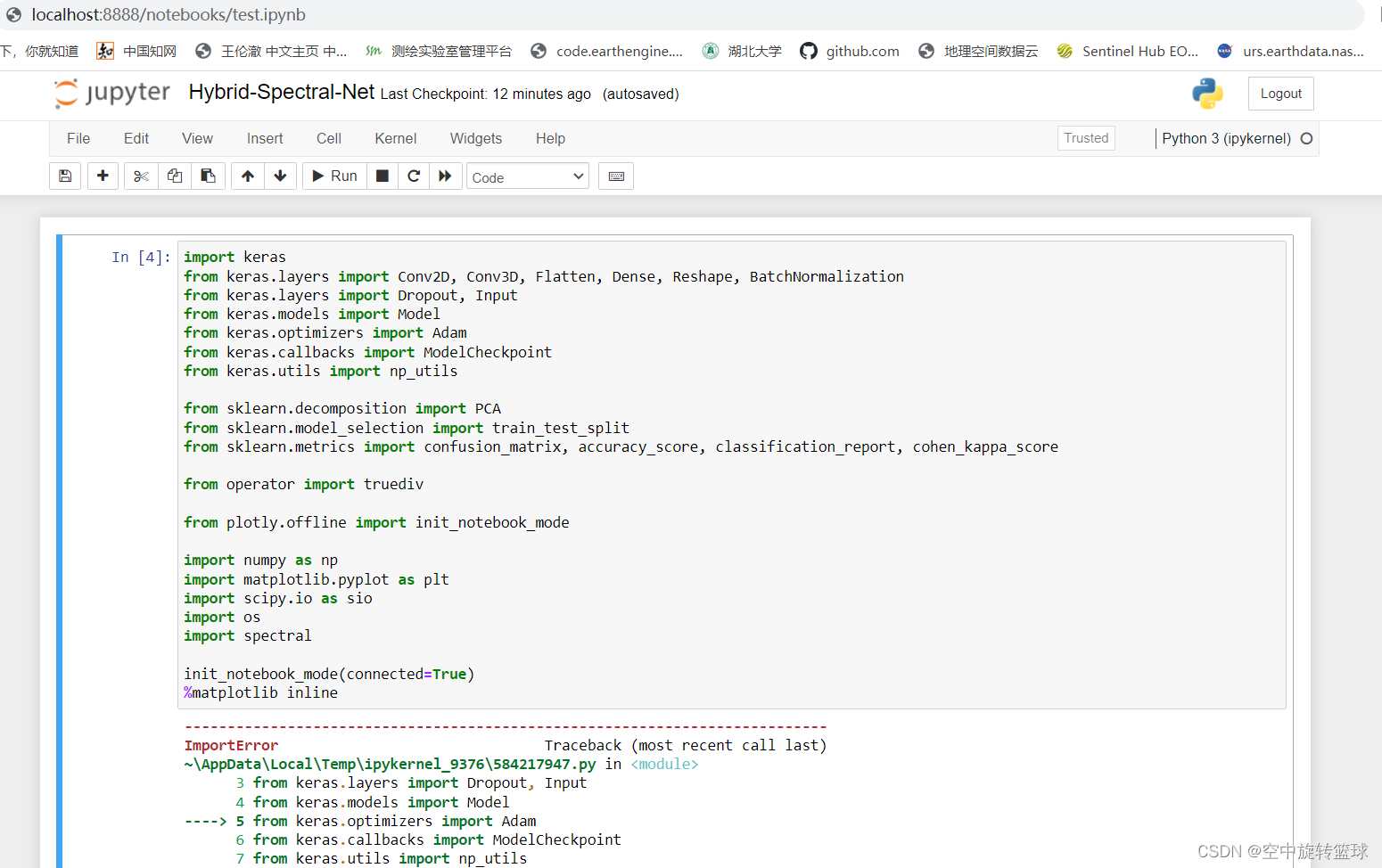
运行一下,显示有错误,需要进一步调试运行环境。
此外,我们还可以安装函数提醒的库,命令:pip install jupyter_contrib_nbextensions
至此,本文结束,希望对大家有所帮助。


 1776


 扫一扫


 被折叠的 条评论
为什么被折叠?
 到【灌水乐园】发言


