
AE+VS开发颜色符号系统之单一值符号(一)

AE+VS2010开发 AE的二次开发的一个源代码程序 使用vs2010的C#开发的 可以直接运行 立即下载

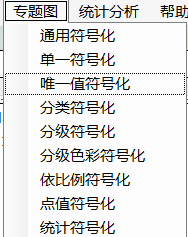
在主窗体中创建菜单

windows窗体中创建单一值符号化菜单
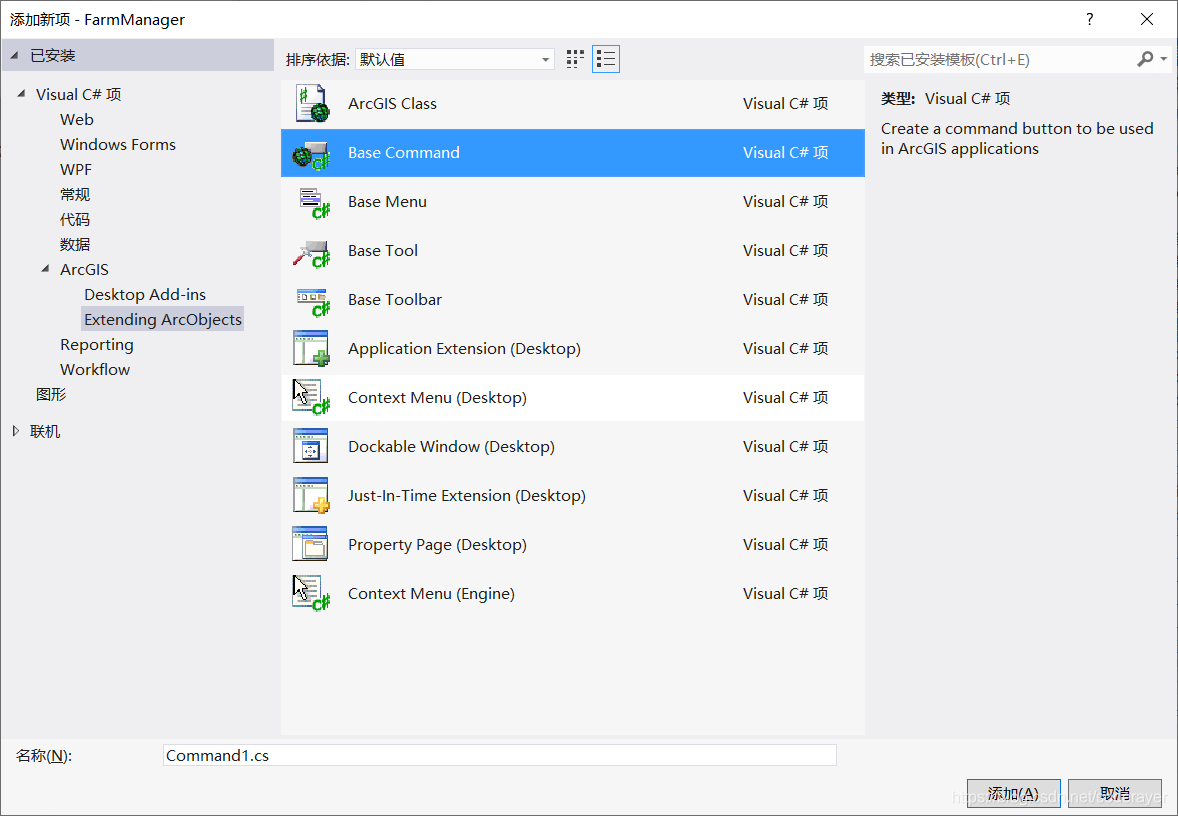
添加单一符号化类(ArcGISClass)

新建SingleSymbolCmd类  类型是Base Command
 

在类中的public override void OnClick()函数添加启动符号化窗口代码

完整代码如下:

using System;
using System.Drawing;
using System.Runtime.InteropServices;
using ESRI.ArcGIS.ADF.BaseClasses;
using ESRI.ArcGIS.ADF.CATIDs;
using ESRI.ArcGIS.Controls;

namespace Visualization
{
    /// <summary>
    /// Command that works in ArcMap/Map/PageLayout
    /// </summary>
    [Guid("ae485cc9-ff2f-4b2f-9a84-2e68be4a1f8d")]
    [ClassInterface(ClassInterfaceType.None)]
    [ProgId("Visualization.SingleSymbolCmd")]
    public sealed class SingleSymbolCmd : BaseCommand
    {
        #region COM Registration Function(s)
        [ComRegisterFunction()]
        [ComVisible(false)]
        static void RegisterFunction(Type registerType)
        {
            // Required for ArcGIS Component Category Registrar support
            ArcGISCategoryRegistration(registerType);

            //
            // TODO: Add any COM registration code here
            //
        }

        [ComUnregisterFunction()]
        [ComVisible(false)]
        static void UnregisterFunction(Type registerType)
        {
            // Required for ArcGIS Component Category Registrar support
            ArcGISCategoryUnregistration(registerType);

            //
            // TODO: Add any COM unregistration code here
            //
        }

        #region ArcGIS Component Category Registrar generated code
        /// <summary>
        /// Required method for ArcGIS Component Category registration -
        /// Do not modify the contents of this method with the code editor.
        /// </summary>
        private static void ArcGISCategoryRegistration(Type registerType)
        {
            string regKey = string.Format("HKEY_CLASSES_ROOT\\CLSID\\{{{0}}}", registerType.GUID);
            MxCommands.Register(regKey);
            ControlsCommands.Register(regKey);
        }
        /// <summary>
        /// Required method for ArcGIS Component Category unregistration -
        /// Do not modify the contents of this method with the code editor.
        /// </summary>
        private static void ArcGISCategoryUnregistration(Type registerType)
        {
            string regKey = string.Format("HKEY_CLASSES_ROOT\\CLSID\\{{{0}}}", registerType.GUID);
            MxCommands.Unregister(regKey);
            ControlsCommands.Unregister(regKey);
        }

        #endregion
        #endregion

        private IHookHelper m_hookHelper = null;
        public SingleSymbolCmd()
        {
            base.m_category = "Visualization"; 
            base.m_caption = "单一符号化";   
            base.m_message = "单一符号化";  
            base.m_toolTip = "单一符号化";  
            base.m_name = "";   

            try
            {
                string bitmapResourceName = GetType().Name + ".bmp";
                base.m_bitmap = new Bitmap(GetType(), bitmapResourceName);
            }
            catch (Exception ex)
            {
                System.Diagnostics.Trace.WriteLine(ex.Message, "Invalid Bitmap");
            }
        }

        #region Overridden Class Methods

        /// <summary>
        /// Occurs when this command is created
        /// </summary>
        /// <param name="hook">Instance of the application</param>
        public override void OnCreate(object hook)
        {
            if (hook == null)
                return;

            try
            {
                m_hookHelper = new HookHelperClass();
                m_hookHelper.Hook = hook;
                if (m_hookHelper.ActiveView == null)
                    m_hookHelper = null;
            }
            catch
            {
                m_hookHelper = null;
            }

            if (m_hookHelper == null)
                base.m_enabled = false;
            else
                base.m_enabled = true;

            // TODO:  Add other initialization code
        }

        /// <summary>
        /// Occurs when this command is clicked
        /// </summary>
        public override void OnClick()
        {
           if (m_hookHelper == null) return;
            if (m_hookHelper.FocusMap.LayerCount > 0)
            {
                SingleSymbol singleSymbol = new SingleSymbol(m_hookHelper);
                singleSymbol.Show(m_hookHelper as System.Windows.Forms.IWin32Window);
            }
        }

        #endregion
    }
}

public override void OnClick()函数添加代码为

        public override void OnClick()
        {
           if (m_hookHelper == null) return;
            if (m_hookHelper.FocusMap.LayerCount > 0)
            {
                SingleSymbol singleSymbol = new SingleSymbol(m_hookHelper);
                singleSymbol.Show(m_hookHelper as System.Windows.Forms.IWin32Window);
            }

        }


启动单一符号化类(ArcGISClass)

在单一符号化菜单点击事件中添加启动单一符号化类(ArcGISClass)

        private void 单一符号化ToolStripMenuItem_Click(object sender, EventArgs e)
        {
            ICommand command = new Visualization.SingleSymbolCmd();
            command.OnCreate(axMapControl1.Object);
            command.OnClick();
        }

通过单一值符号化类实现点击菜单启动符号化窗体

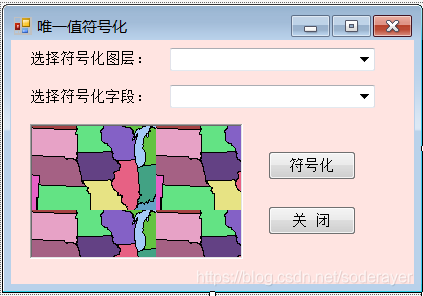
创建单一值符号化窗体

选择符号化图层,点击符号化按钮,随机配色。
代码如下:
 

using System;
using System.Collections.Generic;
using System.ComponentModel;
using System.Data;
using System.Drawing;
using System.Linq;
using System.Text;
using System.Windows.Forms;
using ESRI.ArcGIS.Controls;
using ESRI.ArcGIS.Carto;
using ESRI.ArcGIS.esriSystem;
using ESRI.ArcGIS.Display;
using ESRI.ArcGIS.Geometry;
using ESRI.ArcGIS.DisplayUI;

namespace Visualization
{
    public partial class SingleSymbol : Form
    {
        IHookHelper m_hookHelper = null;
        IActiveView m_activeView = null;
        IMap m_map = null;

        IFeatureLayer layer2Symbolize = null;

        public SingleSymbol(IHookHelper hookHelper)
        {
            InitializeComponent();
            m_hookHelper = hookHelper;
            m_activeView = m_hookHelper.ActiveView;
            m_map = m_hookHelper.FocusMap;       
        }

        private void SingleSymbol_Load(object sender, EventArgs e)
        {
            CbxLayersAddItems();
        }

        private void cbxLayers2Symbolize_SelectedIndexChanged(object sender, EventArgs e)
        {
            if (cbxLayers2Symbolize.SelectedItem != null)
            {
                string strLayer2Symbolize = cbxLayers2Symbolize.SelectedItem.ToString();
                layer2Symbolize = GetFeatureLayer(strLayer2Symbolize);
            }
        }

        private void CbxLayersAddItems()
        {
            if (GetLayers() == null) return;
            IEnumLayer layers = GetLayers();
            layers.Reset();
            ILayer layer = layers.Next();
            while (layer != null)
            {
                if (layer is IFeatureLayer)
                {
                    cbxLayers2Symbolize.Items.Add(layer.Name);
                }
                layer = layers.Next();
            }
        }

        #region "GetLayers"
        private IEnumLayer GetLayers()
        {
            UID uid = new UIDClass();
            uid.Value = "{40A9E885-5533-11d0-98BE-00805F7CED21}";// IFeatureLayer
            //uid.Value = "{E156D7E5-22AF-11D3-9F99-00C04F6BC78E}";  // IGeoFeatureLayer
            //uid.Value = "{6CA416B1-E160-11D2-9F4E-00C04F6BC78E}";  // IDataLayer
            if (m_map.LayerCount != 0)
            {
                IEnumLayer layers = m_map.get_Layers(uid, true);
                return layers;
            }
            return null;
        }
        #endregion

        #region "GetFeatureLayer"
        private IFeatureLayer GetFeatureLayer(string layerName)
        {
            //get the layers from the maps
            if (GetLayers() == null) return null;
            IEnumLayer layers = GetLayers();
            layers.Reset();

            ILayer layer = null;
            while ((layer = layers.Next()) != null)
            {
                if (layer.Name == layerName)
                    return layer as IFeatureLayer;
            }
            return null;
        }

        #endregion

        private void btnSymbolize_Click(object sender, EventArgs e)
        {
            if (layer2Symbolize == null) return;
            ISymbol symbol = GetSymbolByControl(layer2Symbolize.FeatureClass.ShapeType);
            if (symbol == null) return;
            ISimpleRenderer pSimpleRenderer = new SimpleRendererClass();
            pSimpleRenderer.Symbol = symbol;
            pSimpleRenderer.Label = "单一符号化";
            IGeoFeatureLayer pGeoFeatureL = layer2Symbolize as IGeoFeatureLayer;
            pGeoFeatureL.Renderer = pSimpleRenderer as IFeatureRenderer;
            m_activeView.PartialRefresh(esriViewDrawPhase.esriViewGeography, null, m_activeView.Extent);
        }

        private ISymbol GetSymbolByControl(esriGeometryType geometryType)
        {
            GetSymbolByControl symbolForm = null;
            ISymbol symbol = null;
            switch (geometryType)
            {
                case ESRI.ArcGIS.Geometry.esriGeometryType.esriGeometryPoint:
                    symbolForm = new GetSymbolByControl(esriSymbologyStyleClass.esriStyleClassMarkerSymbols);
                    break;
                case ESRI.ArcGIS.Geometry.esriGeometryType.esriGeometryPolyline:
                    symbolForm = new GetSymbolByControl(esriSymbologyStyleClass.esriStyleClassLineSymbols);
                    break;
                case ESRI.ArcGIS.Geometry.esriGeometryType.esriGeometryPolygon:
                    symbolForm = new GetSymbolByControl(esriSymbologyStyleClass.esriStyleClassFillSymbols);
                    break;
                default:
                    break;
            }
            symbolForm.ShowDialog();
            if (symbolForm.m_styleGalleryItem != null)
                symbol = symbolForm.m_styleGalleryItem.Item as ISymbol;
            symbolForm.Dispose();
            return symbol;
        }

        private ISymbol GetSymbolBySymbolSelector(esriGeometryType geometryType)
        {
            ISymbolSelector pSymbolSelector = new SymbolSelectorClass();
            ISymbol symbol = null;
            switch (geometryType)
            {
                case ESRI.ArcGIS.Geometry.esriGeometryType.esriGeometryPoint:
                    symbol = new SimpleMarkerSymbolClass();
                    break;
                case ESRI.ArcGIS.Geometry.esriGeometryType.esriGeometryPolyline:
                    symbol = new SimpleLineSymbolClass();
                    break;
                case ESRI.ArcGIS.Geometry.esriGeometryType.esriGeometryPolygon:
                    symbol = new SimpleFillSymbolClass();
                    break;
                default:
                    break;
            }
            pSymbolSelector.AddSymbol(symbol);
            bool response = pSymbolSelector.SelectSymbol(0);
            if (response)
            {
                symbol = pSymbolSelector.GetSymbolAt(0);
                return symbol;
            }
            return null;
        }

        private void btnClose_Click(object sender, EventArgs e)
        {
            this.Close();
        }
    }
}

本文中代码大多来自示例代码!欢迎交流学习,源代码中TOC会在设置符号系统后实时刷新,移植到其他项目后TOC控件中的图例不及时刷新,加入新数据才会刷新一下,尚未找到根本原因。

原形网络(Prototypical Networks)基于PyTorch的实现 我在Jay2coomzz的基础上修改了数据处理方式和evaluation_model()方法,作为初学者若有不当之处恳请大家批评指正,原文链接如下: https://blog.youkuaiyun.com/weixin_38471579/article/details/102631018 数据集和源码链接将放到评论区 文章目录1 数据集一个简单的数据集介绍数据集处理2 搭建网络CNNProtonets 1 数据集 一个简单的数据集介绍 Omniglot数据集一共包含1623 类手写体,每一类中包含20 个样本。其中. 阅读详情

相关推荐

使用mixamo导入人物动作到unity

导入的材质是withoutSkin时选择Create From Other Model + 选择带withSkin里的。方案二:Textures选择Extract Textures,将文件存放到喜欢的位置(不行继续方案三)2.动画没有动:开个Animation窗口,选择人物的Prefab(Hierachy),查看窗口左侧。方案三:选中素材自带或者导出的Material,接着方案一选择 选中的materials进行转化。选 withSkin,剩下的动作选without Skin)(角色发生位移时出现选项)

big_good_boy的博客 1637

AE+VS开发颜色符号系统之唯一值符号(二)

在主窗体中创建菜单 windows窗体中创建唯一值符号化菜单 添加唯一值符号化类(ArcGISClass) 新建SingleSymbolCmd类 在类中的public override void OnClick()函数添加启动符号化窗口代码 完整代码如下: using System; using System.Drawing; using System.Runtime.InteropServices; using ESRI.ArcGIS.ADF.BaseClasses; using E

soderayer的博客 1617

电商数据分析19——数据分析在电商平台价格弹性研究中的应用

价格弹性是一个衡量产品价格变化对销量影响的经济学指标,对于电商平台而言,深入理解和有效运用价格弹性,对于制定竞争策略、优化产品定价具有重要意义。随着大数据时代的到来,通过数据分析研究产品的价格弹性,成为了电商企业制定价格策略、调整市场定位、优化促销活动的重要依据。

theskylife的博客 2838

C#+AE 地图制图(二)

紧接着上一篇笔记。 文章目录一、专题地图制图二、地图导出 一、专题地图制图 专题地图的制图过程实质上仍是在将地理信息进行某种符号化。 代码如下: mainFrom.cs: private SubjectMap subjectMap=null; private OperateMap m_OperateMap = null; //专题地图制图 private void barButtonItem_SubjectMap_ItemClick(object sender, DevExpress.XtraBar

dayuhaitang1的博客 2699

抓包工具(五)2025版 Burp Suite Professional的下载、安装、使用

抓包工具(五)2025版 Burp Suite Professional的下载、安装、使用

ACGkaka的博客 2万+

UI渲染顺序:合批为何被拆碎?

在 Hierarchy 中,避免出现:Image(列表1) → Text(列表1) → 特效 → Image(列表2) → Text(列表2)…若可行,在逻辑上把布局组织成“同类元素集中”:例如:列表行中,Image 集中、Text 集中;或者接受 Text 本身就拆出一批,关键是不要在 Text 中间再插入别的材质。现实中不一定能做到完美的“所有 Image 连在一起”,但你会有一个意识:同一 Canvas 内,如果你把不同材质的元素交错穿插,

本博客聚焦游戏开发技巧、创业实战心得及大学热门课程干货。这里既有技术深度,也有思维广度,无论你是开发者、创业者还是高校学子,都能在这里找到适合自己的成长之路! 87

AE+VS开发颜色符号系统之分类符号(三)

在主窗体中创建菜单 windows窗体中创建分类符号化菜单 添加分类符号化类(ArcGISClass) 新建ClassBreaksRendererSymbol类 在类中的public override void OnClick()函数添加启动符号化窗口代码 完整代码如下: using System; using System.Drawing; using System.Runtime.InteropServices; using ESRI.ArcGIS.ADF.BaseClasses;

soderayer的博客 1194

23、OpenMP常见用例与标准循环级示例详解

本文详细介绍了OpenMP的三种典型用例:循环级OpenMP、高级OpenMP和MPI+OpenMP,适用于不同层次的并行需求。重点讲解了循环级OpenMP在向量加法、流三元组和模板计算中的应用示例,并探讨了首次触摸优化、线程绑定、NUMA架构影响等关键性能优化策略。通过实际代码演示和性能分析,帮助开发者快速掌握OpenMP的基础并行化方法,并为后续高性能优化提供指导。

fanta的博客 87

C# AE ArcScene 二次开发线符号渲染实现

C# AE ArcScene 二次开发线符号渲染 1、窗体设计使用DevExpress和winform控件组合; 2、实现线要素的符号渲染,以及添加已有的样式进行渲染; 3、点和面的符号样式渲染基本类似,可以根据此窗体进行修改即可实现;......

wangyong_h 1021

Authentication Assertion Tickets,SAP 系统到系统单点登录里的短命凭证

SAP 系统间的身份传递机制存在 Authentication Assertion Ticket 和 SAP Logon Ticket 两种易混淆的凭证。前者用于系统间短时身份委托(有效期2分钟,通过HTTP头传输),后者用于浏览器SSO(可配置有效期,通过Cookie传输)。Assertion Ticket依赖签发系统的数字签名和严格的时间同步,适用于ABAP/Java系统间的后台作业调用。现代SAP架构已转向OAuth 2.0等标准协议,但老系统中仍需注意两种票据的关键差异:传输方式、有效期、接收方限制

2007 年 ~ 2025 年,深耕 SAP 技术 18 年 604

如何在 R 中使用 Gamma 分布(附示例)

在统计学中,伽马分布通常用于模拟与等待时间相关的概率。我们可以使用以下函数来处理 R 中的 gamma 分布:dgamma(x, shape, rate) – 找到具有特定形状和速率参数的 gamma 分布的密度函数值。 pgamma(q, shape, rate) – 找到具有特定形状和速率参数的伽马分布的累积密度函数值。 qgamma(p, shape, rate) – 找到具有特定形状和速率参数的 gamma 分布的逆累积密度函数值。 rgamma(n, shape, rate) – 生成 n 个随机

Mrrunsen的博客 4419

Android View创建复合控件

创建复合控件可以很好的创建出具有重用功能的控件集合。这种方法通常需要继承一个合适的ViewGroup,再给它添加指定的功能控件,从而组合成新的复合控件。通过这种方式创建的控件,我们一般我们会给它一些可配置的属性,让它具有更强的拓展性。下面就以一个TopBar为示例,讲解如何创建复合控件。 我们知道为了应用程序风格的统一,很多应用程序都有一些共通的UI界面,比如图(1)中所示的TopBar这样一个...

qq_34368586的博客 343

(10)三相三绕组变压器的建模仿真

建立了三相三绕组变压器组的Simulink仿真模型,通过实例进行了仿真计算。

weixin_45670943的博客 1146

AE+VS+c#开发颜色符号系统之分级色彩符号化(五)

首先总结一下之前写的几篇符号化文章,列表如下: AE+VS开发颜色符号系统之单一值符号(一) AE+VS开发颜色符号系统之唯一值符号(二) AE+VS开发颜色符号系统之分类符号(三) AE+VS开发颜色符号系统之分级符号符号化(四) 和之前的操作一样,直接贴几段代码: GraduatedColorSymbolsCmd.cs代码 using System; using System.Drawing; using System.Runtime.InteropServices; using ESR

soderayer的博客 2280

C# WinForm 基于DirectShow.dll编写的程序,可边预览边保存视频,音频和图片

基于微软的DirectShow.dll的二次开发1.自动识别连接的摄像头跟麦克风且可以对其进行选择(默认选中第一个)2.可录制wmv和avi两种格式的视频并且都带有音频,avi可以录制的分辨率和帧数进行选择,wmv默认进行了淸晰度优化如不喜欢可去除代码中有相关提示3.可在预览点开之后进行拍照,也可边录制视频边拍照4.添加了视频和音频的压缩功能(酌情使用)这次二次开发发现C#对DirectShow的相关信息太少,这次做完也不敢藏私共享出来,还望大家指正

最新的sdio 4.0 spec 协议标准 带书签 高清完整PDF版

Part-E1-SDIO-Specification-Ver4.00-Final-120220.pdf:最新的sdio 4.0 spec 协议标准 带书签 高清完整PDF版,包括SDIO 接口的外设,SDIO 接口官方协议等。

AE+VS+c#开发颜色符号系统之点值符号化(七)

首先总结一下之前写的几篇符号化文章,列表如下: AE+VS开发颜色符号系统之单一值符号(一) AE+VS开发颜色符号系统之唯一值符号(二) AE+VS开发颜色符号系统之分类符号(三) AE+VS开发颜色符号系统之分级符号符号化(四) AE+VS+c#开发颜色符号系统之分级色彩符号化(五) AE+VS+c#开发颜色符号系统之依比例符号化(六) 和之前的操作一样,直接贴几段代码: DotDensitySymbolsCmd.cs using System; using System.Drawi

soderayer的博客 1252

假人有限元模型

假人模型,车辆碰撞假人有限元模型,适合做乘员安全的研究者利用

AE+VS+c#开发颜色符号系统之统计符号化(八)符号化完结篇

首先总结一下之前写的几篇符号化文章,列表如下: AE+VS开发颜色符号系统之单一值符号(一) AE+VS开发颜色符号系统之唯一值符号(二) AE+VS开发颜色符号系统之分类符号(三) AE+VS开发颜色符号系统之分级符号符号化(四) AE+VS+c#开发颜色符号系统之分级色彩符号化(五) AE+VS+c#开发颜色符号系统之依比例符号化(六) AE+VS+c#开发颜色符号系统之点值符号化(七) 和之前的操作一样,直接贴几段代码: StatisticsSymbolsCmd.cs using

soderayer的博客 1161

深度学习工具包 DeepLearningToolbox

深度学习工具包Deprecation notice.-----This toolbox is outdated and no longer maintained.There are much better tools available for deep learning than this toolbox, e.g. [Theano](http://deeplearning.net/software/theano/), [torch](http://torch.ch/) or [tensorflow](http://www.tensorflow.org/)I would suggest you use one of the tools mentioned above rather than use this toolbox.Best, Rasmus.DeepLearnToolbox================A Matlab toolbox for Deep Learning.Deep Learning is a new subfield of machine learning that focuses on learning deep hierarchical models of data.It is inspired by the human brain's apparent deep (layered, hierarchical) architecture.A good overview of the theory of Deep Learning theory is[Learning Deep Architectures for AI](http://www.iro.umontreal.ca/~bengioy/papers/ftml_book.pdf)For a more informal introduction, see the following videos by Geoffrey Hinton and Andrew Ng.* [The Next Generation of Neural Networks](http://www.youtube.com/watch?v=AyzOUbkUf3M) (Hinton, 2007)* [Recent Developments in Deep Learning](http://www.youtube.com/watch?v=VdIURAu1-aU) (Hinton, 2010)* [Unsupervised Feature Learning and Deep Learning](http://www.youtube.com/watch?v=ZmNOAtZIgIk) (Ng, 2011)If you use this toolbox in your research please cite [Prediction as a candidate for learning deep hierarchical models of data](http://www2.imm.dtu.dk/pubdb/views/publication_details.php?id=6284)```@MASTERSTHESIS\{IMM2012-06284, author = "R. B. Palm", title = "Prediction as a candidate for learning deep hierarchical models of data", year = "2012",}```Contact: rasmusbergpalm at gmail dot comDirectories included in the toolbox-----------------------------------`NN/` - A library for Feedforward Backpropagation Neural Networks`CNN/` - A library for Convolutional Neural Networks`DBN/` - A library for Deep Belief Networks`SAE/` - A library for Stacked Auto-Encoders`CAE/` - A library for Convolutional Auto-Encoders`util/` - Utility functions used by the libraries`data/` - Data used by the examples`tests/` - unit tests to verify toolbox is workingFor references on each library check REFS.mdSetup-----1. Download.2. addpath(genpath('DeepLearnToolbox'));Example: Deep Belief Network---------------------```matlabfunction test_example_DBNload mnist_uint8;train_x = double(train_x) / 255;test_x = double(test_x) / 255;train_y = double(train_y);test_y = double(test_y);%% ex1 train a 100 hidden unit RBM and visualize its weightsrand('state',0)dbn.sizes = [100];opts.numepochs = 1;opts.batchsize = 100;opts.momentum = 0;opts.alpha = 1;dbn = dbnsetup(dbn, train_x, opts);dbn = dbntrain(dbn, train_x, opts);figure; visualize(dbn.rbm{1}.W'); % Visualize the RBM weights%% ex2 train a 100-100 hidden unit DBN and use its weights to initialize a NNrand('state',0)%train dbndbn.sizes = [100 100];opts.numepochs = 1;opts.batchsize = 100;opts.momentum = 0;opts.alpha = 1;dbn = dbnsetup(dbn, train_x, opts);dbn = dbntrain(dbn, train_x, opts);%unfold dbn to nnnn = dbnunfoldtonn(dbn, 10);nn.activation_function = 'sigm';%train nnopts.numepochs = 1;opts.batchsize = 100;nn = nntrain(nn, train_x, train_y, opts);[er, bad] = nntest(nn, test_x, test_y);assert(er < 0.10, 'Too big error');```Example: Stacked Auto-Encoders---------------------```matlabfunction test_example_SAEload mnist_uint8;train_x = double(train_x)/255;test_x = double(test_x)/255;train_y = double(train_y);test_y = double(test_y);%% ex1 train a 100 hidden unit SDAE and use it to initialize a FFNN% Setup and train a stacked denoising autoencoder (SDAE)rand('state',0)sae = saesetup([784 100]);sae.ae{1}.activation_function = 'sigm';sae.ae{1}.learningRate = 1;sae.ae{1}.inputZeroMaskedFraction = 0.5;opts.numepochs = 1;opts.batchsize = 100;sae = saetrain(sae, train_x, opts);visualize(sae.ae{1}.W{1}(:,2:end)')% Use the SDAE to initialize a FFNNnn = nnsetup([784 100 10]);nn.activation_function = 'sigm';nn.learningRate = 1;nn.W{1} = sae.ae{1}.W{1};% Train the FFNNopts.numepochs = 1;opts.batchsize = 100;nn = nntrain(nn, train_x, train_y, opts);[er, bad] = nntest(nn, test_x, test_y);assert(er < 0.16, 'Too big error');```Example: Convolutional Neural Nets---------------------```matlabfunction test_example_CNNload mnist_uint8;train_x = double(reshape(train_x',28,28,60000))/255;test_x = double(reshape(test_x',28,28,10000))/255;train_y = double(train_y');test_y = double(test_y');%% ex1 Train a 6c-2s-12c-2s Convolutional neural network %will run 1 epoch in about 200 second and get around 11% error. %With 100 epochs you'll get around 1.2% errorrand('state',0)cnn.layers = { struct('type', 'i') %input layer struct('type', 'c', 'outputmaps', 6, 'kernelsize', 5) %convolution layer struct('type', 's', 'scale', 2) %sub sampling layer struct('type', 'c', 'outputmaps', 12, 'kernelsize', 5) %convolution layer struct('type', 's', 'scale', 2) %subsampling layer};cnn = cnnsetup(cnn, train_x, train_y);opts.alpha = 1;opts.batchsize = 50;opts.numepochs = 1;cnn = cnntrain(cnn, train_x, train_y, opts);[er, bad] = cnntest(cnn, test_x, test_y);%plot mean squared errorfigure; plot(cnn.rL);assert(er<0.12, 'Too big error');```Example: Neural Networks---------------------```matlabfunction test_example_NNload mnist_uint8;train_x = double(train_x) / 255;test_x = double(test_x) / 255;train_y = double(train_y);test_y = double(test_y);% normalize[train_x, mu, sigma] = zscore(train_x);test_x = normalize(test_x, mu, sigma);%% ex1 vanilla neural netrand('state',0)nn = nnsetup([784 100 10]);opts.numepochs = 1; % Number of full sweeps through dataopts.batchsize = 100; % Take a mean gradient step over this many samples[nn, L] = nntrain(nn, train_x, train_y, opts);[er, bad] = nntest(nn, test_x, test_y);assert(er < 0.08, 'Too big error');%% ex2 neural net with L2 weight decayrand('state',0)nn = nnsetup([784 100 10]);nn.weightPenaltyL2 = 1e-4; % L2 weight decayopts.numepochs = 1; % Number of full sweeps through dataopts.batchsize = 100; % Take a mean gradient step over this many samplesnn = nntrain(nn, train_x, train_y, opts);[er, bad] = nntest(nn, test_x, test_y);assert(er < 0.1, 'Too big error');%% ex3 neural net with dropoutrand('state',0)nn = nnsetup([784 100 10]);nn.dropoutFraction = 0.5; % Dropout fraction opts.numepochs = 1; % Number of full sweeps through dataopts.batchsize = 100; % Take a mean gradient step over this many samplesnn = nntrain(nn, train_x, train_y, opts);[er, bad] = nntest(nn, test_x, test_y);assert(er < 0.1, 'Too big error');%% ex4 neural net with sigmoid activation functionrand('state',0)nn = nnsetup([784 100 10]);nn.activation_function = 'sigm'; % Sigmoid activation functionnn.learningRate = 1; % Sigm require a lower learning rateopts.numepochs = 1; % Number of full sweeps through dataopts.batchsize = 100; % Take a mean gradient step over this many samplesnn = nntrain(nn, train_x, train_y, opts);[er, bad] = nntest(nn, test_x, test_y);assert(er < 0.1, 'Too big error');%% ex5 plotting functionalityrand('state',0)nn = nnsetup([784 20 10]);opts.numepochs = 5; % Number of full sweeps through datann.output = 'softmax'; % use softmax outputopts.batchsize = 1000; % Take a mean gradient step over this many samplesopts.plot = 1; % enable plottingnn = nntrain(nn, train_x, train_y, opts);[er, bad] = nntest(nn, test_x, test_y);assert(er < 0.1, 'Too big error');%% ex6 neural net with sigmoid activation and plotting of validation and training error% split training data into training and validation datavx = train_x(1:10000,:);tx = train_x(10001:end,:);vy = train_y(1:10000,:);ty = train_y(10001:end,:);rand('state',0)nn = nnsetup([784 20 10]); nn.output = 'softmax'; % use softmax outputopts.numepochs = 5; % Number of full sweeps through dataopts.batchsize = 1000; % Take a mean gradient step over this many samplesopts.plot = 1; % enable plottingnn = nntrain(nn, tx, ty, opts, vx, vy); % nntrain takes validation set as last two arguments (optionally)[er, bad] = nntest(nn, test_x, test_y);assert(er < 0.1, 'Too big error');```[![Bitdeli Badge](https://d2weczhvl823v0.cloudfront.net/rasmusbergpalm/deeplearntoolbox/trend.png)](https://bitdeli.com/free "Bitdeli Badge")

AE+VS+c#开发颜色符号系统之依比例符号化(六)

首先总结一下之前写的几篇符号化文章,列表如下: AE+VS开发颜色符号系统之单一值符号(一) AE+VS开发颜色符号系统之唯一值符号(二) AE+VS开发颜色符号系统之分类符号(三) AE+VS开发颜色符号系统之分级符号符号化(四) AE+VS+c#开发颜色符号系统之分级色彩符号化(五) 和之前的操作一样,直接贴几段代码: ProportionalSymbolsCmd.cs代码 using System; using System.Drawing; using System.Runtime

soderayer的博客 825

AE+VS开发颜色符号系统之分级符号符号化(四)

在主窗体中创建菜单 windows窗体中创建分类符号化菜单 添加分级符号化类(ArcGISClass) 新建GraduatedSymbolsCmdl类 在类中的public override void OnClick()函数添加启动符号化窗口代码 完整代码如下: using System; using System.Drawing; using System.Runtime.InteropServices; using ESRI.ArcGIS.ADF.BaseClasses; using E

soderayer的博客 1792

【无套路自取】永磁同步电机在线参数辨识:RLS 实战指南与 Simulink 复现

做永磁同步电机矢量控制的人多半都碰过这个麻烦:电机一跑起来,工况不断变化,电阻、电感这些电气参数就跟着偏,而控制器里那组参数是投运前一次性标定的。要在线参数辨识,这套工程把它做成了 Simulink 里能直接跑起来的仿真模型——辨识端用 RLS(递推最小二乘,每来一帧采样就把参数估计朝真实值再拽一步的在线回归),控制端是标准矢量控制,解压就能看完整架构。 ## 参数漂移为什么拖垮矢量控制 先把

gitblog_00909的博客 183

AEUX终极指南:3分钟实现Sketch/Figma到After Effects的无缝动画转换

你是否厌倦了在Sketch、Figma和After Effects之间手动复制粘贴设计元素?AEUX这款革命性的开源插件正是为打破设计到动画的壁垒而生。作为连接Sketch、Figma与After Effects的桥梁,AEUX能让你在3分钟内将静态设计稿转换为完全可编辑的AE动画图层,彻底改变你的动态设计工作流。 ## 🎯 传统设计到动画的痛点 vs AEUX解决方案 ### 传统工作流的

gitblog_00457的博客 214

儿童绘本AI化浪潮来袭,92%创作者正用错提示词——2024最新Prompt工程白皮书首发,限时开放3天

破解AI生成儿童绘本提示词误区,助创作者提升画面精准度与叙事连贯性。白皮书聚焦教育、出版及独立创作场景,提炼2024高转化Prompt结构模板与角色/画风/分镜三阶优化法,实测生成效率提升3.2倍。值得收藏,点击获取限时开放版。

CompiGap的博客 210

化石清修与古生物标本工作室通过mainTab(底部四主tab)与subTab(首页七内容子tab)两层导航索引完成全部页面切换,无需Navigation路由组件即可实现复杂的多视图导航

在移动互联网与智能穿戴设备高度普及的今天,"习惯养成"已经从一个模糊的自我管理理念,演变为一个可量化、可追踪、可视化的数字化产品赛道。越来越多的人希望借助手中的智能终端,把"早起、冥想、阅读、运动"这些抽象的自律行为,转化为一条条清晰的数据曲线和一张张可触摸的打卡卡片。而鸿蒙生态(HarmonyOS)凭借其跨设备协同、分布式软总线以及声明式 UI 开发框架 ArkUI,为这类注重"轻量化交互 + 即时反馈"的生活方式类应用提供了极为理想的生长土壤。本应用正是一款面向"晨间场景"深度打磨的习惯追踪工具。它聚焦

jin421352的博客 498

AE学习笔记之右键菜单的添加与实现

ArcGIS Engine 中自定义了一些添加命令、工具和菜单的基类,在需要写相应函数的时候可以直接很方便的添加。 我在前面的文章里面有一节讲述过如何添加控件命令:http://blog.youkuaiyun.com/my_lord_/article/details/52599153   。本节讲述一下右键菜单的实现,右键菜单也就是单击鼠标右键时弹出的一个菜单项。主体也就是新建一个IToolbarMen

my_lord 6069

AE属性表操作(2)

转自:http://bbs.esrichina-bj.cn/ESRI/viewthread.php?tid=129398 6、选中行高亮在地图中显示 /// /// 该行选中时高亮显示 /// /// /// private void gdvAttribute_RowHeaderMouseClick

lysc_forever的专栏 5227

【ArcGIS二次开发】TOCControl右键菜单功能实现

1、添加现有项 ①右击解决方案中的项目,添加TOCControlContextMenu中的LayerSelectable、LayerVisibility、RemoveLayer、ZoomToLayer ②点击菜单栏中的项目,添加引用ESRI.ArcGIS.ADF.Local ③修改RemoveLayer中的命名空间为项目名称EngineMapTest;修改Base.m_caption为“删除图层” namespace EngineMapTest { public sealed class Remove

网页设计作业、webgis作业承接 2592
上一篇: 2020年十大健康谣言,你听说过几个?
下一篇: 全国分省DEM数据,精度30米
空中旋转篮球
空中旋转篮球 新星创作者: python技术领域 新星创作者: python技术领域
博客等级 码龄14年 6105粉丝 270原创
评论 1
成就一亿技术人!
拼手气红包6.0元
还能输入1000个字符
 
 条评论被折叠 查看
添加红包

请填写红包祝福语或标题

个

红包个数最小为10个

元

红包金额最低5元

当前余额3.43元 前往充值 >
需支付:10.00元
成就一亿技术人!
领取后你会自动成为博主和红包主的粉丝 规则
hope_wisdom
发出的红包

打赏作者

空中旋转篮球

你的鼓励将是我创作的最大动力

¥1 ¥2 ¥4 ¥6 ¥10 ¥20
扫码支付:¥1
获取中
扫码支付

您的余额不足,请更换扫码支付或充值

打赏作者

实付元
使用余额支付
点击重新获取
扫码支付
钱包余额 0

抵扣说明:

1.余额是钱包充值的虚拟货币,按照1:1的比例进行支付金额的抵扣。
2.余额无法直接购买下载,可以购买VIP、付费专栏及课程。

余额充值