


 针对安卓7.0及以上版本的权限变化,传统的安装方式会导致错误。现在需要使用FileProvider来实现安全的文件共享。首先在res/xml创建路径策略文件,然后根据SDK版本设置不同的安装Intent。别忘了添加请求安装权限。此解决方案适用于解决7.0以上版本的安装问题。
由于安卓在7.0以上的手机做了权限处理,不能用以前的安装方法安装 ,
Intent intent = new Intent(Intent.ACTION_VIEW);
intent.addFlags(Intent.FLAG_ACTIVITY_NEW_TASK);
intent.setDataAndType(Uri.parse(“file://” + path), “application/vnd.android.package-archive”);
startActivity(intent);
7.0以上调用此方法会报错
java.lang.NullPointerException: Attempt to invoke virtual method ‘android.content.res.XmlResourceParser android.content.pm.ProviderInfo.loadXmlMetaData(android.content.pm.PackageManager, java.lang.String)’ on a null object reference
at android.support.v4.content.FileProvider.parsePathStrategy(FileProvider.java:604)
at android.support.v4.content.FileProvider.getPathStrategy(FileProvider.java:578)
at android.support.v4.content.FileProvider.getUriForFile(FileProvider.java:416)
at com.xiaoluobei.facedetection.view.activity.FaceBlackInsertOrUpdateActivity$3.onClick(FaceBlackInsertOrUpdateActivity.java:262)
at
现在要用以下的方法实现安装
首先配置providefile
要在res下添加xml文件夹并写以下文件 pathlist
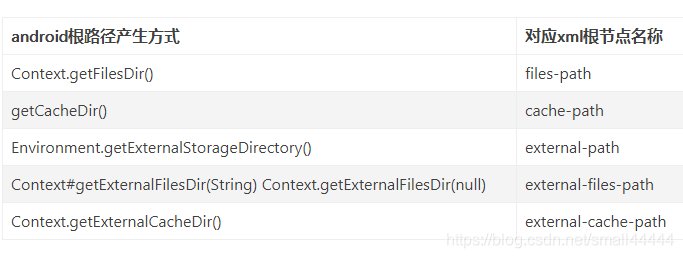
下载完成后调用以下安装方法
Intent _Intent = new Intent();
_Intent.setAction(Intent.ACTION_VIEW);
Uri _uri;
if (Build.VERSION.SDK_INT >= Build.VERSION_CODES.N) {
_Intent.setFlags(Intent.FLAG_GRANT_READ_URI_PERMISSION);
_uri = FileProvider.getUriForFile(pContext, pContext.getPackageName() + “.fileprovider”, pFile);
} else {
_uri = Uri.fromFile(pFile);
_Intent.setFlags(Intent.FLAG_ACTIVITY_NEW_TASK);
}
_Intent.setDataAndType(_uri, “application/vnd.android.package-archive”);
pContext.startActivity(_Intent);
当然申请安装权限不能丢
希望能帮到你





 扫一扫
扫一扫


 5667
5667

 被折叠的 条评论
为什么被折叠?
被折叠的 条评论
为什么被折叠?
 到【灌水乐园】发言





