



目录
1.环境及版本使用
Spring-Boot-Admin(SBA)和Arthas集成部署到rancher环境,监控节点状态、jvm性能、日志收集等工作,留下本文记录搭建过程。
版本选择:
- Spring Boot:2.3.12.RELEASE
- SBA:2.3.1
- Arthas:3.6.4
SBA版本跟随Spring Boot大版本一致,否则容易出一些奇葩问题
2.SBA环境搭建
2.1 SBA服务搭建
使用Spring initializer创建spring boot项目,选择ops下spring boot admin server
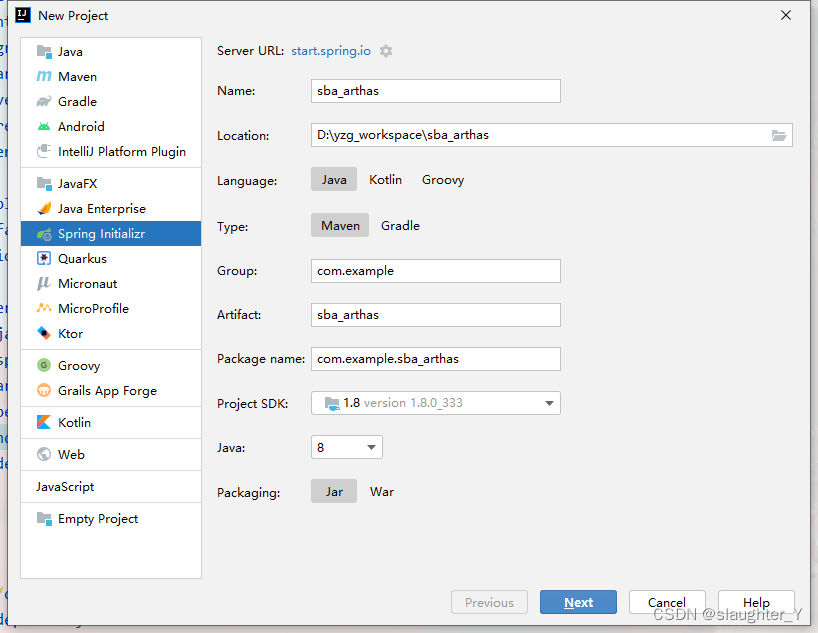
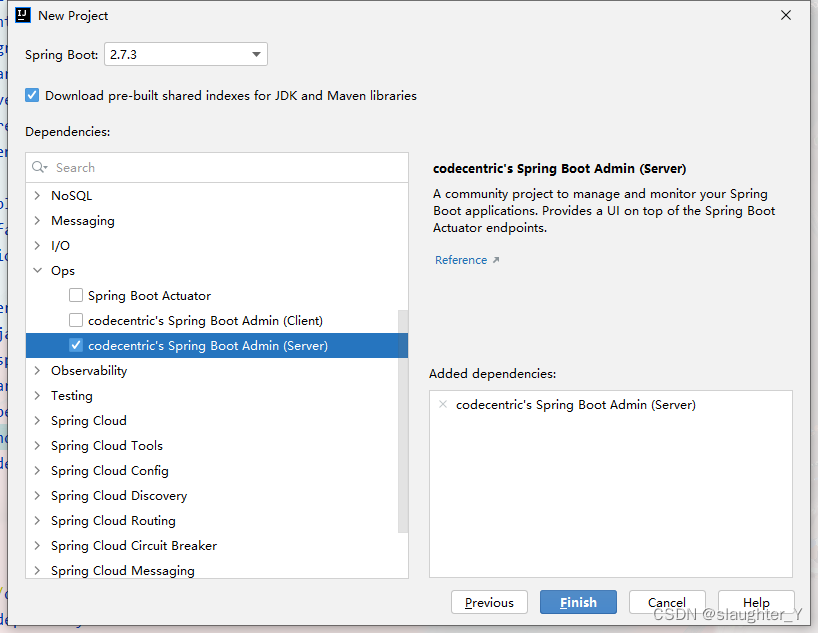
2.2 application.yml
server:
  port: 7000
spring:
  application:
    name: sba_arthas
2.3 SBA启动
在@SpringBootApplication入口类上添加注解@EnableAdminServer以启用SBA
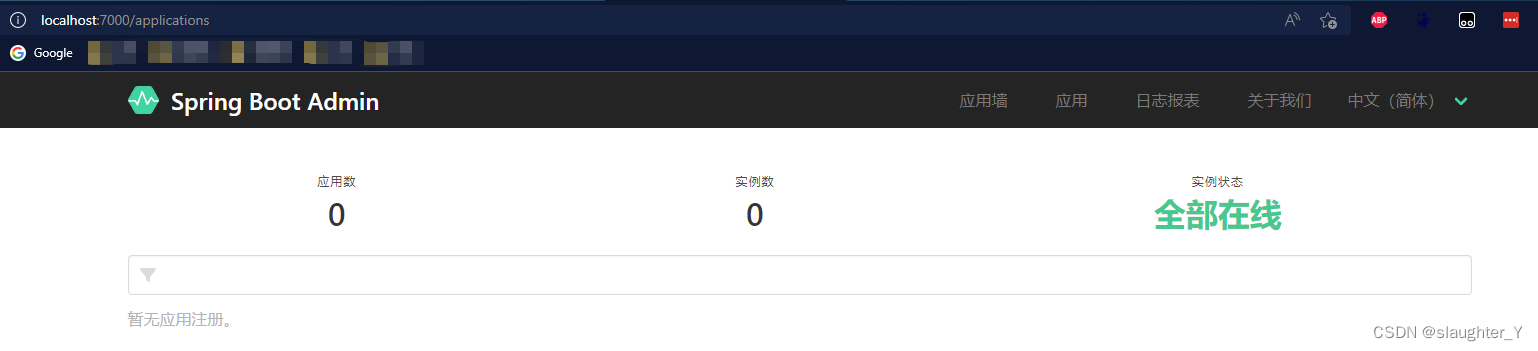
此时没有服务注册进来
3. SBA集成Arthas
3.1 引入完整依赖
<modelVersion>4.0.0</modelVersion>
    <parent>
        <groupId>org.springframework.boot</groupId>
        <artifactId>spring-boot-starter-parent</artifactId>
        <version>2.3.12.RELEASE</version>
        <relativePath/> <!-- lookup parent from repository -->
    </parent>

    <groupId>com.tsit</groupId>
    <artifactId>spring-boot-admin</artifactId>
    <version>0.0.1-SNAPSHOT</version>

    <properties>
        <java.version>1.8</java.version>
        <spring-boot-admin.version>2.3.1</spring-boot-admin.version>
        <arthas.version>3.6.4</arthas.version>
    </properties>
    <dependencies>
        <dependency>
            <groupId>org.projectlombok</groupId>
            <artifactId>lombok</artifactId>
            <version>1.16.14</version>
            <scope>provided</scope>
        </dependency>
        <dependency>
            <groupId>org.springframework.boot</groupId>
            <artifactId>spring-boot-starter-web</artifactId>
        </dependency>
        <dependency>
            <groupId>de.codecentric</groupId>
            <artifactId>spring-boot-admin-starter-server</artifactId>
        </dependency>
        <dependency>
            <groupId>de.codecentric</groupId>
            <artifactId>spring-boot-admin-server-ui</artifactId>
        </dependency>
        <dependency>
            <groupId>org.springframework.boot</groupId>
            <artifactId>spring-boot-starter-security</artifactId>
        </dependency>
        <dependency>
            <groupId>org.springframework.boot</groupId>
            <artifactId>spring-boot-starter-test</artifactId>
            <scope>test</scope>
        </dependency>
        <!-- arthas 集成需要 -->
        <dependency>
            <groupId>com.taobao.arthas</groupId>
            <artifactId>arthas-common</artifactId>
            <version>${arthas.version}</version>
        </dependency>
        <dependency>
            <groupId>com.taobao.arthas</groupId>
            <artifactId>arthas-tunnel-common</artifactId>
            <version>${arthas.version}</version>
        </dependency>
        <dependency>
            <groupId>it.ozimov</groupId>
            <artifactId>embedded-redis</artifactId>
            <version>0.7.3</version>
            <exclusions>
                <exclusion>
                    <groupId>org.slf4j</groupId>
                    <artifactId>slf4j-simple</artifactId>
                </exclusion>
            </exclusions>
        </dependency>
        <dependency>
            <groupId>org.springframework.boot</groupId>
            <artifactId>spring-boot-starter-data-redis</artifactId>
        </dependency>
        <dependency>
            <groupId>com.github.ben-manes.caffeine</groupId>
            <artifactId>caffeine</artifactId>
        </dependency>
        <dependency>
            <groupId>org.apache.commons</groupId>
            <artifactId>commons-pool2</artifactId>
        </dependency>
        <dependency>
            <groupId>org.apache.commons</groupId>
            <artifactId>commons-lang3</artifactId>
        </dependency>
    </dependencies>
3.2 arthas源代码拷贝到SBA中
- 下载: Arthas源码地址:Gitee版本
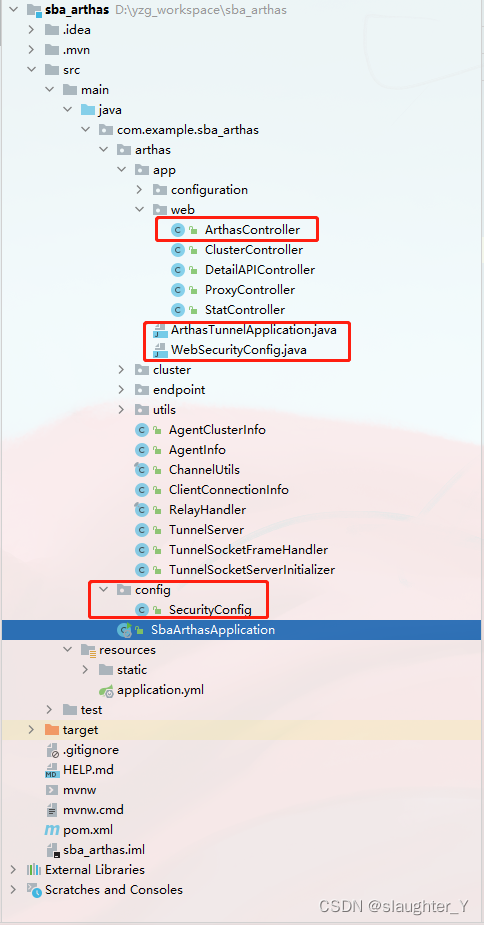
- 拷贝tunnel-server下代码到SBA中,Arthas目录结构如下
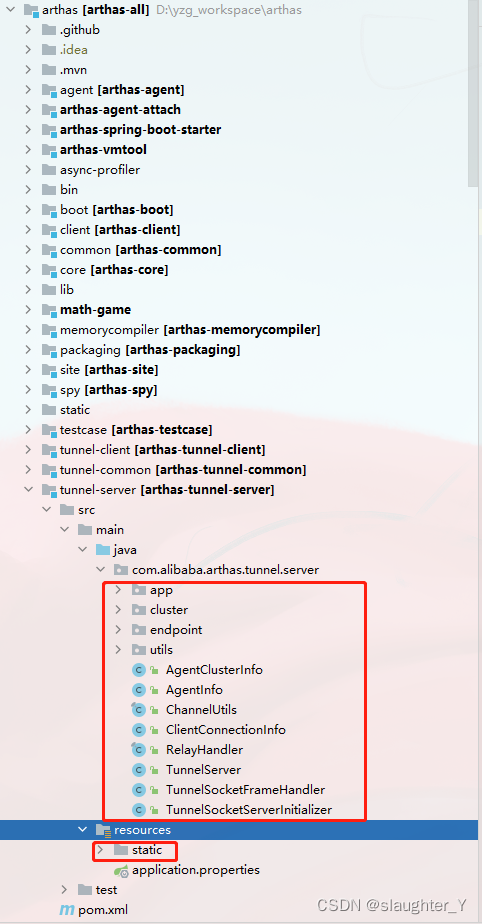
- 拷贝后SBA目录结构如下
3.3 application.yml完整版
server:
  port: 7000

spring:
  application:
    name: sba_arthas
  ## 集成了spring security安全组件,定义登录SBA的账号密码,
  ## 后期注册到SBA的客户端也要设置此权限才能注册进来
  security:
    user:
      name: admin
      password: admin
  boot:
    admin:
      # SBA添加外链扩展页面,此处外链跳转Arthas控制台
      ui:
        external-views:
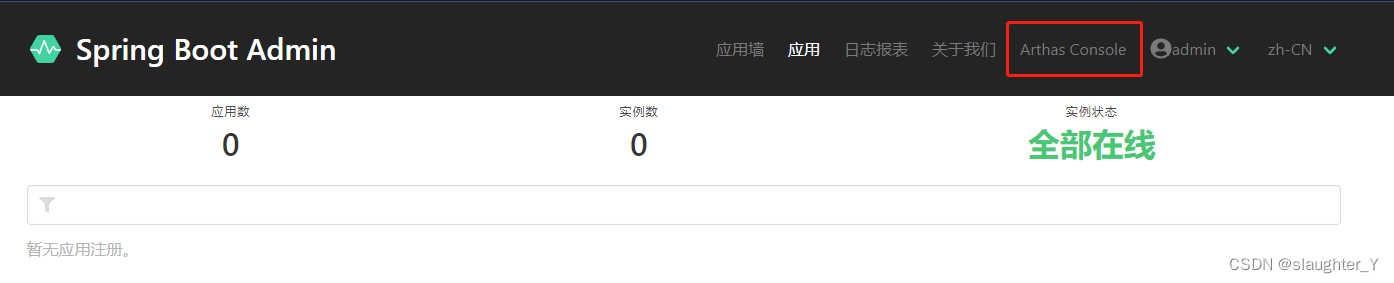
          - label: "Arthas Console"
            url: "./extensions/arthas/arthas.html"
            order: 1900
  # Arthas的缓存策略
  cache:
    type: caffeine
    cache-names: inMemoryClusterCache
    caffeine:
      spec: maximumSize=3000,expireAfterAccess=3600s

# 监控所有页面
management:
  endpoints:
    web:
      exposure:
        include: '*'
  metrics:
    tags:
      application: ${spring.application.name}
  ## 关闭rabbitmq,redis,es 健康检查
  health:
    redis:
      enabled: false
    rabbit:
      enabled: false
    elasticsearch:
      enabled: false
  # 总是显示服务健康细节
  endpoint:
    health:
      show-details: always
# arthas tunnel-server监听地址端口
arthas:
  server:
    host: 0.0.0.0
    port: ${PORT:7777}
  enableDetailPages: true
3.4 SBA服务改造
- 添加ArthasController类,以获取所有注册到tunnel-server的服务agentId
- 注释ArthasTunnelApplication,从SBA的application类启动,并添加@EnableCaching启用缓存策略
- 注释WebSecurityConfig,添加新的SecurityConfig,兼容SBA的权限过滤设置
- 修改ProxyController类,以支持arthas火焰图文件地址查看
- static文件改造添加arthas.html和arthas.js
- 修改web-console.js中updateArthasOutputLink方法
完整代码
package com.example.sba_arthas.arthas.app.web;

import com.example.sba_arthas.arthas.AgentInfo;
import com.example.sba_arthas.arthas.TunnelServer;
import org.springframework.beans.factory.annotation.Autowired;
import org.springframework.web.bind.annotation.RequestMapping;
import org.springframework.web.bind.annotation.RequestMethod;
import org.springframework.web.bind.annotation.RestController;

import java.util.Map;
import java.util.Set;

/**
 * 获取所有注册到 Arthas 的客户端 <br>
 *
 * @date: 2022年8月24日11:30:30 <br>
 * @author: yzg <br>
 * @since: 1.0 <br>
 * @version: 1.0 <br>
 */
@RequestMapping("/api/arthas")
@RestController
public class ArthasController {

	@Autowired
	private TunnelServer tunnelServer;

	@RequestMapping(value = "/clients", method = RequestMethod.GET)
	public Set<String> getClients() {
		Map<String, AgentInfo> agentInfoMap = tunnelServer.getAgentInfoMap();
		return agentInfoMap.keySet();
	}


}
package com.example.sba_arthas.config;

import com.example.sba_arthas.arthas.app.configuration.ArthasProperties;
import de.codecentric.boot.admin.server.config.AdminServerProperties;
import org.springframework.beans.factory.annotation.Autowired;
import org.springframework.context.annotation.Configuration;
import org.springframework.security.config.annotation.web.builders.HttpSecurity;
import org.springframework.security.config.annotation.web.configuration.WebSecurityConfigurerAdapter;
import org.springframework.security.web.authentication.SavedRequestAwareAuthenticationSuccessHandler;
import org.springframework.security.web.csrf.CookieCsrfTokenRepository;

/**
 * @author :yzg
 * @date :Created in 2022/8/22 14:56
 * @description:
 * @modified By:
 * @version: $
 */

@Configuration
public class SecurityConfig extends WebSecurityConfigurerAdapter {

	private final String adminContextPath;

	@Autowired
	private ArthasProperties arthasProperties;

	public SecurityConfig(AdminServerProperties adminServerProperties) {
		this.adminContextPath = adminServerProperties.getContextPath();
	}

	@Override
	protected void configure(HttpSecurity http) throws Exception {

		// @formatter:off
		SavedRequestAwareAuthenticationSuccessHandler successHandler = new SavedRequestAwareAuthenticationSuccessHandler();
		successHandler.setTargetUrlParameter("redirectTo");
		successHandler.setDefaultTargetUrl(adminContextPath + "/");

		// allow iframe
		if (arthasProperties.isEnableIframeSupport()) {
			http.headers().frameOptions().disable();
		}

		http.authorizeRequests()
				.antMatchers(adminContextPath + "/assets/**").permitAll()//Grants public access to all static assets and the login page.
				.antMatchers(adminContextPath + "/login").permitAll()
				.anyRequest().authenticated()//	Every other request must be authenticated.
				.and()
				.formLogin().loginPage(adminContextPath + "/login").successHandler(successHandler).and()//Configures login and logout.
				.logout().logoutUrl(adminContextPath + "/logout").and()
				.httpBasic().and()//Enables HTTP-Basic support. This is needed for the Spring Boot Admin Client to register.
				.csrf()
				.csrfTokenRepository(CookieCsrfTokenRepository.withHttpOnlyFalse())//	Enables CSRF-Protection using Cookies
				.ignoringAntMatchers(
						adminContextPath + "/instances",//	Disables CRSF-Protection the endpoint the Spring Boot Admin Client uses to register.
						adminContextPath + "/actuator/**"//Disables CRSF-Protection for the actuator endpoints.
				);
	}
}
package com.tsit.springbootadmin.arthas.app.web;

import com.alibaba.arthas.tunnel.common.MethodConstants;
import com.alibaba.arthas.tunnel.common.SimpleHttpResponse;
import com.alibaba.arthas.tunnel.common.URIConstans;
import com.tsit.springbootadmin.arthas.AgentInfo;
import com.tsit.springbootadmin.arthas.TunnelServer;
import io.netty.channel.ChannelHandlerContext;
import io.netty.handler.codec.http.websocketx.TextWebSocketFrame;
import io.netty.util.concurrent.GlobalEventExecutor;
import io.netty.util.concurrent.Promise;
import org.apache.commons.lang3.RandomStringUtils;
import org.apache.commons.lang3.StringUtils;
import org.slf4j.Logger;
import org.slf4j.LoggerFactory;
import org.springframework.beans.factory.annotation.Autowired;
import org.springframework.http.ResponseEntity;
import org.springframework.http.ResponseEntity.BodyBuilder;
import org.springframework.stereotype.Controller;
import org.springframework.web.bind.annotation.PathVariable;
import org.springframework.web.bind.annotation.RequestMapping;
import org.springframework.web.bind.annotation.ResponseBody;
import org.springframework.web.servlet.HandlerMapping;
import org.springframework.web.util.UriComponentsBuilder;

import javax.servlet.http.HttpServletRequest;
import java.net.URI;
import java.util.Map.Entry;
import java.util.Optional;
import java.util.concurrent.ExecutionException;
import java.util.concurrent.TimeUnit;
import java.util.concurrent.TimeoutException;

/**
 * 代理http请求到具体的 arthas agent里
 *
 * @author hengyunabc 2020-10-22
 *
 */
@RequestMapping(value = {"/extensions/arthas", "/"})
@Controller
public class ProxyController {
    private final static Logger logger = LoggerFactory.getLogger(ProxyController.class);

    @Autowired
	TunnelServer tunnelServer;

    @RequestMapping(value = "/proxy/{agentId}/**")
    @ResponseBody
    public ResponseEntity<?> execute(@PathVariable(name = "agentId", required = true) String agentId,
            HttpServletRequest request) throws InterruptedException, ExecutionException, TimeoutException {

        String fullPath = (String) request.getAttribute(HandlerMapping.PATH_WITHIN_HANDLER_MAPPING_ATTRIBUTE);
		fullPath = StringUtils.replace(fullPath, "/extensions/arthas", "");
		logger.info("fullPath:{}", fullPath);
        String targetUrl = fullPath.substring("/proxy/".length() + agentId.length());

        logger.info("http proxy, agentId: {}, targetUrl: {}", agentId, targetUrl);

        Optional<AgentInfo> findAgent = tunnelServer.findAgent(agentId);

        if (findAgent.isPresent()) {
            String requestId = RandomStringUtils.random(20, true, true).toUpperCase();

            ChannelHandlerContext agentCtx = findAgent.get().getChannelHandlerContext();

            Promise<SimpleHttpResponse> httpResponsePromise = GlobalEventExecutor.INSTANCE.newPromise();

            tunnelServer.addProxyRequestPromise(requestId, httpResponsePromise);

            URI uri = UriComponentsBuilder.newInstance().scheme(URIConstans.RESPONSE).path("/")
                    .queryParam(URIConstans.METHOD, MethodConstants.HTTP_PROXY).queryParam(URIConstans.ID, agentId)
                    .queryParam(URIConstans.TARGET_URL, targetUrl).queryParam(URIConstans.PROXY_REQUEST_ID, requestId)
                    .build().toUri();

            agentCtx.channel().writeAndFlush(new TextWebSocketFrame(uri.toString()));
            logger.info("waitting for arthas agent http proxy, agentId: {}, targetUrl: {}", agentId, targetUrl);

            SimpleHttpResponse simpleHttpResponse = httpResponsePromise.get(15, TimeUnit.SECONDS);

            BodyBuilder bodyBuilder = ResponseEntity.status(simpleHttpResponse.getStatus());
            for (Entry<String, String> entry : simpleHttpResponse.getHeaders().entrySet()) {
                bodyBuilder.header(entry.getKey(), entry.getValue());
            }
            ResponseEntity<byte[]> responseEntity = bodyBuilder.body(simpleHttpResponse.getContent());
            return responseEntity;
        } else {
            logger.error("can not find agent by agentId: {}", agentId);
        }

        return ResponseEntity.notFound().build();
    }
}
arthas.html是拷贝的index.html,可以比较一下两个不同
<!doctype html>
<html lang="en">

<head>
    <!-- Required meta tags -->
    <meta charset="utf-8">
    <meta name="viewport" content="width=device-width, initial-scale=1, shrink-to-fit=no">

    <!-- Bootstrap CSS -->
    <link rel="stylesheet" href="bootstrap-4.2.1.min.css">
    <link rel="stylesheet" href="bootstrap-select.css">

    <link href="xterm.css" rel="stylesheet" />
    <link href="main.css" rel="stylesheet" />

    <!-- Optional JavaScript -->
    <!-- jQuery first, then Popper.js, then Bootstrap JS -->
    <script src="jquery-3.3.1.min.js"></script>
    <script src="popper-1.14.6.min.js"></script>
    <script src="bootstrap-4.2.1.min.js"></script>
    <script src="xterm.js" type="text/javascript"></script>
    <script src="web-console.js"></script>
    <script src="arthas.js"></script>
    <script src="bootstrap-select.js"></script>


    <script type="text/javascript">
        window.addEventListener('resize', function () {
            if(ws !== undefined && ws !== null){
                let terminalSize = getTerminalSize();
                ws.send(JSON.stringify({ action: 'resize', cols: terminalSize.cols, rows: terminalSize.rows }));
                xterm.resize(terminalSize.cols, terminalSize.rows);
            }
        });
    </script>

    <title>Arthas Console</title>
</head>

<body>
    <nav class="navbar navbar-expand navbar-light bg-light flex-column flex-md-row bd-navbar">
        <a href="https://github.com/alibaba/arthas" target="_blank" title="" class="navbar-brand"><img src="logo.png"
                alt="Arthas" title="Welcome to Arthas web console" style="height: 25px;" class="img-responsive"></a>

        <button class="navbar-toggler" type="button" data-toggle="collapse" data-target="#navbarSupportedContent"
            aria-controls="navbarSupportedContent" aria-expanded="false" aria-label="Toggle navigation">
            <span class="navbar-toggler-icon"></span>
        </button>

        <div class="collapse navbar-collapse" id="navbarSupportedContent">
            <ul class="navbar-nav mr-auto">
                <li class="nav-item active">
                    <a class="nav-link" href="https://arthas.aliyun.com/doc" target="_blank">Documentation
                        <span class="sr-only">(current)</span></a>
                </li>
                <li class="nav-item">
                    <a class="nav-link" href="https://arthas.aliyun.com/doc/arthas-tutorials.html" target="_blank">Online Tutorials</a>
                </li>
                <li class="nav-item">
                    <a class="nav-link" href="https://github.com/alibaba/arthas" target="_blank">Github</a>
                </li>
            </ul>
        </div>

        <form class="form-inline my-2 my-lg-0">
            <div class="col">
                <div class="input-group ">
                    <div class="input-group-prepend">
                        <span class="input-group-text" id="ip-addon">IP</span>
                    </div>
                    <input value="127.0.0.1" v-model="ip" type="text" class="form-control" name="ip" id="ip"
                        placeholder="please enter ip address" aria-label="ip" aria-describedby="ip-addon">
                </div>
            </div>

            <div class="col">
                <div class="input-group ">
                    <div class="input-group-prepend">
                        <span class="input-group-text" id="port-addon">Port</span>
                    </div>
                    <input value="7777" v-model="port" type="text" class="form-control" name="port" id="port"
                        placeholder="please enter port" aria-label="port" aria-describedby="port-addon">
                </div>
            </div>

            <div class="col">
                <select id="selectServer" data-type="btn-info" class="bootstrap-select"></select>
<!--                <div class="input-group ">-->
<!--                    <div class="input-group-prepend">-->
<!--                        <span class="input-group-text" id="agentId-addon">AgentId</span>-->
<!--                    </div>-->
<!--                    <input value="" v-model="agentId" type="text" class="form-control" name="agentId" id="agentId"-->
<!--                        placeholder="please enter agentId" aria-label="agentId" aria-describedby="agentId-addon">-->
<!--                </div>-->
            </div>

            <div class="col-inline">
                <button title="connect" type="button" class="btn btn-info form-control" onclick="startConnect()">Connect</button>
                <button title="disconnect" type="button" class="btn btn-info form-control" onclick="disconnect()">Disconnect</button>
                <a id="arthasOutputA" target="_blank" href="arthas-output/" class="btn btn-info" role="button" onclick="updateArthasOutputLink()">Arthas Output</a>
            </div>

        </form>

    </nav>

    <div class="container-fluid px-0">
        <div class="col px-0" id="terminal-card">
            <div id="terminal"></div>
        </div>
    </div>

    <div title="fullscreen" id="fullSc" class="fullSc">
        <button id="fullScBtn" onclick="xtermFullScreen()"><img src="fullsc.png"></button>
    </div>
</body>

</html>
var registerApplications = null;
var applications = null;
$(document).ready(function () {
reloadRegisterApplications();
reloadApplications();
});
/**
* 获取注册的arthas客户端
*/
function reloadRegisterApplications() {
var result = reqSync("/api/arthas/clients", "get");
registerApplications = result;
initSelect("#selectServer", registerApplications, "");
}
function reloadAgent(){
reloadRegisterApplications();
reloadApplications();
}
/**
* 获取注册的应用
*/
function reloadApplications() {
applications = reqSync("/api/applications", "get");
console.log(applications)
}
/**
* 初始化下拉选择框
*/
function initSelect(uiSelect, list, key) {
$(uiSelect).html('');
var server;
for (var i = 0; i < list.length; i++) {
//server = list[i].toLowerCase().split("@");
//if ("phantom-admin" === server[0]) continue;
//$(uiSelect).append("<option value=" + list[i].toLowerCase() + ">" + server[0] + "</option>");
server = list[i].toLowerCase();
$(uiSelect).append("<option value=" + server + ">" + server + "</option>");
}
}
/**
* 重置配置文件
*/
function release() {
var currentServer = $("#selectServer").text();
for (var i = 0; i < applications.length; i++) {
serverId = applications[i].id;
serverName = applications[i].name.toLowerCase();
console.log(serverId + "/" + serverName);
if (currentServer === serverName) {
var result = reqSync("/api/applications/" +serverId+ "/env/reset", "post");
alert("env reset success");
}
}
}
function reqSync(url, method) {
var result = null;
$.ajax({
url: url,
type: method,
async: false, //使用同步的方式,true为异步方式
headers: {
'Content-Type': 'application/json;charset=utf8;',
},
success: function (data) {
// console.log(data);
result = data;
},
error: function (data) {
console.log("error");
}
});
return result;
}
function updateArthasOutputLink() {
    $('#arthasOutputA').prop("href", "proxy/" + $("#selectServer").val() + "/arthas-output/")
}
3.5 Arthas外链设置
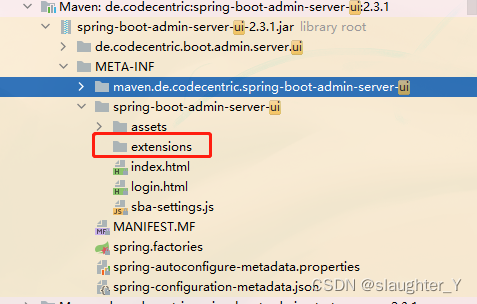
yml文件中定义的Arthas控制台外链地址如何定义,此处是重点
SBA启动后访问的页面是spring-boot-admin-server-ui依赖的页面,外链指向的地址是希望通过maven打包的方式将static静态资源打入到该目录下。
引入pom打包模块
<build>
        <finalName>${project.artifactId}</finalName>
        <resources>
            <!-- 指定 src/main/resources下所有文件及文件夹为资源文件 -->
            <resource>
                <directory>src/main/resources</directory>
                <targetPath>${project.build.directory}/classes</targetPath>
                <includes>
                    <include>**/*</include>
                </includes>
                <filtering>true</filtering>
            </resource>
            <!-- 通过 Maven Resource 的指定配置打入指定目录,实现 SBA 启动时的自定义加载 ,通过application配置 外链-->
            <resource>
                <directory>src/main/resources/static</directory>
                <targetPath>${project.build.directory}/classes/META-INF/spring-boot-admin-server-ui/extensions/arthas
                </targetPath>
                <filtering>false</filtering>
            </resource>
        </resources>
        <plugins>
            <plugin>
                <groupId>org.springframework.boot</groupId>
                <artifactId>spring-boot-maven-plugin</artifactId>
                <configuration>
                    <excludes>
                        <exclude>
                            <groupId>org.projectlombok</groupId>
                            <artifactId>lombok</artifactId>
                        </exclude>
                    </excludes>
                </configuration>
            </plugin>
        </plugins>
    </build>
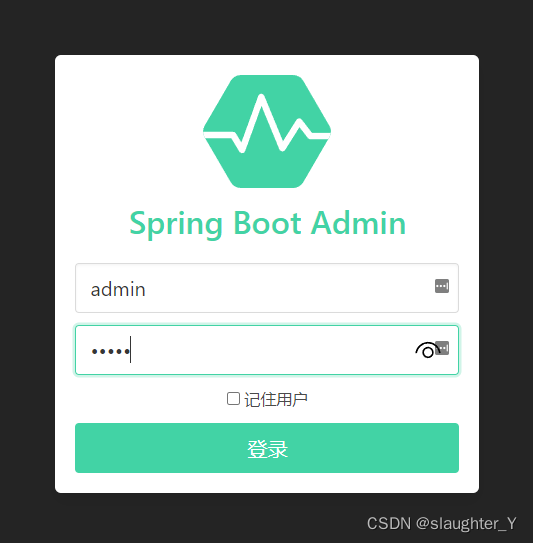
3.6 重新启动SBA并访问Arthas Console

3.7 日志收集(客户端设置)
3.7.1 slf4j方式
logging:
  file:
    ## 日志路径,默认文件名spring.log
    path: /user/iot/manage
  pattern:
    file: '%clr(%d{yyyy-MM-dd HH:mm:ss.SSS}){faint} %clr(${LOG_LEVEL_PATTERN:-%5p}) %clr(${PID:- }){magenta} %clr(---){faint} %clr([%thread]){faint} %clr(%logger{50}){cyan} %clr(LN:%L){faint} %m%n${LOG_EXCEPTION_CONVERSION_WORD:-%wEx}}'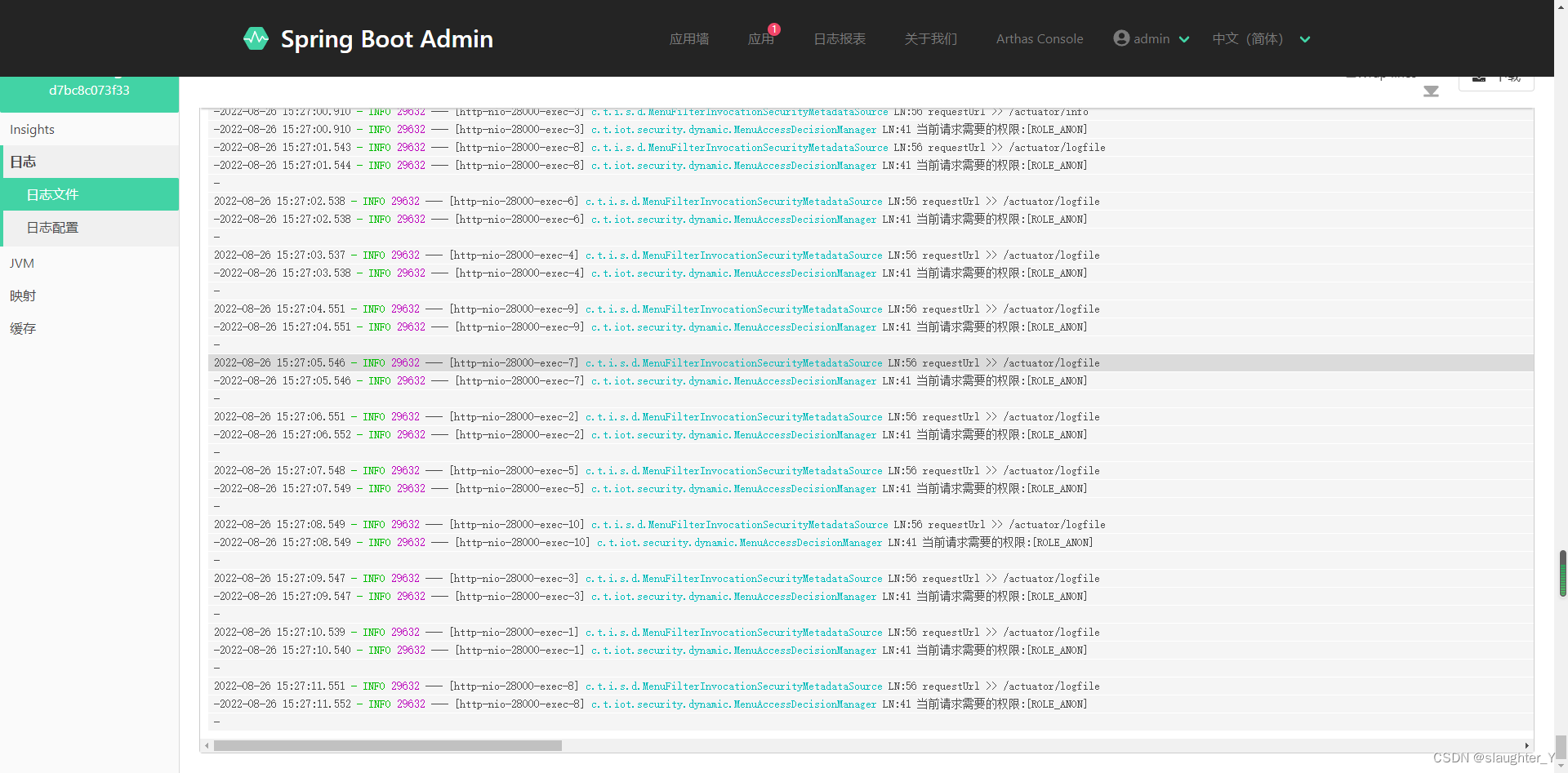
3.7.2 logback方式
添加logback-spring.xml文件
<?xml version="1.0" encoding="UTF-8"?>
<configuration>
    <property name="APP_Name" value="iot-work" />
  <contextName>${APP_Name}</contextName>
    <!--定义日志文件的存储地址 勿在 LogBack 的配置中使用相对路径,请根据需求配置路径-->
    <property name="LOG_HOME" value="/user/iot/work/logs/" />

    <!-- 彩色日志依赖的渲染类 -->
    <conversionRule conversionWord="clr" converterClass="org.springframework.boot.logging.logback.ColorConverter" />
    <conversionRule conversionWord="wex" converterClass="org.springframework.boot.logging.logback.WhitespaceThrowableProxyConverter" />
    <conversionRule conversionWord="wEx" converterClass="org.springframework.boot.logging.logback.ExtendedWhitespaceThrowableProxyConverter" />
    <!-- 彩色日志格式 -->
    <property name="CONSOLE_LOG_PATTERN"
              value="${CONSOLE_LOG_PATTERN:-%clr(%d{yyyy-MM-dd HH:mm:ss.SSS}){faint} %clr(${LOG_LEVEL_PATTERN:-%5p}) %clr(${PID:- }){magenta} %clr(---){faint} %clr([%thread]){faint} %clr(%logger{50}){cyan} %clr(LN:%L){faint} %m%n${LOG_EXCEPTION_CONVERSION_WORD:-%wEx}}" />

    <!-- 控制台输出 -->
    <appender name="STDOUT" class="ch.qos.logback.core.ConsoleAppender">
        <encoder class="ch.qos.logback.classic.encoder.PatternLayoutEncoder">
            <pattern>${CONSOLE_LOG_PATTERN}</pattern>
            <charset>utf8</charset>
        </encoder>
    </appender>

    <!-- 按照每天生成日志文件 -->
    <appender name="FILE"  class="ch.qos.logback.core.rolling.RollingFileAppender">
        <file>${LOG_HOME}/iot-work.log</file>
        <rollingPolicy class="ch.qos.logback.core.rolling.TimeBasedRollingPolicy">
            <!--日志文件输出的文件名-->
            <FileNamePattern>${LOG_HOME}/iot-work-%d{yyyy-MM-dd}.log</FileNamePattern>
            <!--日志文件保留天数-->
            <MaxHistory>3</MaxHistory>
        </rollingPolicy>
        <encoder class="ch.qos.logback.classic.encoder.PatternLayoutEncoder">
            <!--格式化输出:%d表示日期,%thread表示线程名,%-5level:级别从左显示5个字符宽度%msg:日志消息,%n是换行符-->
            <pattern>%d{yyyy-MM-dd HH:mm:ss.SSS} [%thread] %-5level %logger{50}:%L - %msg%n</pattern>
        </encoder>
        <!--日志文件最大的大小-->
        <triggeringPolicy class="ch.qos.logback.core.rolling.SizeBasedTriggeringPolicy">
            <MaxFileSize>10MB</MaxFileSize>
        </triggeringPolicy>
    </appender>

<!--    <logger name="org.springframework.boot.actuate.endpoint.web.servlet" level="trace"/>-->

    <!-- 日志输出级别  ,注意:如果不写<appender-ref ref="FILE" /> ,将导致springbootadmin找不到文件,无法查看日志 -->
    <root level="INFO">
        <appender-ref ref="STDOUT" />
        <appender-ref ref="FILE" />
    </root>
</configuration>
添加application.yml中logging模块
management:
  endpoint:
    logfile:
      ## logback-spring.xml中定义的日志文件路径
      external-file: /user/iot/work/logs/iot-work.log

logging:
  config: classpath:logback-spring.xml
至此SBA集成Arthas搭建完成,下一章搭建客户端注册SBA,后续添加上DockerFile后打包部署到rancher上。
参考资料:https://blog.youkuaiyun.com/xiaoll880214/article/details/120191476?spm=1001.2014.3001.5502





 扫一扫
扫一扫


 8953
8953


 到【灌水乐园】发言



