gcc编译和目标文件

网络攻防实验——网络监听 利用CAIN实现ARP监听。 阅读详情

1 基本概念

Gcc编译4阶段:预处理、编译、汇编、链接

预处理(cpp):处理头文件、宏定义、条件编译等;
编译(ccl):代码检查,生成.s汇编文件;
汇编(as):生成可重定位(全局、外部函数等符号)的.o目标文件;
链接过程(ld):把所有代码和数据组合到单个文件,这个文件可以被加载到内存中执行。

1.1 链接过程类型

编译期链接:针编译可执行文件过程时对静态库、可重定位目标文件的链接
加载期链接:针对动态库的运行时链接,在被加载器加载到内存执行时。
运行时链接:针对动态库,由应用程序来动态加载库文件,相关函数如:dladdr, dlclose, dlerror, dlopen, dlsym, dlvsym。Java本地接口即通过运行时链接方式动态链接和加载使用C/C++编译生成的动态链接库。

1.2 目标文件形式

可重定位目标文件:编译、汇编后的.o目标文件,可重定位;
可执行目标文件:二进制可执行目标文件,静态链接后的bin文件
共享目标文件:动态链接库

2 Gcc编译过程示例

2.1 示例代码

三个文件
add.h文件内容:
int add(int a,int b);
add.c文件内容:
int add(int a,int b)
{
return a+b;
}
main.c文件内容:
#include “add.h”
int a = 1;
int b = 2;

int main()
{
int res=add(a,b);
}

2.2 预处理

2.2.1 main.i

gcc -E main.c -o main.i
生成对main.c预处理后的main.i文件

# 1 "main.c"
# 1 "<built-in>"
# 1 "<command-line>"
# 1 "/usr/include/stdc-predef.h" 1 3 4
# 1 "<command-line>" 2
# 1 "main.c"
# 1 "add.h" 1
int add(int a,int b);
# 2 "main.c" 2
int a = 1;
int b = 2;

int main()
{
 int res=add(a,b);
}

2.2.2 add.i

# 1 "add.c"
# 1 "<built-in>"
# 1 "<command-line>"
# 1 "/usr/include/stdc-predef.h" 1 3 4
# 1 "<command-line>" 2
# 1 "add.c"
int add(int a,int b)
{
 return a+b;
}

2.3 编译

2.3.1 main.s

cc1 -m32 main.i -o main.s
生成汇编文件main.s
备注:
1、 这里以32bit进行编译
2、 若提示命令找不到,原因是cc1所在目录不在$PATH环境变量中,可使用可使用绝对路径,如/usr/lib/gcc/x86_64-linux-gnu/4.8.4/cc1 -m32 main.i -o main.s
3、 cc1第3个字符是数字1,不是字母l

	.file	"main.i"
	.globl	a
	.data
	.align 4
	.type	a, @object
	.size	a, 4
a:
	.long	1
	.globl	b
	.align 4
	.type	b, @object
	.size	b, 4
b:
	.long	2
	.text
	.globl	main
	.type	main, @function
main:
.LFB0:
	.cfi_startproc
	pushq	%rbp
	.cfi_def_cfa_offset 16
	.cfi_offset 6, -16
	movq	%rsp, %rbp
	.cfi_def_cfa_register 6
	subq	$16, %rsp
	movl	b(%rip), %edx
	movl	a(%rip), %eax
	movl	%edx, %esi
	movl	%eax, %edi
	call	add
	movl	%eax, -4(%rbp)
	leave
	.cfi_def_cfa 7, 8
	ret
	.cfi_endproc
.LFE0:
	.size	main, .-main
	.ident	"GCC: (Ubuntu 4.8.4-2ubuntu1~14.04.4) 4.8.4"
	.section	.note.GNU-stack,"",@progbits
2.3.2	add.s
	.file	"add.i"
	.text
	.globl	add
	.type	add, @function
add:
.LFB0:
	.cfi_startproc
	pushl	%ebp
	.cfi_def_cfa_offset 8
	.cfi_offset 5, -8
	movl	%esp, %ebp
	.cfi_def_cfa_register 5
	movl	12(%ebp), %eax
	movl	8(%ebp), %edx
	addl	%edx, %eax
	popl	%ebp
	.cfi_restore 5
	.cfi_def_cfa 4, 4
	ret
	.cfi_endproc
.LFE0:
	.size	add, .-add
	.ident	"GCC: (Ubuntu 4.8.4-2ubuntu1~14.04.4) 4.8.4"
	.section	.note.GNU-stack,"",@progbits

2.4 汇编和反汇编

as --32 -o main.o main.s
生成可重定位目标文件main.o

2.4.1 main.o

此文件不好使用cat直接查看,会显示一堆乱码。
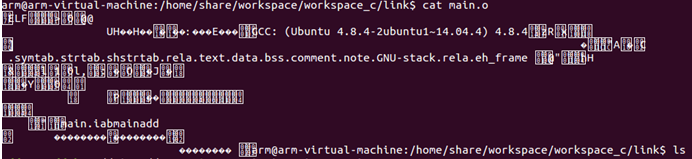
在这里插入图片描述

可使用objdump进行反汇编命令选项查看:
objdump -dx main.o
-d:反汇编
-x:显示所有header
命令结果显示如下:

main.o:     file format elf32-i386
main.o
architecture: i386, flags 0x00000011:
HAS_RELOC, HAS_SYMS
start address 0x00000000

Sections:
Idx Name          Size      VMA       LMA       File off  Algn
  0 .text         00000026  00000000  00000000  00000034  2**0
                  CONTENTS, ALLOC, LOAD, RELOC, READONLY, CODE
  1 .data         00000008  00000000  00000000  0000005c  2**2
                  CONTENTS, ALLOC, LOAD, DATA
  2 .bss          00000000  00000000  00000000  00000064  2**0
                  ALLOC
  3 .comment      0000002c  00000000  00000000  00000064  2**0
                  CONTENTS, READONLY
  4 .note.GNU-stack 00000000  00000000  00000000  00000090  2**0
                  CONTENTS, READONLY
  5 .eh_frame     00000038  00000000  00000000  00000090  2**2
                  CONTENTS, ALLOC, LOAD, RELOC, READONLY, DATA
SYMBOL TABLE:
00000000 l    df *ABS*	00000000 main.i
00000000 l    d  .text	00000000 .text
00000000 l    d  .data	00000000 .data
00000000 l    d  .bss	00000000 .bss
00000000 l    d  .note.GNU-stack	00000000 .note.GNU-stack
00000000 l    d  .eh_frame	00000000 .eh_frame
00000000 l    d  .comment	00000000 .comment
00000000 g     O .data	00000004 a
00000004 g     O .data	00000004 b
00000000 g     F .text	00000026 main
00000000         *UND*	00000000 add


Disassembly of section .text:

00000000 <main>:
   0:	55                   	push   %ebp
   1:	89 e5                	mov    %esp,%ebp
   3:	83 e4 f0             	and    $0xfffffff0,%esp
   6:	83 ec 20             	sub    $0x20,%esp
   9:	8b 15 00 00 00 00    	mov    0x0,%edx
			b: R_386_32	b
   f:	a1 00 00 00 00       	mov    0x0,%eax
			10: R_386_32	a
  14:	89 54 24 04          	mov    %edx,0x4(%esp)
  18:	89 04 24             	mov    %eax,(%esp)
  1b:	e8 fc ff ff ff       	call   1c <main+0x1c>
			1c: R_386_PC32	add
  20:	89 44 24 1c          	mov    %eax,0x1c(%esp)
  24:	c9                   	leave  
  25:	c3                   	ret    

2.4.2 add.o

main.o:     file format elf32-i386
main.o
architecture: i386, flags 0x00000011:
HAS_RELOC, HAS_SYMS
start address 0x00000000

Sections:
Idx Name          Size      VMA       LMA       File off  Algn
  0 .text         00000026  00000000  00000000  00000034  2**0
                  CONTENTS, ALLOC, LOAD, RELOC, READONLY, CODE
  1 .data         00000008  00000000  00000000  0000005c  2**2
                  CONTENTS, ALLOC, LOAD, DATA
  2 .bss          00000000  00000000  00000000  00000064  2**0
                  ALLOC
  3 .comment      0000002c  00000000  00000000  00000064  2**0
                  CONTENTS, READONLY
  4 .note.GNU-stack 00000000  00000000  00000000  00000090  2**0
                  CONTENTS, READONLY
  5 .eh_frame     00000038  00000000  00000000  00000090  2**2
                  CONTENTS, ALLOC, LOAD, RELOC, READONLY, DATA
SYMBOL TABLE:
00000000 l    df *ABS*	00000000 main.i
00000000 l    d  .text	00000000 .text
00000000 l    d  .data	00000000 .data
00000000 l    d  .bss	00000000 .bss
00000000 l    d  .note.GNU-stack	00000000 .note.GNU-stack
00000000 l    d  .eh_frame	00000000 .eh_frame
00000000 l    d  .comment	00000000 .comment
00000000 g     O .data	00000004 a
00000004 g     O .data	00000004 b
00000000 g     F .text	00000026 main
00000000         *UND*	00000000 add


Disassembly of section .text:

00000000 <main>:
   0:	55                   	push   %ebp
   1:	89 e5                	mov    %esp,%ebp
   3:	83 e4 f0             	and    $0xfffffff0,%esp
   6:	83 ec 20             	sub    $0x20,%esp
   9:	8b 15 00 00 00 00    	mov    0x0,%edx
			b: R_386_32	b
   f:	a1 00 00 00 00       	mov    0x0,%eax
			10: R_386_32	a
  14:	89 54 24 04          	mov    %edx,0x4(%esp)
  18:	89 04 24             	mov    %eax,(%esp)
  1b:	e8 fc ff ff ff       	call   1c <main+0x1c>
			1c: R_386_PC32	add
  20:	89 44 24 1c          	mov    %eax,0x1c(%esp)
  24:	c9                   	leave  
  25:	c3                   	ret    

2.5 链接

ld -m elf_i386 -o main main.o add.o

2.6 相关命令汇总

cpp main.c main.i
cc1 main.i -o main.s
as --32 -o main.o main.s
objdump -dx main.o >main.o.txt

cpp add.c add.i
/usr/lib/gcc/x86_64-linux-gnu/4.8.4/cc1 -m32 add.i -o add.s
as --32 -o add.o add.s
objdump -dx add.o >add.o.txt

链接:
ld -m elf_i386 -o main main.o add.o

备注:cc1命令使用的版本路径
/usr/lib/gcc/x86_64-linux-gnu/4.8.4/ cc1

3 可执行文件分析

3.1 可执行ELF文件空间布局
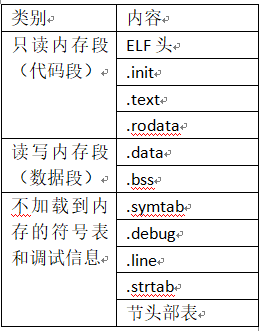
在这里插入图片描述

3.2 可执行文件反编译

objdump -dx main

3.2.1 文件基本信息

main: file format elf32-i386
main
architecture: i386, flags 0x00000112:
EXEC_P, HAS_SYMS, D_PAGED
start address 0x08048094

3.2.2 程序头部表信息

Program Header:
LOAD off 0x00000000 vaddr 0x08048000 paddr 0x08048000 align 212
filesz 0x00000120 memsz 0x00000120 flags r-x
LOAD off 0x00000120 vaddr 0x08049120 paddr 0x08049120 align 2
12
filesz 0x00000008 memsz 0x00000008 flags rw-
STACK off 0x00000000 vaddr 0x00000000 paddr 0x00000000 align 2**4
filesz 0x00000000 memsz 0x00000000 flags rw-
说明:
Off:目标文件中的偏移
Vadd/paddr:内存地址
Align:对齐要求
Filesz:目标文件中的段大小
Memsz:内存中的段大小
Flags:运行时访问权限

3.2.3 段信息

Sections:
Idx Name Size VMA LMA File off Algn
0 .text 00000033 08048094 08048094 00000094 20
CONTENTS, ALLOC, LOAD, READONLY, CODE
1 .eh_frame 00000058 080480c8 080480c8 000000c8 2
2
CONTENTS, ALLOC, LOAD, READONLY, DATA
2 .data 00000008 08049120 08049120 00000120 22
CONTENTS, ALLOC, LOAD, DATA
3 .comment 0000002b 00000000 00000000 00000128 2
0
CONTENTS, READONLY

3.2.4 符号表信息

SYMBOL TABLE:
08048094 l d .text 00000000 .text
080480c8 l d .eh_frame 00000000 .eh_frame
08049120 l d .data 00000000 .data
00000000 l d .comment 00000000 .comment
00000000 l df ABS 00000000 main.i
00000000 l df ABS 00000000 add.i
00000000 l df ABS 00000000
08049124 g O .data 00000004 b
080480ba g F .text 0000000d add
00000000 UND 00000000 _start
08049128 g .data 00000000 __bss_start
08048094 g F .text 00000026 main
08049128 g .data 00000000 _edata
08049128 g .data 00000000 _end
08049120 g O .data 00000004 a

3.2.5 反汇编信息

Disassembly of section .text:

08048094 :
8048094: 55 push %ebp
8048095: 89 e5 mov %esp,%ebp
8048097: 83 e4 f0 and $0xfffffff0,%esp
804809a: 83 ec 20 sub $0x20,%esp
804809d: 8b 15 24 91 04 08 mov 0x8049124,%edx
80480a3: a1 20 91 04 08 mov 0x8049120,%eax
80480a8: 89 54 24 04 mov %edx,0x4(%esp)
80480ac: 89 04 24 mov %eax,(%esp)
80480af: e8 06 00 00 00 call 80480ba
80480b4: 89 44 24 1c mov %eax,0x1c(%esp)
80480b8: c9 leave
80480b9: c3 ret

080480ba :
80480ba: 55 push %ebp
80480bb: 89 e5 mov %esp,%ebp
80480bd: 8b 45 0c mov 0xc(%ebp),%eax
80480c0: 8b 55 08 mov 0x8(%ebp),%edx
80480c3: 01 d0 add %edx,%eax
80480c5: 5d pop %ebp
80480c6: c3 ret

4 加载可执行目标文件

4.1 运行时内存映像
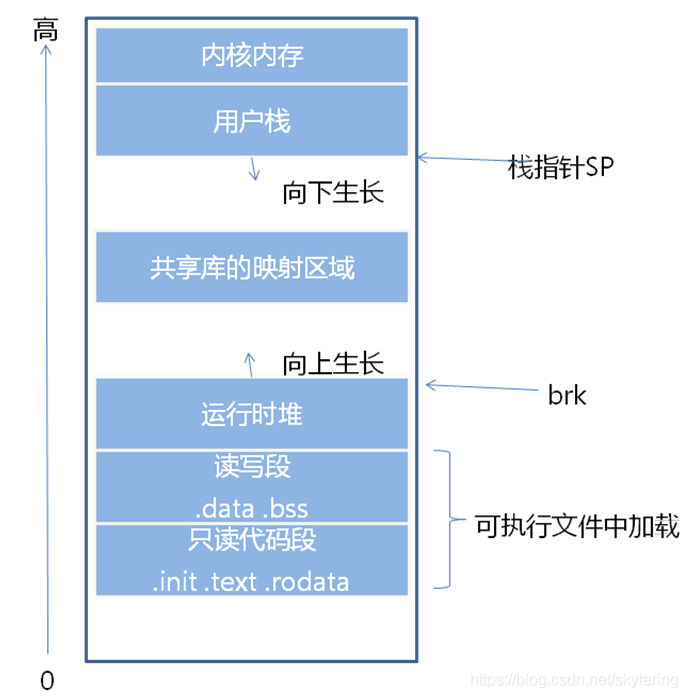
在这里插入图片描述

5 参考资料

1、《深入理解计算机系统》,【美】Randal E.Bryant,David R.O’Hallaron
, 第3版,2019年3月,机械工业出版社,

MemSeg:一种差异和共性来检测图像表面缺陷的半监督方法 本文认为人为创建类内差异和保持类内共性可以帮助模型实现更好的缺陷检测能力,从而更好地区分非正常图像。如图一所示。差异(differences):MemSeg引入人工模拟的异常图像在训练阶段使模型能够区分正常和异常的图像,减轻了半监督学习只能用正常样本进行训练的不足,然后在推理阶段可以直接输入图像无需做任何后处理。共性(commonalities):MemSeg引入了一个记忆池来记录正常样本的通用模式,在训练和推理阶段,比较输入图像和记忆池中的样本之间的差异,为异常区域的定位提供有用的信息。 阅读详情

相关推荐

计算机组成原理实验(已通关)-华中科技大学头歌Educoder(Logisim)

汉字国标码转区位码实验 汉字机内码获取实验 8位可控加减法电路设计 第2关 CLA182四位先行进位电路设计 第3关 4位快速加法器设计 第4关 16位快速加法器设计 第5关 32位快速加法器设计 第6关 5位无符号阵列乘法器设计 6位有符号补码阵列乘法器 乘法流水线设计 原码一位乘法器设计 偶校验编码设计 偶校验解码电路设计 16位海明编码电路设计 16位海明解码电路设计 海明编码流水传输实验 16位CRC并行编解码电路设计 CRC编码流水传输实验

紫荆鱼的博客 4万+

第7章-链接-命令分析

命令分析 1.命令: gcc -Wall -Og -c static-local.c gcc -Wall -Og -o prog main.o sum.o gcc -Wall -Og -S main.c 运行结果 分析 gcc -Wall -Og -c static-local.c是编译并优化,汇编该代码为static-local.o的二进制文件。 gcc -Wall -Og -o prog m...

李師缦的博客 271

C语言编写Picard迭代和牛顿迭代法

为了完成学校计算方法的作业,花了两个多星期将所有实验报告编写出来,看到同桌找代码的辛苦,优快云也没有这类代码,我只是一时兴起,想分享我写的代码与大家共飨,有错误还请多多指正,代码都不难,也是为了让优快云帮我保存下,我辛辛苦苦做出来的,倘若能给别人带来一丝一毫的帮助,我都万分荣幸。 1:什么是Picard迭代 先弄一个满足f(x) = 0的函数将其转化为x= 正在上传… 重新上传 取消 ...

mohenxiang的博客 4699

怎么保存修改的elf_静态链接ELF文件介绍

看CSAPP第七章 链接时,老是感觉迷迷糊糊的,所以实际看看程序的可重定位目标文件和可执行目标文件的内容。我这里以书中的代码为例//main.c 然后在命令行中运行gcc -Og -c main.c可以得到main.c的可重定位目标文件main.o,然后使用以下命令行查看该ELF文件readelf -a -x .text -x .data main.o 可重定位目标文件的ELF格式包含以下内容我们...

weixin_39934675的博客 301

【电子元件篇】电容的九大作用与选型指南-超简单解读

本文系统介绍了电容的基础概念、核心功能及实际应用。电容作为存储电荷的被动元件,其容值公式为C=Q/V,单位包括法拉及常用派生单位。文章重点解析了电容的九大功能:滤波(通过RC低通电路抑制噪声)、耦合(传递交流隔离直流)、去耦(稳定供电)、储能(短暂供电)、定时(RC延时)、谐振(RLC振荡)、旁路(高频通路)、电压调节(DC-DC转换)以及保护(吸收浪涌)。同时详细阐述了电容分类(陶瓷/电解/薄膜等)、参数选型要点(耐压/容值/精度/温度)及PCB设计注意事项,并针对不同应用场景提供了具体选型建议和常见误区

2301_81299416的博客 4009

机器人抓取(一)—— ROS MoveIt! 程序控制真实UR5机器人运动(python)

接上篇:ubuntu18.04 ros-melodic 安装 ur_robot_driver,驱动真实的 ur5 机器人 上文在 ubuntu 系统中配置了ur 机器人ros功能包 universal_robot 和驱动 Universal_Robots_ROS_Driver,并实现了用 moveit_rviz 拖动机器人运动。本文旨在学习如何使用 moveit python 用户接口moveit_commander,实现真实的ur5 机器人轨迹规划与控制。 1. ur5 机器人控制 参考:MoveIt »

zxxRobot的博客 1万+

gcc编译过程四步

gcc编译过程四步 步骤 命令 解释 预处理 gcc -o hello.i -E hello.c 插入#include<文件> #define替换等 编译 gcc -o hello.s -S hello.i 生成汇编代码 汇编 gcc -o hello.o -c hello.s 机器语言,二进制文件 链接 gcc -o hello hello.o

滴水穿石 1437

00 — Intel xe SVM 内核实现精读系列专栏导读

本文系统介绍了Intel Xe GPU的共享虚拟内存(SVM)实现机制。第一部分通过概念地图阐述SVM的六个核心概念及其关系;第二部分通过三个测试用例解析SVM关键功能:fault生命周期验证、madvise与VRAM迁移、跨GPU一致性;第三部分深入内核实现,包括初始化/销毁流程、Page Fault处理、MMU Notifier失效路径、异步垃圾回收、VRAM迁移机制、madvise实现原理,以及与ROCm SVM的对比。文章建议按功能模块顺序学习,从基本概念到测试用例,再深入内核实现细节,最后对比不同

图形/计算GPU的驱动与虚拟化技术分享园地 1665

【Linux庖丁解牛】—gcc/g++&make/Makefile!

在我们的实际开发中,不可能将所有代码放在⼀个源⽂件中,所以会出现多个源⽂件,⽽且多个源⽂件之间不是独⽴的,⽽会存在多种依赖关系,如⼀个源⽂件可能要调⽤另⼀个源⽂件中定义的函数,但是每个源⽂件都是独⽴编译的,即每个*.c⽂件会形成⼀个*.o⽂件,为了满⾜前⾯说的依赖关系,则需要将这些源⽂件产⽣的⽬标⽂件进⾏链接,从⽽形成⼀个可以执⾏的程序。它的主要功能是确定文件的类型。上面说到过make的好处就是让我们的工程编译更加的方便,但是到目前为止,我们并没有看到make命令让我们的编译更加方便,甚至还更加复杂了。

2301_80221228的博客 1465

(十一)随机性与独立性回顾

随机性与独立性回顾

旺旺的碎冰冰~的博客 1017

Vite 任意文件读取漏洞复现(CVE-2026-39363)

Vite开发服务器 WebSocket中的fetchModule方法未实施server.fs访问控制,导致攻击者可通过WebSocket连接并读取服务器上的任意文件(CVE-2026-39363)

iSee857的博客 220

gcc 使用中常用的参数及命令

1. 执行过程 虽然我们称Gcc是C语言的编译器,但使用gcc由C语言源代码文件生成可执行文件的过程不仅仅是编译的过程,而是要经历四个相互关联的步骤∶预处理(也称预编译,Preprocessing)、编译(Compilation)、汇编(Assembly)和链接(Linking)。  命令gcc (1). 首先调用cpp进行预处理,在预处理过程中,对源代码文件中的文件...

841

“华为杯”研究生数学建模竞赛2016年-【华为杯】A题:多无人机协同任务规划

题分别求解,保证了攻击方无人机滞留在防御方雷达有效探测范围内的时间总和最小,接着,通过提出巡检待命无人机的设想,型无人机携带炸弹的具体清单和攻击的目标清单),保证攻击方的无人机滞留防御方雷。在使用基于贪心算法的覆盖法时,覆盖的目标点中必须首先不含配备雷达站的目标点。步优化保证攻击方的无人机滞留防御方雷达有效探测范围内的时间总和最小,需首先。的“灵巧”炸弹,采用抛投方式对地攻击,即投放后炸弹以飞机投弹时的速度作抛物。运动,当炸弹接近目标后,可主动寻的攻击待打击的目标,因此炸弹落点位于目标中。

getusushu的博客 1035

GCC编译和链接多个文件(包括源文件、目标文件、汇编文件等)

编译多个源代码文件会生成多个目标文件,每个目标文件都包含一个源文件的机器码和相关数据的符号表。除非使用-c选项指示 GCC 只编译不链接,否则 GCC 会使用临时文件作为目标文件输出: $ gcc -c main.c $ gcc -c func.c 这些命令会在当前目录中生成两个目标文件,分别是 main.o 和 func.o。把两个源文件名放在同一个 GCC 命令中,也可以获得同...

weixin_30299709的博客 1607

jre9下载 jdk9

(Java SE Runtime Environment 9.0) 9.0u175 官方最新版 【x86|x64】

RU DOS版、EFI版32bit/64bit BIOS常用工具

DOS版、EFI版的RU工具,可用来查看IO、MEM、PCI、SMBIOS等资源。亲测在EFI SHELL下可用。

GCC -c 选项 (只编译不链接,生成目标文件)

GCC -c 选项 (只编译不链接,生成目标文件) -c 选项表示编译、汇编指定的源文件 (编译源文件),但是不进行链接。使用 -c 选项可以将每一个源文件编译成对应的目标文件。 目标文件是一种中间文件或者临时文件,如果不设置该选项,gcc 一般不会保留目标文件,可执行文件生成完成后就自动删除了。 strong@foreverstrong:~/ForeverStrong/function_printf$ pwd /home/strong/ForeverStrong/function_printf stron

程永强 6234

深度学习工具包 DeepLearningToolbox

深度学习工具包Deprecation notice.-----This toolbox is outdated and no longer maintained.There are much better tools available for deep learning than this toolbox, e.g. [Theano](http://deeplearning.net/software/theano/), [torch](http://torch.ch/) or [tensorflow](http://www.tensorflow.org/)I would suggest you use one of the tools mentioned above rather than use this toolbox.Best, Rasmus.DeepLearnToolbox================A Matlab toolbox for Deep Learning.Deep Learning is a new subfield of machine learning that focuses on learning deep hierarchical models of data.It is inspired by the human brain's apparent deep (layered, hierarchical) architecture.A good overview of the theory of Deep Learning theory is[Learning Deep Architectures for AI](http://www.iro.umontreal.ca/~bengioy/papers/ftml_book.pdf)For a more informal introduction, see the following videos by Geoffrey Hinton and Andrew Ng.* [The Next Generation of Neural Networks](http://www.youtube.com/watch?v=AyzOUbkUf3M) (Hinton, 2007)* [Recent Developments in Deep Learning](http://www.youtube.com/watch?v=VdIURAu1-aU) (Hinton, 2010)* [Unsupervised Feature Learning and Deep Learning](http://www.youtube.com/watch?v=ZmNOAtZIgIk) (Ng, 2011)If you use this toolbox in your research please cite [Prediction as a candidate for learning deep hierarchical models of data](http://www2.imm.dtu.dk/pubdb/views/publication_details.php?id=6284)```@MASTERSTHESIS\{IMM2012-06284, author = "R. B. Palm", title = "Prediction as a candidate for learning deep hierarchical models of data", year = "2012",}```Contact: rasmusbergpalm at gmail dot comDirectories included in the toolbox-----------------------------------`NN/` - A library for Feedforward Backpropagation Neural Networks`CNN/` - A library for Convolutional Neural Networks`DBN/` - A library for Deep Belief Networks`SAE/` - A library for Stacked Auto-Encoders`CAE/` - A library for Convolutional Auto-Encoders`util/` - Utility functions used by the libraries`data/` - Data used by the examples`tests/` - unit tests to verify toolbox is workingFor references on each library check REFS.mdSetup-----1. Download.2. addpath(genpath('DeepLearnToolbox'));Example: Deep Belief Network---------------------```matlabfunction test_example_DBNload mnist_uint8;train_x = double(train_x) / 255;test_x = double(test_x) / 255;train_y = double(train_y);test_y = double(test_y);%% ex1 train a 100 hidden unit RBM and visualize its weightsrand('state',0)dbn.sizes = [100];opts.numepochs = 1;opts.batchsize = 100;opts.momentum = 0;opts.alpha = 1;dbn = dbnsetup(dbn, train_x, opts);dbn = dbntrain(dbn, train_x, opts);figure; visualize(dbn.rbm{1}.W'); % Visualize the RBM weights%% ex2 train a 100-100 hidden unit DBN and use its weights to initialize a NNrand('state',0)%train dbndbn.sizes = [100 100];opts.numepochs = 1;opts.batchsize = 100;opts.momentum = 0;opts.alpha = 1;dbn = dbnsetup(dbn, train_x, opts);dbn = dbntrain(dbn, train_x, opts);%unfold dbn to nnnn = dbnunfoldtonn(dbn, 10);nn.activation_function = 'sigm';%train nnopts.numepochs = 1;opts.batchsize = 100;nn = nntrain(nn, train_x, train_y, opts);[er, bad] = nntest(nn, test_x, test_y);assert(er < 0.10, 'Too big error');```Example: Stacked Auto-Encoders---------------------```matlabfunction test_example_SAEload mnist_uint8;train_x = double(train_x)/255;test_x = double(test_x)/255;train_y = double(train_y);test_y = double(test_y);%% ex1 train a 100 hidden unit SDAE and use it to initialize a FFNN% Setup and train a stacked denoising autoencoder (SDAE)rand('state',0)sae = saesetup([784 100]);sae.ae{1}.activation_function = 'sigm';sae.ae{1}.learningRate = 1;sae.ae{1}.inputZeroMaskedFraction = 0.5;opts.numepochs = 1;opts.batchsize = 100;sae = saetrain(sae, train_x, opts);visualize(sae.ae{1}.W{1}(:,2:end)')% Use the SDAE to initialize a FFNNnn = nnsetup([784 100 10]);nn.activation_function = 'sigm';nn.learningRate = 1;nn.W{1} = sae.ae{1}.W{1};% Train the FFNNopts.numepochs = 1;opts.batchsize = 100;nn = nntrain(nn, train_x, train_y, opts);[er, bad] = nntest(nn, test_x, test_y);assert(er < 0.16, 'Too big error');```Example: Convolutional Neural Nets---------------------```matlabfunction test_example_CNNload mnist_uint8;train_x = double(reshape(train_x',28,28,60000))/255;test_x = double(reshape(test_x',28,28,10000))/255;train_y = double(train_y');test_y = double(test_y');%% ex1 Train a 6c-2s-12c-2s Convolutional neural network %will run 1 epoch in about 200 second and get around 11% error. %With 100 epochs you'll get around 1.2% errorrand('state',0)cnn.layers = { struct('type', 'i') %input layer struct('type', 'c', 'outputmaps', 6, 'kernelsize', 5) %convolution layer struct('type', 's', 'scale', 2) %sub sampling layer struct('type', 'c', 'outputmaps', 12, 'kernelsize', 5) %convolution layer struct('type', 's', 'scale', 2) %subsampling layer};cnn = cnnsetup(cnn, train_x, train_y);opts.alpha = 1;opts.batchsize = 50;opts.numepochs = 1;cnn = cnntrain(cnn, train_x, train_y, opts);[er, bad] = cnntest(cnn, test_x, test_y);%plot mean squared errorfigure; plot(cnn.rL);assert(er<0.12, 'Too big error');```Example: Neural Networks---------------------```matlabfunction test_example_NNload mnist_uint8;train_x = double(train_x) / 255;test_x = double(test_x) / 255;train_y = double(train_y);test_y = double(test_y);% normalize[train_x, mu, sigma] = zscore(train_x);test_x = normalize(test_x, mu, sigma);%% ex1 vanilla neural netrand('state',0)nn = nnsetup([784 100 10]);opts.numepochs = 1; % Number of full sweeps through dataopts.batchsize = 100; % Take a mean gradient step over this many samples[nn, L] = nntrain(nn, train_x, train_y, opts);[er, bad] = nntest(nn, test_x, test_y);assert(er < 0.08, 'Too big error');%% ex2 neural net with L2 weight decayrand('state',0)nn = nnsetup([784 100 10]);nn.weightPenaltyL2 = 1e-4; % L2 weight decayopts.numepochs = 1; % Number of full sweeps through dataopts.batchsize = 100; % Take a mean gradient step over this many samplesnn = nntrain(nn, train_x, train_y, opts);[er, bad] = nntest(nn, test_x, test_y);assert(er < 0.1, 'Too big error');%% ex3 neural net with dropoutrand('state',0)nn = nnsetup([784 100 10]);nn.dropoutFraction = 0.5; % Dropout fraction opts.numepochs = 1; % Number of full sweeps through dataopts.batchsize = 100; % Take a mean gradient step over this many samplesnn = nntrain(nn, train_x, train_y, opts);[er, bad] = nntest(nn, test_x, test_y);assert(er < 0.1, 'Too big error');%% ex4 neural net with sigmoid activation functionrand('state',0)nn = nnsetup([784 100 10]);nn.activation_function = 'sigm'; % Sigmoid activation functionnn.learningRate = 1; % Sigm require a lower learning rateopts.numepochs = 1; % Number of full sweeps through dataopts.batchsize = 100; % Take a mean gradient step over this many samplesnn = nntrain(nn, train_x, train_y, opts);[er, bad] = nntest(nn, test_x, test_y);assert(er < 0.1, 'Too big error');%% ex5 plotting functionalityrand('state',0)nn = nnsetup([784 20 10]);opts.numepochs = 5; % Number of full sweeps through datann.output = 'softmax'; % use softmax outputopts.batchsize = 1000; % Take a mean gradient step over this many samplesopts.plot = 1; % enable plottingnn = nntrain(nn, train_x, train_y, opts);[er, bad] = nntest(nn, test_x, test_y);assert(er < 0.1, 'Too big error');%% ex6 neural net with sigmoid activation and plotting of validation and training error% split training data into training and validation datavx = train_x(1:10000,:);tx = train_x(10001:end,:);vy = train_y(1:10000,:);ty = train_y(10001:end,:);rand('state',0)nn = nnsetup([784 20 10]); nn.output = 'softmax'; % use softmax outputopts.numepochs = 5; % Number of full sweeps through dataopts.batchsize = 1000; % Take a mean gradient step over this many samplesopts.plot = 1; % enable plottingnn = nntrain(nn, tx, ty, opts, vx, vy); % nntrain takes validation set as last two arguments (optionally)[er, bad] = nntest(nn, test_x, test_y);assert(er < 0.1, 'Too big error');```[![Bitdeli Badge](https://d2weczhvl823v0.cloudfront.net/rasmusbergpalm/deeplearntoolbox/trend.png)](https://bitdeli.com/free "Bitdeli Badge")

【C++】GCC编译过程与目标文件类别

书籍下载:程序员的自我修养:链接、装载与库.pdf - 经典技术书籍

q742971636的博客 250

visio安装包

Microsoft Office Visio 是一款专业的制图软件。利用经过更新的形状、协作工具和数据链接图表,创建专业级图表以简化复杂的信息。

Linux gcc 重要选项简析(预编译、汇编、目标文件生成)

Linux gcc 重要选项简析 在终端输入 man gcc,显示如下: gcc选项有很多,本文主要简介部分重要常用的选项,如下: -E 生成后缀为 .i 的预编译文件 -S 生成后缀为 .s 的汇编源文件 -c 生成后缀为 .o 的目标文件 -o 指定生成的文件名称 使用示例如下: gcc -E add.c -o add.i [nictse@192 ~/Documents/t...

舒海文的博客 1329

gcc -c:只编译不链接,仅生成目标文件

-c 只编译不链接,仅生成目标文件(.o) 可以同时编译多个文件 如果不加-c,则会进行链接操作. 例子: 定义两个源文件fun1.c和main.c //fun1.c #include"stdio.h" void fun1() { printf("this is fun1\n"); } //main.c #include"stdio.h" int main() { fun1(); f...

Stephen___Qin的博客 747

【0基础嵌入式学习日志】Day04:GCC 编译流程、.o 目标文件与 Makefile 分步编译

理解了.c.h.o和可执行文件之间的关系;学会了使用gcc -c将.c文件编译成.o目标文件;理解了-c表示只编译、不链接;理解了多个.o文件需要链接后才能生成最终可执行程序;学会了使用 Makefile 管理分步编译流程;掌握了make cleanmakemake run的基本作用;进一步理解了真实 C 工程中的编译组织方式。.c 源文件先分别编译成 .o 目标文件,多个 .o 文件再链接成最终可执行程序。这一步对后续学习嵌入式工程、驱动开发、交叉编译和大型项目构建非常重要。

duhong2026的博客 481

windows下使用gcc完成头文件和目标文件编译

环境要求 安装了gcc win+r然后输入cmd , dos界面输入 gcc -v 查看有没有安装gcc 进入正题 新建 text.c文件键入如下代码: #include <stdio.h> #include ".\\head.h" int main(void){ head(); } 新建head.h文件键入代码: //_HEAD_H...

weixin_30817749的博客 469

gcc编译被多次定义,无法编译出目标文件,闪一下就退出

那天想学着老师的代码编写风格,改正自己的编码习惯,把全写main里的代码拆分成多个文件,并且在linux下用gcc编译,代码写完后,理所当然的编译不通过,哈哈哈,笑死,编译情况如下 china@ubuntu:~/1/test4$ gcc -o hhh arraylist.c arraylist_test.c arraylist.c: In function ‘int_arraylist_init’: arraylist.c:19:3: warning: implicit declaration of f

weixin_44520323的博客 618

gcc 用combine 选项将多个源文件编译为一个目标文件

gcc -c -combine test_a.c test_b.c  -combine  If you are compiling multiple source files, this option tells the driver to pass all the source files to the compiler at once (for those languages f

rheostat的专栏 1330

linux 查看 编译选项,gcc编译选项及一些查看目标文件信息的命令

一、gcc options-E 不生成文件,只输出预处理结果(输出终端-S 只预处理和编译,把文件编译成为汇编代码greet.s-c 预处理,编译和汇编,生成.o的obj文件 ( greet.o )-o file 输出名为file的可执行文件名 (缺省为a.out)-O -O2 优化编译-g: 产生可用于调试的输出-W...

weixin_33765593的博客 2413

Const变量和enum变量gcc编译生成目标文件分析

<!-- @page { size: 8.5in 11in; margin: 0.79in } P { margin-bottom: 0.08in } --> Effective C++第三版中文版(候捷译)第二条“尽量以const, enum, inline 替换#define”中讲到 此外虽然优秀的编译器不会为“整数型const对象”设定另外的

sharpblade's Blog 1676

c语言目标文件是,GCC -c选项:生成目标文件

我们知道,从 C、C++源代码生成可执行文件要经历 4 个过程,分别为预处理、编译、汇编和链接。《GCC -E选项:对源程序做预处理操作》一节以 demo.c 源文件为例,介绍了如何对源文件进行预处理,并生成相应的 demo.i 预处理文件;《GCC -S选项:编译非汇编文件》一节介绍了如何对 demo.c 或者 demo.i 进行编译,并生成相应的 demo.s 汇编代码文件。[root@bog...

weixin_42501956的博客 675

GCC -c选项:生成目标文件

[root@bogon demo]# ls demo.c [root@bogon demo]# cat demo.c #include <stdio.h> int main(){ puts("Hello,World!"); return 0; } [root@bogon demo]# gcc -E demo.c -o demo.i [root@bogon demo]# ls demo.cdemo.i [root@bogon demo]# gcc -S demo.i [root@b...

683
上一篇: C++ protobuf调试打印
下一篇: C++默认构造函数的构造操作
skytering
博客等级 码龄18年 33粉丝 54原创
评论
成就一亿技术人!
拼手气红包6.0元
还能输入1000个字符
 
 条评论被折叠 查看
添加红包

请填写红包祝福语或标题

个

红包个数最小为10个

元

红包金额最低5元

当前余额3.43元 前往充值 >
需支付:10.00元
成就一亿技术人!
领取后你会自动成为博主和红包主的粉丝 规则
hope_wisdom
发出的红包
实付元
使用余额支付
点击重新获取
扫码支付
钱包余额 0

抵扣说明:

1.余额是钱包充值的虚拟货币,按照1:1的比例进行支付金额的抵扣。
2.余额无法直接购买下载,可以购买VIP、付费专栏及课程。

余额充值