


 在Springboot项目中,由于SpringDataJPA的查询关键字不直接支持GroupBy,因此需要通过CriteriaQuery自定义查询来实现。文章展示了如何创建定制方法接口和实现类,使用CriteriaQuery进行多选并分组,同时强调了POJO类构造方法中参数顺序的重要性,以确保数据能正确映射。
项目 是Spring boot,想要使用Spring JPA实现Group By 功能,但是Spring支持的查询关键字不包括Group By,只能另辟蹊径了。
 https://docs.spring.io/spring-data/jpa/docs/current/reference/html/#repository-query-keywords
表结构:
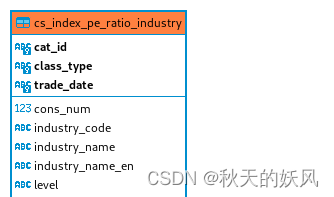
最上面三个字段组成联合主键。
想要实现的SQL功能:
(select中的参数必须满足上面的三个联合主键,不能少)
SELECT max(trade_date), max(class_type),  cat_id
FROM cs_index_pe_ratio_industry
group by cat_id
创建定制方法接口:
public interface CsIndexPeRatioIndustryRepositoryMy {
    List<CsIndexPeRatioIndustry> findAllByIdTradeDate();
}
实现类:
public class CsIndexPeRatioIndustryRepositoryMyImpl implements CsIndexPeRatioIndustryRepositoryMy {
	@PersistenceContext
	private EntityManager entityManager;

	public void setEntityManager(EntityManager em) {
		this.entityManager = em;
	}

	@Override
	public List<CsIndexPeRatioIndustry> findAllByIdTradeDate() {
		CriteriaBuilder criteriaBuilder = entityManager.getCriteriaBuilder();
		CriteriaQuery<CsIndexPeRatioIndustry> query = criteriaBuilder.createQuery(CsIndexPeRatioIndustry.class);
		Root<CsIndexPeRatioIndustry> root = query.from(CsIndexPeRatioIndustry.class);
		query.multiselect(criteriaBuilder.max(root.get("id").get("tradeDate")), criteriaBuilder.max(root.get("id").get("classType")), root.get("id").get("catId"))
				.groupBy(root.get("id").get("catId"));

		return entityManager.createQuery(query).getResultList();
	}

}
注意 query.multiselect 中参数的排列顺序。
创建主Repository:
public interface CsIndexPeRatioIndustryRepository extends JpaRepository<CsIndexPeRatioIndustry, String>, CsIndexPeRatioIndustryRepositoryMy {

}
使用方法:
@Autowired
CsIndexPeRatioIndustryRepository csIndexPeRatioIndustryRepository;

。。。。。。。。。。。。。。。。。
。。。。。。。。。。。。。。。。。
。。。。。。。。。。。。。。。。。

List<CsIndexPeRatioIndustry> findAllByIdTradeDate = csIndexPeRatioIndustryRepository.findAllByIdTradeDate();
最重要的是POJO类怎么写:
一定要注意构造方法里面的参数顺序,一定要跟上面的query.multiselect中的参数顺序一致。
public CsIndexPeRatioIndustry(String tradeDate, String classType, String catId)
public class CsIndexPeRatioIndustry {
    public CsIndexPeRatioIndustry() {
	}

	public CsIndexPeRatioIndustry(String tradeDate, String classType, String catId) {
		this.id = new CsIndexPeRatioIndustryId();
		this.id.setTradeDate(tradeDate);
		this.id.setClassType(classType);
		this.id.setCatId(catId);
	}

	@EmbeddedId
	protected CsIndexPeRatioIndustryId id;

    protected String level;
    protected String parentCid;
    protected String industryName;
    protected String industryNameEn;
    protected String industryCode;
}
@Embeddable
public class CsIndexPeRatioIndustryId implements Serializable{
public CsIndexPeRatioIndustryId() {
}
protected String classType;
protected String catId;
protected String tradeDate;
}上面省略了很多settter/getter。





 扫一扫
扫一扫


 1052
1052

 被折叠的 条评论
为什么被折叠?
被折叠的 条评论
为什么被折叠?
 到【灌水乐园】发言





