





 这篇博客介绍了三种方法来拆分合图,包括通过cocoscreator和cocosstudio的插件工具,以及利用Python的PIL模块手动拆分。重点讲述了使用Python的方法,详细解释了安装PIL、读取plist文件和图片、解析数据并拆分图片的步骤,适合对编程有一定基础的读者进行图像处理。
1.使用cocos creator的可以到官方商店找对应的插件工具,不过不是免费的... :( ,链接地址:cocos creator合图拆分
2.使用cocos studio就简单一些,直接新建工程导入plist文件,进入文件所在文件夹,看到一个隐藏文件夹,进入里面就是想要的东西了。参考链接:cocos studio合图拆分
3.就是使用python的PIL图片处理模块来拆分了:
(1)安装python,这个自行百度吧,方法简单。
(2)安装python的PIL模块:
pip install Pillow(3)代码部分:
split.py
#!python
import os,sys
from xml.etree import ElementTree
from PIL import Image

def tree_to_dict(tree):
    d = {}
    for index, item in enumerate(tree):
        if item.tag == 'key':
            if tree[index+1].tag == 'string':
                d[item.text] = tree[index + 1].text
            elif tree[index + 1].tag == 'true':
                d[item.text] = True
            elif tree[index + 1].tag == 'false':
                d[item.text] = False
            elif tree[index+1].tag == 'dict':
                d[item.text] = tree_to_dict(tree[index+1])
    return d

def gen_png_from_plist(plist_filename, png_filename):
    file_path = plist_filename.replace('.plist', '')
    big_image = Image.open(png_filename)
    root = ElementTree.fromstring(open(plist_filename, 'r').read())
    plist_dict = tree_to_dict(root[0])
    to_list = lambda x: x.replace('{','').replace('}','').split(',')
    for k,v in plist_dict['frames'].items():
        rectlist = to_list(v['frame'])
        width = int( rectlist[3] if v['rotated'] else rectlist[2] )
        height = int( rectlist[2] if v['rotated'] else rectlist[3] )
        box=(
            int(rectlist[0]),
            int(rectlist[1]),
            int(rectlist[0]) + width,
            int(rectlist[1]) + height,
            )
        sizelist = [ int(x) for x in to_list(v['sourceSize'])]
        rect_on_big = big_image.crop(box)

        if v['rotated']:
            rect_on_big = rect_on_big.rotate(90)

        result_image = Image.new('RGBA', sizelist, (0,0,0,0))
        #if v['rotated']:
        #    result_box=(
        #        ( sizelist[0] - height )//2,
        #        ( sizelist[1] - width )//2,
        #        ( sizelist[0] + height )//2,
        #        ( sizelist[1] + width )//2
        #        )
        #else:
        result_box=(
            ( sizelist[0] - width )//2,
            ( sizelist[1] - height )//2,
            ( sizelist[0] + width )//2,
            ( sizelist[1] + height )//2
            )
        print(rect_on_big, result_box)
        result_image.paste(rect_on_big, result_box, mask=0)

        if not os.path.isdir(file_path):
            os.mkdir(file_path)
        outfile = (file_path+'/' + k).replace('gift_', '')
        print(outfile, "generated")
        result_image.save(outfile)

if __name__ == '__main__':
    filename = sys.argv[1]
    plist_filename = filename + '.plist'
    png_filename = filename + '.png'
    if (os.path.exists(plist_filename) and os.path.exists(png_filename)):
        gen_png_from_plist( plist_filename, png_filename )
    else:
        print("make sure you have boith plist and png files in the same directory")
(4)将需要拆分的plist文件和图片跟脚本放在同一目录下
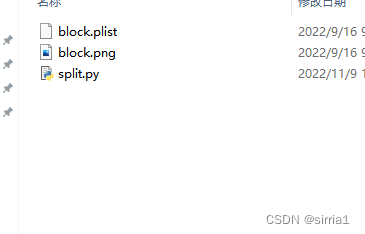
(5)运行拆分脚本:
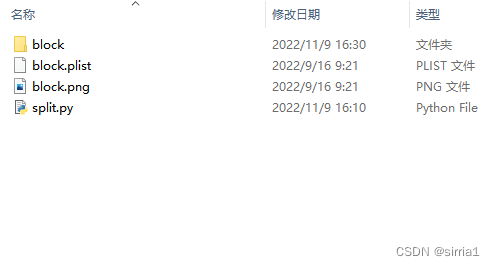
python split.py block即可在当前目录下生成一个文件夹,里面包含了所有plist里的图片






 扫一扫
扫一扫


 1284
1284


 被折叠的 条评论
为什么被折叠?
被折叠的 条评论
为什么被折叠?
 到【灌水乐园】发言




