



 本文介绍如何使用Win32 API BCM_SETSHIELD消息在Windows应用程序中为Button控件启用高亮(盾牌)图标,包括.NET环境下的C#代码实现。
需要调用Win32 API了
要调用API么,要先引用命名空间
using System.Runtime.InteropServices;
然后调用API
        [DllImport("user32.dll")]
        private static extern IntPtr SendMessage(HandleRef hWnd, uint Msg, IntPtr wParam, IntPtr lParam);

        ///////////////////////////////////////////////////////////////////////
        /// <summary>
        ///     Enables the elevated shield icon on the given button control
        /// </summary>
        /// <param name="ThisButton">
        ///     Button control to enable the elevated shield icon on.
        /// </param>
        ///////////////////////////////////////////////////////////////////////
        private void EnableElevateIcon_BCM_SETSHIELD(Button ThisButton)
        {
            // Input validation, validate that ThisControl is not null
            if (ThisButton == null)
            {
                return;
            }

            // Define BCM_SETSHIELD locally, declared originally in Commctrl.h
            uint BCM_SETSHIELD = 0x0000160C;

            // Set button style to the system style
            ThisButton.FlatStyle = FlatStyle.System;

            // Send the BCM_SETSHIELD message to the button control
            SendMessage(new HandleRef(ThisButton, ThisButton.Handle), BCM_SETSHIELD, new IntPtr(0), new IntPtr(1));
        }
在Form上拖个Button,拖大一点哦,小了图标看不清
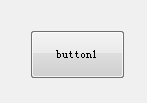
然后在Form1_Load里,用API把图标加到Button1上
        private void Form1_Load(object sender, EventArgs e)
        {
            EnableElevateIcon_BCM_SETSHIELD(button1);
        }
最后执行看下效果吧!

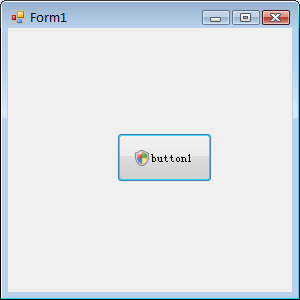
恩?盾牌为啥有点不一样呢,上面那个图标是server08上的,win7上应该是下面这样:


有错误的地方欢迎指出。





 扫一扫
扫一扫


 7513
7513


 被折叠的 条评论
为什么被折叠?
被折叠的 条评论
为什么被折叠?
 到【灌水乐园】发言




