


 本文介绍Vue.js中的组件化开发流程,包括组件定义、注册及使用方法,并通过火车票信息展示的例子,演示如何利用Vue组件实现数据绑定和动态渲染。
Vue组件化
- 组件: 🚗 的组件是发动机, 轮胎, 外观框架。
- 组件化开发,也是这样。 所有的应用界面,都可被抽象成为组件树。全组件构成。
- Vue 组件本质是一个具有预定义选项的实例。
- 注册组件非常简单
- 但需注意注册的位置
注册的步骤:
- 定义要处理的数据 const WorkTiles = {}
- 通过定义好的挂载点数据, 创建 app (创建 Vue 应用), const app = Vue.createApp( WorkTiles )
- 将挂载点挂载到 容器上 (#contianer)app.mount(’#container’);
- 组件要卸载注册树挂载之前,也就 mount 之前进行
- 所以 app.component() 要写在 app.mount() 之前
- 组件的写法, 这里边没有拆分文件,具体拆分文件的以后再说
- app.component('组件的名字‘ , { } )
- 在 第二个参数, 对象里写模板 template: ` ` , 注意模板标记的符号不是单引号! 【`】 不是 【 ’】 - 在绑定好的挂载容器上使用组件
- <组件名> </组件名>
<!DOCTYPE html>
<html>
<head>
	<title>Vue入门到应用</title>
	<script type="text/javascript" src="./node_modules/vue/dist/vue.global.js"></script>
</head>
<body>

	<div id="container">
		// 5
		<todo-list></todo-list>

	</div>

</body>

<script type="text/javascript">
	// 1
	const WorkTiles = {
	}

	// 2
	const app = Vue.createApp(WorkTiles);

	// 4
	app.component('todo-list', {
		template:`<span>我是组件</span>`
	});

	// 3
	app.mount('#container');

</script>

<style type="text/css">

</style>
</html>
vue 组件化 Demo
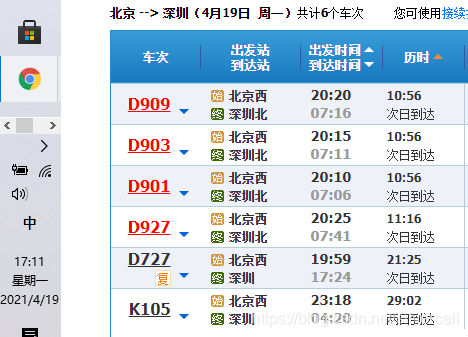
- 这是这个表怎么做? 从设计收到的数据结构开始教你的是思考,完成大致就可以了
- 看我的code里面的数据结构, 虽然是个例子 , 但是也基本就是业务逻辑思路
- 什么思路? 获取数据, 观察结构,填充结构,调试测试。
<!DOCTYPE html>
<html>
<head>
	<title>Vue入门到应用</title>
	<script type="text/javascript" src="./node_modules/vue/dist/vue.global.js"></script>
</head>
<body>

	<div id="container">

				<train-ticket
					v-for="item in train_info"
					v-bind:tick = "item"
					v-bind:key = "item.id"
				></train-ticket>

			</ol>

	</div>

</body>

<script type="text/javascript">

	const trains = {
		data() {
			return {
				train_info: [
					{ id: 0, train_number: 'D909', begin: '北京西', target:'深圳北', start:'20:20',end:'07:16', time:'10:56', arrived:'次日到达'},
					{ id: 1, train_number: 'D903', begin: '北京西', target:'深圳北', start:'20:15',end:'07:11', time:'10:56', arrived:'次日到达'},
					{ id: 2, train_number: 'D901', begin: '北京西', target:'深圳北', start:'20:10',end:'07:41', time:'11:16', arrived:'次日到达'},
					{ id: 3, train_number: 'D927', begin: '北京西', target:'深圳北', start:'20:25',end:'17:24', time:'21:56', arrived:'次日到达'},
					{ id: 4, train_number: 'D727', begin: '北京西', target:'深圳北', start:'23:18',end:'17:29', time:'28:56', arrived:'次日到达'},
				],

			}
		}
	}


	const app = Vue.createApp(trains);


	app.component('train-ticket', {

		props: ['tick'],

		template:`
			<li>
				<td>{{tick.train_number}}</td>

				<td>
					<td>{{tick.begin}}</td>
					<td>{{tick.target}}</td>
				</td>

				<td>
					<td>{{tick.start}}</td>
					<td>{{tick.end}}</td>
				</td>

				<td>
					<td>{{tick.time}}</td>
					<td>{{tick.arrived}}</td>
				</td>
			</li>
		`
	})

	app.mount('#container');

</script>

<style type="text/css">

</style>
</html>
- 是不是感觉很丑,标签页不对
- 我就问你组件懂了没??
关于以后的组件
yy一个组件树,将页面拆分成每个部分,是不是开发起来就舒服多了,我也是这么想的,慢慢更新
好好的学, 用不多久就开发出来了 , hurry up !
<div id="app">
  <app-nav></app-nav>
  <app-view>
    <app-sidebar></app-sidebar>
    <app-content></app-content>
  </app-view>
</div>
行了, 谁 UI 做好了的,发给我啊, 留言给我
毕竟我是coder 不是 UI/UE hhhc
我是 silvercell , 本文的 Author, 欢迎关注我





 扫一扫
扫一扫


 1万+
1万+

 被折叠的 条评论
为什么被折叠?
被折叠的 条评论
为什么被折叠?
 到【灌水乐园】发言





