



In continuation of the previous text:第二章:模块的编译与运行-9 Platform Dependency, let's GO ahead .
The Kernel Symbol Table
We’ve seen how insmod resolves undefined symbols against the table of public kernel symbols. The table contains the addresses of global kernel items—functions and variables—that are needed to implement modularized drivers. When a module is loaded, any symbol exported by the module becomes part of the kernel symbol table. In the usual case, a module implements its own functionality without the need to export any symbols at all. You need to export symbols, however, whenever other modules may benefit from using them.
我们已经了解 insmod 如何通过内核公共符号表解析未定义符号。该表包含实现模块化驱动所需的全局内核项(函数和变量)地址。当模块加载时,其导出的所有符号都会成为内核符号表的一部分。通常情况下,模块实现自身功能时完全无需导出任何符号。但当其他模块可能需要使用你的模块中的符号时,就必须进行符号导出。
New modules can use symbols exported by your module, and you can stack new modules on top of other modules. Module stacking is implemented in the mainstream kernel sources as well: the msdos filesystem relies on symbols exported by the fat module, and each input USB device module stacks on the usbcore and input modules.
新模块可以使用你模块导出的符号,也可以 “堆叠” 在其他模块之上。主线内核源码中也实现了模块堆叠:
-
msdos文件系统依赖fat模块导出的符号; -
每个 USB 输入设备模块都堆叠在
usbcore和input模块之上。
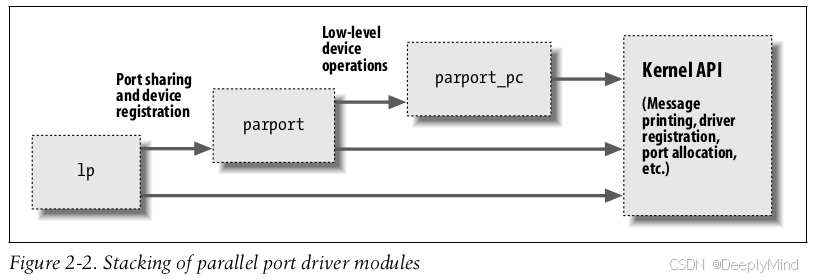
Module stacking is useful in complex projects. If a new abstraction is implemented in the form of a device driver, it might offer a plug for hardware-specific implementations. For example, the video-for-linux set of drivers is split into a generic module that exports symbols used by lower-level device drivers for specific hardware. According to your setup, you load the generic video module and the specific module for your installed hardware. Support for parallel ports and the wide variety of attachable devices is handled in the same way, as is the USB kernel subsystem. Stacking in the parallel port subsystem is shown in Figure 2-2; the arrows show the communications between the modules and with the kernel programming interface.
模块堆叠在复杂项目中非常实用。若某新抽象以设备驱动形式实现,可预留硬件特定实现的 “接口”。例如:
-
“视频采集(video-for-linux)” 系列驱动分为通用模块和硬件专用模块,通用模块导出符号供底层硬件驱动使用;
-
并行端口及外接设备的支持、USB 内核子系统,均采用这种分层堆叠设计。
When using stacked modules, it is helpful to be aware of the modprobe utility. As we described earlier, modprobe functions in much the same way as insmod, but it also loads any other modules that are required by the module you want to load. Thus, one modprobe command can sometimes replace several invocations of insmod (although you’ll still need insmod when loading your own modules from the current directory, because modprobe looks only in the standard installed module directories).
使用堆叠模块时,modprobe 工具会很有帮助。如前所述,它与 insmod 功能相似,但会自动加载目标模块依赖的所有其他模块。因此,一条 modprobe 命令有时可替代多条 insmod 命令(不过从当前目录加载自定义模块时仍需 insmod,因为 modprobe 仅在标准模块安装目录中查找)。
Using stacking to split modules into multiple layers can help reduce development time by simplifying each layer. This is similar to the separation between mechanism and policy that we discussed in Chapter 1.
将模块拆分为多层堆叠,可简化每层逻辑,从而缩短开发时间。这与第 1 章讨论的 “机制与策略分离” 原则类似。
The Linux kernel header files provide a convenient way to manage the visibility of your symbols, thus reducing namespace pollution (filling the namespace with names that may conflict with those defined elsewhere in the kernel) and promoting proper information hiding. If your module needs to export symbols for other modules to use, the following macros should be used.
Linux 内核头文件提供了一种便捷的方式来管理符号的可见性,既能减少命名空间污染(避免符号名称与内核其他部分定义的名称冲突),又能促进合理的信息隐藏。如果你的模块需要导出符号供其他模块使用,应使用以下宏:
EXPORT_SYMBOL(name);
EXPORT_SYMBOL_GPL(name);
Either of the above macros makes the given symbol available outside the module. The _GPL version makes the symbol available to GPL-licensed modules only. Symbols must be exported in the global part of the module’s file, outside of any function, because the macros expand to the declaration of a special-purpose variable that is expected to be accessible globally. This variable is stored in a special part of the module executible (an “ELF section”) that is used by the kernel at load time to find the variables exported by the module. (Interested readers can look at <linux/module.h> for the details, even though the details are not needed to make things work.)
上述任意一个宏都能使指定符号在模块外部可用。其中,带有 _GPL 后缀的宏仅允许遵循 GPL 许可证的模块使用该符号。符号必须在模块文件的全局部分(即所有函数之外)导出,因为这些宏会展开为一个专用变量的声明,而该变量需要具备全局可访问性。这个变量会存储在模块可执行文件的特殊部分(一个 “ELF 段”)中,内核在加载模块时会通过该部分查找模块导出的变量。(感兴趣的读者可以查看 <linux/module.h> 了解细节,不过这些细节并非让功能正常工作所必需。)
补充说明:
-
符号导出的核心规则
-
符号必须是全局的:只有在模块全局作用域(非函数内部)定义的函数或变量,才能通过
EXPORT_SYMBOL导出,局部符号无法被其他模块访问。 -
导出时机:符号导出在模块编译时生效,
EXPORT_SYMBOL宏会将符号信息写入模块的 ELF 段(如.symtab和.export段),内核加载时会读取这些信息并添加到全局符号表。 -
非导出符号的限制:模块中未导出的全局符号,仅能在模块内部使用,其他模块无法引用,这是内核 “信息隐藏” 的重要手段。
-
-
EXPORT_SYMBOL与EXPORT_SYMBOL_GPL的差异
两者的核心区别在于许可证限制,具体对比如下:宏 适用场景 许可证限制 EXPORT_SYMBOL导出无需限制使用权限的符号 无(任何模块可使用) EXPORT_SYMBOL_GPL导出仅允许 GPL 兼容许可证模块使用的符号 仅 GPL 及兼容许可证 若非 GPL 模块引用
EXPORT_SYMBOL_GPL导出的符号,内核会拒绝加载该模块,并在日志中提示 “disagrees about version of symbol” 相关错误。 -
模块堆叠的依赖管理
-
依赖记录:模块堆叠的依赖关系会被记录在
/lib/modules/$(uname -r)/modules.dep文件中,modprobe正是通过该文件自动加载所有依赖模块。 -
依赖顺序:堆叠时需保证 “底层模块先加载,上层模块后加载”。例如,加载 USB 鼠标驱动前,
modprobe会先加载usbcore(底层核心)和input(输入子系统)模块,再加载鼠标的专用驱动(上层模块)。 -
移除顺序:卸载时需反向操作,先卸载上层模块,再卸载底层模块,否则会因 “模块被占用” 导致移除失败。
-
-
命名空间污染的避免
内核符号表是全局的,若多个模块导出同名符号,会导致符号冲突(加载时提示 “duplicate symbol”)。因此,导出符号时建议添加模块专属前缀(如usb_表示 USB 子系统符号,vfio_表示 VFIO 驱动符号),避免与其他模块或内核原生符号重名。






 扫一扫
扫一扫


 1218
1218

 被折叠的 条评论
为什么被折叠?
被折叠的 条评论
为什么被折叠?
 到【灌水乐园】发言





