


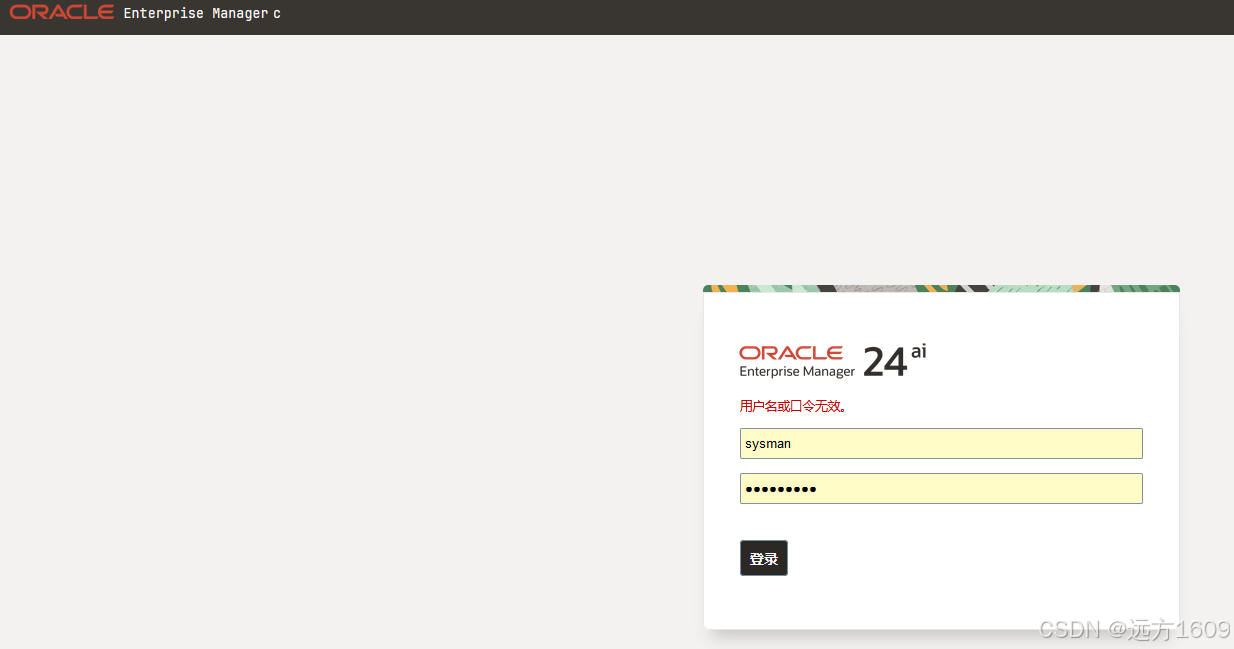
一、问题症状:SYSMAN口令无效
这个问题也许是bug、也许是用户使用量小,搜遍全网都没得解决步骤。国外有几个ace的方案还是EMCC12C,EMCC13.5的。全网第一份这么盯着日志几天,终于找到方法。
1、安装完毕EM24ai之后,将实例加入纳管之后,一段时间内必会报SYSMAN口令无效,即使密码确认是对的。
2、经过小伙伴的帮助,查看学习了MOS 3069507.1的文档修复步骤依然报错。
二、以下为排错步骤
1、密码已知,报错。重置中需要录入原密码
Steps to follow if the current SYSMAN password is known
1. Stop all OMS instances:
/bin/emctl stop oms

 2. Modify the SYSMAN password on the primary OMS server (where the Admin server is configured):
/bin/emctl config oms -change_repos_pwd

 3. In multi OMS environment, run the same command on each OMS machine to update each OMS keystore:
/bin/emctl config oms -change_repos_pwd

4. Stop the Admin server on the primary OMS machine /bin/emctl stop oms -all

5. Restart all the Management Services:
/bin/emctl start oms
2、无密码,直接重置
Steps to follow if the current SYSMAN password is unknown
1. Stop all the OMS:
/bin/emctl stop oms

 2. Modify the SYSMAN password on the primary OMS server (where the Admin server is configured): /emctl config oms -change_repos_pwd -use_sys_pwd -sys_pwd
 -new_pwd

  3. In multi OMS environment, run the following command on each OMS machine to update each OMS keystore:
/bin/emctl config oms -change_repos_pwd

4. Stop the Admin server on the primary OMS machine /bin/emctl stop oms -all


5. Restart all the Management Services:
/bin/emctl start oms
3、以上两步按照手册操作后,无效的话,需要观察后续的日志,再修改。
(此次根据日志排错)
三、观察日志报错
错误1
 [[ACTIVE] ExecuteThread: '117' for queue: 'weblogic.kernel.Default (self-tuning)'] WARN  auth.EMRepLoginFilter doFilter.529 -
InvalidEMUserException caught in EMRepLoginFilter:
Failed to login using repository authentication for user: SYSMAN
oracle.sysman.emSDK.sec.auth.InvalidEMUserException: Failed to login using repository authentication for user: SYSMAN
2025-06-24 10:19:14,271 [[ACTIVE] ExecuteThread: '92' for queue: 'weblogic.kernel.Default (self-tuning)'] WARN  auth.EMRepLoginFilter doFilter.529 - InvalidEMUserException caught in EMRepLoginFilter: Failed to login using repository authentication for user: SYSMAN
oracle.sysman.emSDK.sec.auth.InvalidEMUserException: Failed to login using repository authentication for user: SYSMAN
        at oracle.sysman.emSDK.sec.auth.EMLoginService._performLogin(EMLoginService.java:1704) ~[emCoreSDK.jar:?]
错误2
 [[ACTIVE] ExecuteThread: '117' for queue: 'weblogic.kernel.Default (self-tuning)'] WARN  auth.EMRepLoginFilter doFilter.529 -
InvalidEMUserException caught in EMRepLoginFilter:
Failed to login using repository authentication for user: SYSMAN
oracle.sysman.emSDK.sec.auth.InvalidEMUserException: Failed to login using repository authentication for user: SYSMAN
2025-06-24 10:19:14,271 [[ACTIVE] ExecuteThread: '92' for queue: 'weblogic.kernel.Default (self-tuning)'] WARN  auth.EMRepLoginFilter doFilter.529 - InvalidEMUserException caught in EMRepLoginFilter: Failed to login using repository authentication for user: SYSMAN
oracle.sysman.emSDK.sec.auth.InvalidEMUserException: Failed to login using repository authentication for user: SYSMAN
        at oracle.sysman.emSDK.sec.auth.EMLoginService._performLogin(EMLoginService.java:1704) ~[emCoreSDK.jar:?]
错误3
2025-06-24 12:11:58,227 [main] INFO  oms.ChangeReposPwd - MDS password in domain updated successfully.
2025-06-24 12:11:58,304 [main] ERROR audit.AuditLogHandler - Could not log the audit record java.sql.SQLException: ORA-14400: inserted partition key does not map to any partition
ORA-06512: at "SYSMAN.MGMT_AUDIT", line 931
ORA-06512: at "SYSMAN.MGMT_AUDIT", line 818
ORA-06512: at "SYSMAN.MGMT_AUDIT", line 430
ORA-06512: at line 1

2025-06-24 12:11:58,305 [main] INFO  util.EmctlUtil - Failed to log audit record
2025-06-24 12:11:58,305 [main] INFO  oms.ChangeReposPwd - Commiting the getLockConn to release lock on EM_UPDATE_DATASOURCES_LOCK
2025-06-24 12:11:58,305 [main] INFO  oms.ChangeReposPwd - Done commiting the getLockConn

错误4
2025-06-24 10:54:05,581 [main] INFO  oms.ChangeReposPwd - MDS password in domain updated successfully.
2025-06-24 10:54:05,670 [main] ERROR audit.AuditLogHandler - Could not log the audit record java.sql.SQLException: ORA-14400: inserted partition key does not map to any partition
ORA-06512: at "SYSMAN.MGMT_AUDIT", line 931
ORA-06512: at "SYSMAN.MGMT_AUDIT", line 818
ORA-06512: at "SYSMAN.MGMT_AUDIT", line 430
ORA-06512: at line 1

2025-06-24 10:54:05,671 [main] INFO  util.EmctlUtil - Failed to log audit record
2025-06-24 10:54:05,671 [main] INFO  oms.ChangeReposPwd - Commiting the getLockConn to release lock on EM_UPDATE_DATASOURCES_LOCK
2025-06-24 10:54:05,673 [main] INFO  oms.ChangeReposPwd - Done commiting the getLockConn
2025-06-24 11:12:24,599 [main] INFO  oms.AdminCredsWalletUtil - Getting credentials from wallet
2025-06-24 11:12:24,904 [main] INFO  oms.AdminCredsWalletUtil - Read the credentials from wallet
2025-06-24 11:12:24,905 [main] INFO  util.EmctlUtil - Connecting over t3s to: em24ai/7102 using id: weblogic to get JMX Connector.
2025-06-24 11:12:25,775 [main] INFO  util.EmctlUtil - Unable to get JMX Connector over t3s :Failed to initialize JNDI context, tried 2 time or times totally, the interval of each time is 0ms.
t3s://em24ai:7102: Destination 10.6.0.21, 7102 unreachable.; nested exception is:
        java.net.ConnectException: Connection refused (Connection refused); No available router to destination.; nested exception is:
        java.rmi.ConnectException: No available router to destination.
四、定位根因,MGMG表空间容量小、不扩展
/u01/app/oracle/middleware/oms/oms_home/bin
emctl config oms -change_repos_pwd
--
cd /u01/app/oracle/middleware/oms/oms_home/bin
 [oracle@em24ai:/u01/app/oracle/middleware/oms/oms_home/bin]$ ./emctl status oms -details
Oracle Enterprise Manager 24ai Release 1
Copyright (c) 1996, 2024 Oracle Corporation.  All rights reserved.
Console Server Host        : em24ai
HTTP Console Port          : 7788
HTTPS Console Port         : 7803
HTTP Upload Port           : 4889
HTTPS Upload Port          : 4903
EM Instance Home           : /u01/app/oracle/middleware/oms/gc_inst/em/EMGC_OMS1
OMS Log Directory Location : /u01/app/oracle/middleware/oms/gc_inst/em/EMGC_OMS1/sysman/log
OMS is not configured with SLB or virtual hostname
Agent Upload is locked.
OMS Console is locked.
Active CA ID: 1
Console URL: https://em24ai:7803/em
Upload URL: https://em24ai:4903/empbs/upload

WLS Domain Information
Domain Name            : GCDomain
Admin Server Host      : em24ai
Admin Server HTTPS Port: 7102
Admin Server is RUNNING

Extended Domain Name            : EMExtDomain1
Extended Admin Server Host      : em24ai
Extended Admin Server HTTPS Port: 7016
Extended Admin Server is RUNNING

Oracle Management Server Information
Managed Server Instance Name: EMGC_OMS1
Oracle Management Server Instance Host: em24ai
WebTier is Up
Oracle Management Server is Up
JVMD Engine is Up
[oracle@em24ai:/u01/app/oracle/middleware/oms/oms_home/bin]$
----
[oracle@em24ai:/u01/app/oracle/middleware/oms/oms_home/bin]$ ./emctl config oms -change_repos_pwd
Oracle Enterprise Manager 24ai Release 1
Copyright (c) 1996, 2024 Oracle Corporation.  All rights reserved.
Enter Repository User's Current Password :
Enter Repository User's New Password :

Updating repository password in Credential Store...
Successfully updated Repository password in Credential Store.
Changing passwords in backend ...
Passwords changed in backend successfully.
After running this command on all the OMSs, Restart all the OMSs using 'emctl stop oms -all' and 'emctl start oms'.
Successfully changed repository password.
[oracle@em24ai:/u01/app/oracle/middleware/oms/oms_home/bin]$
--同时观察到的解锁标志
2025-06-24 09:52:55,752 [main] INFO  util.EmctlUtil - Failed to log audit record
2025-06-24 09:52:55,752 [main] INFO  oms.ChangeReposPwd - Commiting the getLockConn to release lock on EM_UPDATE_DATASOURCES_LOCK
2025-06-24 09:52:55,753 [main] INFO  oms.ChangeReposPwd - Done commiting the getLockConn
--emctl start oms
--依然报错index无法扩展错误
--查询日志
oracle.mds.persistence.MDSIOException: MDS-00515: failure to create document /oracle/sysman/rescat/em-catalog.xml in the metadata repository
java.sql.BatchUpdateException: ORA-01654: unable to extend index SYSMAN_MDS.MDS_ATTRIBUTES_U2 by 128 in tablespace MGMT_TABLESPACE

ORA-01654: unable to extend index SYSMAN_MDS.MDS_ATTRIBUTES_U2 by 128 in tablespace MGMT_TABLESPACE
--查看表空间
SELECT tablespace_name, file_name,bytes/1024/1024 current_size_mb,
maxbytes/1024/1024 max_size_mb,autoextensible FROM dba_data_files WHERE tablespace_name = 'MGMT_TABLESPACE';
--
   TABLESPACE_NAME                 FILE_NAME    CURRENT_SIZE_MB     MAX_SIZE_MB    AUTOEXTENSIBLE
__________________ _________________________ __________________ _______________ _________________
MGMT_TABLESPACE    /oradata/EMCC/mgmt.dbf          32767.984375    32767.984375 YES
SYS@emcc SQL> ALTER DATABASE DATAFILE '/oradata/EMCC/mgmt.dbf' AUTOEXTEND ON NEXT 100M MAXSIZE 200G;
Error starting at line : 1 in command -
ALTER DATABASE DATAFILE '/oradata/EMCC/mgmt.dbf' AUTOEXTEND ON NEXT 100M MAXSIZE 200G
Error report -
ORA-03206: maximum file size of (26214400) blocks in AUTOEXTEND clause is out of range
03206. 00000 -  "maximum file size of (%s) blocks in AUTOEXTEND clause is out of range"
*Cause:    The maximum file size for an autoextendable file has
           exceeded the maximum number of blocks allowed.
*Action:   Reduce the size and retry.
SYS@emcc SQL> ALTER DATABASE DATAFILE '/oradata/EMCC/mgmt.dbf' AUTOEXTEND ON NEXT 100M MAXSIZE 26214400;
Database altered.
--未生效,重新查询
SYS@emcc SQL> SELECT tablespace_name, file_name,bytes/1024/1024
   current_size_mb,maxbytes/1024/1024 max_size_mb,autoextensible
   FROM dba_data_files WHERE tablespace_name = 'MGMT_TABLESPACE';

   TABLESPACE_NAME                 FILE_NAME    CURRENT_SIZE_MB     MAX_SIZE_MB    AUTOEXTENSIBLE
__________________ _________________________ __________________ _______________ _________________
MGMT_TABLESPACE    /oradata/EMCC/mgmt.dbf          32767.984375    32767.984375 YES

SYS@emcc SQL> ALTER TABLESPACE MGMT_TABLESPACE
      ADD DATAFILE '/oradata/EMCC/mgmt01.dbf' SIZE 1G
      AUTOEXTEND ON NEXT 500M MAXSIZE 30G;

TABLESPACE MGMT_TABLESPACE altered.

SYS@emcc SQL> SELECT tablespace_name, file_name,bytes/1024/1024
   current_size_mb,maxbytes/1024/1024 max_size_mb,autoextensible
   FROM dba_data_files WHERE tablespace_name = 'MGMT_TABLESPACE';

   TABLESPACE_NAME                   FILE_NAME    CURRENT_SIZE_MB     MAX_SIZE_MB    AUTOEXTENSIBLE
__________________ ___________________________ __________________ _______________ _________________
MGMT_TABLESPACE    /oradata/EMCC/mgmt.dbf            32767.984375    32767.984375 YES
MGMT_TABLESPACE    /oradata/EMCC/mgmt01.dbf                  1024           30720 YES

ALTER TABLESPACE MGMT_TABLESPACE
  ADD DATAFILE '/oradata/EMCC/mgmt01.dbf' SIZE 1G
  AUTOEXTEND ON NEXT 500M MAXSIZE 30G;
--
五、修改索引的重建和检查
Oracle Database 19c Enterprise Edition Release 19.0.0.0.0 - Production
Version 19.24.0.0.0

SYS@emcc SQL> set sqlformat ansiconsole
SYS@emcc SQL> SELECT tablespace_name, file_name,bytes/1024/1024
  2  current_size_mb,maxbytes/1024/1024 max_size_mb,autoextensible
  3* FROM dba_data_files WHERE tablespace_name = 'MGMT_TABLESPACE';

   TABLESPACE_NAME                   FILE_NAME    CURRENT_SIZE_MB     MAX_SIZE_MB    AUTOEXTENSIBLE
__________________ ___________________________ __________________ _______________ _________________
MGMT_TABLESPACE    /oradata/EMCC/mgmt.dbf            32767.984375    32767.984375 YES
MGMT_TABLESPACE    /oradata/EMCC/mgmt01.dbf                  2024           30720 YES
--修改前
SYS@emcc SQL> SELECT name, height,
           ROUND((del_lf_rows / NULLIF(lf_rows,0)) * 100, 2) frag_pct
   FROM index_stats;

                NAME    HEIGHT    FRAG_PCT
____________________ _________ ___________
MDS_ATTRIBUTES_U2            3        0.33
SYS@emcc SQL> SELECT status FROM dba_indexes WHERE index_name = 'MDS_ATTRIBUTES_U2';
   STATUS
_________
VALID
--
--修改后
SYS@emcc SQL> ALTER INDEX SYSMAN_MDS.MDS_ATTRIBUTES_U2 REBUILD
     TABLESPACE MGMT_TABLESPACE
     STORAGE (INITIAL 64K NEXT 64K)
     ONLINE;

Index SYSMAN_MDS.MDS_ATTRIBUTES_U2 altered.

SYS@emcc SQL> ANALYZE INDEX SYSMAN_MDS.MDS_ATTRIBUTES_U2 VALIDATE STRUCTURE;
Index SYSMAN_MDS.MDS_ATTRIBUTES_U2 analyzed.

SYS@emcc SQL> SELECT name, height,
           ROUND((del_lf_rows / NULLIF(lf_rows,0)) * 100, 2) frag_pct
   FROM index_stats;

                NAME    HEIGHT    FRAG_PCT
____________________ _________ ___________
MDS_ATTRIBUTES_U2            2           0
六、重启使用第二步骤,生效
[oracle@em24ai:/u01/app/oracle/middleware/oms/oms_home/bin]$ ./emctl config oms -change_repos_pwd
Oracle Enterprise Manager 24ai Release 1
Copyright (c) 1996, 2024 Oracle Corporation.  All rights reserved.
Enter Repository User's Current Password :
Enter Repository User's New Password :

Updating repository password in Credential Store...
Successfully updated Repository password in Credential Store.
Changing passwords in backend ...
Passwords changed in backend successfully.
After running this command on all the OMSs, Restart all the OMSs using 'emctl stop oms -all' and 'emctl start oms'.
Successfully changed repository password.
[oracle@em24ai:/u01/app/oracle/middleware/oms/oms_home/bin]$ ./emctl stop oms -all
Oracle Enterprise Manager 24ai Release 1
Copyright (c) 1996, 2024 Oracle Corporation.  All rights reserved.
Stopping Oracle Management Server...
WebTier Successfully Stopped
Oracle Management Server Already Stopped
AdminServer Successfully Stopped
Oracle Management Server is Down
JVMD Engine is Down
[oracle@em24ai:/u01/app/oracle/middleware/oms/oms_home/bin]$ ./emctl start oms
Oracle Enterprise Manager 24ai Release 1
Copyright (c) 1996, 2024 Oracle Corporation.  All rights reserved.
Starting Oracle Management Server...
WebTier Successfully Started
Oracle Management Server Successfully Started
Oracle Management Server is Up
JVMD Engine is Up
[oracle@em24ai:/u01/app/oracle/middleware/oms/oms_home/bin]$ ./emctl stop oms -all
Oracle Enterprise Manager 24ai Release 1
Copyright (c) 1996, 2024 Oracle Corporation.  All rights reserved.
Stopping Oracle Management Server...
WebTier Successfully Stopped
Oracle Management Server Successfully Stopped
AdminServer Successfully Stopped
Oracle Management Server is Down
JVMD Engine is Down
[oracle@em24ai:/u01/app/oracle/middleware/oms/oms_home/bin]$ ./emctl start oms
Oracle Enterprise Manager 24ai Release 1
Copyright (c) 1996, 2024 Oracle Corporation.  All rights reserved.
Starting Oracle Management Server...
WebTier Successfully Started
Oracle Management Server Successfully Started
Oracle Management Server is Up
JVMD Engine is Up
[oracle@em24ai:/u01/app/oracle/middleware/oms/oms_home/bin]$ exit
logout
[root@em24ai:/u01/app/oracle/middleware/oms/oms_home/bin]# reboot
[root@em24ai:/u01/app/oracle/middleware/oms/oms_home/bin]#
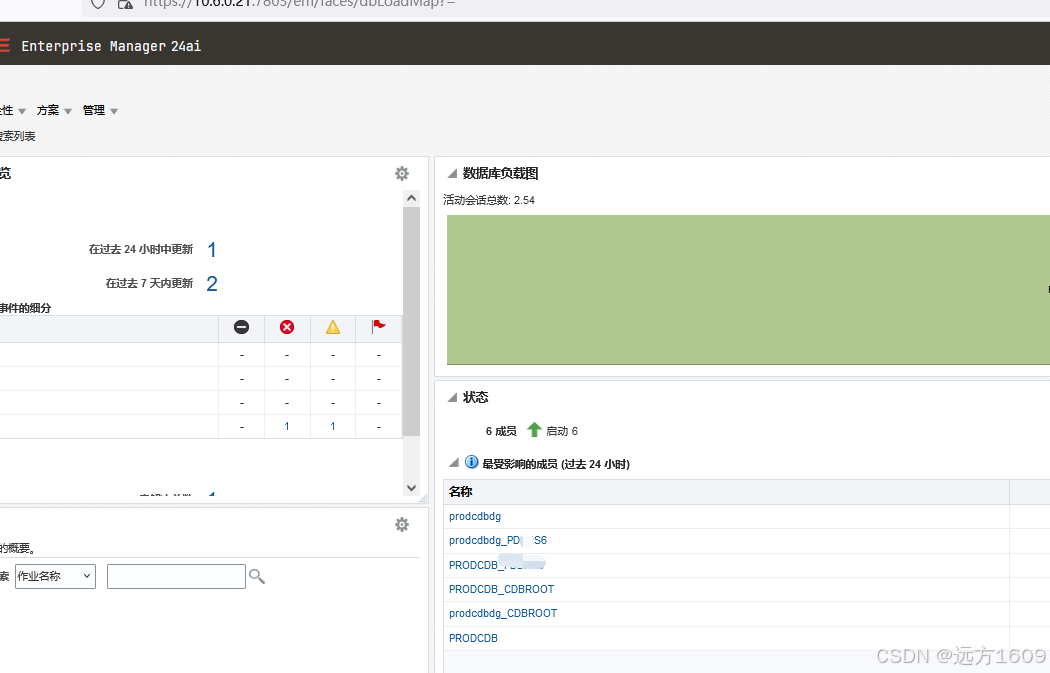
登录后,观察登录的安全验证日志
[oracle@em24ai:/u01/app/oracle/middleware/oms/gc_inst/em/EMGC_OMS1/sysman/log]$ pwd
/u01/app/oracle/middleware/oms/gc_inst/em/EMGC_OMS1/sysman/log
[oracle@em24ai:/u01/app/oracle/middleware/oms/gc_inst/em/EMGC_OMS1/sysman/log]$ tail -f -n 300 secure.log
 5380


 扫一扫


 被折叠的 条评论
为什么被折叠?
 到【灌水乐园】发言


