





uniapp展示在浏览器上
思路:
发现直接设置sticky不管用
通过监听滚动事件,在到达指定高度的时候进行样式的更换
通过getBoundingClientRect().top获取距离顶部的高度
// h5
<view class="mt-12rpx mx--32rpx" id="prideTabFixed">
    <view searchColor :class="titleFixed == true ? 'fixed' : ''">
        <wd-search
            placeholder="输入关键词搜索"
            placeholder-left
            custom-class="search-custom"
        />
    </view>
</view>
 // js
const titleFixed = ref(false)

// 滚动监听,头部固定
function handleScroll() {
  const offTop = document.getElementById('prideTabFixed').getBoundingClientRect().top
  if (offTop > 44) {
    titleFixed.value = false
  } else {
    titleFixed.value = true
  }
}
onMounted(async () => {
  window.addEventListener('scroll', handleScroll)
})

// 在组件卸载时移除滚动事件监听器
onUnmounted(() => {
  window.removeEventListener('scroll', handleScroll)
})
// css
.fixed {
  position: fixed;
  padding-top: 0;
  top: 44px; /* 根据需要调整 */
  left: 0;
  right: 0;
  z-index: 100; /* 确保元素在其他内容之上 */
  background-image: linear-gradient(to bottom, rgb(247, 251, 255), rgb(255, 255, 255));
}
但是发现小程序没有监听事件,于是更改,使用了wot-design uni组件库,<wd-sticky>
将被吸顶组件放进里面
<wd-sticky>
    <wd-search
        placeholder="输入关键词搜索"
        placeholder-left
        custom-class="search-custom"
    />
</wd-sticky>
发现会更改输入框的样式,于是
:deep(.search-custom) {
  width: 100vw;
  background: transparent !important;
}
:deep(.wd-sticky__container) {
  background-image: linear-gradient(to bottom, rgb(247, 251, 255), rgb(255, 255, 255));
}
定义宽度和背景色
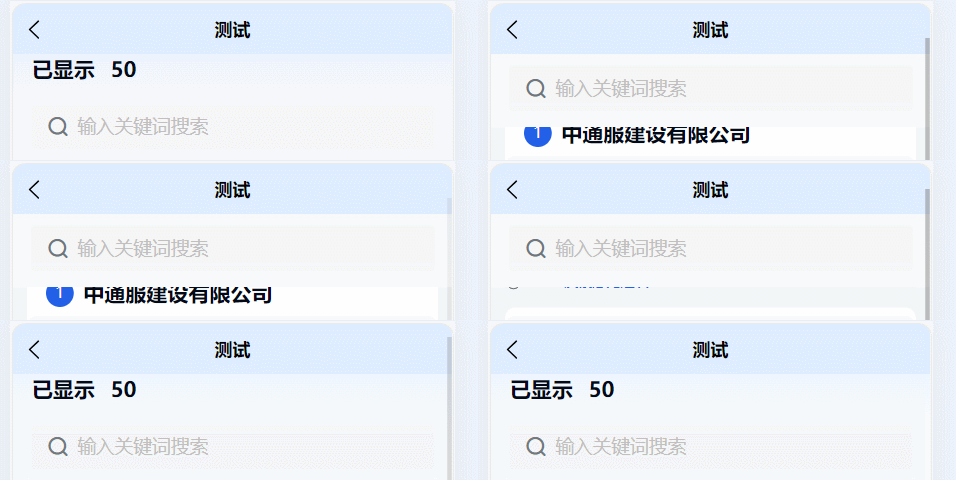
结果,适配h5和小程序端:
小小记录下本文:





 扫一扫
扫一扫


 1万+
1万+

 被折叠的 条评论
为什么被折叠?
被折叠的 条评论
为什么被折叠?
 到【灌水乐园】发言





