



 该博客介绍了如何使用PyTorch构建一个卷积神经网络(CNN)模型来识别MNIST数据集的手写数字。首先,从Kaggle下载并预处理数据,然后将数据划分为训练集和测试集。接着,定义了一个简单的CNN模型,并使用Adam优化器进行训练。在每个训练周期结束后,计算并打印出测试集上的准确率。最终,模型在测试集上达到一定准确率后,将其用于预测Kaggle测试集的数据,并将结果保存为CSV文件供提交。
数据集:https://www.kaggle.com/c/digit-recognizer/data
The data files train.csv and test.csv contain gray-scale images of hand-drawn digits, from zero through nine.
Each image is 28 pixels in height and 28 pixels in width, for a total of 784 pixels in total. Each pixel has a single pixel-value associated with it, indicating the lightness or darkness of that pixel, with higher numbers meaning darker. This pixel-value is an integer between 0 and 255, inclusive.
The training data set, (train.csv), has 785 columns. The first column, called "label", is the digit that was drawn by the user. The rest of the columns contain the pixel-values of the associated image.
Each pixel column in the training set has a name like pixelx, where x is an integer between 0 and 783, inclusive. To locate this pixel on the image, suppose that we have decomposed x as x = i * 28 + j, where i and j are integers between 0 and 27, inclusive. Then pixelx is located on row i and column j of a 28 x 28 matrix, (indexing by zero).
For example, pixel31 indicates the pixel that is in the fourth column from the left, and the second row from the top, as in the ascii-diagram below.
Visually, if we omit the "pixel" prefix, the pixels make up the image like this:
000 001 002 003 ... 026 027
028 029 030 031 ... 054 055
056 057 058 059 ... 082 083
 |   |   |   |  ...  |   |
728 729 730 731 ... 754 755
756 757 758 759 ... 782 783
The test data set, (test.csv), is the same as the training set, except that it does not contain the "label" column.
Your submission file should be in the following format: For each of the 28000 images in the test set, output a single line containing the ImageId and the digit you predict. For example, if you predict that the first image is of a 3, the second image is of a 7, and the third image is of a 8, then your submission file would look like:
ImageId,Label
1,3
2,7
3,8
(27997 more lines)
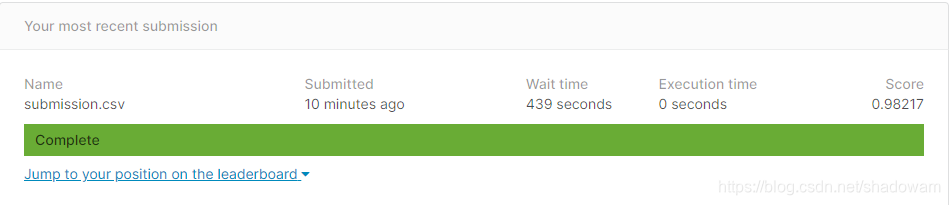
The evaluation metric for this contest is the categorization accuracy, or the proportion of test images that are correctly classified. For example, a categorization accuracy of 0.97 indicates that you have correctly classified all but 3% of the images.
code:
import numpy as np
import pandas as pd
import matplotlib.pyplot as plt

import torch
import torch.nn as nn
import torch.optim as optim
from torch.utils.data import DataLoader, TensorDataset
from sklearn.model_selection import train_test_split

def opencsv():

    train = pd.read_csv(r"./input/train.csv", dtype=np.float32)

    # split data into features(pixels) and labels(numbers from 0 to 9)
    targets_numpy = train.label.values
    features_numpy = train.loc[:, train.columns != "label"].values / 255
    features_train, features_test, targets_train, targets_test = train_test_split(features_numpy,
                                                                                  targets_numpy,
                                                                                  test_size=0.2,
                                                                                  random_state=42)
    train_data = torch.from_numpy(features_train)
    train_label = torch.from_numpy(targets_train).type(torch.LongTensor)
    test_data = torch.from_numpy(features_test)
    test_label = torch.from_numpy(targets_test).type(torch.LongTensor)

    # print(train_data)
    return train_data, train_label, test_data, test_label


class CNNModel(nn.Module):
    def __init__(self):
        super(CNNModel, self).__init__()

        self.conv1 = nn.Sequential(
            nn.Conv2d(1, 16, 5, 1, 0),
            nn.ReLU(),
            nn.MaxPool2d(2),
            nn.Dropout(p=0.5),
        )
        self.conv2 = nn.Sequential(
            nn.Conv2d(16, 32, 5, 1, 0),
            nn.ReLU(),
            nn.MaxPool2d(2),
        )
        self.out = nn.Linear(32 * 4 * 4, 10)

    def forward(self, x):
        x = self.conv1(x)
        x = self.conv2(x)
        x = x.view(x.size(0), -1)
        output = self.out(x)


        return output


trainData, trainLabel, testData, testLabel = opencsv()
batch_size = 100
n_iters = 2500
learning_rate = 0.004
num_epochs = n_iters / (len(trainData) / batch_size)
num_epochs = int(num_epochs)
print(num_epochs)

train = TensorDataset(trainData, trainLabel)
test = TensorDataset(testData, testLabel)

# print(train, test)
trainLoader = DataLoader(train, batch_size=batch_size, shuffle=False)
testLoader = DataLoader(test, batch_size=batch_size, shuffle=False)

cnn = CNNModel()
loss_func = nn.CrossEntropyLoss()
optimizer = optim.Adam(cnn.parameters(), lr=learning_rate)

for epoch in range(num_epochs):
    for step, (x, y) in enumerate(trainLoader):

        train_x = x.view(100, 1, 28, 28)
        train_y = y
        # print(train_x)

        optimizer.zero_grad()
        output = cnn(train_x)
        loss = loss_func(output, train_y)
        loss.backward()
        optimizer.step()

        # if epoch % 50 == 0:

    correct = 0
    total = 0
    for step_in, (test_x, test_y) in enumerate(testLoader):

        test_x = test_x.view(100, 1, 28, 28)
        testOutput = cnn(test_x)

        pred_y = torch.max(testOutput.data, 1)[1]
        total += len(test_y)
        correct += (pred_y == test_y).sum()

    accuracy = 100 * correct / float(total)
    print('Iteration: {}  Loss: {}  Accuracy: {} %'.format(epoch, loss.data, accuracy))
torch.save(cnn, './mnist_test.pt')

test_data = pd.read_csv('./input/test.csv', dtype=np.float32).values.reshape(-1, 1, 28, 28) / 255
test_tensor = torch.from_numpy(test_data)
prediction_cnn = cnn(test_tensor)
prediction = (torch.max(prediction_cnn.data, 1)[1]).numpy()
np.savetxt("./submission.csv", np.dstack((np.arange(1, prediction.size+1), prediction))[0], "%d,%d", header="ImageId,Label", comments='')
结果:






 扫一扫
扫一扫


 9万+
9万+

 被折叠的 条评论
为什么被折叠?
被折叠的 条评论
为什么被折叠?
 到【灌水乐园】发言





