




 本文介绍如何在Ubuntu上为Linphone手动编译并安装H.264插件,包括下载源代码、安装依赖包、配置编译选项、解决编译错误等步骤。
h.264 plugin isn't a standard part of
linphone installation on ubuntu. We must manually compile and install it.
1. Download msx264 plugin source code.
2. Run sudo apt-get install libmediastreamer-dev libx264-dev libavcodec-dev libswscale-dev libtheora-dev to meet msx264's dependency requirements.
3. Run ./configure --prefix=/usr/lib. It's mandatory to set prefix to /usr/lib, because linphone can't find the plugin if it's installed in default location, /usr/local/lib.
4. Run sudo make install.
5. Change the line 393 in src/msx264.c from
393 if (sws_scale(s->sws_ctx,(uint8_t * const*)orig->data,orig->linesize, 0,
to
393 if (sws_scale(s->sws_ctx,(uint8_t **)orig->data,orig->linesize, 0,
to get rid of compilation error, if you have.
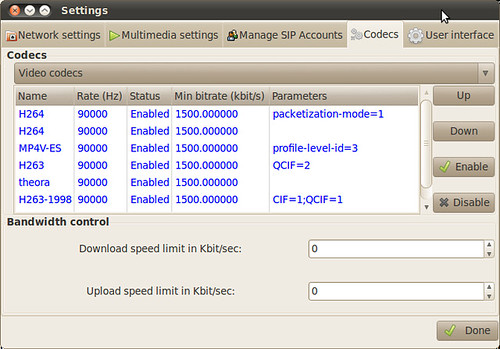
6. Restart linphone, the h.264 plugin should be available now.
1. Download msx264 plugin source code.
2. Run sudo apt-get install libmediastreamer-dev libx264-dev libavcodec-dev libswscale-dev libtheora-dev to meet msx264's dependency requirements.
3. Run ./configure --prefix=/usr/lib. It's mandatory to set prefix to /usr/lib, because linphone can't find the plugin if it's installed in default location, /usr/local/lib.
4. Run sudo make install.
5. Change the line 393 in src/msx264.c from
393 if (sws_scale(s->sws_ctx,(uint8_t * const*)orig->data,orig->linesize, 0,
393 if (sws_scale(s->sws_ctx,(uint8_t **)orig->data,orig->linesize, 0,
6. Restart linphone, the h.264 plugin should be available now.





 扫一扫
扫一扫


 4399
4399

 被折叠的 条评论
为什么被折叠?
被折叠的 条评论
为什么被折叠?
 到【灌水乐园】发言





