


目录
前言
单点登录,英文是 Single Sign On(缩写为 SSO)。即多个站点共用一台认证授权服务器,用户在其中任何一个站点登录后,可以免登录访问其他所有站点。而且,各站点间可以通过该登录状态直接交互。
本文为学习阶段的总结,为的是在以后工作学习中方便复习查看。
一、构建项目
创建meven项目。
添加依赖
    <dependency>
        <groupId>org.springframework.boot</groupId>
        <artifactId>spring-boot-starter-web</artifactId>
    </dependency>
    <dependency>
        <groupId>org.springframework.cloud</groupId>
        <artifactId>spring-cloud-starter-oauth2</artifactId>
    </dependency>
    <dependency>
        <groupId>com.alibaba.cloud</groupId>
        <artifactId>spring-cloud-starter-alibaba-nacos-discovery</artifactId>
    </dependency>
    <dependency>
        <groupId>com.alibaba.cloud</groupId>
        <artifactId>spring-cloud-starter-alibaba-nacos-config</artifactId>
    </dependency>
构建配置文件
在工程中resource包下创建bootstrap.yml文件
server:
  port: 8071
spring:
  application:
    name: sca-auth
  cloud:
    nacos:
      discovery:
        server-addr: localhost:8848
      config:
        server-addr: localhost:8848
启动并访问项目
- 创建spring启动类并启动,控制台会默认生成一个密码。
- 打开浏览器输入http://localhost:8071 呈现登陆页面。
- 默认用户名为user,密码为系统启动时,在控制台呈现的密码。执行登陆测试,登陆成功则返回404界面(因为没有定义登陆页面,所以会出现404)。
二、自定义登录逻辑
业务流程
我们的单点登录系统最终会按照如下结构进行设计和实现:
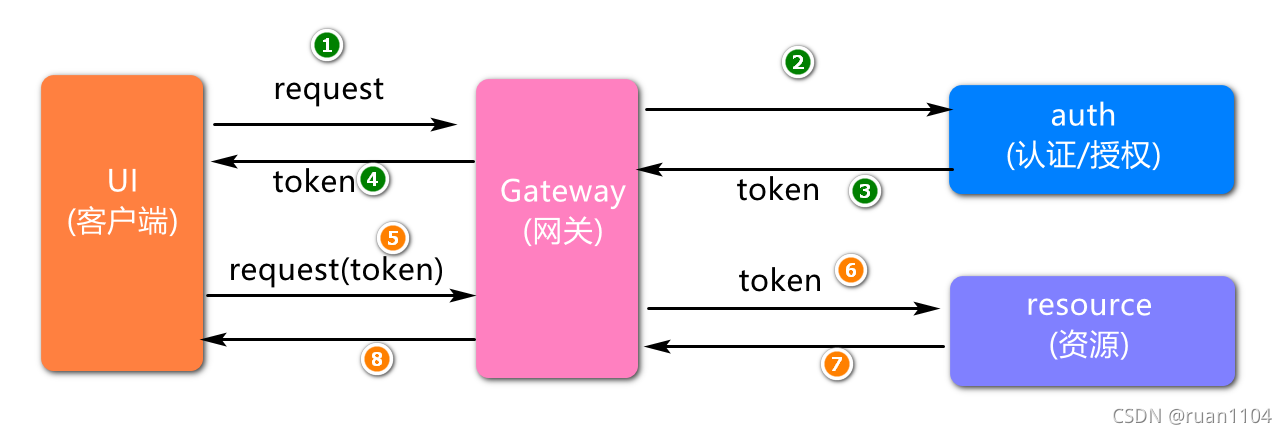
我们在实现登录时,会在UI工程中定义登录页面(login.html),然后在页面中输入自己的登陆账号、密码,将请求提交给网关,然后网关将请求转发到auth工程,登陆成功和失败要返回json数据。
定义安全配置类
创建SecurityConfig类,添加登录成功或失败的处理逻辑:
package com.jt.auth.config;
import org.codehaus.jackson.map.ObjectMapper;
import org.springframework.context.annotation.Bean;
import org.springframework.context.annotation.Configuration;
import org.springframework.security.authentication.AuthenticationManager;
import org.springframework.security.config.annotation.web.builders.HttpSecurity;
import org.springframework.security.config.annotation.web.configuration.WebSecurityConfigurerAdapter;
import org.springframework.security.crypto.bcrypt.BCryptPasswordEncoder;
import org.springframework.security.web.authentication.AuthenticationFailureHandler;
import org.springframework.security.web.authentication.AuthenticationSuccessHandler;
import javax.servlet.http.HttpServletResponse;
import java.io.IOException;
import java.io.PrintWriter;
import java.util.HashMap;
import java.util.Map;
@Configuration
public class SecurityConfig extends WebSecurityConfigurerAdapter {
//初始化密码加密对象
@Bean
public BCryptPasswordEncoder passwordEncoder(){
return new BCryptPasswordEncoder();
}
//配置认证管理器
@Bean
public AuthenticationManager authenticationManagerBean()
throws Exception {
return super.authenticationManagerBean();
}
@Override
protected void configure(HttpSecurity http) throws Exception{
//关闭跨域工具
http.csrf().disable();
//放行所有请求
http.authorizeRequests().anyRequest().permitAll();
//登陆成功与失败的处理
http.formLogin()
.successHandler(successHandler())
.failureHandler(failureHandler());
}
@Bean
public AuthenticationSuccessHandler successHandler(){
return (request,response,authentication) -> {
//1.构建map对象,封装响应数据
Map<String,Object> map = new HashMap<>();
map.put("state", 200);
map.put("message", "login ok");
writeJsonToClient(response, map);
};
}
@Bean
public AuthenticationFailureHandler failureHandler(){
return (request,response,exception) -> {
Map<String,Object> map = new HashMap<>();
map.put("state", 500);
map.put("message", "login fail");
writeJsonToClient(response, map);
};
}
private void writeJsonToClient(HttpServletResponse response,Object object) throws IOException {
//2.将 最低0.47元/天 解锁文章






 扫一扫
扫一扫


 1293
1293

 被折叠的 条评论
为什么被折叠?
被折叠的 条评论
为什么被折叠?
 到【灌水乐园】发言





