



 由于Windows不支持'n'模块,无法通过命令行更新Node.js。可以访问Node.js官网下载新版本,覆盖原有安装,确保新旧版本安装路径相同,以完成更新。通过CMD输入'where node'查看安装位置,'node -v'检查版本。
由于windows系统不支持n模块,所以你在网上查找的很多资料在使用的时候都会报错,例如
npm ERR! code EBADPLATFORM
npm ERR! notsup Unsupported platform for n@6.5.1: wanted {"os":"!win32","arch":"any"} (current: {"os":"win32","arch":"x64"})
npm ERR! notsup Valid OS:    !win32
npm ERR! notsup Valid Arch:  any
npm ERR! notsup Actual OS:   win32
npm ERR! notsup Actual Arch: x64
原因:
node官方说明:(Unfortunately n is not supported on Windows yet. If you're able to make it work, send in a pull request!)
那么就无法根据命令行更新node.js,那怎么办呢?
最简单的方法就是直接去node官网下载:https://nodejs.org/zh-cn/

或者下载你需要的具体版本:https://nodejs.org/zh-cn/download/
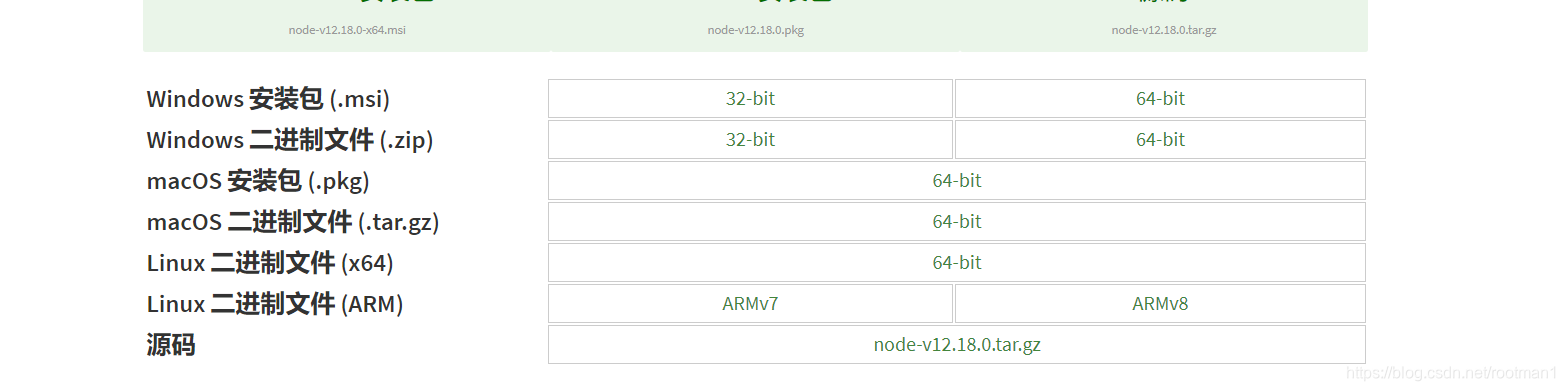
然后在覆盖以前安装的node版本,但是注意:
再次安装的新版本node.js的安装位置必须与原来的安装位置一致(不用担心会有两个node,新版本会直接覆盖旧版本)
查看node安装位置:打开CMD,输入:where node
C:\Users\周爸爸>where node
D:\node\node.exe
查看node版本:node -v






 扫一扫
扫一扫


 4449
4449

 被折叠的 条评论
为什么被折叠?
被折叠的 条评论
为什么被折叠?
 到【灌水乐园】发言





