





首先我今天是来给大家解闷的, 推荐一个有趣的网页聊天室 - 摸鱼派 - 白与画科技,这个网页有一个聊天功能,可以愉快的跟大家摸鱼,但是目标太大
容易被boss发现,所以小编今天给大家整理了一下大家都可以用的操作来减少被发现的办法。
第一个方法
就是官网自提供的摸鱼插件,仅限于vscodeFishPiOffical/fishpi.vsix: 摸鱼派聊天室 VSCode 扩展
第二个方法
就是我自己写的python程序
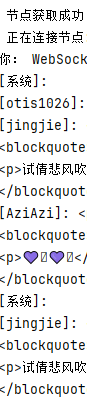
因为是小编自己写的一个隐蔽的窗口,因为隐私的原因所以展示这么多(也就是[用户]:<p>语言</p>),因为这是在python控制台展示的所以相当隐秘,但是缺点很明显就是你在控制台输入 的时候别人发信息就会导致你换行,输错字的时候他就会删除不了
下面是代码展示:
import os
import json
import hashlib
import requests
import websocket
import time
import threading


class FishPiChatroom:
    def __init__(self, username, password, mfa_code="", cache_file="api_key.txt"):
        self.username = username
        self.password_raw = password
        self.password = hashlib.md5(password.encode()).hexdigest()
        self.mfa_code = mfa_code
        self.api_key = None
        self.ws = None
        self.base_url = "https://fishpi.cn"
        self.headers = {
            "User-Agent": "Mozilla/5.0"
        }
        self.cache_file = cache_file
        self.node_info = None
        self.reconnect_count = 0
        self.max_reconnect_attempts = 5
        self.reconnect_delay = 3

    def load_cached_api_key(self):
        if os.path.exists(self.cache_file):
            with open(self.cache_file, "r") as f:
                self.api_key = f.read().strip()
                if self.api_key:
                    print(" 使用缓存 API Key")
                    return True
        return False

    def save_api_key(self):
        with open(self.cache_file, "w") as f:
            f.write(self.api_key)

    def get_api_key(self):
        if self.load_cached_api_key():
            return True

        url = f"{self.base_url}/api/getKey"
        data = {
            "nameOrEmail": self.username,
            "userPassword": self.password
        }
        if self.mfa_code:
            data["mfaCode"] = self.mfa_code

        response = requests.post(url, json=data, headers=self.headers)
        result = response.json()

        msg = result.get("msg", "")
        if result.get("code") == 0:
            self.api_key = result.get("Key")
            self.save_api_key()
            print(f" API Key获取成功并已缓存")
            return True
        elif "频率过快" in msg:
            print(" 登录频率过快,请 5 分钟后再试")
        else:
            print(f" API Key获取失败: {msg}")
        return False

    def get_node_url(self):
        if not self.api_key and not self.get_api_key():
            return None

        url = f"{self.base_url}/chat-room/node/get?apiKey={self.api_key}"
        try:
            response = requests.get(url, headers=self.headers)
            if response.status_code != 200:
                print(f" 获取节点失败: {response.status_code}")
                print(f" 响应内容: {response.text}")
                return None

            result = response.json()
            if result.get("code") == 0:
                self.node_info = result
                print(" 节点获取成功")
                return result.get("data")
            else:
                print(f" 节点错误: {result.get('msg')}")
                return None
        except Exception as e:
            print(f" 节点请求异常: {e}")
            return None

    def on_message(self, ws, message):
        try:
            data = json.loads(message)
            print(f"[{data.get('userName', '系统')}]: {data.get('content', '')}")
        except:
            print(" 消息格式错误")

    def on_error(self, ws, error):
        print(f" 连接错误: {error}")
        self.reconnect()

    def on_close(self, ws, close_status_code, close_msg):
        print(f" 连接关闭: {close_status_code} - {close_msg}")
        self.reconnect()

    def reconnect(self):
        if self.reconnect_count >= self.max_reconnect_attempts:
            print(" 达到最大重连次数")
            return
        self.reconnect_count += 1
        print(f" 正在重连({self.reconnect_count})...")
        time.sleep(self.reconnect_delay)
        self.connect()

    def connect(self):
        node_url = self.get_node_url()
        if not node_url:
            print(" 无法连接到聊天室")
            return False
        print(f" 正在连接节点: {node_url}")
        self.ws = websocket.WebSocketApp(
            node_url,
            on_open=lambda ws: print(" WebSocket连接已建立"),
            on_message=self.on_message,
            on_error=self.on_error,
            on_close=self.on_close,
            header=self.headers
        )
        threading.Thread(target=self.ws.run_forever, daemon=True).start()
        return True

    def send_message(self, content):
        if not self.api_key:
            if not self.get_api_key():
                return False
        url = f"{self.base_url}/chat-room/send"
        data = {
            "apiKey": self.api_key,
            "content": content
        }
        try:
            response = requests.post(url, json=data, headers=self.headers)
            result = response.json()
            if result.get("code") == 0:
                return True
            else:
                print(f" 发送失败: {result.get('msg')}")
        except Exception as e:
            print(f" 发送出错: {e}")
        return False

    def send_redpacket(self, count=5, value=32, msg="恭喜发财"):
        payload = {
            "msg": msg,
            "money": value,
            "count": count,
            "type": "random"
        }
        content = f"[redpacket]{json.dumps(payload)}[/redpacket]"
        return self.send_message(content)

    def close(self):
        if self.ws:
            self.ws.close()

#  加上主程序
def main():
    #  替换为你自己的用户名和密码
    username = "请输入你的账号"
    password = "请输入你的密码"

    client = FishPiChatroom(username, password)

    if not client.connect():
        print(" 无法连接到聊天室")
        return

    try:
        while True:
            msg = input("你:")
            if msg.strip().lower() == "exit":
                break
            client.send_message(msg)
    except KeyboardInterrupt:
        print("\n 已终止")
    finally:
        client.close()

#  启动入口
if __name__ == "__main__":
    main()
在请输入你的密码和请输入你的账号就是对应着网站你注册的账号和密码,切记先注册在使用哦,
Python 3.13.5
certifi 2025.7.14
charset-normalizer 3.4.2
idna 3.10
markdown-it-py 3.0.0
mdurl 0.1.2
pip 25.1.1
prompt_toolkit 3.0.51
Pygments 2.19.2
rel 0.4.9.20
requests 2.32.4
rich 14.1.0
urllib3 2.5.0
wcwidth 0.2.13
websocket-client 1.8.0
这是小编项目用到的插件
第三个方法
直接上图!!!
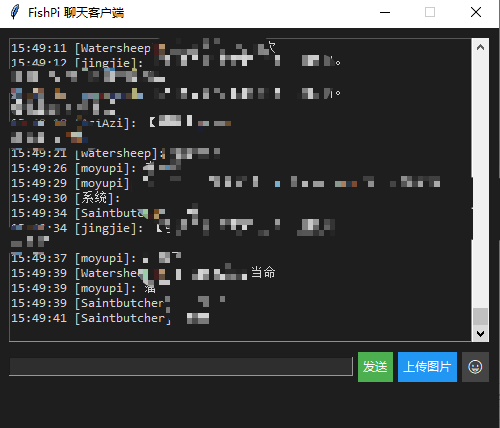
直接做成页面性质的,图片可能是站主有设置,我没有办法上传图片,我可以看到我发的图片但是,别人看不到,表情是可以用的
废话不多说直接上代码(环境同上):
import tkinter as tk
from tkinter.scrolledtext import ScrolledText
from tkinter import filedialog as fd
import hashlib
import requests
import websocket
import json
import time
import os
import threading
import re
from html import unescape
from datetime import datetime

# emoji 数据(可扩展)
EMOJI_LIST = [
    ("😀", "笑脸"), ("😂", "笑泪"), ("😍", "爱心眼"), ("🥺", "可怜"), ("🤔", "思考"),
    ("👍", "点赞"), ("😎", "酷"), ("😭", "大哭"), ("🎉", "庆祝"), ("🔥", "火焰"),
    ("🙌", "举手"), ("😡", "生气"), ("😴", "困"), ("😱", "惊讶"), ("😇", "天使"),
    ("🤯", "爆炸头"), ("🤮", "想吐"), ("🥳", "派对"), ("🤓", "书呆子"), ("😤", "生闷气"),
    ("💀", "笑死"), ("🤡", "小丑"), ("😈", "恶魔"), ("🤑", "发财"), ("🤗", "拥抱"),
    ("💩", "便便")
]

def strip_html_tags(html):
    # 处理 <blockquote> 引用块
    quote_parts = []

    def process_quote_block(match):
        block = match.group(1)

        # 处理图片
        block = re.sub(r'<img[^>]*src="([^"]+)"[^>]*>', lambda m: f"[图片: {m.group(1)}]", block)

        # 提取纯文本
        block = re.sub(r'<.*?>', '', block)
        block = unescape(block.strip())

        # 加前缀
        if block:
            quote_parts.append(f"【引用】{block}")
        return ""  # 移除原始引用块

    # 找出所有 blockquote 内容,并处理
    html = re.sub(r'<blockquote>(.*?)</blockquote>', process_quote_block, html, flags=re.DOTALL)

    # 处理正文中的图片
    html = re.sub(r'<img[^>]*src="([^"]+)"[^>]*>', r'[图片: \1]', html)

    # 清理剩余 HTML 标签
    html = re.sub(r'<.*?>', '', html)
    html = unescape(html.strip())

    # 合并引用和正文
    return "\n".join(quote_parts + [html]) if html else "\n".join(quote_parts)


def upload_with_fallback(file_path, retries=2, delay=2):
    def upload_to_imgurl(path):
        try:
            with open(path, "rb") as img:
                res = requests.post("https://imgurl.org/api/v2/upload", files={"file": img}, timeout=10)
                data = res.json()
                if data.get("code") == 200:
                    return data["data"]["url"]
        except: return None

    def upload_to_catbox(path):
        try:
            with open(path, "rb") as img:
                res = requests.post("https://catbox.moe/user/api.php", data={"reqtype": "fileupload"},
                                    files={"fileToUpload": img}, timeout=10)
                if res.status_code == 200 and res.text.startswith("https://"):
                    return res.text.strip()
        except: return None

    def upload_to_telegra(path):
        try:
            with open(path, 'rb') as f:
                res = requests.post("https://telegra.ph/upload", files=[("file", f)], timeout=10)
                if res.status_code == 200 and isinstance(res.json(), list):
                    return "https://telegra.ph" + res.json()[0]["src"]
        except: return None

    for _ in range(retries):
        for method in [upload_to_imgurl, upload_to_catbox, upload_to_telegra]:
            url = method(file_path)
            if url:
                return url
        time.sleep(delay)
    return None

class FishPiChatroom:
    def __init__(self, username, password):
        self.username = username
        self.password = hashlib.md5(password.encode()).hexdigest()
        self.api_key = None
        self.base_url = "https://fishpi.cn"
        self.ws = None
        self.headers = {"User-Agent": "Mozilla/5.0"}

    def get_api_key(self):
        url = f"{self.base_url}/api/getKey"
        data = {"nameOrEmail": self.username, "userPassword": self.password}
        try:
            res = requests.post(url, json=data, headers=self.headers)
            if res.status_code == 200 and res.json().get("code") == 0:
                self.api_key = res.json().get("Key")
                self.user_id = res.json().get("userId")  # 保存自己的 senderId
                return True
        except:
            pass
        return False

    def get_node_url(self):
        url = f"{self.base_url}/chat-room/node/get?apiKey={self.api_key}"
        try:
            res = requests.get(url, headers=self.headers)
            if res.status_code == 200 and res.json().get("code") == 0:
                return res.json()["data"]
        except: pass
        return None

    def send_message(self, content):
        url = f"{self.base_url}/chat-room/send"
        data = {"apiKey": self.api_key, "content": content}
        try:
            res = requests.post(url, json=data, headers=self.headers)
            return res.status_code == 200 and res.json().get("code") == 0
        except: return False

    def connect(self, on_message_callback):
        if not self.get_api_key(): return False
        node_url = self.get_node_url()
        if not node_url: return False

        def on_message(ws, message):
            try:
                data = json.loads(message)

                # 判断是否为自己发的消息(用 senderId 而不是 userName)
                sender_id = data.get("senderId")
                if sender_id and hasattr(self, "user_id") and sender_id == self.user_id:
                    return

                user = data.get("userName", "").strip()
                if not user or user.lower() in ("系统", "system", "sys", "null", "none"):
                    user = "系统"

                raw_content = data.get("content", "")

                # 尝试将 content 解析为 dict
                content_data = None
                if isinstance(raw_content, str):
                    try:
                        content_data = json.loads(raw_content)
                    except:
                        pass

                # ===== 处理嵌套红包 =====
                if isinstance(content_data, dict) and content_data.get("msgType") == "redPacket":
                    red_type = content_data.get("type", "")
                    money = content_data.get("money", 0)
                    count = content_data.get("count", 0)
                    msg = content_data.get("msg", "")

                    type_map = {
                        "common": "普通红包",
                        "rockPaperScissors": "猜拳红包",
                        "thunder": "雷红包",
                    }
                    red_type_name = type_map.get(red_type, red_type or "红包")
                    msg_line = f"发送了一个{red_type_name}({count} 个,共 {money} 元)"
                    if msg:
                        msg_line += f":{msg}"
                    on_message_callback(f"[{user}]: {msg_line}")
                    return

                # ===== 普通文本消息 =====
                content = strip_html_tags(raw_content)
                on_message_callback(f"[{user}]: {content}")

            except Exception as e:
                print(f"[调试] 消息处理失败: {e}")

        def on_open(ws): on_message_callback("[系统]: WebSocket连接已建立")

        self.ws = websocket.WebSocketApp(
            node_url, on_message=on_message, on_open=on_open
        )
        threading.Thread(target=self.ws.run_forever, daemon=True).start()
        return True

class EmojiPanel(tk.Toplevel):
    def __init__(self, master, entry):
        super().__init__(master)
        self.entry = entry
        self.configure(bg="#2e2e2e")
        self.overrideredirect(True)
        self.attributes("-topmost", True)
        self.build_ui()

    def build_ui(self):
        for i, (emoji, label) in enumerate(EMOJI_LIST):
            btn = tk.Button(self, text=emoji, width=4, height=2, command=lambda e=emoji: self.insert_emoji(e),
                            bg="#2e2e2e", fg="white", relief="flat")
            btn.grid(row=i // 6, column=i % 6, padx=2, pady=2)

    def insert_emoji(self, emoji):
        self.entry.insert('insert', emoji)
        self.destroy()

class ChatApp:
    def __init__(self, root, client):
        self.client = client
        root.title("FishPi 聊天客户端")
        root.geometry("500x400+1400+700")
        root.configure(bg="#1e1e1e")
        root.resizable(False, False)

        self.text_area = ScrolledText(root, state='disabled', height=20, width=70,
                                      bg="#1e1e1e", fg="#d4d4d4", insertbackground="white", font=("Consolas", 10))
        self.text_area.pack(padx=10, pady=10)

        frame = tk.Frame(root, bg="#1e1e1e")
        frame.pack(padx=10, pady=(0, 10), fill='x')

        self.entry = tk.Entry(frame, width=40, bg="#2e2e2e", fg="#d4d4d4",
                              insertbackground="white", font=("Consolas", 10))
        self.entry.pack(side='left', expand=True, fill='x')
        self.entry.bind("<Return>", self.send_message)

        self.send_btn = tk.Button(frame, text="发送", bg="#4caf50", fg="white", relief="flat", command=self.send_message)
        self.send_btn.pack(side='left', padx=(5, 0))

        self.upload_btn = tk.Button(frame, text="上传图片", bg="#2196f3", fg="white", relief="flat", command=self.send_image)
        self.upload_btn.pack(side='left', padx=(5, 0))

        self.emoji_btn = tk.Button(frame, text="😀", bg="#444", fg="white", relief="flat", command=self.toggle_emoji_panel)
        self.emoji_btn.pack(side='left', padx=(5, 0))

        if not self.client.connect(self.display_message):
            self.display_message("[系统]: 无法连接到聊天室")

        self.emoji_panel = None

    def toggle_emoji_panel(self):
        if self.emoji_panel and self.emoji_panel.winfo_exists():
            self.emoji_panel.destroy()
        else:
            x = self.entry.winfo_rootx()
            y = self.entry.winfo_rooty() - 90
            self.emoji_panel = EmojiPanel(self.entry, self.entry)
            self.emoji_panel.geometry(f"+{x}+{y}")

    def display_message(self, msg):
        timestamp = datetime.now().strftime('%H:%M:%S')
        self.text_area.config(state='normal')
        self.text_area.insert('end', f"{timestamp} {msg}\n")
        self.text_area.yview('end')
        self.text_area.config(state='disabled')

    def send_message(self, event=None):
        content = self.entry.get().strip()
        if content:
            html = f"<p>{content}</p>"
            success = self.client.send_message(html)
            if not success:
                self.display_message("[系统]: 消息发送失败")
        self.entry.delete(0, 'end')

    def send_image(self):
        threading.Thread(target=self._upload_image_thread, daemon=True).start()

    def _upload_image_thread(self):
        try:
            file_path = fd.askopenfilename(filetypes=[("Image files", "*.png;*.jpg;*.jpeg;*.gif")])
            if not file_path:
                return

            if os.path.getsize(file_path) > 2 * 1024 * 1024:
                self.display_message("[系统]: 图片太大,请选择小于2MB的图片")
                return

            self.display_message("[系统]: 正在上传图片,请稍候...")

            img_url = upload_with_fallback(file_path)
            if img_url:
                html = f'<p><img src="{img_url}" /></p>'
                self.client.send_message(html)
                self.display_message(f"[{self.client.username}]: [图片: {img_url}]")
            else:
                self.display_message("[系统]: 所有图床上传失败,请稍后重试")
        except Exception as e:
            self.display_message(f"[系统]: 上传异常:{str(e)}")

if __name__ == '__main__':
    username = "请输入你的账号"
    password = "请输入你的密码"
    client = FishPiChatroom(username, password)

    root = tk.Tk()
    app = ChatApp(root, client)
    root.mainloop()
到此,完美结束,希望大家适当摸鱼,在遇到困境的时候看看聊天室的朋友们在干什么缓缓思维,换换心情,或许就能一敲十行,日进斗金呢,祝愿大家节节高升,薪资高高





 扫一扫
扫一扫


 6万+
6万+


 到【灌水乐园】发言



