



package com.gxl.springclass.tools;

import javax.swing.*;
import java.awt.*;
import java.awt.event.ActionEvent;
import java.awt.event.ActionListener;
import java.awt.event.WindowAdapter;
import java.awt.event.WindowEvent;
import java.awt.image.BufferedImage;
import java.text.SimpleDateFormat;
import java.time.DayOfWeek;
import java.time.LocalDate;
import java.util.Date;

/**
 * Author:Dragon.X
 * Date:2025-01-12
 * Function:clock for desktop
 */
public class Clock extends JFrame implements ActionListener {
    private Timer timer;
    private SimpleDateFormat dateFormatYMD = new SimpleDateFormat("yyyy/MM/dd");
    private SimpleDateFormat dateFormatTM = new SimpleDateFormat("HH:mm:ss");
    private JLabel timeLabel = new JLabel("");


    public Clock() {

        super("Dragon.X");
        super.setResizable(false);
        super.setUndecorated(false);


        super.addWindowListener(new WindowAdapter() {
            public void windowClosing(WindowEvent e) {
                // 在这里添加自定义的关闭逻辑
                // 关闭 JFrame
            }
        });

        // 创建一个带有颜色背景的图标
        Image iconImage = createColoredIcon(28, 28, Color.green);
        super.setIconImage(iconImage);

        timeLabel.setFont(new Font("Digital-7", Font.BOLD, 28));
        timeLabel.setHorizontalAlignment(JLabel.CENTER);

        add(timeLabel);

        timer = new Timer(1000, this); // 设置定时器每秒触发一次
        timer.start(); // 启动定时器

        setSize(160, 139);
        setVisible(true);
        setDefaultCloseOperation(JFrame.EXIT_ON_CLOSE);
        // super.setDefaultCloseOperation(JFrame.DO_NOTHING_ON_CLOSE);
    }

    @Override
    public void actionPerformed(ActionEvent e) {

        Date now = new Date();
        String ymd = dateFormatYMD.format(now);
        // 解析特定日期
        LocalDate specificDate = LocalDate.now();
        // 获取星期几
        DayOfWeek dayOfWeek = specificDate.getDayOfWeek();

        String tm = dateFormatTM.format(now);
        timeLabel.setText("<html><font style='color: #AA0000'>"+tm+"</font><br>" +
                "<font style='color: #F1BF00'>"+ymd+"</font>" +
                "<br><font style='color: purple'>"+dayOfWeek+"</font></html>");

    }

    private static Image createColoredIcon(int width, int height, Color color) {
        // 创建一个 BufferedImage
        BufferedImage image = new BufferedImage(width, height, BufferedImage.TYPE_INT_ARGB);
        Graphics2D g2d = image.createGraphics();

        // 填充背景颜色
        g2d.setColor(color);
        g2d.fillRect(0, 0, width, height);

        // 可以在这里绘制其他图形或文本
        // 例如,绘制一个白色的圆形
        g2d.setColor(Color.green);
        g2d.fillOval(4, 4, width - 8, height - 8);

        g2d.dispose(); // 释放图形上下文
        return image;
    }

    public static void main(String[] args) {
        new Clock();
    }
}
上边是源码部分,大家可以直接复制一下,进行编译。
下边是一个bat文件,点击后就会自动执行
clock.bat:
@echo off
start javaw -jar Clock.jar
---------------------
效果就是:
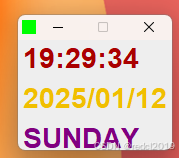
-------------------------
以上程序已经打包好了,可以到我的资源进行下载,双击clock.bat文件后即可执行时间控件了。





 扫一扫
扫一扫


 2204
2204


 到【灌水乐园】发言



