






Fragment的replace方法失效问题
1.背景
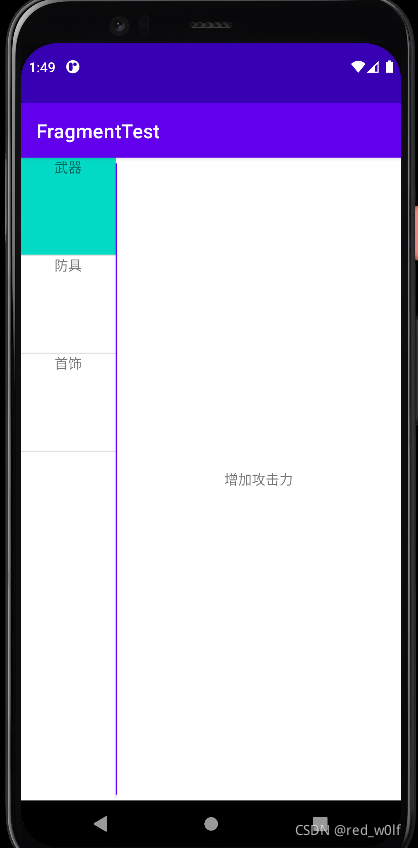
今天在练习使用Fragment时,发现replace()方法好像失效了。本来是要实现这样一个见简单的功能:左侧是ListView,右侧是Fragment,然后点击左边列表项,右边显示描述的内容。但是,发现点击列表项右边内容变为空白,将replace方法换为add可以,但是这样之前的Fragment并没有销毁,浪费资源,最后仔细研究了一下,发现关键还是在于Fragment的生命周期。
2.代码
2.1 总体布局:activity_main.xml
<?xml version="1.0" encoding="utf-8"?>
<androidx.constraintlayout.widget.ConstraintLayout xmlns:android="http://schemas.android.com/apk/res/android"
    xmlns:tools="http://schemas.android.com/tools"
    android:layout_width="match_parent"
    android:layout_height="match_parent"
    tools:context=".MainActivity">

    <androidx.appcompat.widget.LinearLayoutCompat
        android:layout_width="match_parent"
        android:layout_height="match_parent"
        android:orientation="horizontal">

        <ListView
            android:id="@+id/list_view"
            android:layout_width="0dp"
            android:layout_height="match_parent"
            android:layout_weight="1"/>

        <Button
            android:id="@+id/test"
            android:layout_width="1dp"
            android:layout_height="match_parent"/>

        <androidx.fragment.app.FragmentContainerView
            android:id="@+id/fragment_container"
            android:layout_width="0dp"
            android:layout_height="match_parent"
            android:layout_weight="3"/>

    </androidx.appcompat.widget.LinearLayoutCompat>
</androidx.constraintlayout.widget.ConstraintLayout>
这里就是一个ListView、一个用Button实现的分隔线、一个container存放Fragment。
2.2 主函数:MainActivity.java
public class MainActivity extends AppCompatActivity {

    public final static String TAG = "MY_TAG";
    public static tempItemID = 0;
    private final static String[] mMenu = {"武器","防具","首饰"};
    private final static String[] mDescrip = {"增加攻击力","增加防御力","增加生命力"};

    @Override
    protected void onCreate(Bundle savedInstanceState) {
        super.onCreate(savedInstanceState);
        setContentView(R.layout.activity_main);
        Log.d(TAG, "Main:onCreate");

        ListView menu = findViewById(R.id.list_view);
        menu.setAdapter(new MyAdapter());
        menu.setOnItemClickListener((adapterView, view, i, l) -> {
        view.setBackgroundColor(getResources().getColor(R.color.teal_200));
         if (i != tempItemID){
             menu.getChildAt(tempItemID).setBackgroundColor(getResources().getColor(R.color.white));
             tempItemID = i;
         } //设置正在点击的列表项的颜色
         getSupportFragmentManager().beginTransaction()
                 .setReorderingAllowed(true)
                 .replace(R.id.fragment_container,MyFragment.newInstance(mDescrip[i]))
                 .commit();
     });
		//设置初始第一个列表项的颜色,之所以用post是因为setAdapter是异步操作,在主线程不能getChildAt
        menu.post(() -> menu.getChildAt(0).setBackgroundColor(getResources().getColor(R.color.teal_200)));
        getSupportFragmentManager().beginTransaction()
                .setReorderingAllowed(true)
                .add(R.id.fragment_container,MyFragment.newInstance(mDescrip[0]))
                .commit();
    }
    private class MyAdapter extends BaseAdapter{

        @Override
        public int getCount() {
            return mMenu.length;
        }

        @Override
        public Object getItem(int i) {
            return 0;
        }

        @Override
        public long getItemId(int i) {
            return 0;
        }

        @Override
        public View getView(int i, View view, ViewGroup viewGroup) {
            if (view == null)
                    view = getLayoutInflater().inflate(R.layout.list_item,viewGroup,false);
            ( (TextView) view.findViewById(R.id.contentTV) ).setText(mMenu[i]);
            return view;
        }
    }
这里主要是为ListView创建一个Adaper,并为其设置Listener来监听item的点击,并将初始Fragment添加到FragmentContainerView。
2.3 列表项布局:list_item.xml
<?xml version="1.0" encoding="utf-8"?>
<androidx.appcompat.widget.LinearLayoutCompat
    xmlns:android="http://schemas.android.com/apk/res/android"
    android:layout_width="match_parent"
    android:layout_height="match_parent"
    android:minHeight="100dp"
    android:orientation="vertical">

    <TextView
        android:id="@+id/contentTV"
        android:layout_width="wrap_content"
        android:layout_height="wrap_content"
        android:layout_gravity="center"/>

</androidx.appcompat.widget.LinearLayoutCompat>
这里就是一个线性布局,里面有一个TextView来显示每一个列表项的内容。(注意:这里设置了minHeight来改变列表项的高度,设置layout_height是不行的。)
2.4 Fragment布局:my_fragment_layout.xml
<?xml version="1.0" encoding="utf-8"?>
<FrameLayout xmlns:android="http://schemas.android.com/apk/res/android"
    xmlns:tools="http://schemas.android.com/tools"
    android:layout_width="match_parent"
    android:layout_height="match_parent"
    tools:context=".MyFragment">

        <TextView
            android:id="@+id/content"
            android:layout_width="wrap_content"
            android:layout_height="wrap_content"
            android:layout_gravity="center"/>

</FrameLayout>
这里就是一个帧布局,里面有一个TextView显示描述内容。
2.5 Fragment函数:MyFragment.java
public class MyFragment extends Fragment {

    // the fragment initialization parameters, e.g. ARG_ITEM_NUMBER
    private static final String ARG_PARAM1 = "param1";

    private String mParam1;

    public MyFragment() {
        // Required empty public constructor
    }

    /**
     * Use this factory method to create a new instance of
     * this fragment using the provided parameters.
     *
     * @param param1 Parameter 1.
     * @return A new instance of fragment MyFragment.
     */
    public static MyFragment newInstance(String param1) {
        MyFragment fragment = new MyFragment();
        Bundle args = new Bundle();
        args.putString(ARG_PARAM1, param1);
        fragment.setArguments(args);
        return fragment;
    }

    @Override
    public void onCreate(Bundle savedInstanceState) {
        super.onCreate(savedInstanceState);
        if (getArguments() != null) {
            mParam1 = getArguments().getString(ARG_PARAM1);
        }
    }

    @Override
    public View onCreateView(LayoutInflater inflater, ViewGroup container,
                             Bundle savedInstanceState) {
        // Inflate the layout for this fragment
        return inflater.inflate(R.layout.my_fragment_layout, container, false);;
    }

     @Override
    public void onStart(){
        super.onStart();
       ((TextView)requireActivity().findViewById(R.id.content)).setText(mParam1));
    }
这里是利用函数调用和全局变量来和Activity交换数据。然后在onStart()函数为Fragment的TextView进行赋值。
3.错误结果展示
3.1 初始界面
3.2 点击其他列表项后的界面
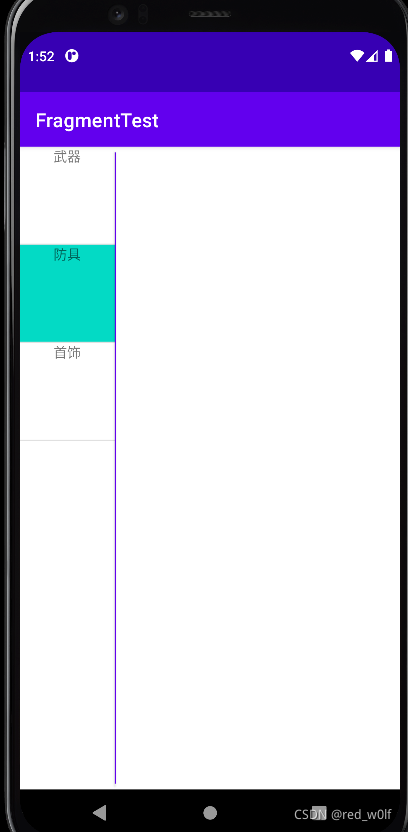
可以发现,出现了错误,Fragment好像并没有被正确替换。
4.原因分析
2021-09-27 22:25:30.557 8824-8824/com.example.fragmenttest D/MY_TAG: Main:onCreate
2021-09-27 22:25:30.583 8824-8824/com.example.fragmenttest D/MY_TAG: onCreate
2021-09-27 22:25:30.584 8824-8824/com.example.fragmenttest D/MY_TAG: onCreateView
2021-09-27 22:25:30.594 8824-8824/com.example.fragmenttest D/MY_TAG: onStart
2021-09-27 22:25:30.597 8824-8824/com.example.fragmenttest D/MY_TAG: Main: onResume
2021-09-27 22:25:30.600 8824-8824/com.example.fragmenttest D/MY_TAG: onResume:
2021-09-27 22:25:34.942 8824-8824/com.example.fragmenttest D/MY_TAG: onPause:
2021-09-27 22:25:34.943 8824-8824/com.example.fragmenttest D/MY_TAG: onStop:
2021-09-27 22:25:34.943 8824-8824/com.example.fragmenttest D/MY_TAG: onCreate
2021-09-27 22:25:34.943 8824-8824/com.example.fragmenttest D/MY_TAG: onCreateView
2021-09-27 22:25:34.946 8824-8824/com.example.fragmenttest D/MY_TAG: onStart
2021-09-27 22:25:34.951 8824-8824/com.example.fragmenttest D/MY_TAG: onDestroy
2021-09-27 22:25:34.951 8824-8824/com.example.fragmenttest D/MY_TAG: onDetach
2021-09-27 22:25:34.951 8824-8824/com.example.fragmenttest D/MY_TAG: onResume:
经过加log调试发现,是fragment的onStart()方法中的requireActivity().findViewById()这个方法用错了,确切地说是时机用错了,当执行replace()后,会先暂停原fragment,再创建新的fragment,而这时原Fragment虽已暂停但还未destroy,即还未detach,这时执行新的fragment的onStart()方法时,findViewById()找到的是之前那个TextView,而执行完新fragment的onStart()方法后便会销毁旧fragment执行onDestroy(),故现在显示的是fragment的xml的textview的默认值,这里为空。
5.解决方法
1.直接在onResume里用requireActivity()即可,因为此时旧的已detach。
2. 不用requireActivity,直接在onCreateView里面利用Fragment找到TextView,这样是准确无误的。
这里采用第二种方法,将requireActivity方法移除,修改onCreateView。
@Override
    public View onCreateView(LayoutInflater inflater, ViewGroup container,
                             Bundle savedInstanceState) {
        // Inflate the layout for this fragment
        Log.d(MainActivity.TAG,"onCreateView");

        View view = inflater.inflate(R.layout.my_fragment_layout, container, false);
        ((TextView) view.findViewById(R.id.out)).setText(mParam1);
         return view;
    }
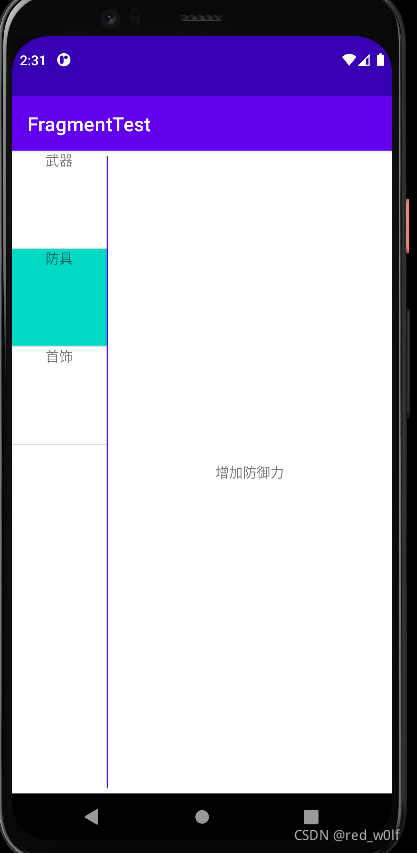
6.正确结果





 扫一扫
扫一扫


 2417
2417

 被折叠的 条评论
为什么被折叠?
被折叠的 条评论
为什么被折叠?
 到【灌水乐园】发言





