

AutoMapper 9.0 在.Net Core 下的使用教程

本文介绍了AutoMapper 9.0在.NET Core 3.0环境下的使用方法,包括依赖注入(DI)注册、配置Profile、以及与旧版本的区别,如静态API的移除。通过示例展示了如何创建Profile、注册映射以及如何在项目中便捷地使用AutoMapper。

AutoMapper升级为9.0之后,优化了(简化了)很多使用方法,特别是结合Core系统本身的一些改进,造成了曾经的9.0 以前版本不一样的地方。现做一个总结,代码再某个角度上讲还可以进行优化,欢迎大佬斧正。

环境

vs2019 

.Net Core 3.0

AutoMapper 9.0

项目 .Net Core WebApi


*step 0: 本文从Core自带的DI方式来注册使用AutoMapper(目前9.0已经停止了静态api注册,官方推荐注入方式使用)

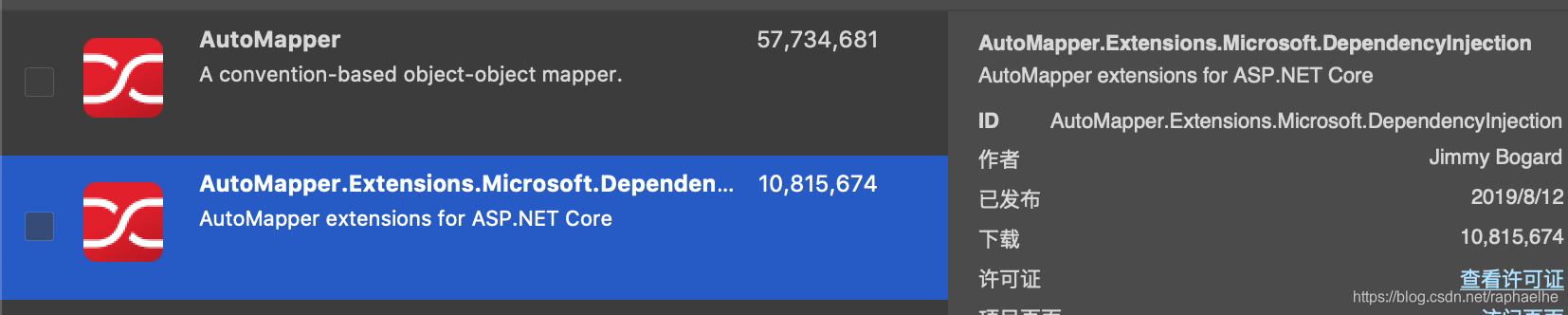
step 1:首先还是需要直接Nutget两个包:
准备两个数据类

public class User
{
public string Name{get; set;}
}

public class UserDto
{
public string Name{get; set;}
}

step 2 : profile配置

Using AutoMapper;
...
  public class UserProfile:Profile
    {
        public UserProfile()
        {
            CreateMap<UserDto, User>();
            CreateMap<User, UserDto>();
        }
    }


step 3:入口配置

在startup.cs的

 public void ConfigureServices(IServiceCollection services)
        { 
          services.AddAutoMapper(typeof(Userprofile));
        }

参考官网说明
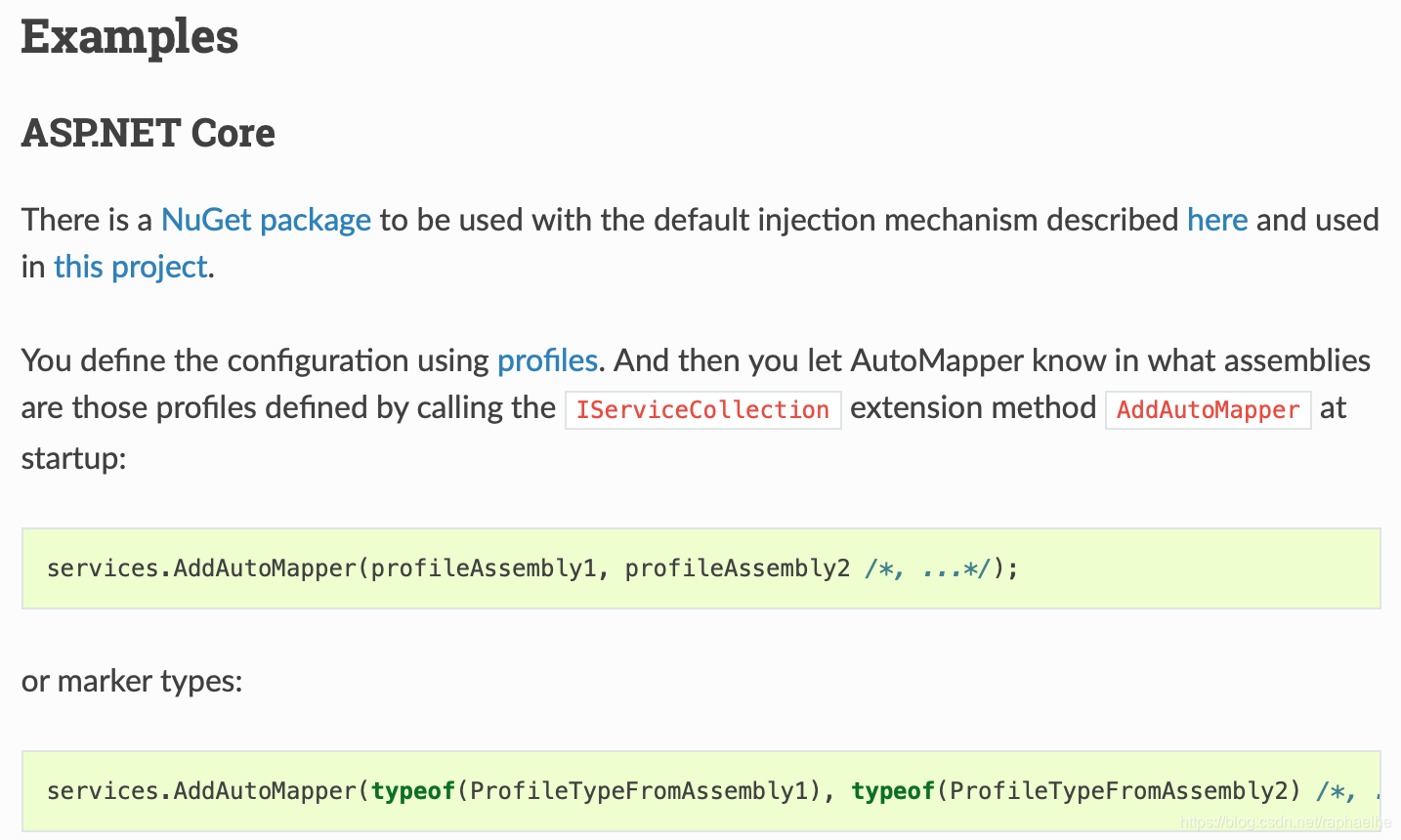
按照官网说明可以配置继承profile类或者程序集的集合,也就是可以写成(这是比9.0之前更直观的地方,也比之前更方便的扩展)

eg:

<Project Sdk="Microsoft.NET.Sdk.Web"> <PropertyGroup> <TargetFramework>net9.0</TargetFramework> <Nullable>enable</Nullable> <ImplicitUsings>enable</ImplicitUsings> <UserSecretsId>aspnet-UserManagementSystem.Web-1b679971-7546-4347-9974-3575660d05fc</UserSecretsId> <!-- 启用 Razor 编译支持 --> <MvcRazorCompileOnPublish>true</MvcRazorCompileOnPublish> <PreserveCompilationReferences>true</PreserveCompilationReferences> </PropertyGroup> <ItemGroup> <None Update="app.db" CopyToOutputDirectory="PreserveNewest" ExcludeFromSingleFile="true" /> </ItemGroup> <ItemGroup> <PackageReference Include="AutoMapper.Extensions.Microsoft.DependencyInjection" Version="12.0.1" /> <PackageReference Include="Microsoft.AspNetCore.Diagnostics.EntityFrameworkCore" Version="9.0.8" /> <PackageReference Include="Microsoft.AspNetCore.Identity.EntityFrameworkCore" Version="9.0.9" /> <PackageReference Include="Microsoft.AspNetCore.Identity.UI" Version="9.0.9" /> <!-- 删除 Microsoft.AspNetCore.Mvc.TagHelpers 手动引用 --> <PackageReference Include="Microsoft.EntityFrameworkCore.Design" Version="9.0.9"> <IncludeAssets>runtime; build; native; contentfiles; analyzers; buildtransitive</IncludeAssets> <PrivateAssets>all</PrivateAssets> </PackageReference> <PackageReference Include="Microsoft.EntityFrameworkCore.Sqlite" Version="9.0.8" /> <PackageReference Include="Microsoft.EntityFrameworkCore.SqlServer" Version="9.0.9" /> <PackageReference Include="Microsoft.EntityFrameworkCore.Tools" Version="9.0.8" /> <PackageReference Include="Microsoft.VisualStudio.Web.CodeGeneration.Design" Version="9.0.0" /> </ItemGroup> </Project> 这是我的csproj文件
最新发布
10-06
感谢你提供了完整的 `.csproj` 文件内容,这非常关键! 我们来 **逐行分析** 并定位问题根源。 --- ### 🔍 你的 `UserManagementSystem.Web.csproj` 内容如下: ```xml <Project Sdk="Microsoft.NET.Sdk.Web"> <PropertyGroup> <TargetFramework>net9.0</TargetFramework> <Nullable>enable</Nullable> <ImplicitUsings>enable</ImplicitUsings> <UserSecretsId>aspnet-UserManagementSystem.Web-1b679971-7546-4347-9974-3575660d05fc</UserSecretsId> <!-- 启用 Razor 编译支持 --> <MvcRazorCompileOnPublish>true</MvcRazorCompileOnPublish> <PreserveCompilationReferences>true</PreserveCompilationReferences> </PropertyGroup> <ItemGroup> <None Update="app.db" CopyToOutputDirectory="PreserveNewest" ExcludeFromSingleFile="true" /> </ItemGroup> <ItemGroup> <PackageReference Include="AutoMapper.Extensions.Microsoft.DependencyInjection" Version="12.0.1" /> <PackageReference Include="Microsoft.AspNetCore.Diagnostics.EntityFrameworkCore" Version="9.0.8" /> <PackageReference Include="Microsoft.AspNetCore.Identity.EntityFrameworkCore" Version="9.0.9" /> <PackageReference Include="Microsoft.AspNetCore.Identity.UI" Version="9.0.9" /> <PackageReference Include="Microsoft.EntityFrameworkCore.Design" Version="9.0.9"> <IncludeAssets>runtime; build; native; contentfiles; analyzers; buildtransitive</IncludeAssets> <PrivateAssets>all</PrivateAssets> </PackageReference> <PackageReference Include="Microsoft.EntityFrameworkCore.Sqlite" Version="9.0.8" /> <PackageReference Include="Microsoft.EntityFrameworkCore.SqlServer" Version="9.0.9" /> <PackageReference Include="Microsoft.EntityFrameworkCore.Tools" Version="9.0.8" /> <PackageReference Include="Microsoft.VisualStudio.Web.CodeGeneration.Design" Version="9.0.0" /> </ItemGroup> </Project> ``` --- ## ✅ 关键发现:**缺少 `<Compile>` 项且未启用默认编译行为?** 虽然你没有显式设置 `<EnableDefaultCompileItems>false</EnableDefaultCompileItems>`, 但—— ### ⚠️ **这个项目中没有任何 `<Compile Include=...>` 或隐含文件包含机制的声明!** 正常情况下,SDK 项目(`Microsoft.NET.Sdk.Web`)会 **自动包含所有 `.cs` 文件**,只要你没关闭它。 但在某些编辑器操作、手动迁移、或 Git 同步错误后,**Visual Studio / MSBuild 可能“忘记”扫描某些目录下的 `.cs` 文件。** --- ## 🧩 根本原因推测(高概率) > ❌ `Models/ViewModels/CmbListViewModel.cs` 文件存在,命名空间正确,但 **MSBuild 没有把它加入编译流程!** 为什么? 因为: - 你没有手动 `<Compile Include=...>` - 而 SDK 的“默认包含规则”可能由于某种原因失效了(比如临时缓存错乱、路径大小写敏感等) --- ## ✅ 解决方案:强制将 `CmbListViewModel.cs` 加入编译 ### ✅ 修改 `.csproj` 文件,在某个 `<ItemGroup>` 中添加: ```xml <Compile Include="Models\ViewModels\CmbListViewModel.cs" /> ``` 完整修改示例: ```xml <ItemGroup> <PackageReference Include="..." Version="..." /> <!-- 其他包引用 --> </ItemGroup> <!-- 新增这一段 --> <ItemGroup> <Compile Include="Models\ViewModels\CmbListViewModel.cs" /> <Compile Include="Models\ViewModels\CmbEditViewModel.cs" /> <!-- 可选:确保其他 ViewModel 也被包含 --> </ItemGroup> ``` 📌 注意路径必须准确: - 如果你的项目结构是: ``` UserManagementSystem.Web/ └── Models/ └── ViewModels/ ├── CmbListViewModel.cs └── CmbEditViewModel.cs ``` 那么路径就是 `Models\ViewModels\CmbListViewModel.cs` > ✅ 斜杠 `\` 或 `/` 在 MSBuild 中都可以使用(推荐用 `\`) --- ## ✅ 执行清理重建验证 打开命令行,运行: ```bash # 清理 dotnet clean # 删除 bin 和 obj(保险起见) rd /s /q bin rd /s /q obj # 还原依赖 dotnet restore # 构建并输出详细日志 dotnet build --no-incremental /v:quiet ``` 👉 观察是否还有 `CS0246: 找不到类型 &#39;CmbListViewModel&#39;` 如果此时不再报错 ➜ 成功解决! --- ## 🔎 补充建议:启用编译日志查看实际参与的文件 在 `.csproj` 中加入以下代码以调试: ```xml <Target Name="LogCompileFiles" BeforeTargets="CoreCompile"> <Message Text="Compiling: %(Compile.Identity)" Importance="high" /> </Target> ``` 然后运行 `dotnet build`,你会看到所有被编译的 `.cs` 文件列表。 你应该能看到这一行: ``` Compiling: Models\ViewModels\CmbListViewModel.cs ``` 如果没有 ➜ 说明文件仍未被纳入编译 --- ## ✅ 最终确认:检查文件是否真的存在于磁盘 在终端执行: ```cmd dir Models\ViewModels\ ``` 输出应包含: ``` CmbListViewModel.cs CmbEditViewModel.cs ``` 否则说明文件只是“在 VS 中显示”,但并未保存到磁盘! --- ## ✅ 总结:你现在要做的三件事 | 步骤 | 操作 | |------|------| | 1️⃣ | 编辑 `.csproj` 文件,添加:<br>`<Compile Include="Models\ViewModels\CmbListViewModel.cs" />` | | 2️⃣ | 保存文件,关闭 VS,运行 `dotnet clean && dotnet build` | | 3️⃣ | 若成功 → 删除该 `<Compile>` 行再试一次(验证是否永久修复)<br>若失败 → 使用 PowerShell 检查文件系统一致性 | ---
评论 2
成就一亿技术人!
拼手气红包6.0元
还能输入1000个字符
 
红包 添加红包
表情包 插入表情
 条评论被折叠 查看
添加红包

请填写红包祝福语或标题

红包个数最小为10个

红包金额最低5元

当前余额3.43前往充值 >
需支付:10.00
成就一亿技术人!
领取后你会自动成为博主和红包主的粉丝 规则
hope_wisdom
发出的红包
实付
使用余额支付
点击重新获取
扫码支付
钱包余额 0

抵扣说明:

1.余额是钱包充值的虚拟货币,按照1:1的比例进行支付金额的抵扣。
2.余额无法直接购买下载,可以购买VIP、付费专栏及课程。

余额充值



