



Python内置模块pathlib:更优雅的文件系统路径操作指南
夸克资源分享:
表情包:https://pan.quark.cn/s/5b9ddeb237fe
工具箱:https://pan.quark.cn/s/aa2d6a730482,图吧、美蛋、路遥入梦等
Fiddler Everywhere抓包:https://pan.quark.cn/s/6b1e2fbae019,
Adobe:https://pan.quark.cn/s/13e39cfeaadb,先看安装教程
JetBranis开发者工具:https://pan.quark.cn/s/16e94dcff1f7,先看安装教程下的jetbra教程
逆向工具:https://pan.quark.cn/s/50e93c8ca54c
前端项目搭建集锦:https://blog.youkuaiyun.com/randy521520/article/details/146998467
一、简介
Python 的pathlib库是 Python 3.4 + 引入的面向对象文件系统路径处理模块,以直观的对象化方式替代传统os.path的字符串操作,大幅简化路径处理逻辑。
它将路径封装为Path对象,支持链式调用,例如Path(“/home”) / “user” / “file.txt"即可完成路径拼接,无需关注系统分隔符差异。核心功能涵盖路径判断(is_file()/is_dir())、属性获取(name/suffix/parent)、文件操作(read_text()/write_bytes())等,兼具跨平台兼容性。
相比os.path,pathlib语义更清晰,如path.suffix直接获取文件扩展名,path.parent返回上级目录,避免了字符串切片的繁琐。同时整合了glob匹配(Path.glob(”*.txt"))、路径拼接与解析等能力,让文件系统操作更符合 Pythonic 风格,显著提升代码可读性与开发效率。
二、pathlib 核心路径类
1.PurePath:pathlib 中的基础纯路径类,仅处理路径字符串操作,不与实际文件系统交互,提供路径解析、拼接、比较等核心功能。
2.PurePosixPath:继承PurePath,专门处理 POSIX 风格(Linux/macOS)路径,强制遵循 Unix 路径规则(如分隔符为/),不涉及系统调用,适合跨平台路径字符串处理;
3.PureWindowsPath:继承PurePath,针对 Windows 系统路径设计,支持盘符、反斜杠分隔符等 Windows 路径特性,仅做字符串层面的路径操作,与实际文件系统无关;
4.Path:继承PurePath,结合纯路径操作与实际文件系统交互能力,可执行文件 / 目录的创建、删除、属性查询等 I/O 操作;
5.PosixPath:继承Path、PurePosixPath,适配 POSIX 系统的具体路径实现,封装 Linux/macOS 下的文件系统操作(如权限管理、符号链接处理),继承 PurePosixPath 的路径规则;
6.WindowsPath:继承Path、PureWindowsPath,针对 Windows 系统的具体路径实现,支持 Windows 特有的文件系统功能(如 NTFS 权限、盘符操作),基于 PureWindowsPath 扩展实际 I/O 能力;
三、使用说明
由于Path类及支持linux又支持windows,平常使用Path就能解决大部分问题,所以本文只讲解Path类。
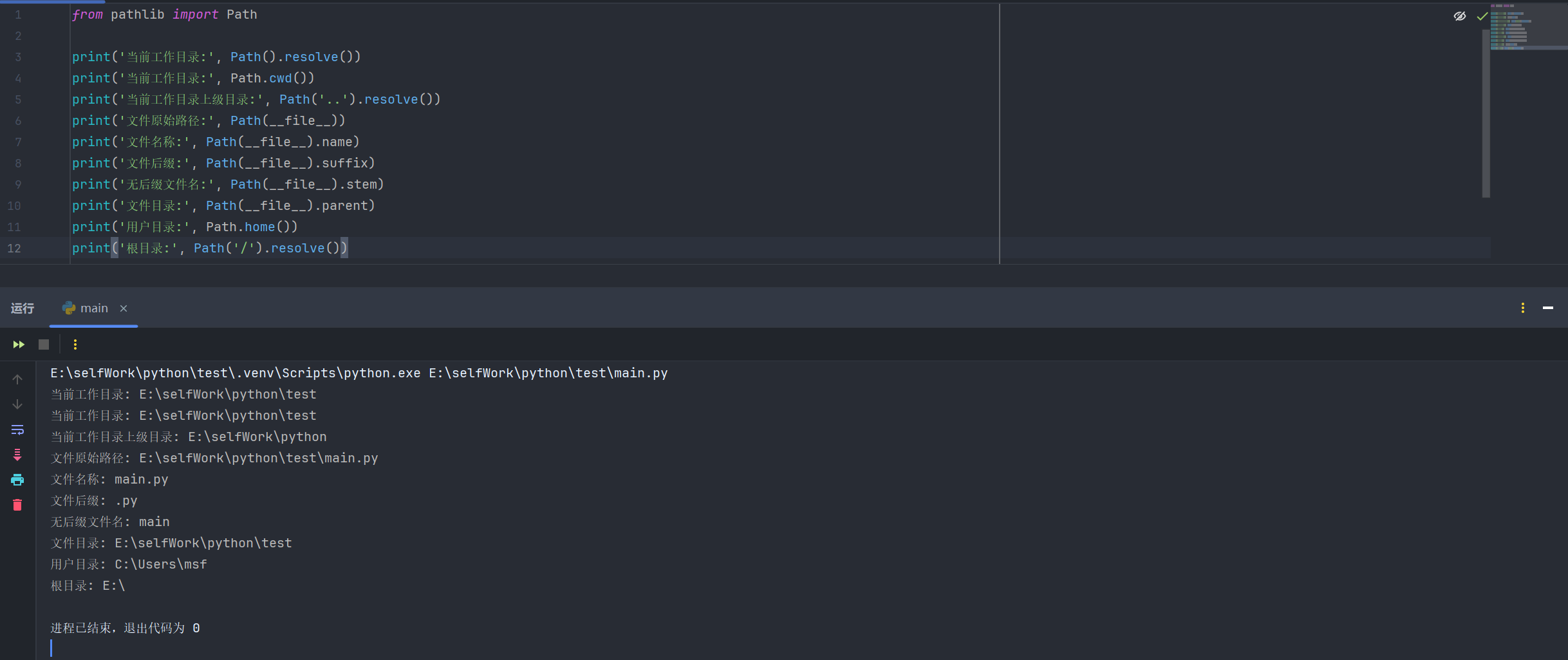
1.基本使用
from pathlib import Path

print('当前工作目录:', Path().resolve())
print('当前工作目录:', Path.cwd())
print('当前工作目录上级目录:', Path('..').resolve())
print('文件原始路径:', Path(__file__))
print('文件名称:', Path(__file__).name)
print('文件后缀:', Path(__file__).suffix)
print('无后缀文件名:', Path(__file__).stem)
print('文件目录:', Path(__file__).parent)
print('用户目录:', Path.home())
print('根目录:', Path('/').resolve())
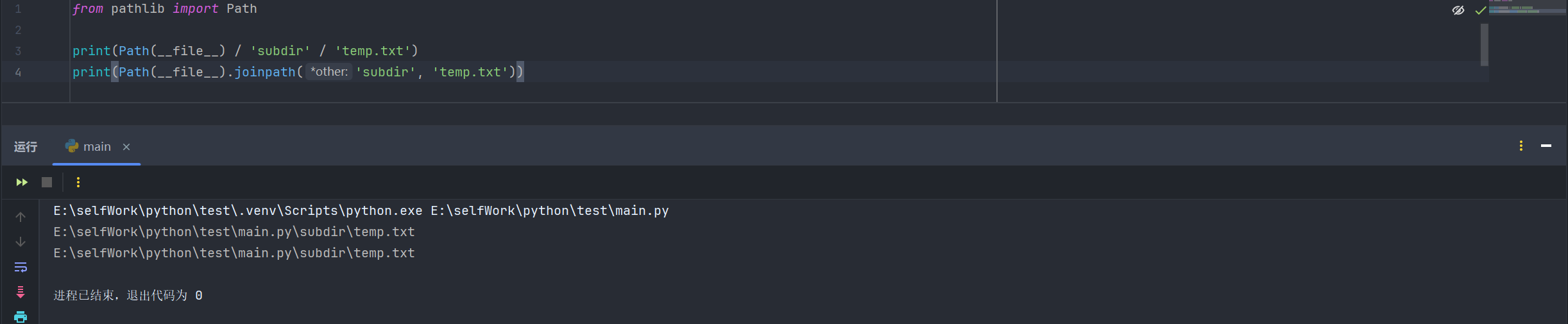
2.路径拼接
from pathlib import Path

print(Path(__file__) / 'subdir' / 'temp.txt')
print(Path(__file__).joinpath('subdir', 'temp.txt'))
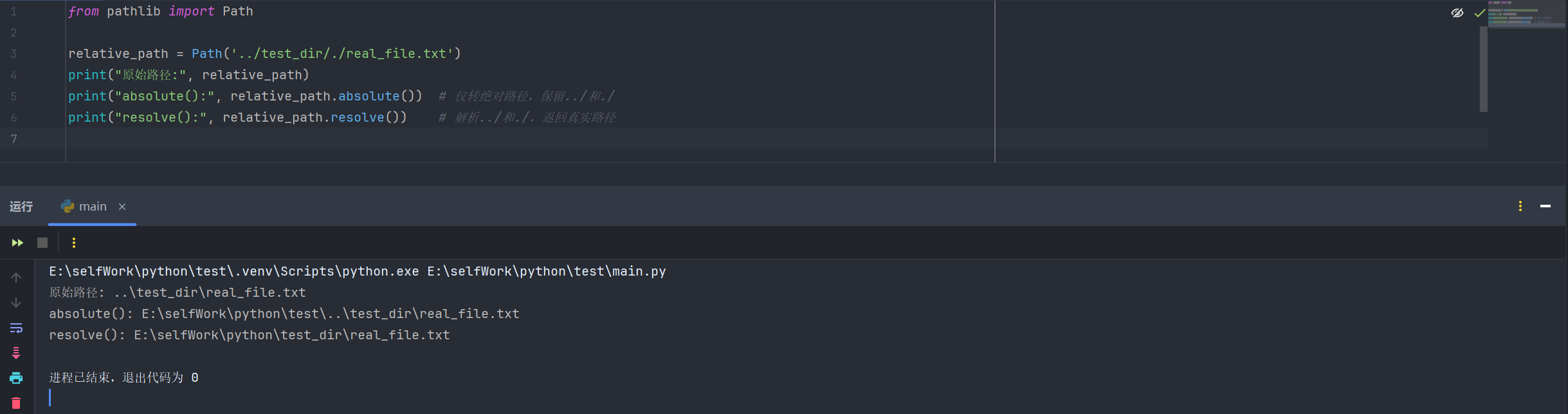
3.获取绝对路径:.absolute()只做 绝对化,不处理符号链接、./…等冗余部分。.resolve()不仅返回绝对路径,还会解析符号链接、折叠./…等冗余路径
from pathlib import Path

relative_path = Path('../test_dir/./real_file.txt')
print("原始路径:", relative_path)
print("absolute():", relative_path.absolute())  # 仅转绝对路径,保留../和./
print("resolve():", relative_path.resolve())    # 解析../和./,返回真实路径
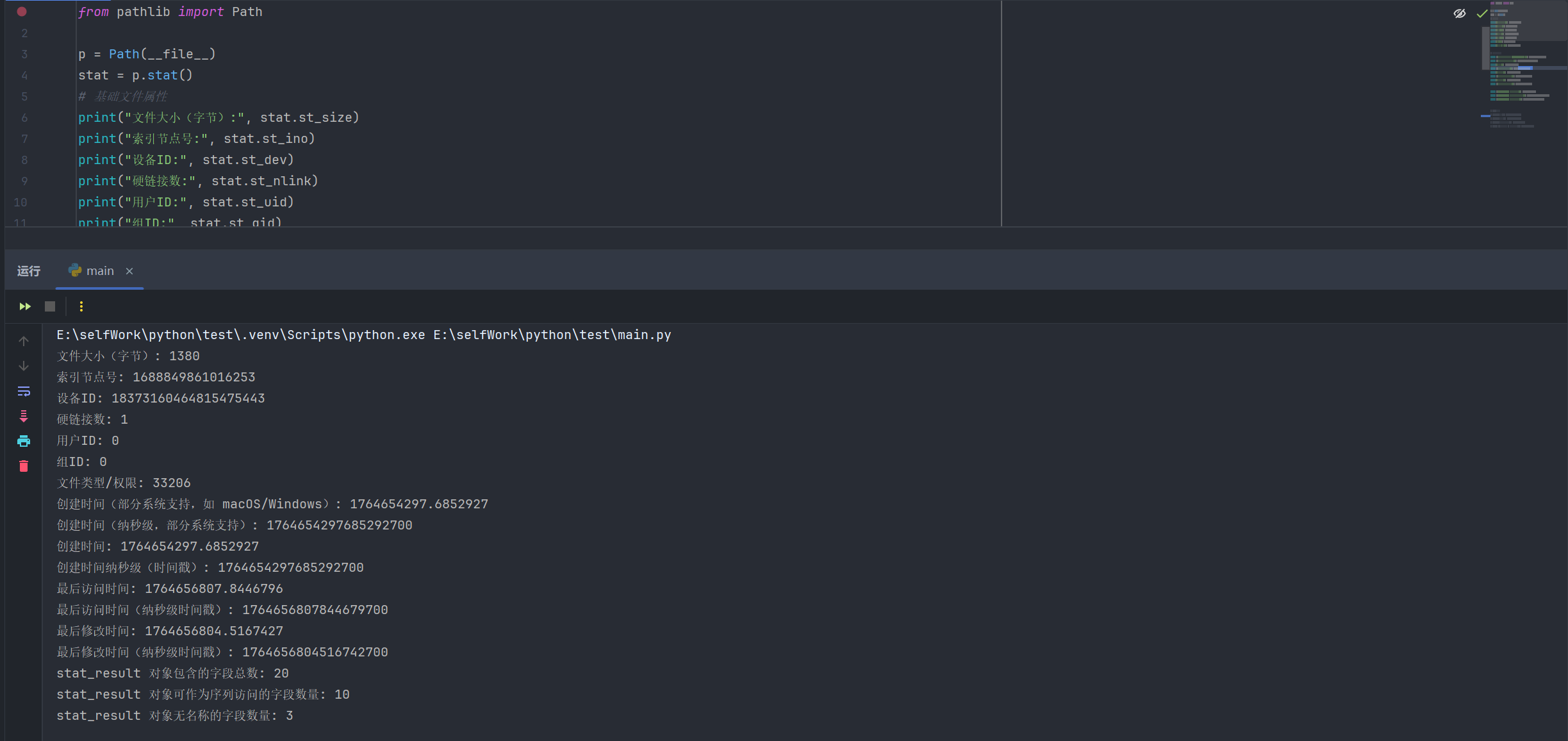
4.获取文件/目录信息
from pathlib import Path

p = Path(__file__)
stat = p.stat()
# 基础文件属性
print("文件大小(字节):", stat.st_size)
print("索引节点号:", stat.st_ino)
print("设备ID:", stat.st_dev)
print("硬链接数:", stat.st_nlink)
print("用户ID:", stat.st_uid)
print("组ID:", stat.st_gid)
print("文件类型/权限:", stat.st_mode)

# 时间属性(时间戳)
print ("创建时间(部分系统支持,如 macOS/Windows):", stat.st_birthtime)
print ("创建时间(纳秒级,部分系统支持):", stat.st_birthtime_ns)
print("创建时间:", stat.st_ctime)
print ("创建时间纳秒级(时间戳):", stat.st_ctime_ns)
print("最后访问时间:", stat.st_atime)
print ("最后访问时间(纳秒级时间戳):", stat.st_atime_ns)
print("最后修改时间:", stat.st_mtime)
print ("最后修改时间(纳秒级时间戳):", stat.st_mtime_ns)

print ("stat_result 对象包含的字段总数:", stat.n_fields)
print ("stat_result 对象可作为序列访问的字段数量:", stat.n_sequence_fields)
print ("stat_result 对象无名称的字段数量:", stat.n_unnamed_fields)


# Unix特有属性
# print("块大小:", stat.st_blksize)
# print("占用块数:", stat.st_blocks)
# print("设备类型(特殊文件):", stat.st_rdev)
# print ("设备号(仅字符 / 块设备文件有效):", stat.st_rdev)
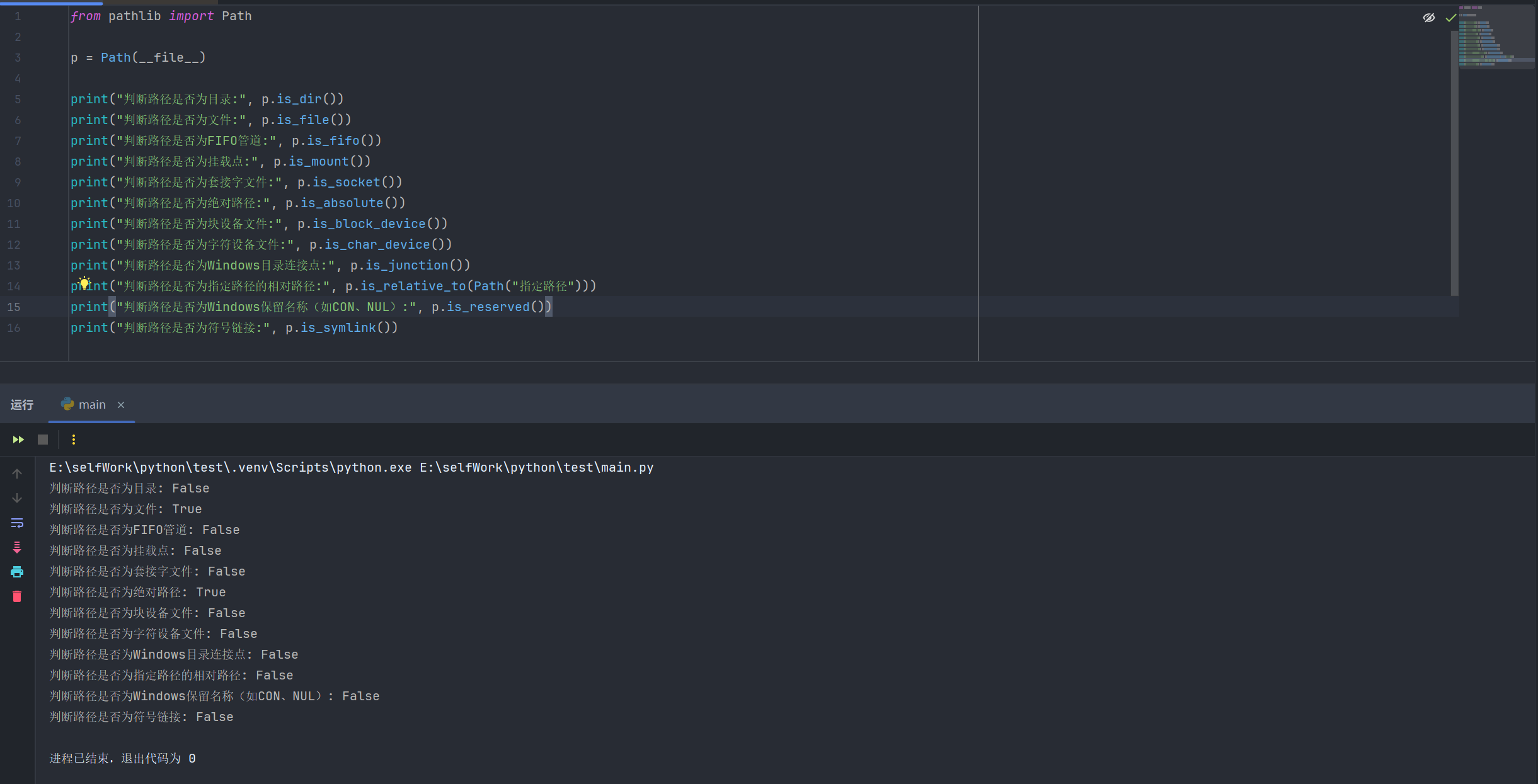
5.路径判断
from pathlib import Path

p = Path(__file__)

print("判断路径是否为目录:", p.is_dir())
print("判断路径是否为文件:", p.is_file())
print("判断路径是否为FIFO管道:", p.is_fifo())
print("判断路径是否为挂载点:", p.is_mount())
print("判断路径是否为套接字文件:", p.is_socket())
print("判断路径是否为绝对路径:", p.is_absolute())
print("判断路径是否为块设备文件:", p.is_block_device())
print("判断路径是否为字符设备文件:", p.is_char_device())
print("判断路径是否为Windows目录连接点:", p.is_junction())
print("判断路径是否为指定路径的相对路径:", p.is_relative_to(Path("指定路径")))
print("判断路径是否为Windows保留名称(如CON、NUL):", p.is_reserved())
print("判断路径是否为符号链接:", p.is_symlink())
6.遍历目录
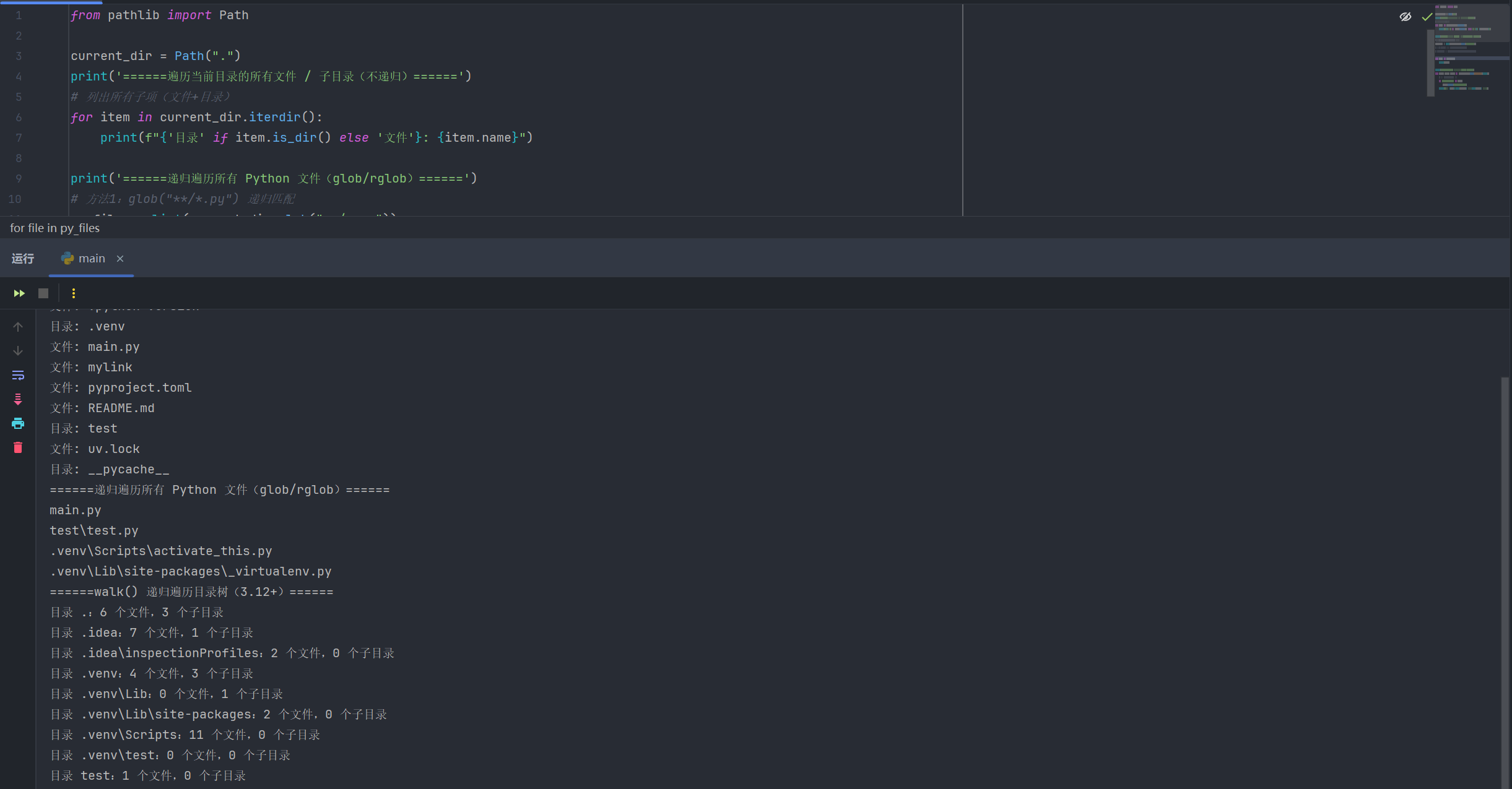
from pathlib import Path

current_dir = Path(".")
print('======遍历当前目录的所有文件 / 子目录(不递归)======')
# 列出所有子项(文件+目录)
for item in current_dir.iterdir():
    print(f"{'目录' if item.is_dir() else '文件'}: {item.name}")

print('======递归遍历所有 Python 文件(glob/rglob)======')
# 方法1:glob("**/*.py") 递归匹配
py_files = list(current_dir.glob("**/*.py"))
# 方法2:rglob 等价于 glob("**/pattern")
# py_files = list(current_dir.rglob("*.py"))

for file in py_files:
    print(file)

print('======walk() 递归遍历目录树(3.12+)======')
for root, dirs, files in current_dir.walk(on_error=print):
    # 跳过 __pycache__ 目录
    if "__pycache__" in dirs:
        dirs.remove("__pycache__")
    print(f"目录 {root}:{len(files)} 个文件,{len(dirs)} 个子目录")
7.创建目录 / 文件
from pathlib import Path

# 创建单层目录(目录已存在会报错,需加 exist_ok=True)
Path("new_dir").mkdir(exist_ok=True)

# 创建多层目录(parents=True 递归创建父目录)
Path("data/logs/2025").mkdir(parents=True, exist_ok=True)

#创建空文件
new_file = Path("data/temp.txt")
new_file.touch()

8.重命名 / 移动目录 / 文件
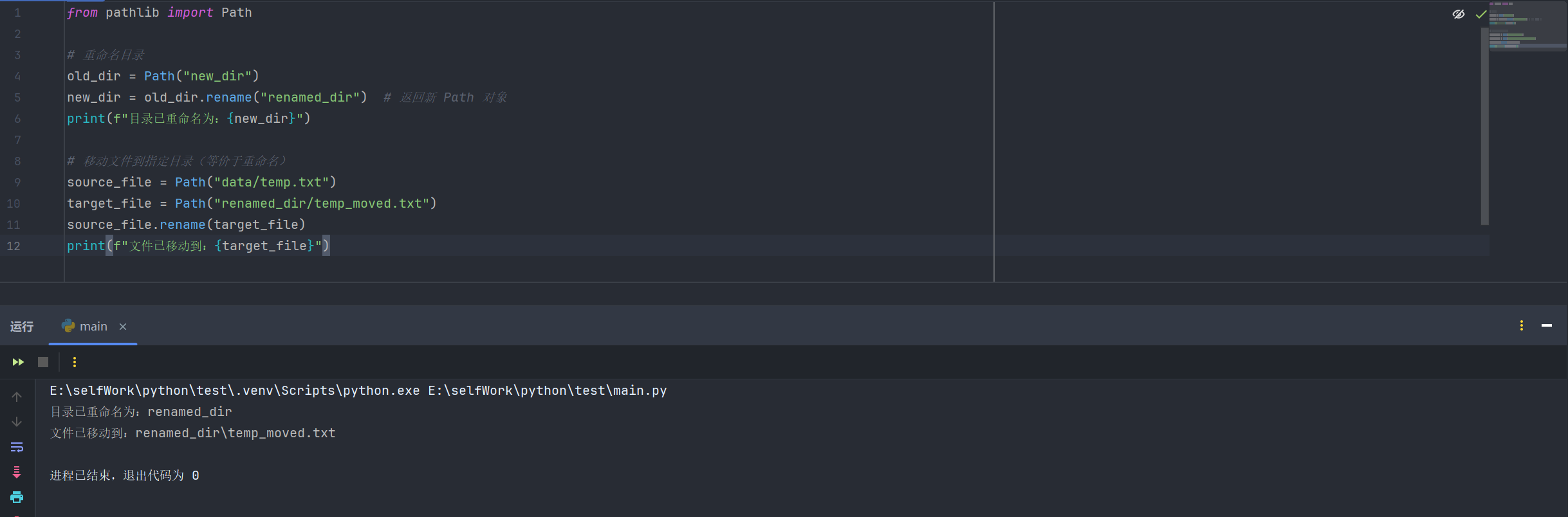
from pathlib import Path

# 重命名目录
old_dir = Path("new_dir")
new_dir = old_dir.rename("renamed_dir")  # 返回新 Path 对象
print(f"目录已重命名为:{new_dir}")

# 移动文件到指定目录(等价于重命名)
source_file = Path("data/temp.txt")
target_file = Path("renamed_dir/temp_moved.txt")
source_file.rename(target_file)
print(f"文件已移动到:{target_file}")
- 删除目录 / 文件
from pathlib import Path

#删除文件
target_file = Path("renamed_dir/temp_moved.txt")
target_file.unlink(missing_ok=True)

# 删除空目录(目录非空会报错)
empty_dir = Path("data/logs/2025")
empty_dir.rmdir()

# 递归删除非空目录(谨慎使用!)
def delete_dir(dir_path: Path):
    if dir_path.is_dir():
        for item in dir_path.iterdir():
            if item.is_file():
                item.unlink()
            else:
                delete_dir(item)
        dir_path.rmdir()

delete_dir(Path("data"))
10.读取文件内容
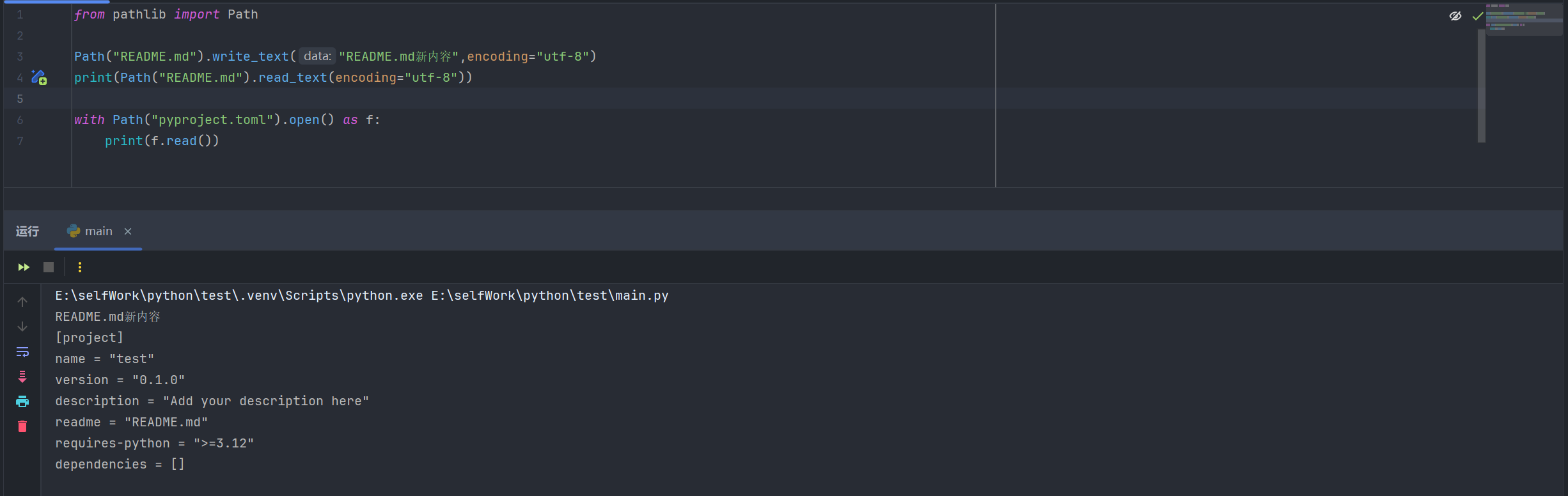
from pathlib import Path

Path("README.md").write_text("README.md新内容",encoding="utf-8")
print(Path("README.md").read_text(encoding="utf-8"))

with Path("pyproject.toml").open() as f:
    print(f.read())
四、Path路径属性
| 属性 | 说明 | 代码示例 | 结果(Unix) |
|---|---|---|---|
| parts | 路径组件元组 | Path("/usr/bin/python3").parts | ('/', 'usr', 'bin', 'python3') |
| drive | 驱动器 / UNC 共享名 | Path("C:/Windows").drive | Unix: ""windows: 'C:' |
| root | 根路径 | Path("/etc").root | '/' |
| anchor | 驱动器 + 根路径 | Path("C:/Windows").anchor | Unix: ""windows: 'C:\\' |
| parents | 祖先路径序列(支持切片和负索引) | Path("a/b/c.py").parents[0] | PosixPath('a/b') |
| parent | 直接父路径 | Path("a/b/c.py").parent | PosixPath('a/b') |
| name | 最后一个组件(文件名 / 目录名) | Path("a/b/c.py").name | 'c.py' |
| stem | 文件名(不含后缀) | Path("a/b/c.tar.gz").stem | 'c.tar' |
| suffix | 文件后缀(最后一个) | Path("a/b/c.tar.gz").suffix | '.gz' |
| suffixes | 所有后缀列表 | Path("a/b/c.tar.gz").suffixes | ['.tar', '.gz'] |
五、路径判断方法
| 方法 | 说明 |
|---|---|
is_absolute() | 判断是否为绝对路径 |
is_relative_to(other) | 判断是否相对于other路径(3.9+,3.12弃用多参数) |
is_reserved() | 判断是否为 Windows 保留路径(Unix 始终返回False) |
exists(follow_symlinks=True) | 判断路径是否存在(3.12+ 支持控制符号链接) |
is_file() | 判断是否为普通文件(或指向文件的符号链接) |
is_dir() | 判断是否为目录(或指向目录的符号链接) |
is_symlink() | 判断是否为符号链接 |
is_junction() | 判断是否为 Windows 接合点(3.12+) |
is_mount() | 判断是否为挂载点(3.7+,3.12+ 支持 Windows) |
is_socket() | 判断是否为 Unix 套接字文件 |
is_fifo() | 判断是否为 FIFO 管道文件 |
is_block_device() | 判断是否为块设备 |
is_char_device() | 判断是否为字符设备 |
samefile(other_path) | 判断是否与other_path指向同一文件(3.5+) |
六、路径操作方法
| 方法 | 说明 | 代码示例 |
|---|---|---|
joinpath(*pathsegments) | 拼接路径(等价于/运算符) | Path("/etc").joinpath("passwd") → /etc/passwd |
with_name(name) | 修改文件名(保留路径) | Path("a/b/c.py").with_name("d.txt") → a/b/d.txt |
with_stem(stem) | 修改文件名(保留后缀,3.9+) | Path("a/b/c.tar.gz").with_stem("e") → a/b/e.gz |
with_suffix(suffix) | 修改后缀(空字符串移除后缀) | Path("a/b/c.py").with_suffix(".txt") → a/b/c.txt |
with_segments(*pathsegments) | 重构路径组件(3.12+) | Path("a/b/c").with_segments("x", "y") → x/y |
relative_to(other, walk_up=False) | 计算相对路径(3.12+ 支持walk_up=True生成…/) | Path("/etc/passwd").relative_to("/usr", walk_up=True) → ../etc/passwd |
match(pattern,case_sensitive=None) | 匹配 glob 模式(3.12+ 支持大小写控制) | Path("a/b.py").match("*.py") → True |
expanduser() | 扩展和user路径(3.5+) | Path("~/docs").expanduser() → /home/user/docs |
absolute() | 转为绝对路径(不解析符号链和…) | Path("a/b").absolute() → /current/dir/a/b |
resolve(strict=False) | 绝对化并解析符号链接/…(3.6+ 支持strict) | Path("docs/../setup.py").resolve() → /current/dir/setup.py |
readlink() | 返回符号链接指向的路径(3.9+) | Path("mylink").readlink() → setup.py |
七、文件 I/O 方法
| 方法 | 说明 | 代码示例 |
|---|---|---|
open(mode='r', **kwargs) | 打开文件(等价于内置open) | with Path("a.txt").open() as f: f.read() |
read_text(encoding=None,errors=None) | 读取文本内容(3.5+) | Path("a.txt").read_text() → '文件内容' |
write_text(data, encoding=None, **kwargs) | 写入文本(覆盖现有文件,3.5+) | Path("a.txt").write_text("新内容") → 返回字节数 |
read_bytes() | 读取二进制内容(3.5+) | Path("a.bin").read_bytes() → b'二进制数据' |
write_bytes(data) | 写入二进制(覆盖现有文件,3.5+) | Path("a.bin").write_bytes(b'新数据') → 返回字节数 |
八、文件属性与权限方法
| 方法 | 说明 | 代码示例 |
|---|---|---|
stat(follow_symlinks=True) | 获取文件状态(3.10+ 支持控制符号链接) | Path("a.txt").stat().st_size → 文件大小 |
lstat() | 获取文件状态(不跟随符号链接) | Path("mylink").lstat() → 符号链接本身的状态 |
owner() | 返回文件所有者用户名 | Path("a.txt").owner() → 'user' |
group() | 返回文件所属组名 | Path("a.txt").group() → 'users' |
chmod(mode, follow_symlinks=True) | 修改文件权限(3.10+ 支持控制符号链接) | Path("a.txt").chmod(0o444) → 只读权限 |
lchmod(mode) | 修改符号链接权限(不跟随目标) | Path("mylink").lchmod(0o777) |
九、目录操作方法
| 方法 | 说明 | 代码示例 |
|---|---|---|
iterdir() | 遍历目录下的文件/子目录(不递归) | [x for x in Path(".").iterdir() if x.is_dir()] |
glob(pattern, case_sensitive=None) | 匹配目录下的文件(支持**递归,3.12+ 支持大小写控制) | list(Path(".").glob("**/*.py")) → 所有Python文件 |
rglob(pattern, case_sensitive=None) | 递归匹配(等价于glob("**/pattern"),3.12+ 支持大小写控制) | list(Path(".").rglob("*.txt")) → 所有子目录的TXT文件 |
walk(top_down=True, on_error=None, follow_symlinks=False) | 递归遍历目录树(3.12+) | for root, dirs, files in Path("project").walk(): ... |
touch(mode=0o666, exist_ok=True) | 创建空文件(已存在则更新修改时间) | Path("new.txt").touch() |
mkdir(mode=0o777, parents=False, exist_ok=False) | 创建目录(parents=True递归创建父目录,3.5+ 支持exist_ok) | Path("a/b/c").mkdir(parents=True, exist_ok=True) |
symlink_to(target, target_is_directory=False) | 创建符号链接(Windows需指定目标类型) | Path("link").symlink_to("target.py") |
hardlink_to(target) | 创建硬链接(3.10+) | Path("hardlink").hardlink_to("target.py") |
rename(target) | 重命名文件/目录(3.8+ 返回新Path) | Path("old.txt").rename("new.txt") → PosixPath('new.txt') |
replace(target) | 重命名文件/目录(无条件覆盖,3.8+ 返回新Path) | Path("old.txt").replace("exist.txt") |
unlink(missing_ok=False) | 删除文件/符号链接(3.8+ 支持missing_ok) | Path("a.txt").unlink(missing_ok=True) |
rmdir() | 删除空目录(目录非空则报错) | Path("empty_dir").rmdir() |
十、与 os 模块的对应关系
| os.path 函数 | 说明 | pathlib 替代方案 | 替代方案说明 |
|---|---|---|---|
os.path.dirname(path) | 返回路径的目录部分 | Path(path).parent | 获取路径的直接父目录 |
os.path.basename(path) | 返回路径的最后一个组件(文件名/目录名) | Path(path).name | 获取路径的最后一个组件 |
os.path.splitext(path) | 拆分文件名与后缀(返回元组 (stem, suffix)) | Path(path).stem / Path(path).suffix | stem 为文件名(不含后缀),suffix 为最后一个后缀 |
os.path.join(a, b) | 拼接多个路径组件 | Path(a) / b 或 Path(a).joinpath(b) | 支持运算符 / 或 joinpath 方法拼接路径 |
os.path.isabs(path) | 判断路径是否为绝对路径 | Path(path).is_absolute() | 检查路径是否为绝对路径 |
os.path.relpath(path, start) | 计算从 start 到 path 的相对路径 | Path(path).relative_to(start) | 生成相对于 start 路径的相对路径 |
os.path.expanduser(path) | 扩展路径中的 ~(用户主目录)和 ~user | Path(path).expanduser() | 解析路径中的用户主目录占位符 |
os.path.realpath(path) | 返回解析符号链接后的绝对路径 | Path(path).resolve() | 绝对化路径并解析符号链接和 .. |
os.path.abspath(path) | 返回路径的绝对路径(不解析符号链接) | Path(path).absolute() | 转换为绝对路径(保留符号链接和 ..) |
os.listdir(path) | 列出目录下的所有条目(返回字符串列表) | list(Path(path).iterdir()) | 返回目录下所有条目的 Path 对象列表 |
os.walk(path) | 递归遍历目录树(生成 (dirpath, dirnames, filenames)) | Path(path).walk() | 递归生成目录树中的所有 Path 对象 |
os.mkdir(path) / os.makedirs(path) | 创建单个目录 / 递归创建目录(含父目录) | Path(path).mkdir() | 支持 parents=True 递归创建父目录 |
os.symlink(target, link) | 创建符号链接(link 指向 target) | Path(link).symlink_to(target) | 创建指向 target 的符号链接 |
os.rename(src, dst) | 重命名或移动文件/目录 | Path(src).rename(dst) | 重命名或移动路径到目标位置 |
os.remove(path) / os.unlink(path) | 删除文件(remove 与 unlink 功能相同) | Path(path).unlink() | 删除文件(支持 missing_ok=True 忽略不存在的文件) |
os.rmdir(path) | 删除空目录 | Path(path).rmdir() | 删除空目录(目录非空时抛出错误) |
十一、os.path方法
| 函数 | 说明 | 代码示例 | 结果 |
|---|---|---|---|
os.path.exists(path) | 判断指定路径(文件/目录)是否存在;失效符号链接返回False,权限不足可能误判 | os.path.exists("/etc/passwd") | True(Unix) |
os.path.join(path1, path2, ...) | 智能拼接路径(适配系统分隔符),后续绝对路径片段会重置拼接起点 | os.path.join("/home", "user", "docs") | '/home/user/docs'(Unix) |
os.path.split(path) | 拆分路径为(目录路径, 文件名/最后部分),路径以分隔符结尾则文件名部分为空 | os.path.split("/home/user/file.txt") | ('/home/user', 'file.txt') |
os.path.dirname(path) | 获取路径的目录部分(等价于split(path)[0]) | os.path.dirname("/home/user/file.txt") | '/home/user' |
os.path.basename(path) | 获取路径的最后部分(文件名/目录名,等价于split(path)[1]),路径以分隔符结尾返回空 | os.path.basename("/home/user/file.txt") | 'file.txt' |
os.path.isdir(path) | 判断路径是否为现有目录,符号链接指向目录返回True | os.path.isdir("/home/user") | True |
os.path.isfile(path) | 判断路径是否为现有常规文件,符号链接指向文件返回True | os.path.isfile("/home/user/file.txt") | True |
os.path.getsize(path) | 返回文件大小(字节),路径不存在/不可访问抛OSError | os.path.getsize("/home/user/file.txt") | 1024(假设文件1KB) |
os.path.abspath(name) | 返回标准化绝对路径(基于当前工作目录),路径无需真实存在 | os.path.abspath("file.txt") | '/home/user/file.txt'(当前目录为/home/user) |
os.path.isabs(path) | 判断是否为绝对路径(Unix以/开头,Windows以盘符/开头) | os.path.isabs("/home") | True(Unix) |
os.path.normpath(path) | 规范路径(折叠重复分隔符、解析..,Windows转斜杠为反斜杠) | os.path.normpath("/home/user/../docs") | '/home/docs' |
os.path.splitext(path) | 拆分路径为(根路径/文件名, 扩展名),扩展名以最后一个.开头 | os.path.splitext("file.tar.gz") | ('file.tar', '.gz') |
os.path.getatime(path) | 返回路径最后访问时间(时间戳),路径不存在/不可访问抛OSError | os.path.getatime("/home/user/file.txt") | 1699999999.123456 |
os.path.getmtime(path) | 返回路径最后修改时间(时间戳),路径不存在/不可访问抛OSError | os.path.getmtime("/home/user/file.txt") | 1699999999.123456 |
os.path.lexists(path) | 判断路径是否存在(含失效符号链接),不支持lstat()时等价于exists() | os.path.lexists("/home/user/broken_symlink") | True(若符号链接存在,无论是否失效) |
os.path.expanduser(path) | 替换路径中“”为当前用户家目录、“user”为指定用户家目录 | os.path.expanduser("~/docs") | '/home/user/docs'(Unix) |
os.path.expandvars(path) | 展开路径中的环境变量(Unix:$name;Windows:%name%) | os.path.expandvars("$HOME/docs") | '/home/user/docs'(Unix,$HOME已定义) |
os.path.getctime(path) | 返回系统级ctime(Unix:元数据修改时间;Windows:创建时间),路径不存在/不可访问抛OSError | os.path.getctime("/home/user/file.txt") | 1699999999.123456(示例时间戳) |
os.path.islink(path) | 判断路径是否为现有符号链接,不支持符号链接的平台返回False | os.path.islink("/home/user/symlink") | True(若为有效符号链接) |
os.path.ismount(path) | 判断路径是否为挂载点(Unix检测设备号/inode;Windows盘符/UNC路径为挂载点) | os.path.ismount("/") | True(Unix根目录) |
os.path.commonpath(paths) | 返回多个路径的最长有效公共子路径,混合绝对/相对路径、跨驱动器抛ValueError | os.path.commonpath(["/home/user/docs", "/home/user/photos"]) | '/home/user' |
os.path.commonprefix(list) | 逐字符返回多个路径的最长公共前缀(可能为无效路径) | os.path.commonprefix(["/home/user", "/home/docs"]) | '/home/' |
os.path.relpath(path, start=os.curdir) | 返回从start到path的相对路径,Windows跨驱动器抛ValueError | os.path.relpath("/home/user/docs", "/home") | 'user/docs' |
os.path.samefile(path1, path2) | 通过设备号和inode判断是否指向同一文件/目录,访问失败抛异常 | os.path.samefile("/home/user/file.txt", "/home/user/link.txt") | True(若link.txt是file.txt的硬链接) |
os.path.sameopenfile(fp1, fp2) | 判断两个文件描述符是否指向同一文件 | f1 = open("file.txt"); f2 = open("file.txt"); os.path.sameopenfile(f1.fileno(), f2.fileno()) | True |
os.path.samestat(stat1, stat2) | 判断两个stat元组是否指向同一文件 | stat1 = os.stat("file1.txt"); stat2 = os.stat("file2.txt"); os.path.samestat(stat1, stat2) | False(不同文件) |
os.path.splitdrive(path) | 拆分路径为(驱动器/挂载点, 剩余路径),无驱动器系统返回(空串, 原路径) | os.path.splitdrive("C:/Windows/System32") | ('C:', '/Windows/System32')(Windows) |
os.path.splitroot(path) | 拆分路径为(驱动器/挂载点, 根分隔符, 剩余路径),POSIX系统驱动器部分为空 | os.path.splitroot("C:/Windows") | ('C:', '/', 'Windows')(Windows) |
os.path.realpath(path, strict=False) | 返回消除符号链接后的规范路径,strict=True时求值失败抛异常 | os.path.realpath("/home/user/symlink") | '/home/user/real_file.txt'(符号链接指向的真实路径) |
os.path.isjunction(path) | 判断路径是否为现有目录连接点,不支持连接点的平台返回False(3.12+) | os.path.isjunction("C:/Junction") | True(Windows下有效连接点) |
os.path.isdevdrive(path) | 判断路径是否位于Windows Dev驱动器,非Windows平台返回False(3.12+) | os.path.isdevdrive("D:/Dev/file.txt") | True(若D:是Dev驱动器) |
os.path.supports_unicode_filenames | 常量,标识当前文件系统是否支持Unicode文件名 | os.path.supports_unicode_filenames | True(多数现代系统) |






 扫一扫
扫一扫


 877
877

 被折叠的 条评论
为什么被折叠?
被折叠的 条评论
为什么被折叠?
 到【灌水乐园】发言





