





 本文详细介绍了如何在React项目中使用TS实现路由缓存,包括配置ReactRouter、React-Activation库以及解决手动控制缓存、滚动位置保存等问题,提供了完整代码实例。
夸克资源分享:
表情包:https://pan.quark.cn/s/5b9ddeb237fe
工具箱:https://pan.quark.cn/s/aa2d6a730482,图吧、美蛋、路遥、入梦等
Fiddler Everywhere抓包:https://pan.quark.cn/s/6b1e2fbae019,
Adobe:https://pan.quark.cn/s/13e39cfeaadb,先看安装教程
JetBranis开发者工具:https://pan.quark.cn/s/16e94dcff1f7,先看安装教程下的jetbra教程
逆向工具:https://pan.quark.cn/s/50e93c8ca54c
前端项目搭建集锦:https://blog.youkuaiyun.com/randy521520/article/details/146998467
react PC端项目构建TS,react@18.2.0+antd+vite+axios+redux+sass+ts 完整版代码下载:
https://download.youkuaiyun.com/download/randy521520/88922625
react PC端项目构建,react@18.2.0+antd+vite+axios+redux+sass完整版代码下载:
https://download.youkuaiyun.com/download/randy521520/88922569
react移动端项目构建TS,react@18.2.0+react-vant+vite+axios+redux+sass+ts完整版代码下载:
https://download.youkuaiyun.com/download/randy521520/88917557
react移动端项目构建,react@18.2.0+react-vant+vite+axios+redux+sass完整版代码下载:
https://download.youkuaiyun.com/download/randy521520/88917543
一、简介
React 路由缓存是指在使用 React Router 或其他路由管理库时,通过一些技术手段来缓存已经加载的页面组件,以便在用户再次访问这些页面时能够更快地呈现内容,提升用户体验和性能。
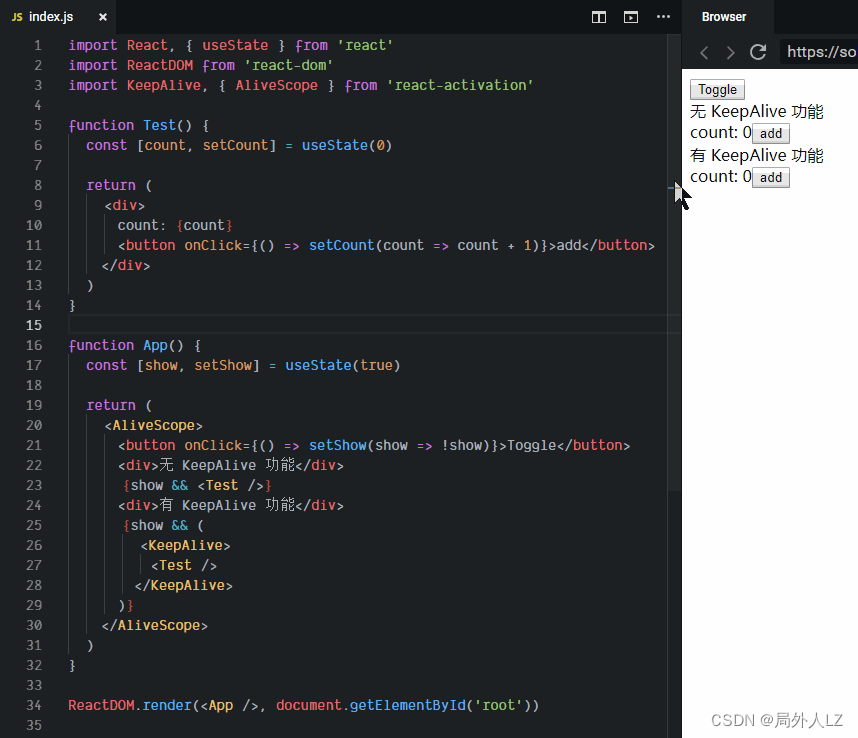
二、配置路由缓存
1.router.jsx,创建路由
import {Suspense, lazy} from "react";
import {Navigate, useRoutes} from "react-router-dom";
import KeepAlive from "react-activation";

const routes = [{
    path: '/',
    element: <Navigate to="/home" replace/>,
}, {
    id: "home",
    path: '/home',
    component: lazy(() => import('@pages/home/home.jsx'))
}, {
    id: "list",
    path: '/list',
    component: lazy(() => import('@pages/list/list.jsx'))
}];

const generateRouter = (routers) => {
    return routers.map((item) => {
        if (item.children) {
            item.children = generateRouter(item.children)
        }
        item.element = <KeepAlive cacheKey={item.path} id={item.path} name={item.path}>
            <Suspense>
                {item.component ? <item.component/> : item.element}
            </Suspense>
        </KeepAlive>;
        return item
    })
};

const RootRouter = () => useRoutes(generateRouter(routes));

export default RootRouter;
2.App.jsx,使用路由
import RootRouter from "@/router.jsx";

function App() {
    return (
        <>
            <RootRouter/>
        </>
    )
}

export default App
3.main.js,使用路由缓存
import ReactDOM from "react-dom/client";
import {BrowserRouter} from "react-router-dom";
import App from "./App.jsx";
import {AliveScope} from "react-activation";

ReactDOM.createRoot(document.getElementById('root')).render(
  <BrowserRouter>
      <AliveScope>
          <App />
      </AliveScope>
  </BrowserRouter>,
)
三、路由缓存生命周期
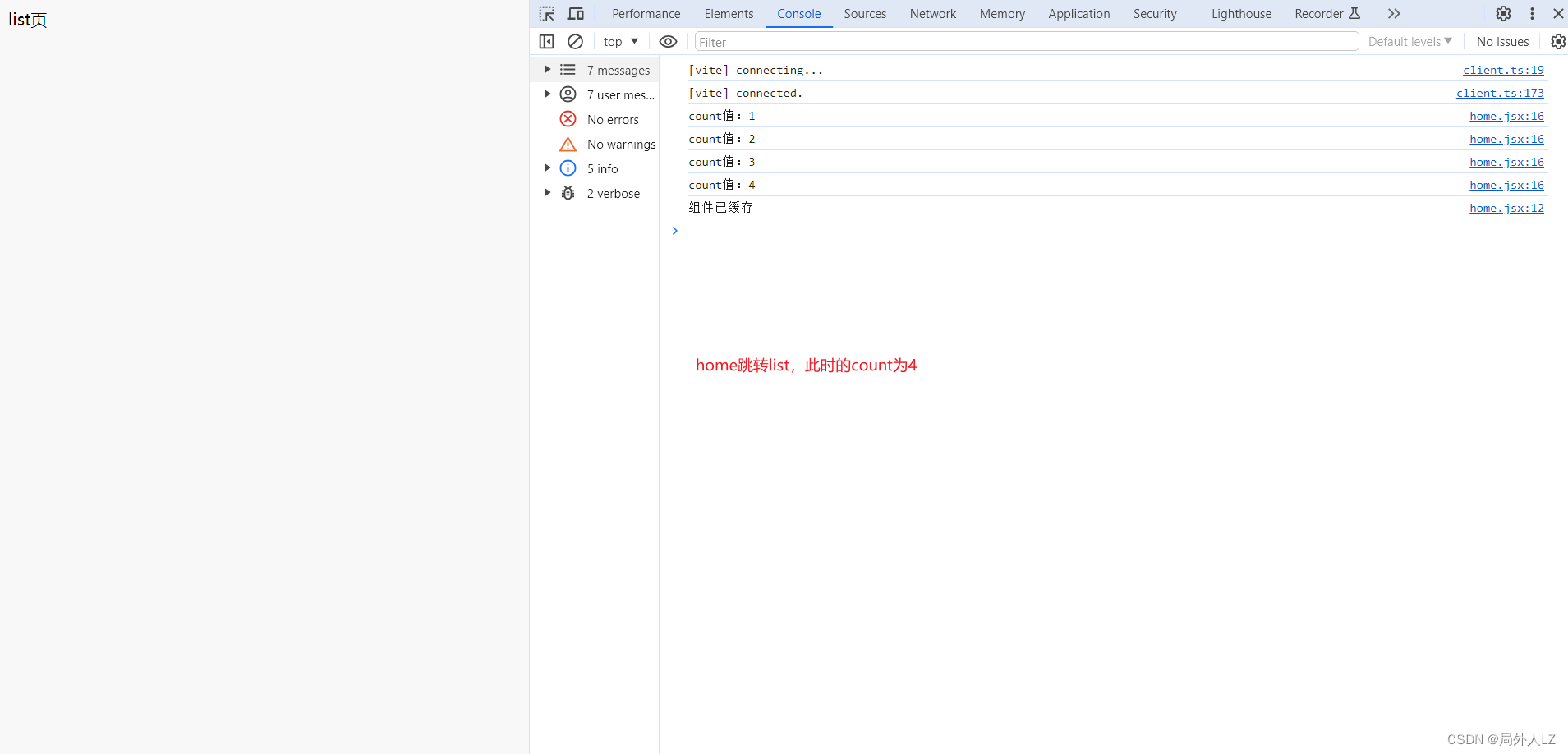
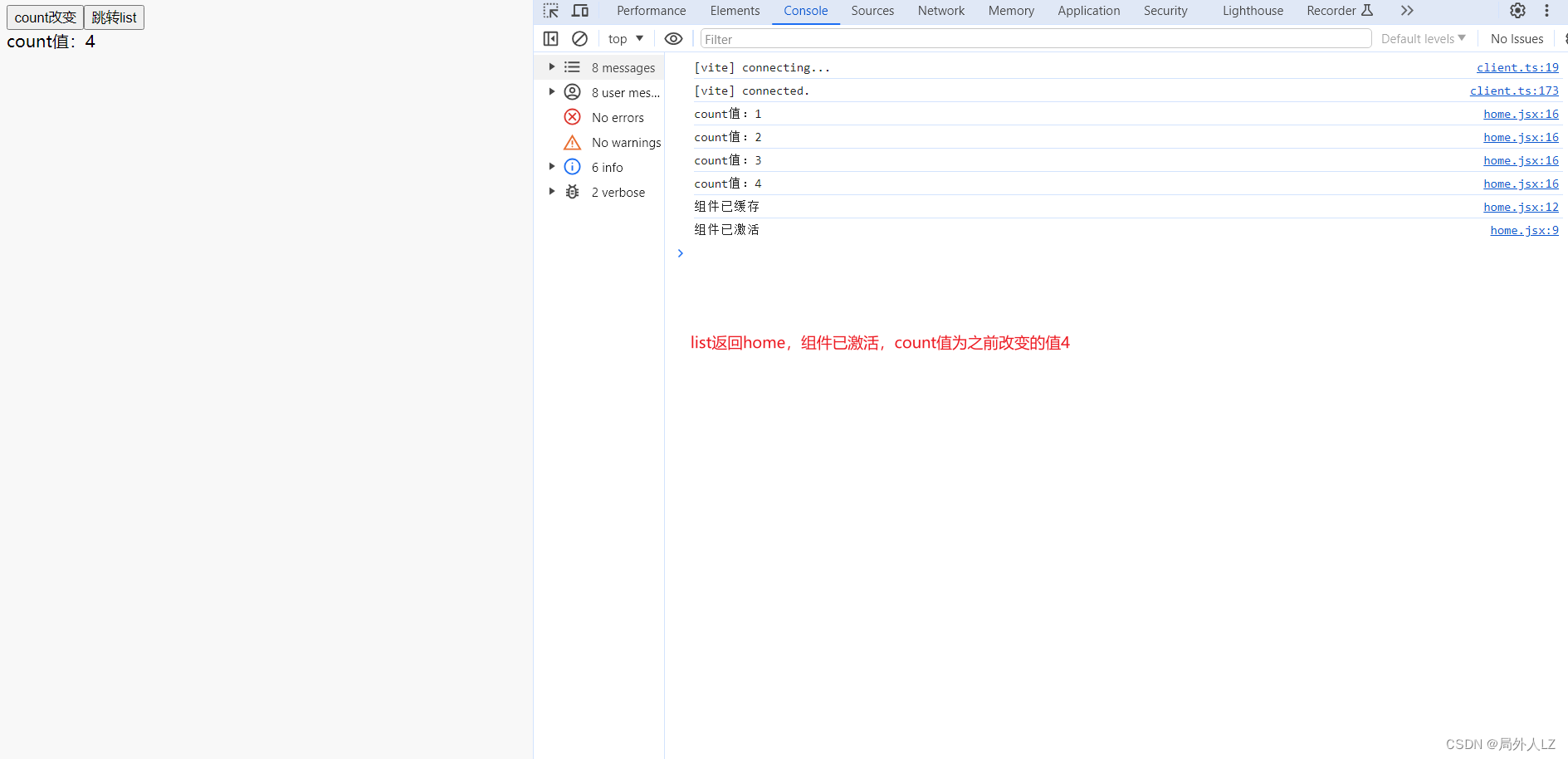
1.useActivate(()=>{}):组件激活,第一次进入组件,不会进入该生命周期,因为组件未缓存
2.useUnactivate(()=>{}): 组件离开,缓存组件
3.案例,class组件可使用componentDidActivate 与 componentWillUnactivate
import {useActivate, useUnactivate} from "react-activation";
import {useState} from "react";
import {useNavigate} from "react-router-dom";

const Home = () => {
    const navigate = useNavigate();
    let [count, setCount] = useState(0);
    useActivate(() => {
        console.log('组件已激活')
    })
    useUnactivate(() => {
        console.log('组件已缓存')
    })
    const onCountChange = ()=>{
        count++;
        console.log(`count值:${count}`)
        setCount(count)
    }

    const goRouter = ()=>{
        navigate('/list')
    }

    return (<>
        <button onClick={onCountChange}>count改变</button>
        <button onClick={goRouter}>跳转list</button>
        <div>count值:{count}</div>
    </>)
}

export default Home;
四、手动控制缓存
1.const { drop, dropScope, refresh,refreshScope,clear, getCachingNodes } = useAliveController()
- drop(name):卸载缓存,需给<KeepAlive>加上name,如果没有缓存但是需要清除缓存状态需使用refresh(name)。仅卸载命中 <KeepAlive> 的第一层内容,不会卸载 <KeepAlive> 中嵌套的、未命中的<KeepAlive>
- dropScope(name):卸载缓存,,需给<KeepAlive>加上name,如果没有缓存但是需要清除缓存状态需使用refresh(name)。将卸载命中 <KeepAlive> 的所有内容,包括 <KeepAlive> 中嵌套的所有 <KeepAlive>
- refresh(name):刷新缓存,仅刷新命中 <KeepAlive> 的第一层内容,不会刷新 <KeepAlive> 中嵌套的、未命中的 <KeepAlive>
- refreshScope(name):刷新缓存,将刷新命中<KeepAlive> 的所有内容,包括 <KeepAlive> 中嵌套的所有 <KeepAlive>
- clear():将清空所有缓存中的 KeepAlive
- getCachingNodes():获取所有缓存中的节点
2.class组件需使用withAliveScope装饰器
@withAliveScope
class App extends Component {
  render() {
    const { drop, dropScope, clear, getCachingNodes } = this.props

    return (
      ...
    )
  }
}
五、自动缓存
给需要控制缓存的 <KeepAlive /> 标签增加 when 属性
1.当 when 类型为 Boolean 时
- true: 卸载时缓存
- false: 卸载时不缓存
<KeepAlive when={true}>
2.当 when 类型为 Array 时
- 第 1 位参数表示是否需要在卸载时缓存
- 第 2 位参数表示是否卸载 <KeepAlive> 的所有缓存内容,包括 <KeepAlive> 中嵌套的所有 <KeepAlive>
<KeepAlive when={[false, true]}>
   <KeepAlive>...</KeepAlive>
</KeepAlive>
3.当 when 类型为 Function 时,可返回Boolean或 Array
<KeepAlive when={() => true}>
<KeepAlive when={() => [false, true]}>
六、多份缓存,用于动态参数的路由
1./item 路由会按 id 来做不同呈现,但只能保留同一份缓存
<Route
path="/item/:id"
  render={props => (
    <KeepAlive>
      <Item {...props} />
    </KeepAlive>
  )}
/>
2.解决方法,给KeepAlive增加id
<Route
  path="/item/:id"
  render={props => (
    <KeepAlive id={props.match.params.id}>
      <Item {...props} />
    </KeepAlive>
  )}
/>
七、保存滚动位置
1.KeepAlive组件增加saveScrollPosition=参数
<KeepAlive saveScrollPosition={true} />
2.如果组件共享了屏幕滚动容器如 document.body 或 document.documentElement, 将 saveScrollPosition 属性设置为 “screen”
<KeepAlive saveScrollPosition="screen" />
八、使用react-activation存在的问题
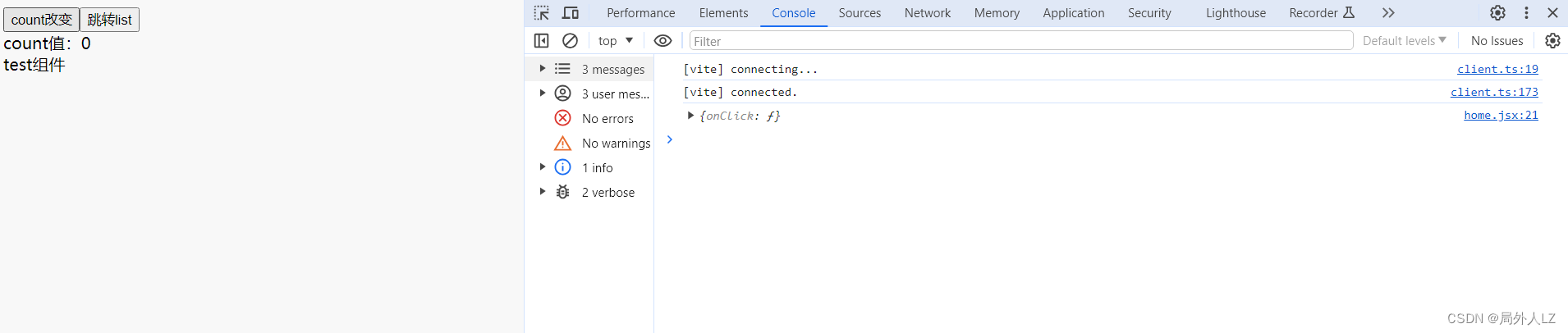
1.<KeepAlive /> 中需要有一个将 children 传递到 <AliveScope /> 的动作,故真实内容的渲染会相较于正常情况慢一拍,将会对严格依赖生命周期顺序的功能造成一定影响,获取组件ref时可能会获取不到,如下面代码:刷新页面后useEffect中并未拿到Test的ref
import KeepAlive, {useActivate, useUnactivate} from "react-activation";
import {forwardRef, useEffect, useImperativeHandle, useRef, useState} from "react";
import {useNavigate} from "react-router-dom";

const _Test = (props,ref)=>{
    useImperativeHandle(ref,()=>({
        onClick:()=>{
            console.log(1)
        }
    }))
    return <>test组件</>
};
const Test = forwardRef(_Test);

const Home = () => {
    const navigate = useNavigate();
    let [count, setCount] = useState(0);
    let testRef = useRef();
    useEffect(() => {
        console.log(testRef.current)
    }, []);

    useActivate(() => {
        console.log('组件已激活')
    })
    useUnactivate(() => {
        console.log('组件已缓存')
    })
    const onCountChange = ()=>{
        count++;
        console.log(`count值:${count}`)
        setCount(count)
    }

    const goRouter = ()=>{
        navigate('/list')
    }

    return (<>
        <button onClick={onCountChange}>count改变</button>
        <button onClick={goRouter}>跳转list</button>
        <div>count值:{count}</div>
        <KeepAlive>
            <Test ref={testRef}/>
        </KeepAlive>
    </>)
}

export default Home;

- 函数组件解决办法使用定时器延时获取ref
import KeepAlive, {useActivate, useUnactivate} from "react-activation";
import {forwardRef, useEffect, useImperativeHandle, useRef, useState} from "react";
import {useNavigate} from "react-router-dom";

const _Test = (props,ref)=>{
    useImperativeHandle(ref,()=>({
        onClick:()=>{
            console.log(1)
        }
    }))
    return <>test组件</>
};
const Test = forwardRef(_Test);

const Home = () => {
    const navigate = useNavigate();
    let [count, setCount] = useState(0);
    let testRef = useRef();
    useEffect(() => {
        setTimeout(()=>{
            console.log(testRef.current)
        },30)
    }, []);

    useActivate(() => {
        console.log('组件已激活')
    })
    useUnactivate(() => {
        console.log('组件已缓存')
    })
    const onCountChange = ()=>{
        count++;
        console.log(`count值:${count}`)
        setCount(count)
    }

    const goRouter = ()=>{
        navigate('/list')
    }

    return (<>
        <button onClick={onCountChange}>count改变</button>
        <button onClick={goRouter}>跳转list</button>
        <div>count值:{count}</div>
        <KeepAlive>
            <Test ref={testRef}/>
        </KeepAlive>
    </>)
}

export default Home;
- class组件解决方案可采用@withActivation装饰器
@withActivation
class Test extends Component {
  componentDidMount() {
    console.log(this.outside) // will log <div /> instance
    console.log(this.inside) // will log <div /> instance
  }

  render() {
    return (
      <div>
        <div
          ref={ref => {
            this.outside = ref
          }}
        >
          Outside KeepAlive
        </div>
        <KeepAlive>
          <div
            ref={ref => {
              this.inside = ref
            }}
          >
            Inside KeepAlive
          </div>
        </KeepAlive>
      </div>
    )
  }
}
2.官方还介绍到对 Context 的破坏性影响、对依赖于 React 层级的功能造成影响,我使用的react版本是V18.2.0、react-activation版本是V0.12.4,暂时没遇到,有遇到的伙伴可查看git文档:https://github.com/CJY0208/react-activation/blob/HEAD/README_CN.md






 扫一扫
扫一扫


 1523
1523

 被折叠的 条评论
为什么被折叠?
被折叠的 条评论
为什么被折叠?
 到【灌水乐园】发言





