


 本文介绍了使用EllipticTitan硬件钱包通过生成和扫描QR码来实现离线交易签名的过程,这一概念源于多年前,利用硬件设备确保价值操作的安全性。
air-gapped, keystone and ellipal diagram:
Making transactions The principle of signing a transaction with the ELLIPAL Titan A transaction can be easily created via the interface in the ELLIPAL app. A QR code is then generated, which must be scanned using the hardware wallet’s camera. This sends all the necessary information to the hardware wallet, which can then sign the transaction. This in turn generates a QR code that is scanned by app. Then the transaction is sent via the app to the corresponding network.
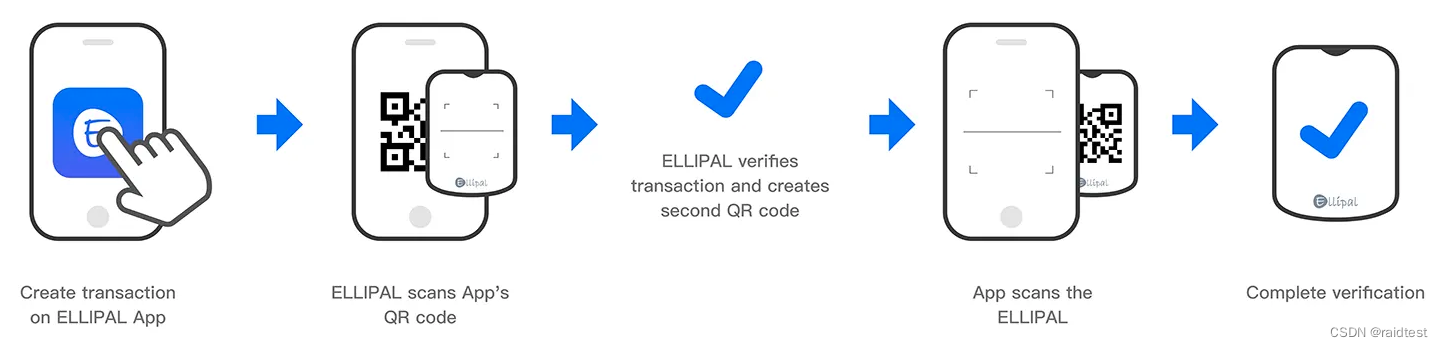
in fact, this is a idea many years ago , the idea is the hardware dog. Use the hard dog to sign any valueable action, such as transaction. Only enhanced with QR code.
The world still base on history.





 扫一扫
扫一扫


 711
711

 被折叠的 条评论
为什么被折叠?
被折叠的 条评论
为什么被折叠?
 到【灌水乐园】发言





