



 本文深入探讨了Android中Fragment与Activity的交互机制,包括Fragment的生命周期、如何在Activity中使用和切换Fragment,以及Fragment和Activity之间的数据传递方式。通过具体代码示例,展示了如何创建、实例化并替换Fragment。
- Fragment有自己的生命周期
- Fragment依赖于Activity
- Fragment通过getActivity()方法可以获取所在Activity;Activity通过FragmentManager的findFragemntById()或findFragemntByTag()获取Fragment
- Fragment和Activity是多对多的关系
AFragment
package com.example.test0508.fragment;

import android.os.Bundle;
import android.view.LayoutInflater;
import android.view.View;
import android.view.ViewGroup;
import android.widget.TextView;

import androidx.annotation.NonNull;
import androidx.annotation.Nullable;
import androidx.fragment.app.Fragment;

import com.example.test0508.R;

public class AFragment extends Fragment {
    private TextView mTvTitle;


    /**
     * 设置布局文件
     */
    @Nullable
    @Override
    public View onCreateView(@NonNull LayoutInflater inflater, @Nullable ViewGroup container, @Nullable Bundle savedInstanceState) {
        View view = inflater.inflate(R.layout.fragment_a,container,false);
        return view;
    }

    /**
     * findViewById 就可以做其他事情
     */
    @Override
    public void onViewCreated(@NonNull View view, @Nullable Bundle savedInstanceState) {
        super.onViewCreated(view, savedInstanceState);
        mTvTitle = view.findViewById(R.id.tv_fragment_a);

    }
}
BFragment
package com.example.test0508.fragment;

import android.os.Bundle;
import android.view.LayoutInflater;
import android.view.View;
import android.view.ViewGroup;
import android.widget.TextView;

import androidx.annotation.NonNull;
import androidx.annotation.Nullable;
import androidx.fragment.app.Fragment;

import com.example.test0508.R;

public class BFragment extends Fragment {
    private TextView mTvTitle;


    /**
     * 设置布局文件
     */
    @Nullable
    @Override
    public View onCreateView(@NonNull LayoutInflater inflater, @Nullable ViewGroup container, @Nullable Bundle savedInstanceState) {
        View view = inflater.inflate(R.layout.fragment_b,container,false);
        return view;
    }

    /**
     * findViewById 就可以做其他事情
     */
    @Override
    public void onViewCreated(@NonNull View view, @Nullable Bundle savedInstanceState) {
        super.onViewCreated(view, savedInstanceState);
        mTvTitle = view.findViewById(R.id.tv_fragment_b);

    }
}
两个fragment对应的layout文件
fragment_a.xml
<?xml version="1.0" encoding="utf-8"?>
<LinearLayout xmlns:android="http://schemas.android.com/apk/res/android"
    android:orientation="vertical" android:layout_width="match_parent"
    android:layout_height="match_parent"
    android:gravity="center"
    >

    <TextView
        android:id="@+id/tv_fragment_a"
        android:layout_width="match_parent"
        android:layout_height="wrap_content"
        android:textSize="20sp"
        android:text="我是Fragment A"
        android:gravity="center"
        />

</LinearLayout>
fragment_b.xml
<?xml version="1.0" encoding="utf-8"?>
<LinearLayout xmlns:android="http://schemas.android.com/apk/res/android"
    android:orientation="vertical" android:layout_width="match_parent"
    android:layout_height="match_parent"
    android:gravity="center"
    >

    <TextView
        android:id="@+id/tv_fragment_b"
        android:layout_width="match_parent"
        android:layout_height="wrap_content"
        android:textSize="20sp"
        android:text="我是Fragment B"
        android:gravity="center"
        />

</LinearLayout>
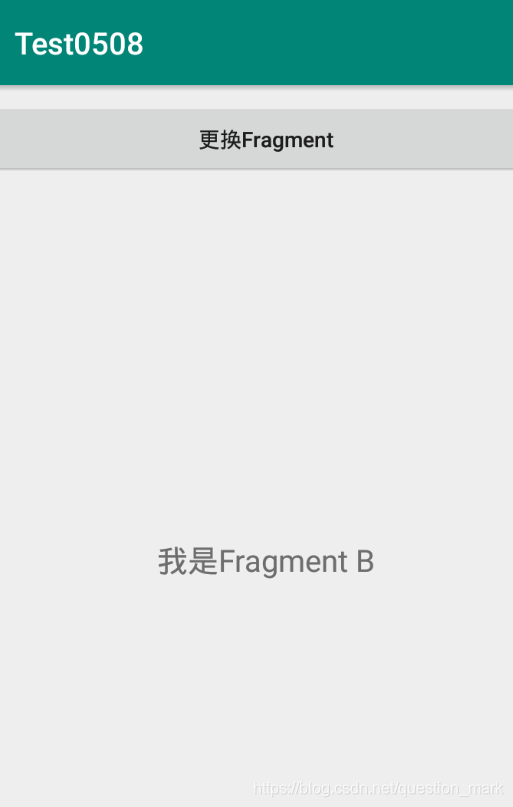
ContainerActivity以及对应的页面布局文件
package com.example.test0508.fragment;

import androidx.appcompat.app.AppCompatActivity;

import android.os.Bundle;
import android.view.View;
import android.widget.Button;

import com.example.test0508.R;

public class ContainerActivity extends AppCompatActivity {

    private AFragment aFragment;
    private Button mBtnChange;
    private BFragment bFragment;


    @Override
    protected void onCreate(Bundle savedInstanceState) {
        super.onCreate(savedInstanceState);
        setContentView(R.layout.activity_container);
        mBtnChange = findViewById(R.id.btn_change);
        mBtnChange.setOnClickListener(new View.OnClickListener() {
            @Override
            public void onClick(View view) {
                //点击之后替换Fragment
                if (bFragment == null){
                    //需要实例化
                    bFragment = new BFragment();
                }
                getSupportFragmentManager().beginTransaction().replace(R.id.fl_container,bFragment).commitAllowingStateLoss();
            }
        });

        //实例化AFragment
        aFragment = new AFragment();
        //把AFragment添加到Activity中
        getSupportFragmentManager().beginTransaction().add(R.id.fl_container,aFragment).commitAllowingStateLoss();


    }
}
<?xml version="1.0" encoding="utf-8"?>
<RelativeLayout xmlns:android="http://schemas.android.com/apk/res/android"
    android:layout_width="match_parent"
    android:layout_height="match_parent"
    android:paddingTop="10dp"
    >
    <Button
        android:id="@+id/btn_change"
        android:layout_width="match_parent"
        android:layout_height="50dp"
        android:text="更换Fragment"
        android:textAllCaps="false"
        />

    <FrameLayout
        android:id="@+id/fl_container"
        android:layout_width="match_parent"
        android:layout_height="match_parent"
        android:layout_below="@+id/btn_change"
        />


</RelativeLayout>





 扫一扫
扫一扫


 940
940

 被折叠的 条评论
为什么被折叠?
被折叠的 条评论
为什么被折叠?
 到【灌水乐园】发言





