


 文章介绍了如何在SpringBoot应用中通过数据库管理用户,创建用户表,配置SpringSecurity以实现用户登录、授权、访问控制和注销功能,包括自定义AccessDeniedHandler和AuthenticationSuccessHandler等。
1.通过加载数据库管理用户
1.创建用户表主要字段(用户名,用户密码)。
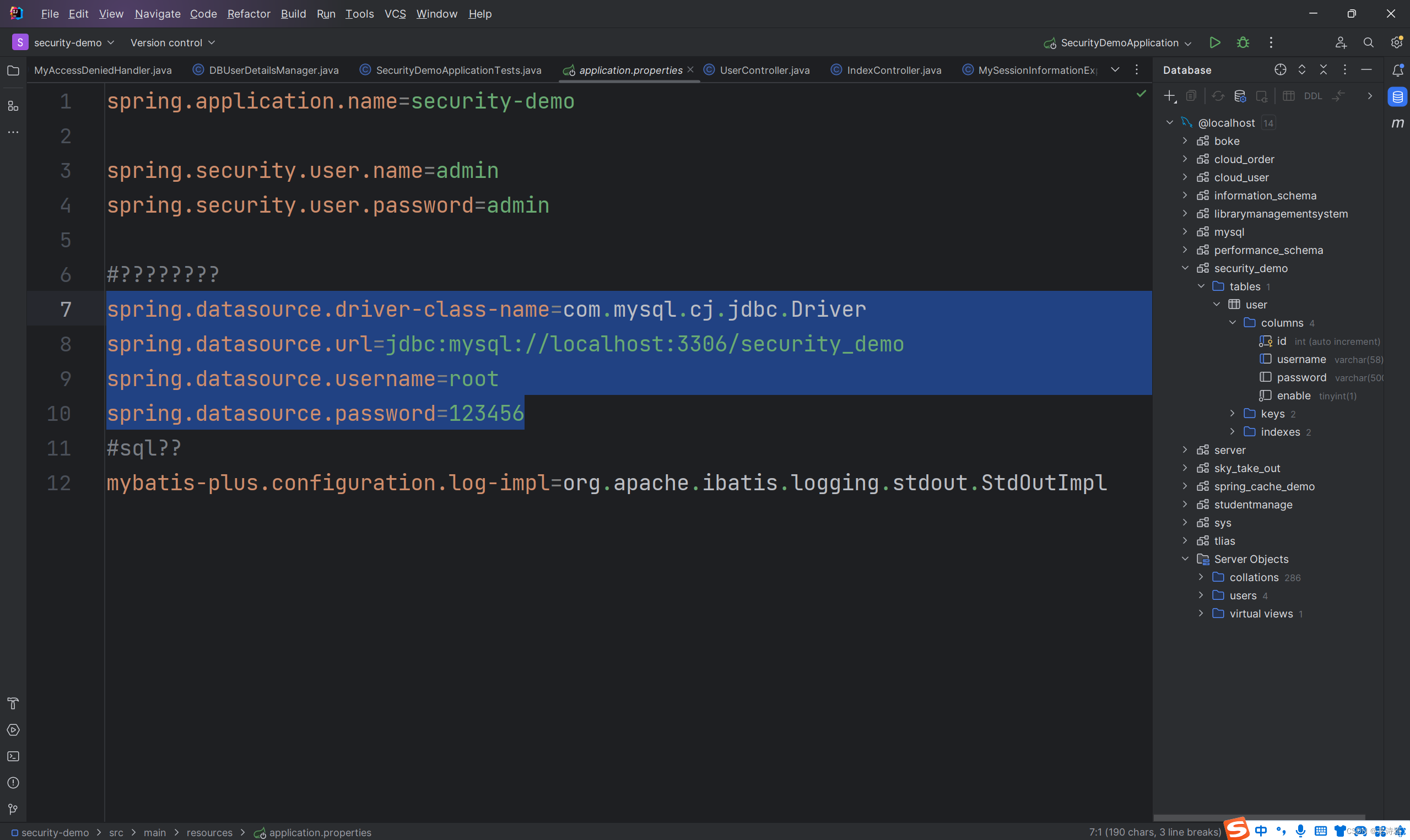
2.springboot application配置数据库连接信息。
2. 创建SpringSecurity配置类
----WebSecurityConfig
package com.example.securitydemo.config;

import org.springframework.context.annotation.Bean;
import org.springframework.context.annotation.Configuration;
import org.springframework.security.config.annotation.method.configuration.EnableMethodSecurity;
import org.springframework.security.config.annotation.web.builders.HttpSecurity;
import org.springframework.security.config.annotation.web.configuration.EnableWebSecurity;
import org.springframework.security.core.GrantedAuthority;
import org.springframework.security.core.authority.SimpleGrantedAuthority;
import org.springframework.security.core.userdetails.User;
import org.springframework.security.core.userdetails.UserDetailsService;
import org.springframework.security.provisioning.InMemoryUserDetailsManager;
import org.springframework.security.web.SecurityFilterChain;

import java.util.Arrays;
import java.util.Collection;

import static org.springframework.security.config.Customizer.withDefaults;

@Configuration
//@EnableWebSecurity  //开启SpringSecurity自定义配置类(在springboot中可以不添加)
@EnableMethodSecurity   //开启基于方法的授权
public class WebSecurityConfig {

    @Bean
    public SecurityFilterChain filterChain(HttpSecurity http) throws Exception {
        http.authorizeRequests(
                authorize -> authorize
//                        .requestMatchers("/user/list").hasAuthority("USER_LIST")
//                        .requestMatchers("/user/add").hasAuthority("USER_ADD")
                        .requestMatchers("/user/**").hasRole("ADMIN")
                        .anyRequest()   //对所有请求开启授权保护
                        .authenticated()    //已认证的请求会被自动授权
              );
            http.formLogin(form -> {
                form //.loginPage("/login").permitAll()   //.permitALl()无需授权即可访问所有界面
                        .successHandler(new MyAuthenticationSuccessHandler())   //认证成功时处理
                        .failureHandler(new MyAuthenticationFailureHandler())

                ;})    //使用表单的方式授权登录
                .httpBasic(withDefaults());   //使用基本方式授权登录

            http.logout(logout -> {
                logout.logoutSuccessHandler(new MyLogoutSuccessHandler());  //注销成功时处理
            });

            http.exceptionHandling(exception ->{
//                exception.authenticationEntryPoint(new MyAuthenticationEntryPoint());
                exception.accessDeniedHandler(new MyAccessDeniedHandler());
            });     //请求未认证处理


        //设置一个账号最大登录数,后面登录的账号会挤掉前面已经登录好的账号
        http.sessionManagement(session -> {
            session.maximumSessions(1).expiredSessionStrategy(new MySessionInformationExpiredStrategy());
        });


        //关闭csrf防御
        http.csrf(csrf -> csrf.disable());
        return http.build();
    }

//    @Bean
//    public UserDetailsService userDetailsService(){
//        // 创建 GrantedAuthority 对象来表示角色
//
//        InMemoryUserDetailsManager manager = new InMemoryUserDetailsManager();
//        manager.createUser(User.withDefaultPasswordEncoder().username("user").password("password").roles("USER").build());
//        return manager;
//    }

    // 可以不在配置类使用添加bean,在DBUserDetailsManager直接添加component

//    @Bean
//    public UserDetailsService userDetailsService(){
//        // 创建 GrantedAuthority 对象来表示角色
//
//        DBUserDetailsManager manager = new DBUserDetailsManager();
//        return manager;
//    }
}
3.配置信息(json格式返回)
1.访问user无访问权限
继承接口AccessDeniedHandler,实现其中的方法handleI()
package com.example.securitydemo.config;

import com.alibaba.fastjson2.JSON;
import jakarta.servlet.ServletException;
import jakarta.servlet.http.HttpServletRequest;
import jakarta.servlet.http.HttpServletResponse;
import org.springframework.security.access.AccessDeniedException;
import org.springframework.security.web.access.AccessDeniedHandler;

import java.io.IOException;
import java.util.HashMap;

public class MyAccessDeniedHandler implements AccessDeniedHandler {
    @Override
    public void handle(HttpServletRequest request, HttpServletResponse response, AccessDeniedException accessDeniedException) throws IOException, ServletException {
        HashMap result = new HashMap<>();
        result.put("code",-1);   //失败
        result.put("message","没有权限");   //
        //将结果转换成json字符串
        String json = JSON.toJSONString(result);
        //返回json数据到前端
        response.setContentType("application/json;charset=UTF-8");
        response.getWriter().println(json);
    }
}
2.登录成功返回
package com.example.securitydemo.config;

import com.alibaba.fastjson2.JSON;
import jakarta.servlet.ServletException;
import jakarta.servlet.http.HttpServletRequest;
import jakarta.servlet.http.HttpServletResponse;
import org.springframework.security.core.Authentication;
import org.springframework.security.core.GrantedAuthority;
import org.springframework.security.web.authentication.AuthenticationSuccessHandler;

import javax.xml.transform.Result;
import java.io.IOException;
import java.util.Collection;
import java.util.HashMap;

public class MyAuthenticationSuccessHandler implements AuthenticationSuccessHandler {
    @Override
    public void onAuthenticationSuccess(HttpServletRequest request, HttpServletResponse response, Authentication authentication) throws IOException, ServletException {

        Object principal = authentication.getPrincipal();   //获取用户身份信息
        //Object credentials = authentication.getCredentials();   //获取用户凭证信息
        //Collection<? extends GrantedAuthority> authorities = authentication.getAuthorities();   //获取用户权限信息


        HashMap result = new HashMap<>();
        result.put("code",0);   //成功
        result.put("message","登录成功");   //
        result.put("data",principal);
        //将结果转换成json字符串
        String json = JSON.toJSONString(result);
        //返回json数据到前端
        response.setContentType("application/json;charset=UTF-8");
        response.getWriter().println(json);
    }
}
3.用户退出登录
package com.example.securitydemo.config;

import com.alibaba.fastjson2.JSON;
import jakarta.servlet.ServletException;
import jakarta.servlet.http.HttpServletRequest;
import jakarta.servlet.http.HttpServletResponse;
import org.springframework.security.core.Authentication;
import org.springframework.security.web.authentication.logout.LogoutSuccessHandler;

import java.io.IOException;
import java.util.HashMap;

public class MyLogoutSuccessHandler implements LogoutSuccessHandler {
    @Override
    public void onLogoutSuccess(HttpServletRequest request, HttpServletResponse response, Authentication authentication) throws IOException, ServletException {
        HashMap result = new HashMap<>();
        result.put("code",0);   //失败
        result.put("message","注销成功");   //
        //将结果转换成json字符串
        String json = JSON.toJSONString(result);
        //返回json数据到前端
        response.setContentType("application/json;charset=UTF-8");
        response.getWriter().println(json);
    }
}
4.用户与多设备
package com.example.securitydemo.config;

import com.alibaba.fastjson2.JSON;
import jakarta.servlet.ServletException;
import jakarta.servlet.http.HttpServletResponse;
import org.springframework.security.web.session.SessionInformationExpiredEvent;
import org.springframework.security.web.session.SessionInformationExpiredStrategy;

import java.io.IOException;
import java.util.HashMap;

public class MySessionInformationExpiredStrategy implements SessionInformationExpiredStrategy {
    @Override
    public void onExpiredSessionDetected(SessionInformationExpiredEvent event) throws IOException, ServletException {
        //创建结果对象
        HashMap result = new HashMap();
        result.put("code", -1);
        result.put("message", "该账号已从其他设备登录");

        //转换成json字符串
        String json = JSON.toJSONString(result);

        HttpServletResponse response = event.getResponse();
        //返回响应
        response.setContentType("application/json;charset=UTF-8");
        response.getWriter().println(json);
    }
}
4.其他
1.前端(SpringSecurity-GitHub)
<!--
  ~ Copyright 2002-2019 the original author or authors.
  ~
  ~ Licensed under the Apache License, Version 2.0 (the "License");
  ~ you may not use this file except in compliance with the License.
  ~ You may obtain a copy of the License at
  ~
  ~      https://www.apache.org/licenses/LICENSE-2.0
  ~
  ~ Unless required by applicable law or agreed to in writing, software
  ~ distributed under the License is distributed on an "AS IS" BASIS,
  ~ WITHOUT WARRANTIES OR CONDITIONS OF ANY KIND, either express or implied.
  ~ See the License for the specific language governing permissions and
  ~ limitations under the License.
  -->

<!DOCTYPE html>
<html xmlns="http://www.w3.org/1999/xhtml" xmlns:th="https://www.thymeleaf.org" xmlns:sec="https://www.thymeleaf.org/thymeleaf-extras-springsecurity5">
<head>
    <title>Hello Spring Security</title>
    <meta charset="utf-8" />
    <link rel="stylesheet" href="/static/css/main.css" th:href="@{/css/main.css}" />
</head>
<body>
<div th:fragment="logout" class="logout" sec:authorize="isAuthenticated()">
    Logged in user: <span sec:authentication="name"></span> |
    Roles: <span sec:authentication="principal.authorities"></span>
    <div>
        <form action="#" th:action="@{/logout}" method="post">
            <input type="submit" value="Logout" />
        </form>
    </div>
</div>
<h1>Hello Spring Security</h1>
<p>This is an unsecured page, but you can access the secured pages after authenticating.</p>
<ul>
    <li>Go to the <a href="/user/index" th:href="@{/user/index}">secured pages</a></li>
</ul>
</body>
</html>
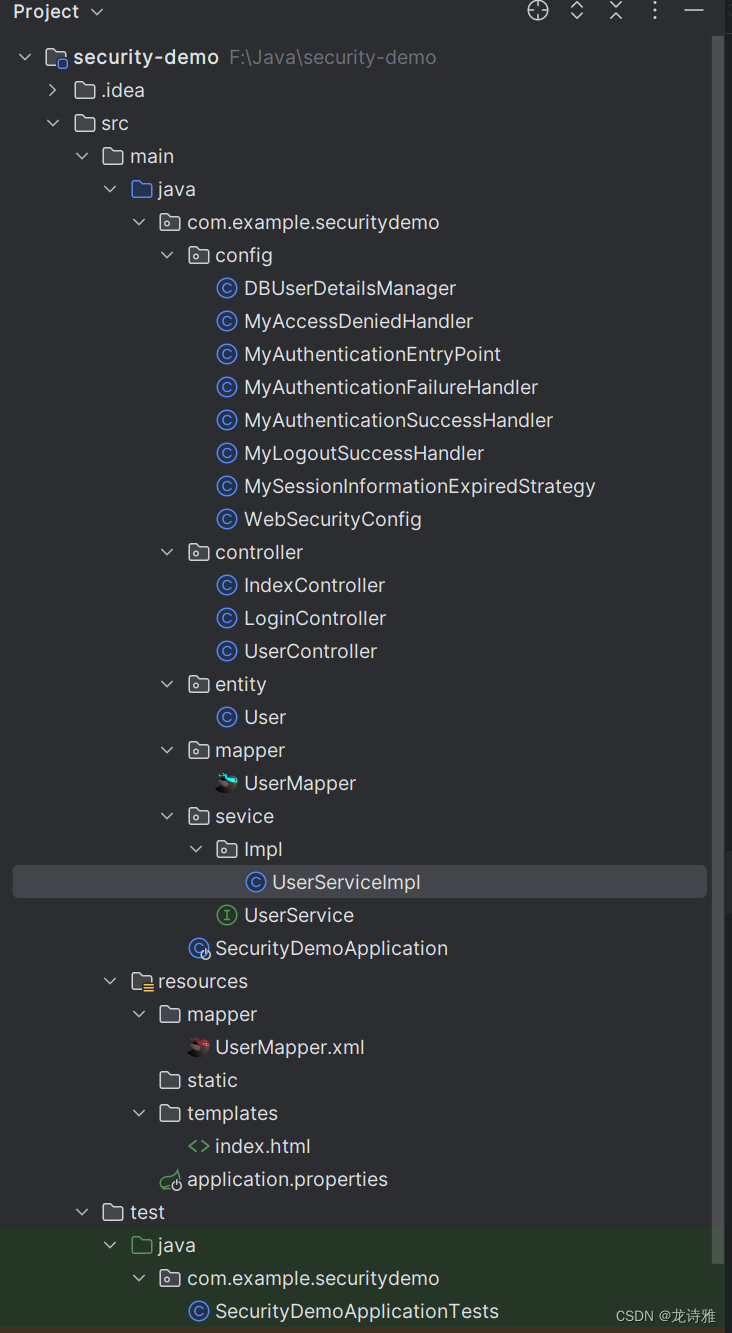
2.项目目录
3.官方
更多详细请前往官网https://github.com/spring-projects/spring-security-samples/tree/main/servlet/spring-boot/java





 扫一扫
扫一扫


 被折叠的 条评论
为什么被折叠?
被折叠的 条评论
为什么被折叠?
 到【灌水乐园】发言





