


导入并输出到控制台
1.引入相应依赖
        <dependency>
            <groupId>org.apache.poi</groupId>
            <artifactId>poi</artifactId>
            <version>4.1.2</version>
        </dependency>
2.编写代码
//导入数据到控制台
    @GetMapping("/ImportExcel")
    public String getExcel() throws IOException {
        //指定要读取的excel文件路径
        String path="D://应用软件/JAVA项目/SpringBoot/单项功能案例/Spring-excel导出/excelFile/testExcel.xlsx";
        //获取一个输入流
        FileInputStream in = new FileInputStream(path);
        //获取一个excel流,并指定文件输入流
        XSSFWorkbook excel = new XSSFWorkbook(in);
        //获取第一页(sheet页码从0开始)
        XSSFSheet sheet = excel.getSheetAt(0);
        //循环获取行和列(getLastRowNum方法获取最后一行索引,getLastCellNum方法获取最后一列索引)
        for (int i = 0; i <= sheet.getLastRowNum(); i++) {
            //获取行对象
            XSSFRow row = sheet.getRow(i);
            for (int j = 0; j < row.getLastCellNum(); j++) {
                System.out.print(row.getCell(j) + " ");
            }
            System.out.println();
        }
        return "控制台输出成功";
    }
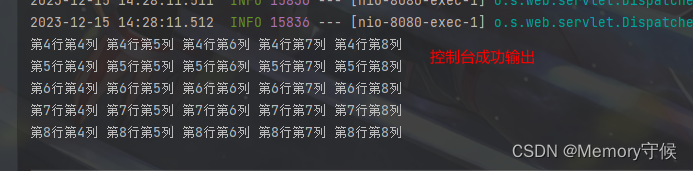
3.测试结果如图


创建并导出excel文件
方法一
1.引入相应依赖
        <dependency>
            <groupId>org.apache.poi</groupId>
            <artifactId>poi</artifactId>
            <version>4.1.2</version>
        </dependency>
2.编写代码
//导出(方法一)
    @GetMapping("/ExportExcel2")
    public void ExportExcel2() throws IOException {
        //创建excel文件流
        XSSFWorkbook workbook = new XSSFWorkbook();
        //创建页
        XSSFSheet sheet = workbook.createSheet("第一页");
        //创建行
        XSSFRow row = sheet.createRow(0);
        //创建单元格
        row.createCell(0).setCellValue("第一行,第一列");
        //循环填充数据
        for (int i = 0; i < 5; i++) {
            XSSFRow r = sheet.createRow(i + 3);
            for (int j = 0; j < 5; j++) {
                r.createCell(j + 3).setCellValue("第" + (i + 4) + "行" + "第" + (j + 4) + "列");
            }
        }
        //文件输出流
        FileOutputStream fileOutputStream = new FileOutputStream(new File("D://wsfile/test" + System.currentTimeMillis() + ".xlsx"));
        //excel内容写入到输出流
        workbook.write(fileOutputStream);
        //关闭输出流和excel流
        fileOutputStream.close();
        workbook.close();
    }
方法二(使用EasyExcel)
1.引入相应依赖
        <dependency>
            <groupId>com.alibaba</groupId>
            <artifactId>easyexcel</artifactId>
            <version>3.3.2</version>
        </dependency>
        <dependency>
            <groupId>org.projectlombok</groupId>
            <artifactId>lombok</artifactId>
        </dependency>
2.编写代码
2.1 测试代码
//导出(方法二)
    @GetMapping("/ExportExcel1")
    public String ExportExcel1() {
        //准备数据
        List<Emp> list = new ArrayList<Emp>();
        list.add(new Emp("雄安", 12, 25, "12451522"));
        list.add(new Emp("小号", 15, 24, "12451522"));
        list.add(new Emp("你佛", 22, 27, "12451522"));
        // 设置文件导出的路径
        String realPath = "D://wsfile/";
        File folder = new File(realPath);
        if (!folder.isDirectory()) {
            folder.mkdirs();
        }
        //生成文件名
        String fileName = realPath + "Emp" + System.currentTimeMillis() + ".xlsx";
        // 这里 需要指定写用哪个class去写,然后写到第一个sheet,名字为员工表 然后文件流会自动关闭,doWrite方法里必须是list
        EasyExcel.write(fileName, Emp.class).sheet("员工表").doWrite(list);
        return "已保存到" + realPath;
    }
2.2 Emp实体类
@Data
@AllArgsConstructor
public class Emp {
    @ExcelProperty(value = "姓名")//指定实体类“name”字段对应excel表中“姓名”一列
    private String name;
    @ExcelProperty(value = "学号")
    private Integer id;
    @ExcelProperty(value = "年龄")
    private Integer age;
    @ExcelIgnore//标记该字段不需要写入到excel文件
    private String password;
}
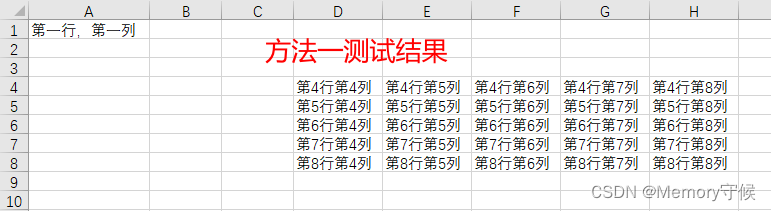
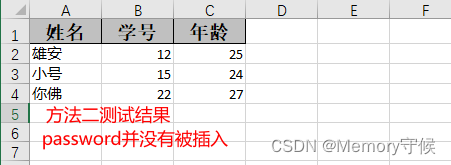
两个方法测试结果
导入模板填充数据,通过浏览器下载
1.引入依赖
        <dependency>
            <groupId>org.apache.poi</groupId>
            <artifactId>poi</artifactId>
            <version>4.1.2</version>
        </dependency>
2.测试代码
//通过模板文件,导入模板数据,并在浏览器端下载
    @GetMapping("/ExportExcel3")
    public void importTempAddExportExcel(HttpServletResponse response) throws Exception {
        String path = "D://应用软件/JAVA项目/SpringBoot/单项功能案例/Spring-excel导出/excelFile/excelTemplate.xlsx";
        //文件输入流
        FileInputStream in = new FileInputStream(path);
        //创建excel流(从指定文件流)
        Workbook excel = WorkbookFactory.create(in);
        //定义数据
        List<Student> list = new ArrayList<>();
        list.add(new Student("李华", 95));
        list.add(new Student("小花", 88));
        list.add(new Student("海燕", 84));
        list.add(new Student("刘明", 79));
        //获取第一页
        Sheet sheet = excel.getSheetAt(0);
        //填充数据
        for (int i = 0; i < list.size(); i++) {
            //模板文件从第三行开始填
            Row row = sheet.getRow(i + 2);
            //第一个单元格填排名
            row.getCell(0).setCellValue(i + 1);
            //第二个单元格填姓名
            row.getCell(1).setCellValue(list.get(i).getName());
            //第三个单元格填分数
            row.getCell(2).setCellValue(list.get(i).getScore());
        }
        //设置Content-Type为appl ication/vnd.openxmLformats -officedocument. spreadsheetmL. sheet
        response.setContentType("application/vnd.openxmlformats-officedocument.spreadsheetml.sheet");
        //设置Content-Dispositiontattachment;filename-excel.xLsx,表示将文件下载到本地,并指定文件名为excel.xLsx
        response.setHeader("Content-Disposition", "attachment;filename=excel.xlsx");
        // 通过输出流将Excel文件下载到客户端浏览器
        ServletOutputStream out = response.getOutputStream();
        excel.write(out);
        //关闭资源
        out.close();
        excel.close();
    }
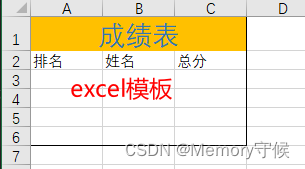
3.看看excel模板
4.测试结果
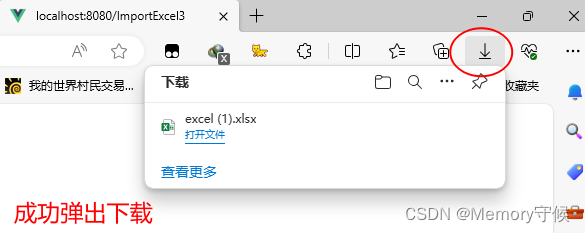
运行项目,浏览器输入地址 http://localhost:8080/ExportExcel3
回车后右上角弹出下载
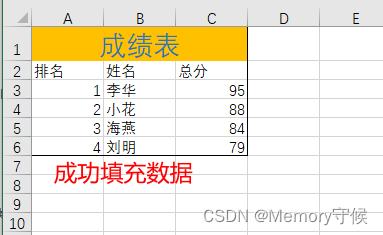
打开下载好的excel文件
总结
本文介绍了一种种基于Java Servlet的方案,导入导出Excel,并将本地Excel文件下载到浏览器上。通过使用ServletOutputStream将文件内容发送到浏览器, 以及设HTTP响应的Content- Type和Content-Disposition,我们可以让浏览器将文件保存到本地。





 扫一扫
扫一扫


 3937
3937

 被折叠的 条评论
为什么被折叠?
被折叠的 条评论
为什么被折叠?
 到【灌水乐园】发言





