


Vue3_03
文章目录
1、标签的ref
在 Vue2_9 里有记载是干嘛的,用来获取dom元素用的
1.Vue2回顾
1.1 ref 的使用
<h1 ref="ha">haha</h1>
<!-- 等同于 -->
<h1 id="ha">haha</h1>
-
id:
document.xxx("#ha") -
ref标签属性:在 vc 或 vm 当中 的
$refs的对象中,使用:this.refs.xxx
1.2 ref 和 document 的区别
主要是在获取组件标签的区别
-
ref 获取的组件标签是 该组件标签所在的组件实例对象()
-
id 获取的组件标签是 该组件标签所在的==组件的 template
2.普通标签使用
2.1 步骤
-
给标签加上
ref='xxx'的属性<h2 ref="haha2">湖北</h2> -
找到这个标签,使用方法:
let ref标签值 = ref()let haha2 = ref()
2.2 小例
<template>
  <div class="Preson">
		<h1>中国</h1>
		<h2 ref="haha2">湖北</h2>
		<h3>我</h3>
		<button @click="showHaha2">h2</button>
  </div>
</template>

<script lang="ts" setup name="Preson123">
import { ref } from 'vue';

// 和 ref 标签属性值重名的变量
let haha2 = ref()

function showHaha2() {
	// Vue2 this.refs.haha2
	console.log(haha2.value);
	// 显示: <h2 data-v-dd0217dd="">湖北</h2>
	// data-v-dd0217dd="" 是 style 的 scoped
}

/*
	如果别的组件和你使用同一个id就会混乱, ref不会
*/
</script>
2.3 小点
- 获取
ref标记的标签会有个data-v-dd0217dd,是style的scoped属性带来的
3.组件标签的使用
使用方法(和普通的一样):<组件 ref="xxx"/>
3.1 获取了什么
和 Vue2 的不一样
- Vue2:获取了所有的东西,如:data、name…
- Vue3:默认啥都获取不了(获取的是
Proxy(Object) {__v_skip: true},屁都没有),但是有方法可以获取
4.defineExpose
用来给(父)组件上的 ref 标签传东西的,使用:defineExpose({传递的东西})
不需要引入,因为 definexxx 一般是 宏函数 不需要引入
4.1 小例
父组件:
<template>
  <div>
    <Preson ref="haha"/>
    <button @click="showHaha">测试</button>
  </div>
</template>

<script lang="ts" setup name="App">
import { ref } from "vue";
import Preson from "./components/Preson.vue"

let haha = ref()

function showHaha() {
	console.log(haha.value);
}
</script>
Preson:
<template>
  <div class="Preson">
  </div>
</template>

<script lang="ts" setup name="Preson123">
import { ref } from 'vue';

let a = ref(10)

// defineExpose(a)	// 会有警告, 让你传一个对象, 显示: 10
defineExpose({a})	// 显示: Proxy(Object) {a: RefImpl, __v_skip: true}
</script>
2、props
1.Vue2回顾
-
在子组件的组件标签传递数据
<XiaoMing name="小明" sex="男" age="12"/> -
使用
props配置项接收数据props:[name,age,sex],
2.defineProps基本使用
Vue3 里接收参数的一个函数,使用方法:defineProps(['数据1', '数据2', ...])
defineProps(['presonList'])
注:这样的接收在 script 标签里无法使用,只能在模版上使用,那怎么能使用呢?使用变量接收
let a = defineProps(['presonList'])
a.presonList
3.指定接收数据的类型
在使用 defineProps 时写泛型(里面是个对象),使用方法:defineProps<{xxx:类型}>(这里就不用写了)
import type { PresonListInter } from "../types";
defineProps<{ presonList: PresonListInter }>()	// PresonListInter: 自定义的类型
4.设置必要性
只需要在写泛型的时候,在对象的 key 后面加一个 ?
defineProps<{ presonList?: PresonListInter }>()
5.设置默认值
使用函数 withDefaults,使用方法:withDefaults(defineProps..., {xxx: 默认值})
withDefaults(defineProps<{
	presonList?: PresonListInter,
	a?: number
 }>(), {
	presonList: () => [{ id: '2000', name: '哈哈', age: 11 }],
	a: 1
})
为什么使用
()=>因为可以保证每次过来的默认值都是一个新的这个玩意
3、生命周期
1.回顾
- 创建
- beforeCreate
- created
- 挂载
- beforeMount
- mounted
- 更新
- beforeUpdate
- updated
- 销毁
- beforeDestroy
- destroyed
- nextTick:在下一次 DOM更新结束后调用
- 路由专属钩子
- activated
- deactivated
2.Vue3的钩子
2.1 创建
在 Vue3_01 中记载:setup 函数什么时候调用呢?答:比 beforeCreate 还早
因为它自己就是 创建 钩子!!!
2.2 其他钩子的简介
怎么使用钩子呢?答:引用钩子函数并使用
import { onBeforeMount, onMounted, onBeforeUpdate, onUpdated, onBeforeUnmount,onUnmounted } from "vue";
- 引入的钩子函数名基本和Vue2的一样,只是前面加了个
on。但是销毁的钩子改了,不叫销毁叫卸载 - 钩子函数的参数1,是一个回调函数
2.3 挂载
onBeforeMount(() => {
	console.log('挂载前');
})
onMounted(() => {
	console.log('挂载后');
})
2.4 更新
onBeforeUpdate(() => {
	console.log('更新前');
})
onUpdated(() => {
	console.log('更新后');
})
2.4 卸载
onBeforeUnmount(() => {
	console.log('卸载前');
})
onUnmounted(() => {
	console.log('卸载后');
})
4.父与子的顺序
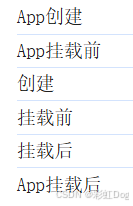
问:是父先挂载好还是子呢?答:子,父比子慢。App是最后挂载好的
4、hook
编程理念,让一个功能里的数据、函数、钩子… 都写在一个文件的函数里返回
原来的代码:
<template>
  <div class="Preson">
		<h2>当前求和为:{{ sum }}</h2>
		<button @click="addSum">sum++</button>
		<button @click="getDog">再来一只小狗</button>
		<hr>
		<div class="dogs">
			<img v-for="(dog, index) in dogList" :src="dog" alt="" :key="index">
		</div>
  </div>
</template>

<script lang="ts" setup name="Preson123">
    import axios from "axios";
    import { ref, reactive } from "vue";

    // 狗狗图片网站: https://dog.ceo/api/breeds/image/random

	// 数据
	let sum = ref(0)
	let dogList = reactive([
		'https://images.dog.ceo/breeds/elkhound-norwegian/n02091467_287.jpg'
	])

	// 方法
	function addSum() {
		sum.value += 1
	}
	async function getDog() {
		try {
			let resp = await axios.get('https://dog.ceo/api/breeds/image/random')
			dogList.push(resp.data.message)
		} catch (error) {
			alert(error)
		}
	}

</script>
两个功能混在一起
使用hook!
-
在
src文件夹下创建一个新文件夹(我的文件名为:hooks) -
在
hooks里创建功能对应的文件,一般叫:useXxx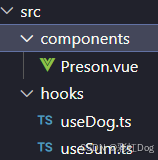
-
把它们该有的数据和功能扳到一块,并用函数返回需要的功能,暴露掉函数
useDog
import axios from "axios";
import { reactive } from "vue";

// 狗狗图片网站: https://dog.ceo/api/breeds/image/random

export default function () {
	// 数据
	let dogList = reactive([
		'https://images.dog.ceo/breeds/elkhound-norwegian/n02091467_287.jpg'
	])

	// 方法
	async function getDog() {
		try {
			let resp = await axios.get('https://dog.ceo/api/breeds/image/random')
			dogList.push(resp.data.message)
		} catch (error) {
			alert(error)
		}
	}

	// 向外部提供东西
	return {dogList, getDog}
}
useSum
import { ref } from "vue"; export default function () { // 数据 let sum = ref(0) // 方法 function addSum() { sum.value += 1 } // 提供 return {sum, addSum} } -
在组件中使用
<script lang="ts" setup name="Preson123">
import useDog from '@/hooks/useDog'
import useSum from '@/hooks/useSum';

let { dogList, getDog } = useDog()
let {sum, addSum} = useSum()
</script>
芝士捕虫
1.axios 外部输出 error
try {
    let resp = await axios.get('https://dog.ceo/api/breeds/image/random')
    dogList.push(resp.data.message)
} catch (error) {
    alert(error)
}





 扫一扫
扫一扫


 2959
2959

 被折叠的 条评论
为什么被折叠?
被折叠的 条评论
为什么被折叠?
 到【灌水乐园】发言





