 深入理解AOP:动态代理、切点表达式与Spring声明式事务



AOP相关概念
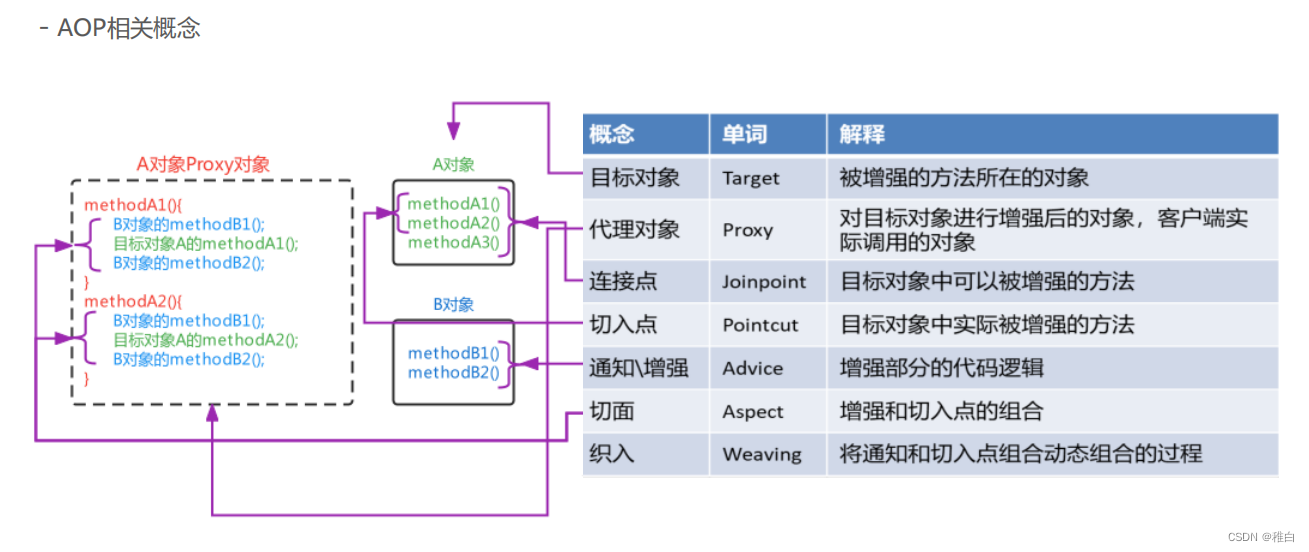
AOP思想的实现方案
动态代理技术,在运行期间,对目标对象的方法进行增强,代理对象同名方法内可以执行原有逻辑的同时嵌入执行其他增强逻辑或其他对象的方法
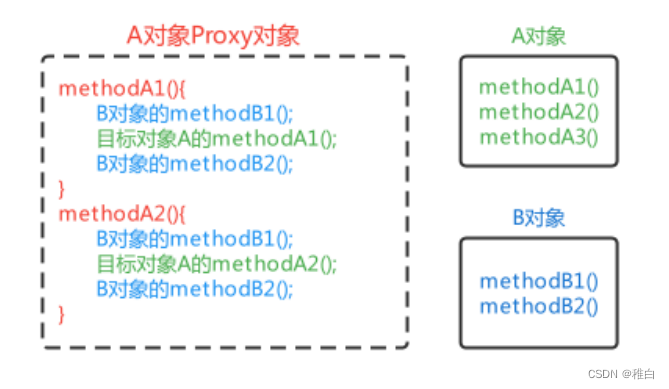
模拟AOP的基础代码
其实在之前学习BeanPostProcessor时,在BeanPostProcessor的after方法中使用动态代理对Bean进行了增强,实际存储到单例池singleObjects中的不是当前目标对象本身,而是当前目标对象的代理对象Proxy,这样在调用目标对象方法时,实际调用的是代理对象Proxy的同名方法,起到了目标方法前后都进行增强的功能,对该方式进行一下优化,将增强的方法提取出去到一个增强类中,且只对com.itheima.service.impl包下的任何类的任何方法进行增强
//增强类,内部提供增强方法
@Component
public class MyAdvice {

    public void beforeAdvice(){
        System.out.println("前置的增强方法...");
    }

    public void afterAdvice(){
        System.out.println("后置的增强方法...");
    }
}
@Component
public class MockAopBeanPostProcessor implements BeanPostProcessor, ApplicationContextAware {

    private ApplicationContext applicationContext;

    //目的:对UserServiceImpl中的show1和show2方法进行增强,增强方法存在于MyAdvice中
    //问题1:筛选service.impl包下的所有类的所有方法都可以进行增强,解决方案if-else
    //问题2:MyAdvice怎么获取?方案:从spring容器中获取


    @Override
    public Object postProcessAfterInitialization(Object bean, String beanName) throws BeansException {
        if(bean.getClass().getPackage().getName().equals("com.itheima.service.impl")){
            Object beanProxy = Proxy.newProxyInstance(
                    bean.getClass().getClassLoader(),
                    bean.getClass().getInterfaces(),
                    (Object proxy, Method method, Object[] args) -> {
                        //执行增强对象的before方法
                        MyAdvice myAdvice = applicationContext.getBean(MyAdvice.class);
                        myAdvice.beforeAdvice();
                        //执行目标对象的目标方法
                        Object result = method.invoke(bean, args);
                        //执行增强对象的after方法
                        myAdvice.afterAdvice();
                        return result;
                    }
            );
            return beanProxy;
        }
        return bean;
    }
    @Override
    public void setApplicationContext(ApplicationContext applicationContext) throws BeansException {
        this.applicationContext = applicationContext;
    }
}
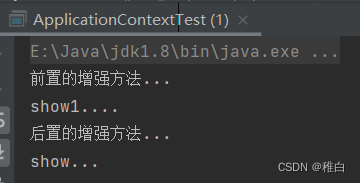
测试结果
基于XML方式配置的AOP
快速入门
xml方式配置AOP的步骤:
1、导入AOP相关坐标;
        <dependency>
            <groupId>org.aspectj</groupId>
            <artifactId>aspectjweaver</artifactId>
            <version>1.9.6</version>
        </dependency>
2、准备目标类、准备增强类,并配置给Spring管理;
@Service
public class UserServiceImpl implements UserService {
    @Override
    public void show1() {
        System.out.println("show1....");
    }

    @Override
    public void show2() {
        System.out.println("show2....");
    }
}
public class MyAdvice {

    public void beforeAdvice(){
        System.out.println("前置的增强方法...");
    }

    public void afterAdvice(){
        System.out.println("后置的增强方法...");
    }
}
3、配置切点表达式(哪些方法被增强);
4、配置织入(切点被哪些通知方法增强,是前置增强还是后置增强)。
    <!--aop配置-->
    <aop:config>
        <!--配置切点表达式,目的是要指定哪些方法被增强-->
        <aop:pointcut id="myPointcut" expression="execution(void com.itheima.service.impl.UserServiceImpl.show1())"/>
        <!--配置织入,目的是要指定哪些切点与哪些通知进行结合-->
        <aop:aspect ref="myAdvice">
            <aop:before method="beforeAdvice" pointcut-ref="myPointcut"/>
            <aop:after method="afterAdvice" pointcut-ref="myPointcut"/>
        </aop:aspect>
    </aop:config>
xml方式AOP配置详解
切点表达式是配置要对哪些连接点(哪些类的哪些方法)进行通知的增强,语法如下:
execution([访问修饰符]返回值类型 包名.类名.方法名(参数))
其中,
⚫ 访问修饰符可以省略不写;
⚫ 返回值类型、某一级包名、类名、方法名 可以使用 * 表示任意;
⚫ 包名与类名之间使用单点 . 表示该包下的类,使用双点 .. 表示该包及其子包下的类;
⚫ 参数列表可以使用两个点 .. 表示任意参数。
示例
//表示访问修饰符为public、无返回值、在com.itheima.aop包下的TargetImpl类的无参方法show
execution(public void com.itheima.aop.TargetImpl.show())

//表述com.itheima.aop包下的TargetImpl类的任意方法
execution(* com.itheima.aop.TargetImpl.*(..))

//表示com.itheima.aop包下的任意类的任意方法
execution(* com.itheima.aop.*.*(..))

//表示com.itheima.aop包及其子包下的任意类的任意方法
execution(* com.itheima.aop..*.*(..))

//表示任意包中的任意类的任意方法
execution(* *..*.*(..))
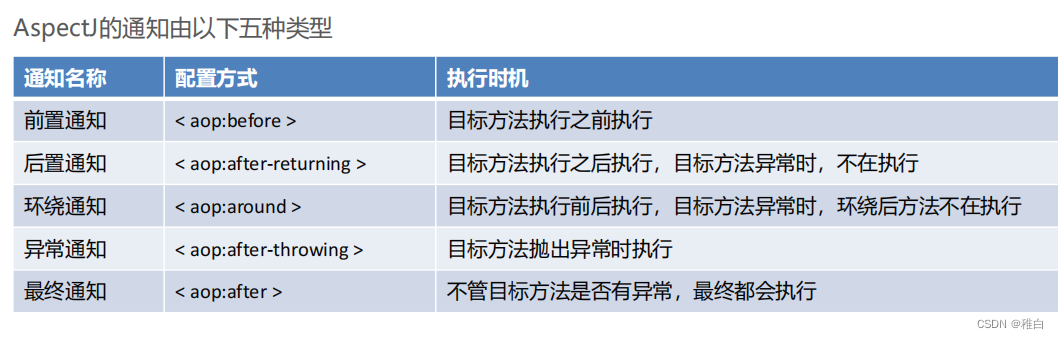
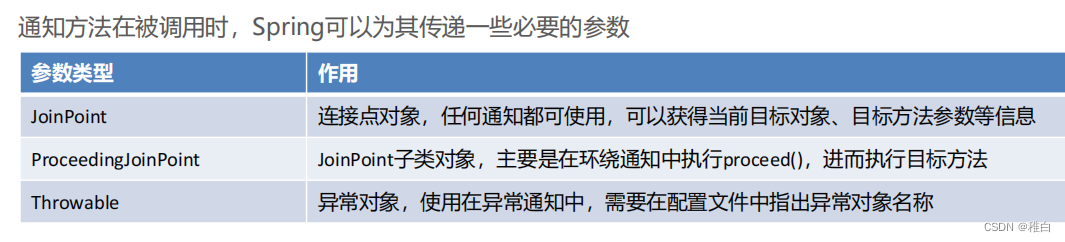
JoinPoint 对象
public void 通知方法名称(JoinPoint joinPoint){
//获得目标方法的参数
System.out.println(joinPoint.getArgs());
//获得目标对象
System.out.println(joinPoint.getTarget());
//获得精确的切点表达式信息
System.out.println(joinPoint.getStaticPart());
}
ProceedingJoinPoint对象
public Object around(ProceedingJoinPoint joinPoint) throws Throwable {
System.out.println(joinPoint.getArgs());//获得目标方法的参数
System.out.println(joinPoint.getTarget());//获得目标对象
System.out.println(joinPoint.getStaticPart());//获得精确的切点表达式信息
Object result = joinPoint.proceed();//执行目标方法
return result;//返回目标方法返回值
}
Throwable对象
public void afterThrowing(JoinPoint joinPoint,Throwable th){
//获得异常信息
System.out.println("异常对象是:"+th+"异常信息是:"+th.getMessage());
}
<aop:after-throwing method="afterThrowing" pointcut-ref="myPointcut" throwing="th"/>
advisor标签
通知类实现了前置通知和后置通知接口
public class MyAdvice2 implements MethodBeforeAdvice, AfterReturningAdvice {

    @Override
    public void before(Method method, Object[] objects, Object o) throws Throwable {
        System.out.println("前置通知.............");

    }

    @Override
    public void afterReturning(Object o, Method method, Object[] objects, Object o1) throws Throwable {
        System.out.println("后置通知.............");
    }


}
切面使用advisor标签配置
<!--配置目标类-->
    <bean id="userService" class="com.itheima.service.impl.UserServiceImpl"></bean>
    <!--通知类-->
    <bean id="myAdvice2" class="com.itheima.advice.MyAdvice2"></bean>

    <!--aop配置-->
    <aop:config>
        <aop:pointcut id="myPointcut" expression="execution(* com.itheima.service.impl.*.*(..))"/>
        <aop:advisor advice-ref="myAdvice2" pointcut-ref="myPointcut"/>
    </aop:config>
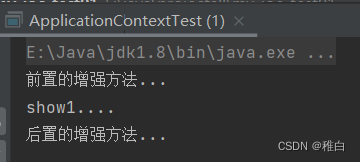
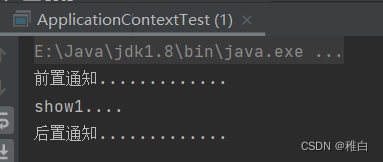
测试结果
使用aspect和advisor配置区别如下:
1)配置语法不同:
<!-- 使用advisor配置 -->
<aop:config>
<!-- advice-ref:通知Bean的id -->
<aop:advisor advice-ref="advices" pointcut="execution(void
com.itheima.aop.TargetImpl.show())"/>
</aop:config>
<!-- 使用aspect配置 -->
<aop:config>
<!-- ref:通知Bean的id -->
<aop:aspect ref="advices">
<aop:before method="before" pointcut="execution(void
com.itheima.aop.TargetImpl.show())"/>
</aop:aspect>
</aop:config>
2)通知类的定义要求不同,advisor 需要的通知类需要实现Advice的子功能接口:
public class Advices implements MethodBeforeAdvice {
public void before(Method method, Object[] objects, Object o) throws Throwable {
System.out.println("This is before Advice ...");
}
public void afterReturning(Object o, Method method, Object[] objects, Object o1) throws
Throwable {
System.out.println("This is afterReturn Advice ...");
}}
aspect 不需要通知类实现任何接口,在配置的时候指定哪些方法属于哪种通知类型即可,更加灵活方便:
public class Advices {
public void before() {
System.out.println("This is before Advice ...");
}
public void afterReturning() {
System.out.println("This is afterReturn Advice ...");
}}
3)可配置的切面数量不同:
⚫ 一个advisor只能配置一个固定通知和一个切点表达式;
⚫ 一个aspect可以配置多个通知和多个切点表达式任意组合,粒度更细。
4)使用场景不同:
⚫ 如果通知类型多、允许随意搭配情况下可以使用aspect进行配置;
⚫ 如果通知类型单一、且通知类中通知方法一次性都会使用到的情况下可以使用advisor进行配置;
⚫ 在通知类型已经固定,不用人为指定通知类型时,可以使用advisor进行配置,例如后面要学习的Spring事务
控制的配置;
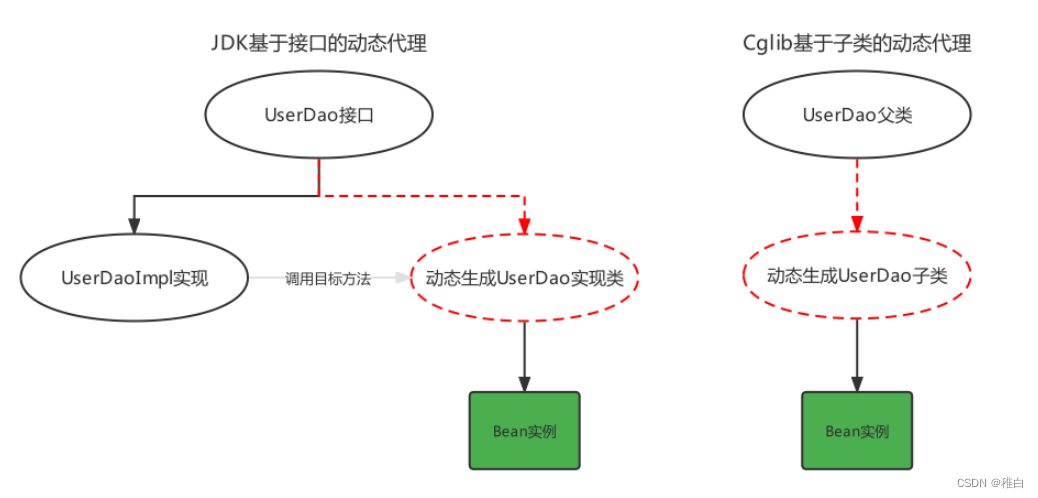
两种动态代理技术
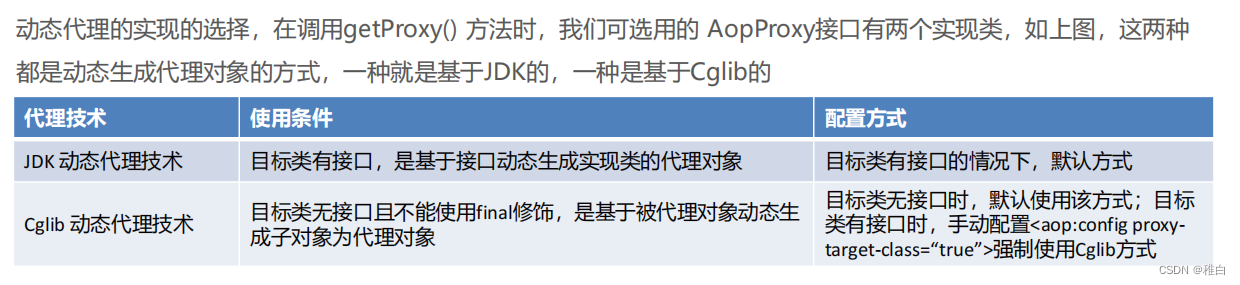
public class CglibTest {
    public static void main(String[] args) {
            //Cglib基于父类(目标类)生成Proxy

        //目标对象
        Target target = new Target();
        //通知对象(增强对象)
        MyAdvice4 myAdvice4 = new MyAdvice4();

        //编写Cglib的代码
        Enhancer enhancer = new Enhancer();
        //设置父类
        enhancer.setSuperclass(Target.class);//生成的代理对象就是Target的子类
        //设置回调
        enhancer.setCallback(new MethodInterceptor() {
            @Override
            //interceptor方法就相当于JDK的Proxy的invoke方法
            public Object intercept(Object o, Method method, Object[] objects, MethodProxy methodProxy) throws Throwable {
                myAdvice4.before();
                Object res = method.invoke(target, objects);//执行目标方法
                myAdvice4.after();

                return res;
            }
        });
        //生成代理对象
        Target proxy = (Target) enhancer.create();

        //测试
        proxy.show();

    }
}
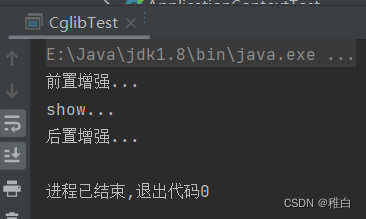
测试结果
基于注解配置的AOP
各种注解方式通知类型
//前置通知
@Before("execution(* com.itheima.aop.*.*(..))")
public void before(JoinPoint joinPoint){}

//后置通知
@AfterReturning("execution(* com.itheima.aop.*.*(..))")
public void AfterReturning(JoinPoint joinPoint){}

//环绕通知
@Around("execution(* com.itheima.aop.*.*(..))")
public void around(ProceedingJoinPoint joinPoint) throws Throwable {}

//异常通知
@AfterThrowing("execution(* com.itheima.aop.*.*(..))")
public void AfterThrowing(JoinPoint joinPoint){}

//最终通知
@After("execution(* com.itheima.aop.*.*(..))")
public void After(JoinPoint joinPoint){}
切点表达式的抽取,使用一个空方法,将切点表达式标注在空方法上,其他通知方法引用即可
@Component
@Aspect
public class AnnoAdvice {
//切点表达式抽取
@Pointcut("execution(* com.itheima.aop.*.*(..))")
public void pointcut(){}
//前置通知
@Before("pointcut()")
public void before(JoinPoint joinPoint){}
//后置通知
@AfterReturning("AnnoAdvice.pointcut()")
public void AfterReturning(JoinPoint joinPoint){}
// ... 省略其他代码 ...
}
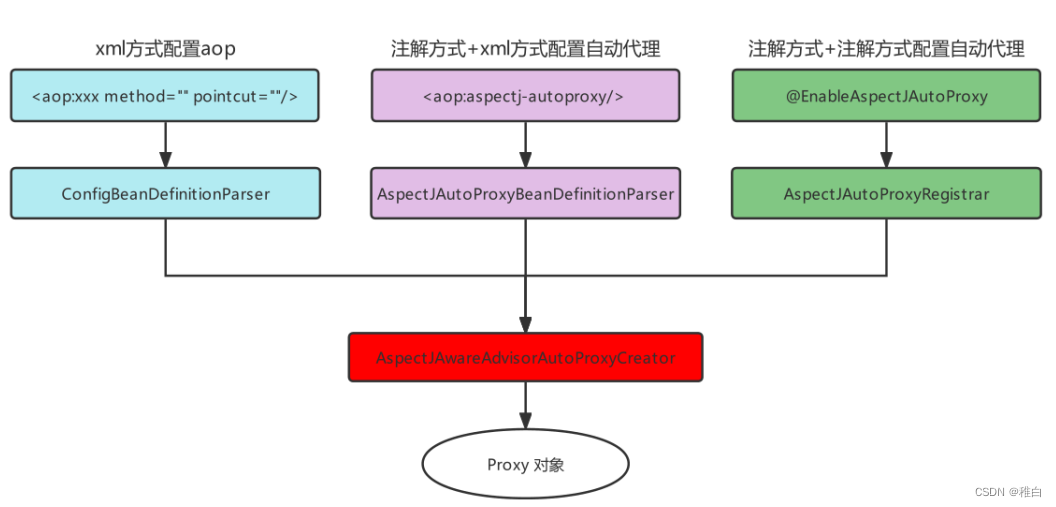
注解方式AOP原理剖析
基于AOP的声明式事务控制
基于xml声明式事务控制
<!--配置平台事务管理器-->
    <bean id="transactionManager" class="org.springframework.jdbc.datasource.DataSourceTransactionManager">
        <property name="dataSource" ref="dataSource"/>
    </bean>

    <!--配置spring提供的advice-->
    <tx:advice id="txAdvice" transaction-manager="transactionManager">
        <tx:attributes>
            <!--
            配置不同方法的事务属性
            name:方法名称  *代表通配符
            isolation:事务隔离级别,解决事务并发问题
            timeout:超时时间,默认-1 单位是秒
            read-only:是否只读
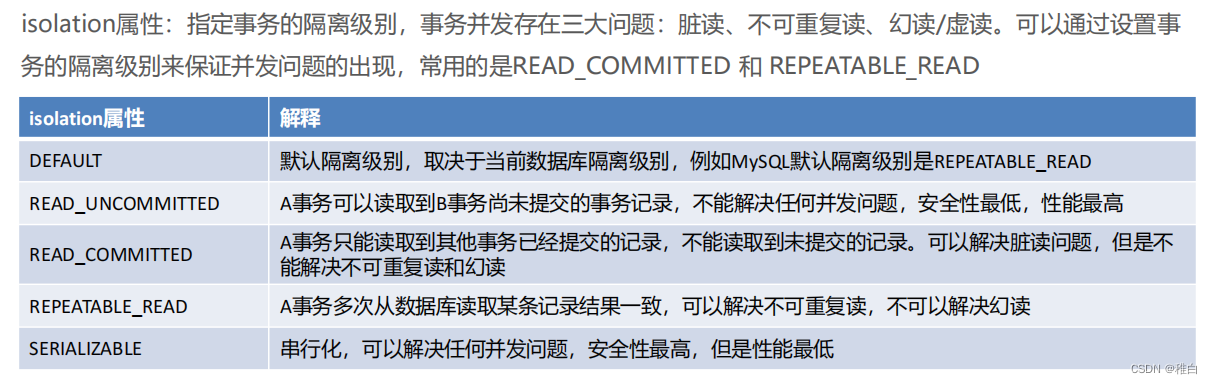
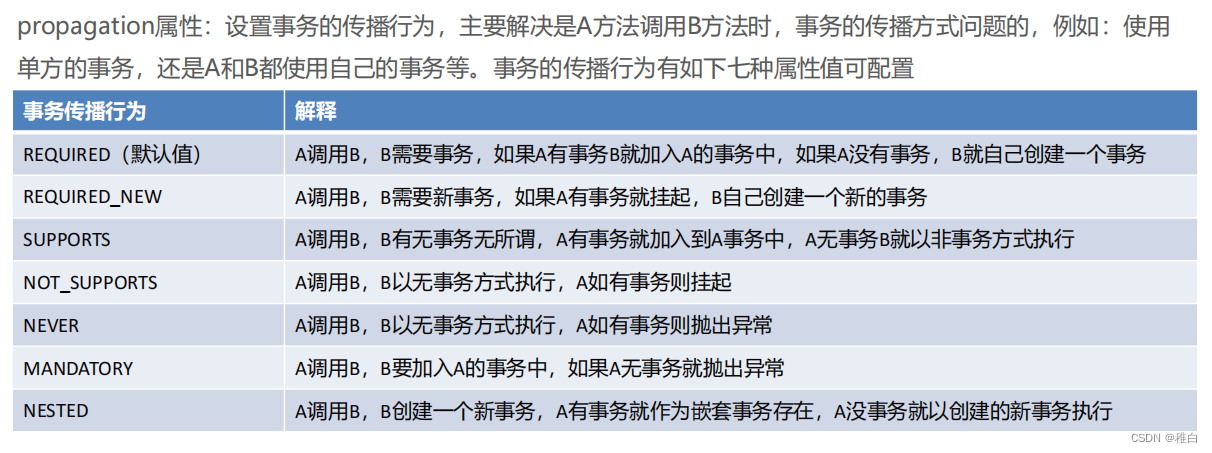
            propagation:事务的传播行为,解决业务调用业务方法(事务嵌套问题)
            -->
            <tx:method name="*" isolation="READ_COMMITTED" timeout="3"/>
        </tx:attributes>
    </tx:advice>

    <!--事务增强的AOP-->
    <aop:config>
        <!--切点表达式-->
        <aop:pointcut id="txPointcut" expression="execution(* com.itheima.service.impl.*.*(..))"/>
        <!--配置织入关系-->
        <aop:advisor advice-ref="txAdvice" pointcut-ref="txPointcut"/>
    </aop:config>
首先,平台事务管理器PlatformTransactionManager是Spring提供的封装事务具体操作的规范接口,封装了事务的提交和回滚方法
其次,事务定义信息配置,每个事务有很多特性,例如:隔离级别、只读状态、超时时间等,这些信息在开发时可以通过connection进行指定,而此处要通过配置文件进行配置
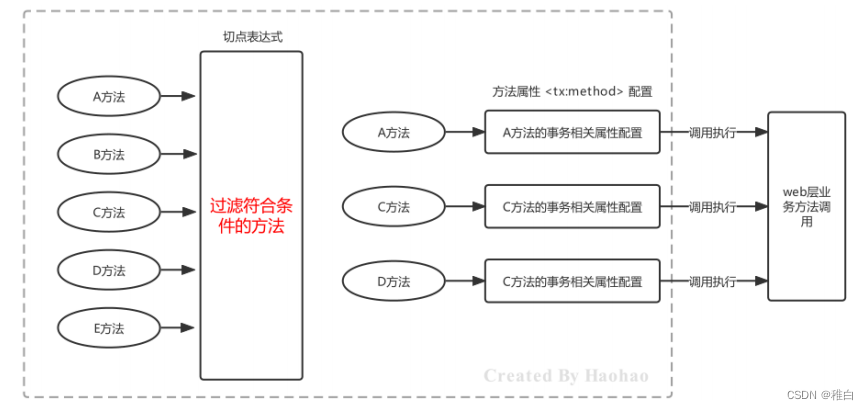
其中,name属性名称指定哪个方法要进行哪些事务的属性配置,此处需要区分的是切点表达式指定的方法与此处指定的方法的区别?切点表达式,是过滤哪些方法可以进行事务增强;事务属性信息的name,是指定哪个方法要进行哪些事务属性的配置
方法名在配置时,也可以使用 * 进行模糊匹配,例如:
<tx:advice id="myAdvice" transaction-manager="transactionManager">
<tx:attributes>
<!--精确匹配transferMoney方法-->
<tx:method name="transferMoney"/>
<!--模糊匹配以Service结尾的方法-->
<tx:method name="*Service"/>
<!--模糊匹配以insert开头的方法-->
<tx:method name="insert*"/>
<!--模糊匹配以update开头的方法-->
<tx:method name="update*"/>
<!--模糊匹配任意方法,一般放到最后作为保底匹配-->
<tx:method name="*"/>
</tx:attributes>
</tx:advice>
read-only属性:设置当前的只读状态,如果是查询则设置为true,可以提高查询性能,如果是更新(增删改)操作则设置为false
<!-- 一般查询相关的业务操作都会设置为只读模式 -->
<tx:method name="select*" read-only="true"/>
<tx:method name="find*" read-only="true"/>
timeout属性:设置事务执行的超时时间,单位是秒,如果超过该时间限制但事务还没有完成,则自动回滚事务,不在继续执行。默认值是-1,即没有超时时间限制
<!-- 设置查询操作的超时时间是3秒 -->
<tx:method name="select*" read-only="true" timeout="3"/>
基于注解声明式事务控制
使用全注解的话,使用如下配置类的形式代替配置文件
@Configuration
@ComponentScan("com.itheima.service")
@PropertySource("classpath:jdbc.properties")
@MapperScan("com.itheima.mapper")
@EnableTransactionManagement
public class ApplicationContextConfig {
@Bean
public PlatformTransactionManager tansactionManager(DataSource dataSource){
DataSourceTransactionManager transactionManager = new DataSourceTransactionManager();
transactionManager.setDataSource(dataSource);
return transactionManager;
}
// ... 省略其他配置 ...
}
@Service("accountService")
public class AccountServiceImpl implements AccountService {
    @Autowired
    private AccountMapper accountMapper;
    @Override
    @Transactional
    public void transferMoney(String outAccount, String inAccount, Integer money) {
        accountMapper.decrMoney(outAccount,money);
        //int i = 1/0;
        accountMapper.incrMoney(inAccount,money);
    }
}





 扫一扫
扫一扫


 168万+
168万+

 被折叠的 条评论
为什么被折叠?
被折叠的 条评论
为什么被折叠?
 到【灌水乐园】发言





