


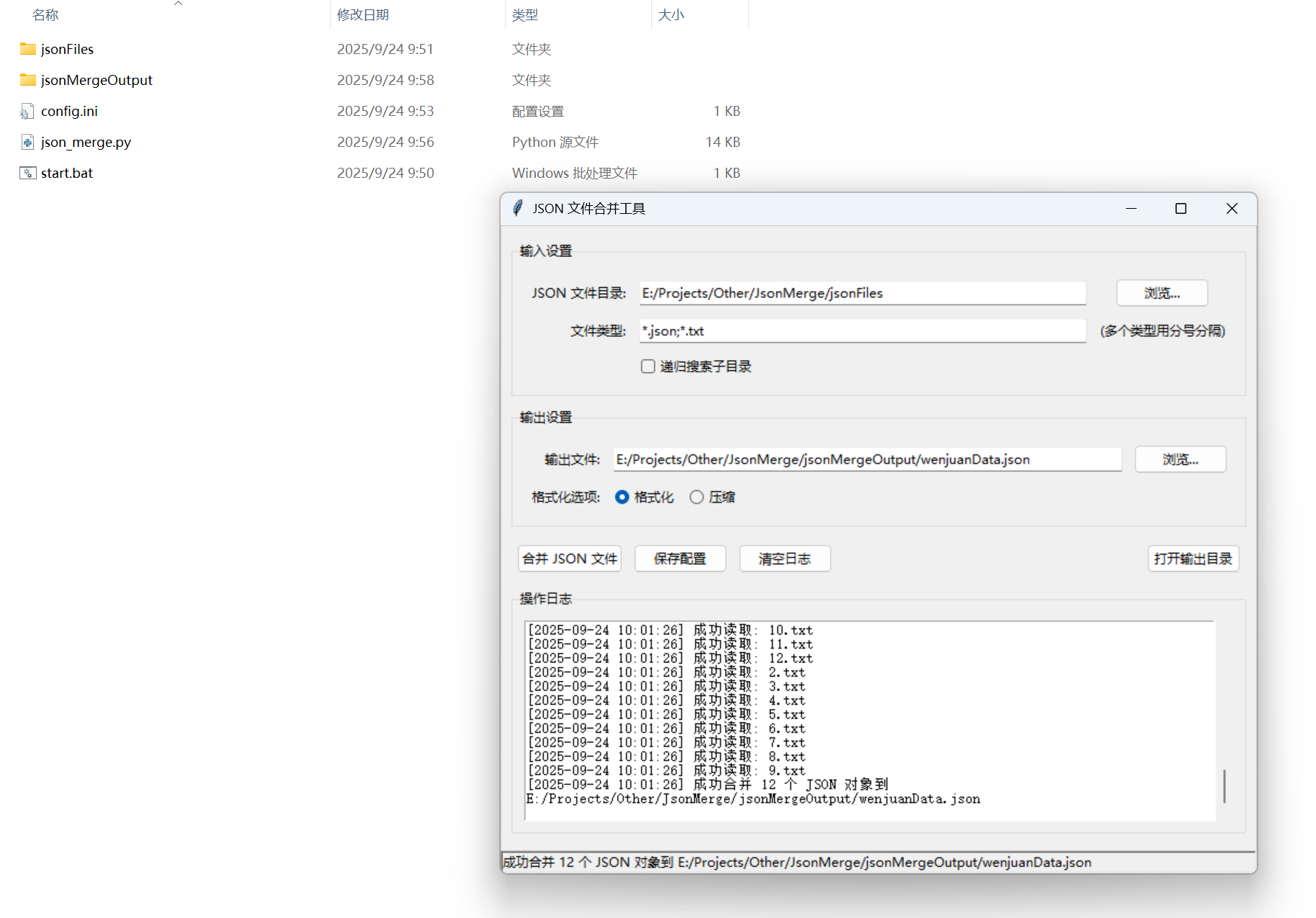
使用 Python 和 Tkinter 实现的窗体应用,它可以读取配置文件中的目录路径,将该目录下的所有 JSON 文件合并为一个 JSON 数组,并输出到指定的文件中。
功能说明
1. 多文件类型支持
-
支持多种文件类型(如 .json, .txt 等)
-
可以指定多个文件类型(用分号分隔)
-
支持递归搜索子目录
2. 增强的用户界面
-
使用主题化的 ttk 控件
-
分组布局(输入设置、输出设置、操作日志)
-
带时间戳的滚动日志窗口
-
状态栏显示当前操作状态
-
响应式布局,支持窗口调整大小
3. 文件处理选项
-
支持格式化或压缩输出
-
自动尝试不同编码(UTF-8 和 Latin-1)
-
详细的错误处理和日志记录
4. 操作便利性
-
后台线程处理,避免界面冻结
-
"打开输出目录"按钮快速访问结果
-
"清空日志"按钮清理日志区域
-
操作过程中禁用按钮防止重复操作
5. 错误处理与日志
-
详细的错误日志记录
-
显示成功和失败的文件计数
-
错误信息包含文件名和具体错误原因
-
显示完整的异常堆栈信息
6. 配置管理
-
保存所有设置(包括文件类型、递归选项等)
-
自动加载上次使用的配置
-
配置保存成功提示
使用说明
-
设置输入目录:
-
点击"浏览..."按钮选择包含 JSON 文件的目录
-
可以指定文件类型(默认:.json;.txt)
-
勾选"递归搜索子目录"可处理子文件夹中的文件
-
-
设置输出文件:
-
点击"浏览..."按钮选择输出文件路径
-
选择输出格式(格式化或压缩)
-
-
执行操作:
-
点击"合并 JSON 文件"开始处理
-
操作过程会在日志区域显示详细信息
-
完成后会显示成功和失败的文件计数
-
-
其他功能:
-
"保存配置":保存当前设置供下次使用
-
"清空日志":清除日志区域内容
-
"打开输出目录":快速访问输出文件所在目录
-
import tkinter as tk
from tkinter import filedialog, messagebox
import json
import os
import configparserclass JsonMergerApp:
def __init__(self, root):
self.root = root
self.root.title("JSON 文件合并工具")
# 配置文件路径
self.config_file = "config.ini"
self.config = configparser.ConfigParser()
# 初始化UI
self.setup_ui()
# 加载配置
self.load_config()
def setup_ui(self):
# 输入目录
tk.Label(self.root, text="JSON 文件目录:").grid(row=0, column=0, padx=5, pady=5, sticky="e")
self.input_dir_var = tk.StringVar()
tk.Entry(self.root, textvariable=self.input_dir_var, width=50).grid(row=0, column=1, padx=5, pady=5)
tk.Button(self.root, text="浏览...", command=self.browse_input_dir).grid(row=0, column=2, padx=5, pady=5)
# 输出文件
tk.Label(self.root, text="输出文件:").grid(row=1, column=0, padx=5, pady=5, sticky="e")
self.output_file_var = tk.StringVar()
tk.Entry(self.root, textvariable=self.output_file_var, width=50).grid(row=1, column=1, padx=5, pady=5)
tk.Button(self.root, text="浏览...", command=self.browse_output_file).grid(row=1, column=2, padx=5, pady=5)
# 操作按钮
tk.Button(self.root, text="合并 JSON 文件", command=self.merge_json_files).grid(row=2, column=1, pady=10)
tk.Button(self.root, text="保存配置", command=self.save_config).grid(row=3, column=1, pady=5)
def browse_input_dir(self):
dir_path = filedialog.askdirectory()
if dir_path:
self.input_dir_var.set(dir_path)
def browse_output_file(self):
file_path = filedialog.asksaveasfilename(defaultextension=".json", filetypes=[("JSON 文件", "*.json")])
if file_path:
self.output_file_var.set(file_path)
def load_config(self):
if os.path.exists(self.config_file):
self.config.read(self.config_file)
if 'DEFAULT' in self.config:
self.input_dir_var.set(self.config['DEFAULT'].get('input_dir', ''))
self.output_file_var.set(self.config['DEFAULT'].get('output_file', ''))
def save_config(self):
self.config['DEFAULT'] = {
'input_dir': self.input_dir_var.get(),
'output_file': self.output_file_var.get()
}
with open(self.config_file, 'w') as configfile:
self.config.write(configfile)
messagebox.showinfo("成功", "配置已保存")
def merge_json_files(self):
input_dir = self.input_dir_var.get()
output_file = self.output_file_var.get()
if not input_dir or not output_file:
messagebox.showerror("错误", "请先设置输入目录和输出文件路径")
return
if not os.path.isdir(input_dir):
messagebox.showerror("错误", f"输入目录不存在: {input_dir}")
return
try:
json_files = [f for f in os.listdir(input_dir) if f.endswith('.json')]
if not json_files:
messagebox.showwarning("警告", f"目录中没有找到 JSON 文件: {input_dir}")
return
json_array = []
for json_file in json_files:
file_path = os.path.join(input_dir, json_file)
try:
with open(file_path, 'r', encoding='utf-8') as f:
data = json.load(f)
json_array.append(data)
except json.JSONDecodeError as e:
messagebox.showwarning("警告", f"文件 {json_file} 不是有效的 JSON: {str(e)}")
continue
except Exception as e:
messagebox.showwarning("警告", f"读取文件 {json_file} 时出错: {str(e)}")
continue
with open(output_file, 'w', encoding='utf-8') as f:
json.dump(json_array, f, ensure_ascii=False, indent=4)
messagebox.showinfo("成功", f"已成功合并 {len(json_array)} 个 JSON 文件到 {output_file}")
except Exception as e:
messagebox.showerror("错误", f"合并过程中出错: {str(e)}")if __name__ == "__main__":
root = tk.Tk()
app = JsonMergerApp(root)
root.mainloop()






 扫一扫
扫一扫


 3735
3735

 被折叠的 条评论
为什么被折叠?
被折叠的 条评论
为什么被折叠?
 到【灌水乐园】发言





