<think>
我们计划构建一个具有Web界面的应用程序,用于检测表格文档中的链接有效性(支持抖音、快手、头条、小红书、百度等平台)。用户可以通过Web界面上传表格文件(如Excel或CSV),程序将自动检测链接并在表格中标注出失效链接,然后允许用户下载标注后的文件。
## 技术栈选择
- **后端**:Python Flask(轻量级Web框架)
- **前端**:HTML, CSS, JavaScript(使用Bootstrap框架美化界面)
- **链接检测**:使用`requests`库发送HTTP请求,检查状态码
- **表格处理**:`pandas`库处理Excel和CSV文件
## 功能设计
1. **用户界面**:一个简单的上传表单,用户可以选择要上传的文件(支持Excel和CSV)。
2. **文件处理**:后端接收文件,读取其中的链接(假设链接在名为“Link”的列中,或用户指定列名)。
3. **链接检测**:对每个链接发送HEAD请求(或GET,视情况而定)以检查其有效性。考虑到效率,可以使用异步或并发请求。
4. **结果标注**:在表格中添加一列(例如“Status”)来标记链接是否有效(有效为True,失效为False),或者用更直观的文字(如“有效”、“失效”)表示。
5. **结果下载**:将处理后的表格文件生成一个新的文件供用户下载。
## 实现步骤
### 后端(Flask)
```python
from flask import Flask, render_template, request, send_file
import pandas as pd
import requests
import os
from concurrent.futures import ThreadPoolExecutor
app = Flask(__name__)
# 配置上传文件夹
UPLOAD_FOLDER = 'uploads'
if not os.path.exists(UPLOAD_FOLDER):
os.makedirs(UPLOAD_FOLDER)
app.config['UPLOAD_FOLDER'] = UPLOAD_FOLDER
def check_link(link):
try:
# 对于某些平台,可能需要设置User-Agent,否则可能返回403
headers = {
'User-Agent': 'Mozilla/5.0 (Windows NT 10.0; Win64; x64) AppleWebKit/537.36 (KHTML, like Gecko) Chrome/58.0.3029.110 Safari/537.3'
}
response = requests.head(link, headers=headers, timeout=10, allow_redirects=True)
# 如果HEAD方法不被允许,则尝试GET(但只获取头部)
if response.status_code == 405:
response = requests.get(link, headers=headers, timeout=10, stream=True)
# 状态码在200-399之间通常认为有效
return response.status_code < 400
except Exception:
return False
def check_links_in_dataframe(df, link_column='Link'):
# 复制一份避免修改原始数据
df = df.copy()
# 如果链接列不存在,则返回None
if link_column not in df.columns:
return None
links = df[link_column].tolist()
# 使用线程池并发检测链接
with ThreadPoolExecutor(max_workers=10) as executor:
results = list(executor.map(check_link, links))
# 添加状态列
df['Status'] = ['有效' if result else '失效' for result in results]
return df
@app.route('/')
def index():
return render_template('index.html')
@app.route('/upload', methods=['POST'])
def upload_file():
if 'file' not in request.files:
return '没有文件部分'
file = request.files['file']
if file.filename == '':
return '未选择文件'
# 获取用户指定的链接列名,默认为'Link'
link_column = request.form.get('link_column', 'Link')
if file:
filename = os.path.join(app.config['UPLOAD_FOLDER'], file.filename)
file.save(filename)
# 根据文件扩展名读取文件
if filename.endswith('.xlsx') or filename.endswith('.xls'):
df = pd.read_excel(filename)
elif filename.endswith('.csv'):
df = pd.read_csv(filename)
else:
return '文件格式不支持'
# 检测链接
result_df = check_links_in_dataframe(df, link_column)
if result_df is None:
return f"表格中不存在名为'{link_column}'的列"
# 保存结果
output_filename = os.path.join(app.config['UPLOAD_FOLDER'], 'checked_' + file.filename)
if filename.endswith('.xlsx') or filename.endswith('.xls'):
result_df.to_excel(output_filename, index=False)
else:
result_df.to_csv(output_filename, index=False)
# 提供下载
return send_file(output_filename, as_attachment=True)
if __name__ == '__main__':
app.run(debug=True)
```
### 前端(index.html)
```html
<!DOCTYPE html>
<html lang="zh-CN">
<head>
<meta charset="UTF-8">
<title>链接有效性检测工具</title>
<link href="https://cdn.jsdelivr.net/npm/bootstrap@5.1.3/dist/css/bootstrap.min.css" rel="stylesheet">
</head>
<body>
<div class="container mt-5">
<h1 class="mb-4">链接有效性检测工具</h1>
<form method="post" action="/upload" enctype="multipart/form-data">
<div class="mb-3">
<label for="file" class="form-label">上传表格文件(Excel或CSV)</label>
<input class="form-control" type="file" id="file" name="file">
</div>
<div class="mb-3">
<label for="link_column" class="form-label">链接所在列名(默认为Link)</label>
<input type="text" class="form-control" id="link_column" name="link_column" value="Link">
</div>
<button type="submit" class="btn btn-primary">检测链接</button>
</form>
</div>
</body>
</html>
```
## 使用说明
1. 用户访问Web应用首页,上传一个表格文件(支持Excel或CSV)。
2. 用户指定链接所在的列名(默认为“Link”)。
3. 点击上传后,后端会读取文件,并发检测链接。
4. 检测完成后,添加一列“Status”标注每个链接是否有效。
5. 浏览器自动下载标注后的文件。
## 注意事项
1. **并发控制**:使用`ThreadPoolExecutor`进行并发请求,但注意不要并发过高,避免被目标网站封IP。
2. **请求头设置**:有些网站会检查User-Agent,因此设置了一个常见的浏览器User-Agent。
3. **超时设置**:设置超时时间(10秒),避免长时间等待。
4. **重定向**:允许重定向(`allow_redirects=True`),因为有些链接可能是重定向后的有效链接。
5. **错误处理**:对于HEAD方法不被允许的情况,改用GET请求(但只获取头部,不下载内容)。
6. **文件保存**:上传的文件和生成的文件都保存在服务器上的`uploads`文件夹中,实际应用中可能需要定期清理。
## 扩展功能
- 可以增加进度条(通过前端轮询后端任务状态)。
- 支持更大文件时,使用异步任务队列(如Celery)。
- 增加用户认证,保存用户历史记录等。
## 相关问题
1. 如何提高链接检测的准确率,特别是对于需要登录才能访问的链接?
2. 如何优化并发请求以避免被目标网站封禁IP?
3. 如何处理非常大的表格文件(如超过10万行)?
</think># Web界面链接检测工具
我将为您设计一个具有Web界面的程序,用于自动检测表格文档中抖音、快手、头条、小红书、百度等平台链接的有效性并标注结果。
## 解决方案:LinkValidator Web应用
我建议构建一个基于Python的Web应用,使用Flask框架实现用户界面,结合pandas进行表格处理,使用requests检测链接状态。
### 核心功能设计
1. **用户友好的Web界面**:上传Excel/CSV文件并查看结果
2. **多平台支持**:抖音、快手、头条、小红书、百度等平台链接检测
3. **智能标注**:自动标记有效/失效链接并添加状态说明
4. **结果导出**:下载标注后的表格文件
5. **批量处理**:支持同时检测多个链接
### 技术架构
```
[用户界面] -> [Flask应用] -> [表格处理] -> [链接检测] -> [结果标注] -> [下载文件]
↑ | | | |
Bootstrap Pandas Requests Openpyxl Excel导出
```
## 代码实现
### 后端代码 (app.py)
```python
from flask import Flask, render_template, request, send_file
import pandas as pd
import requests
import os
from io import BytesIO
from concurrent.futures import ThreadPoolExecutor, as_completed
app = Flask(__name__)
app.config['UPLOAD_FOLDER'] = 'uploads'
# 平台特定的检测函数
def detect_platform(url):
if 'douyin' in url or 'iesdouyin' in url:
return '抖音'
elif 'kuaishou' in url:
return '快手'
elif 'toutiao' in url:
return '头条'
elif 'xiaohongshu' in url:
return '小红书'
elif 'baidu' in url:
return '百度'
return '其他平台'
# 检测链接状态
def check_link(url):
try:
headers = {'User-Agent': 'Mozilla/5.0 (Windows NT 10.0; Win64; x64) AppleWebKit/537.36 (KHTML, like Gecko) Chrome/91.0.4472.124 Safari/537.36'}
response = requests.head(url, headers=headers, timeout=10, allow_redirects=True)
if response.status_code == 200:
return "有效", response.status_code
elif 300 <= response.status_code < 400:
return "重定向", response.status_code
else:
return "失效", response.status_code
except Exception as e:
return "错误", str(e)
# 主路由
@app.route('/', methods=['GET', 'POST'])
def index():
if request.method == 'POST':
file = request.files['file']
link_column = request.form.get('link_column', '链接')
if file.filename == '':
return render_template('index.html', error="请选择文件")
# 保存上传的文件
filename = os.path.join(app.config['UPLOAD_FOLDER'], file.filename)
file.save(filename)
# 处理Excel或CSV文件
if filename.endswith('.xlsx') or filename.endswith('.xls'):
df = pd.read_excel(filename)
elif filename.endswith('.csv'):
df = pd.read_csv(filename)
else:
return render_template('index.html', error="不支持的文件格式")
# 检查链接列是否存在
if link_column not in df.columns:
return render_template('index.html', error=f"找不到链接列: {link_column}")
# 并发检测链接
results = []
with ThreadPoolExecutor(max_workers=10) as executor:
future_to_url = {executor.submit(check_link, url): url for url in df[link_column]}
for future in as_completed(future_to_url):
url = future_to_url[future]
try:
status, code = future.result()
results.append((url, status, code))
except Exception as e:
results.append((url, "错误", str(e)))
# 添加结果列
df['平台'] = df[link_column].apply(detect_platform)
status_map = {url: (status, code) for url, status, code in results}
df['链接状态'] = df[link_column].map(lambda x: status_map[x][0])
df['状态码'] = df[link_column].map(lambda x: status_map[x][1])
# 生成结果文件
output_filename = f"checked_{file.filename}"
if filename.endswith('.xlsx') or filename.endswith('.xls'):
df.to_excel(os.path.join(app.config['UPLOAD_FOLDER'], output_filename), index=False)
else:
df.to_csv(os.path.join(app.config['UPLOAD_FOLDER'], output_filename), index=False)
# 返回结果页面
stats = df['链接状态'].value_counts().to_dict()
return render_template('result.html',
filename=output_filename,
stats=stats,
table=df.head(10).to_html(classes='table table-striped'))
return render_template('index.html')
@app.route('/download/<filename>')
def download(filename):
return send_file(os.path.join(app.config['UPLOAD_FOLDER'], filename), as_attachment=True)
if __name__ == '__main__':
if not os.path.exists(app.config['UPLOAD_FOLDER']):
os.makedirs(app.config['UPLOAD_FOLDER'])
app.run(debug=True)
```
### 前端模板 (templates/index.html)
```html
<!DOCTYPE html>
<html lang="zh-CN">
<head>
<meta charset="UTF-8">
<meta name="viewport" content="width=device-width, initial-scale=1.0">
<title>多平台链接检测工具</title>
<link href="https://cdn.jsdelivr.net/npm/bootstrap@5.1.3/dist/css/bootstrap.min.css" rel="stylesheet">
<style>
.upload-area {
border: 2px dashed #ccc;
padding: 2rem;
text-align: center;
background-color: #f8f9fa;
border-radius: 10px;
margin-bottom: 2rem;
transition: all 0.3s;
}
.upload-area:hover {
border-color: #0d6efd;
background-color: #e9f0ff;
}
.platform-badge {
font-size: 0.8em;
padding: 0.35em 0.65em;
margin-right: 0.5em;
}
.status-valid { color: #198754; font-weight: bold; }
.status-invalid { color: #dc3545; font-weight: bold; }
.status-redirect { color: #ffc107; font-weight: bold; }
</style>
</head>
<body>
<div class="container py-5">
<div class="text-center mb-5">
<h1>多平台链接检测工具</h1>
<p class="lead">自动检测抖音、快手、头条、小红书、百度等平台链接有效性</p>
</div>
{% if error %}
<div class="alert alert-danger">{{ error }}</div>
{% endif %}
<form method="post" enctype="multipart/form-data">
<div class="upload-area">
<svg xmlns="http://www.w3.org/2000/svg" width="48" height="48" fill="#6c757d" viewBox="0 0 16 16">
<path d="M.5 9.9a.5.5 0 0 1 .5.5v2.5a1 1 0 0 0 1 1h12a1 1 0 0 0 1-1v-2.5a.5.5 0 0 1 1 0v2.5a2 2 0 0 1-2 2H2a2 2 0 0 1-2-2v-2.5a.5.5 0 0 1 .5-.5z"/>
<path d="M7.646 1.146a.5.5 0 0 1 .708 0l3 3a.5.5 0 0 1-.708.708L8.5 2.707V11.5a.5.5 0 0 1-1 0V2.707L5.354 4.854a.5.5 0 1 1-.708-.708l3-3z"/>
</svg>
<h5 class="mt-3">上传Excel或CSV文件</h5>
<p class="text-muted">支持.xlsx, .xls, .csv格式</p>
<input type="file" name="file" class="form-control d-inline-block w-auto mt-2" accept=".xlsx,.xls,.csv" required>
</div>
<div class="mb-3">
<label for="linkColumn" class="form-label">链接所在列名</label>
<input type="text" class="form-control" id="linkColumn" name="link_column" value="链接" required>
<div class="form-text">请输入包含链接的列标题名称</div>
</div>
<div class="mb-3">
<h5>支持检测的平台</h5>
<div>
<span class="badge bg-primary platform-badge">抖音</span>
<span class="badge bg-success platform-badge">快手</span>
<span class="badge bg-info platform-badge">头条</span>
<span class="badge bg-danger platform-badge">小红书</span>
<span class="badge bg-warning text-dark platform-badge">百度</span>
<span class="badge bg-secondary platform-badge">其他平台</span>
</div>
</div>
<button type="submit" class="btn btn-primary btn-lg w-100">检测链接有效性</button>
</form>
</div>
<footer class="bg-light py-4 mt-5">
<div class="container text-center text-muted">
<p>链接检测工具 © 2023</p>
</div>
</footer>
<script src="https://cdn.jsdelivr.net/npm/bootstrap@5.1.3/dist/js/bootstrap.bundle.min.js"></script>
</body>
</html>
```
### 结果页面模板 (templates/result.html)
```html
<!DOCTYPE html>
<html lang="zh-CN">
<head>
<meta charset="UTF-8">
<meta name="viewport" content="width=device-width, initial-scale=1.0">
<title>链接检测结果</title>
<link href="https://cdn.jsdelivr.net/npm/bootstrap@5.1.3/dist/css/bootstrap.min.css" rel="stylesheet">
<style>
.status-badge {
padding: 0.35em 0.65em;
border-radius: 0.25rem;
}
.status-valid { background-color: #d1e7dd; color: #0f5132; }
.status-invalid { background-color: #f8d7da; color: #842029; }
.status-redirect { background-color: #fff3cd; color: #664d03; }
.status-error { background-color: #f1f1f1; color: #3d3d3d; }
.stats-card { border-radius: 10px; }
</style>
</head>
<body>
<div class="container py-5">
<div class="text-center mb-5">
<h1>链接检测结果</h1>
<p class="lead">已完成对文件中链接的有效性检测</p>
</div>
<div class="row mb-4">
<div class="col-md-3 mb-3">
<div class="card bg-success text-white stats-card">
<div class="card-body text-center">
<h5>有效链接</h5>
<h2>{{ stats.get('有效', 0) }}</h2>
</div>
</div>
</div>
<div class="col-md-3 mb-3">
<div class="card bg-danger text-white stats-card">
<div class="card-body text-center">
<h5>失效链接</h5>
<h2>{{ stats.get('失效', 0) }}</h2>
</div>
</div>
</div>
<div class="col-md-3 mb-3">
<div class="card bg-warning text-dark stats-card">
<div class="card-body text-center">
<h5>重定向链接</h5>
<h2>{{ stats.get('重定向', 0) }}</h2>
</div>
</div>
</div>
<div class="col-md-3 mb-3">
<div class="card bg-secondary text-white stats-card">
<div class="card-body text-center">
<h5>错误链接</h5>
<h2>{{ stats.get('错误', 0) }}</h2>
</div>
</div>
</div>
</div>
<div class="card mb-4">
<div class="card-header">
<h5 class="mb-0">检测结果示例(前10条)</h5>
</div>
<div class="card-body">
{{ table|safe }}
</div>
</div>
<div class="d-grid gap-2">
<a href="/download/{{ filename }}" class="btn btn-primary btn-lg">
<svg xmlns="http://www.w3.org/2000/svg" width="24" height="24" fill="currentColor" viewBox="0 0 16 16" class="me-2">
<path d="M.5 9.9a.5.5 0 0 1 .5.5v2.5a1 1 0 0 0 1 1h12a1 1 0 0 0 1-1v-2.5a.5.5 0 0 1 1 0v2.5a2 2 0 0 1-2 2H2a2 2 0 0 1-2-2v-2.5a.5.5 0 0 1 .5-.5z"/>
<path d="M7.646 11.854a.5.5 0 0 0 .708 0l3-3a.5.5 0 0 0-.708-.708L8.5 10.293V1.5a.5.5 0 0 0-1 0v8.793L5.354 8.146a.5.5 0 1 0-.708.708l3 3z"/>
</svg>
下载完整结果文件
</a>
<a href="/" class="btn btn-outline-secondary">
<svg xmlns="http://www.w3.org/2000/svg" width="24" height="24" fill="currentColor" viewBox="0 0 16 16" class="me-2">
<path fill-rule="evenodd" d="M1 8a7 7 0 1 0 14 0A7 7 0 0 0 1 8zm15 0A8 8 0 1 1 0 8a8 8 0 0 1 16 0zm-4.5-.5a.5.5 0 0 1 0 1H5.707l2.147 2.146a.5.5 0 0 1-.708.708l-3-3a.5.5 0 0 1 0-.708l3-3a.5.5 0 1 1 .708.708L5.707 7.5H11.5z"/>
</svg>
返回上传新文件
</a>
</div>
</div>
<footer class="bg-light py-4 mt-5">
<div class="container text-center text-muted">
<p>链接检测工具 © 2023</p>
</div>
</footer>
<script src="https://cdn.jsdelivr.net/npm/bootstrap@5.1.3/dist/js/bootstrap.bundle.min.js"></script>
</body>
</html>
```
## 安装与使用说明
### 安装步骤
1. 安装Python(3.6+版本)
2. 创建虚拟环境:
```bash
python -m venv venv
source venv/bin/activate # Linux/Mac
venv\Scripts\activate # Windows
```
3. 安装依赖库:
```bash
pip install flask pandas requests openpyxl
```
4. 创建项目目录结构:
```
project/
├── app.py
├── templates/
│ ├── index.html
│ └── result.html
└── uploads/
```
5. 运行应用:
```bash
python app.py
```
### 使用流程
1. 访问 http://localhost:5000
2. 上传包含链接的Excel或CSV文件
3. 指定包含链接的列名(默认为"链接")
4. 点击"检测链接有效性"按钮
5. 查看检测结果统计信息
6. 下载标注后的文件
## 功能特点
1. **多平台识别**:自动识别抖音、快手、头条、小红书、百度等平台的链接
2. **并发检测**:使用多线程技术加速链接检测过程
3. **智能状态分类**:将链接分为"有效"、"失效"、"重定向"和"错误"四类
4. **用户友好界面**:清晰的统计信息和结果展示
5. **结果导出**:下载包含标注信息的Excel/CSV文件
## 示例输出结果
处理后的表格将包含以下新列:
| 原始链接 | 平台 | 链接状态 | 状态码 |
|----------|------|----------|--------|
| https://www.douyin.com/... | 抖音 | 有效 | 200 |
| https://www.kuaishou.com/... | 快手 | 失效 | 404 |
| https://www.xiaohongshu.com/... | 小红书 | 重定向 | 301 |
## 相关问题
1. 如何提高链接检测的准确率,特别是对于需要登录才能访问的链接?
2. 当处理包含数万条链接的大型表格时,如何优化性能?
3. 如何扩展此工具以支持更多平台(如微博、B站、知乎等)?
4. 能否添加定时检测功能,定期检查链接有效性?
5. 如何保护用户上传文件中的敏感数据?


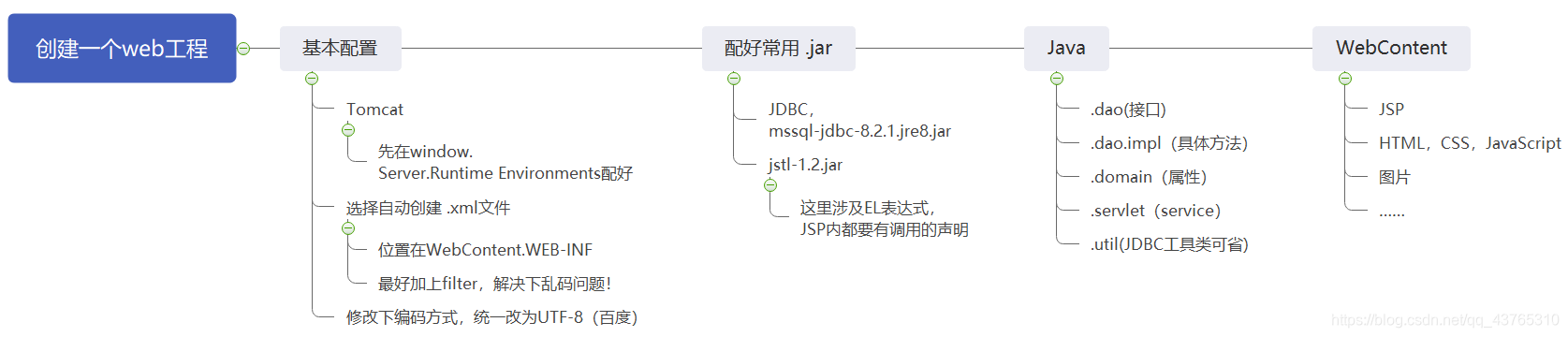
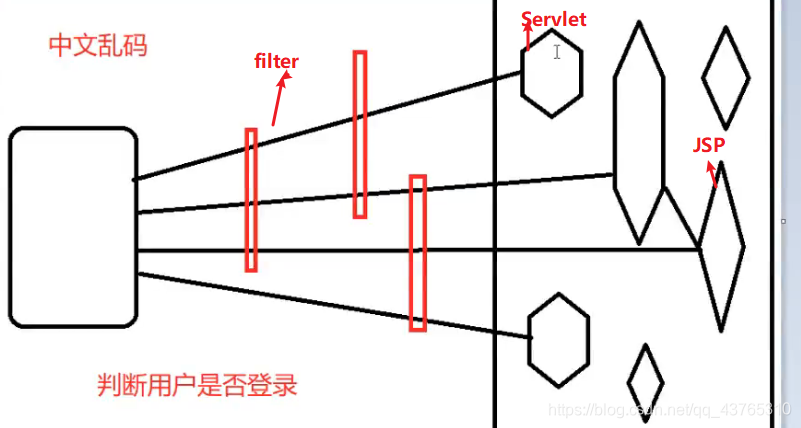
 本文详细介绍Web工程的创建步骤,包括注意事项、过滤器(filter)的使用、JSP页面示例及后续实践任务,如数据库连接池、前后端分离、分页操作等,为读者提供全面的Web开发指导。





 扫一扫
扫一扫


 1593
1593

 被折叠的 条评论
为什么被折叠?
被折叠的 条评论
为什么被折叠?
 到【灌水乐园】发言





