





一、思路来源
来源网站
这个作者在掘金写了一篇文章介绍他/她的思路,我觉得有点意思,就去他的demo网站看看,很好玩,于是决定自己写一个试试。
不想写的,可以直接引用他/她的代码。
二、代码
这段时间正在搞用jsx写vue3,就用jsx写了
import {defineComponent, Teleport, ref, computed, provide,} from "vue";
import {NButton, NIcon,} from "naive-ui"
import {CloseOutlined,} from "@vicons/antd"
import {MdRefresh, MdClose,} from "@vicons/ionicons4"
import {FullscreenTwotone, ArrowBackRound,} from "@vicons/material"
import {nanoid} from 'nanoid'

/*
* 思路来源:http://admin-react-antd.eluxjs.com/
* 多个弹窗,只显示最后一个的内容,支持后退和全屏
* */

interface modelItemType {
    id: string,  // 代表数据的唯一ID
    title: Function | String,   // 标题可以是文字,也可以是函数返回jsx
    content: Function,   // 内容必须是函数,返回jsx
    footer?: Function | undefined,   // 底部操作区,可以是函数返回jsx,或者没有
    onOK?: Function | undefined,      // 点击确定按钮
    onCancel?: Function | undefined,        // 点击取消按钮
    okText?: String | undefined,  // 确认按钮文字
    cancelText?: String | undefined,    // 取消文字
    loading?: boolean,  // 加载状态
    refreshFunc?:Function | undefined,   // 刷新方法
}

export default defineComponent({
    name: "mymodel",
    setup(_p, {slots}) {

        const isfullscreen = ref(false)
        const defaultItem: modelItemType = {
            id: "",
            title: "",
            content: () => {
            },
            loading: false,
            okText: "确 定",
            cancelText: "取 消",
        }
        const modelList = ref<Array<modelItemType>>([])   // 所有弹窗的列表
        const lastmodel = computed(() => {
            if (modelList.value.length > 0) {
                return modelList.value[modelList.value.length - 1]
            } else {
                return null
            }
        })
        // 删除最后一个弹窗元素
        const removeLastModel = () => {
            if (modelList.value.length === 1) {
                modelList.value = []
                 isfullscreen.value = false
            } else {
                modelList.value.splice(modelList.value.length - 1, 1)
            }
        }
        // 清空列表
        const clearmodellist=()=>{
            modelList.value = []
             isfullscreen.value = false
        }
        // 点击确定按钮
        const handleClick1 = () => {
            const result = lastmodel.value?.onOK && lastmodel.value?.onOK()
            if (result === undefined || result === null || result) {
                removeLastModel()
            }
        }
        // 点击取消按钮
        const handleClick2 = () => {
            const result = lastmodel.value?.onCancel && lastmodel.value?.onCancel()
            if (result === undefined || result === null || result) {
                removeLastModel()
            }
        }
        // 点击全屏
        const setFullscreen=()=>{
            isfullscreen.value = !isfullscreen.value
        }
        // 点击刷新
        const  shauxin=()=>{
            lastmodel.value?.refreshFunc && lastmodel.value?.refreshFunc()
        }

        // 向列表添加新的弹窗,生成唯一ID,删除的时候根据唯一ID删除
        const addModelItem = (Item: modelItemType): modelItemType => {
            const itemid = nanoid()
            const item = {
                ...defaultItem, ...Item, id: itemid, destroy: () => {
                    modelList.value.forEach((item, index) => {
                        if (item.id === itemid) {
                            modelList.value.splice(index, 1)
                        }
                    })
                }
            }
            modelList.value.push(item)
            // 将完整的实例返回
            return modelList.value[modelList.value.length - 1]
        }

        // 将添加方法注入到所有子元素当中
        provide("addModelItem", addModelItem)
        return () => (
            <div class="w-full h-full">
                {slots.default ? slots.default() : null}
                {lastmodel.value ? <Teleport to="body">
                    <div class={[isfullscreen.value ? "" : "juzhong1","fixed inset-0 z-1000 bg-gray-400 bg-opacity-80"]}>
                        <div
                            class={[isfullscreen.value ? "absolute left-0 top-0 w-screen h-screen z-2000" : "min-w-600px w-1/2 max-h-9/10 rounded-2xl" ,  " flex flex-col relative bg-white border-2 border-black border-opacity-50  overflow-hidden"]}>
                            <div class="w-full bg-white flex relative border-b border-gray-400">
                                <div class="flex-1 h-10 text-left leading-10 pl-10px text-lg font-semibold">
                                    {typeof lastmodel.value.title === "function" ? lastmodel.value.title() :
                                        <span>{lastmodel.value.title}</span>}
                                </div>
                                <div class="h-10">
                                    <NIcon size={25} class="text-white hover:text-blue-500 bg-black cursor-pointer" onClick={removeLastModel}>
                                        <ArrowBackRound/>
                                    </NIcon>
                                    <NIcon size={25} class="text-white hover:text-blue-500 bg-black cursor-pointer" onClick={shauxin}>
                                        <MdRefresh/>
                                    </NIcon>
                                    <NIcon size={25} class="text-white hover:text-blue-500 bg-black cursor-pointer" onClick={setFullscreen}>
                                        <FullscreenTwotone/>
                                    </NIcon>
                                    <NIcon size={25} class="text-white hover:text-blue-500 bg-black cursor-pointer" onClick={clearmodellist}>
                                        <MdClose />
                                    </NIcon>
                                </div>
                            </div>
                            <div class={[isfullscreen.value ? "flex-1" : "" , "w-full py-2 px-10px overflow-y-auto"]}>
                                {lastmodel.value.content()}
                            </div>
                            <div class="w-full border-t border-gray-400 p-10px">
                                {lastmodel.value.footer ? lastmodel.value.footer() :
                                    <div class="w-full flex justify-end items-center">
                                        <NButton onclick={handleClick1}
                                                 class="mx-5px">{lastmodel.value?.cancelText || "取 消"}</NButton>
                                        <NButton onclick={handleClick2} type={"primary"}
                                                 class="mx-5px">{lastmodel.value?.okText || "确 认"}</NButton>
                                    </div>}
                            </div>
                            {lastmodel.value?.loading ?<div class="absolute inset-0 bg-gray-400 bg-opacity-30 juzhong1">
                                    <span>loading</span>
                                </div> : null}
                        </div>
                    </div>
                </Teleport> : null}
            </div>

        )
    },
})
三、使用
1.首先将这个组件挂载到顶级组件上面,我挂载到App.tsx
其他外层标签
<MyModelList>
其他内层标签
<router-view></router-view>
其他内层标签
</MyModelList>
其他外层标签
2.写一个hook函数
import {inject} from "vue";

export default function ():Function {
    return inject("addModelItem")!
}
3.在需要的组件内引入hook,
 setup() {
 		// getModelAction这个就是hook函数,也可以直接写inject,
        const modelAction = getModelAction()
        // 第二个弹窗
        const additem=(num:number)=>{
            modelAction({
                id: "",
                title: "测试标题" + num,
                content: () => (
                    <div>
                        <div>主要内容</div>
                        <div>主要内容</div>
                        <div>主要内容</div>
                        <div>主要内容</div>
                        <div>主要内容</div>
                        <div>主要内容</div>
                        <div>主要内容</div>
                        <div>主要内容</div>
                        <div>主要内容</div>
                        <div>主要内容</div>
                        <div>主要内容</div>
                        <div>主要内容</div>
                        <div>主要内容</div>
                        <div>主要内容</div>
                        <div>主要内容</div>
                        <div>主要内容</div>
                        <div>主要内容</div>
                        <div>主要内容</div>
                        <div>主要内容</div>
                        <div>主要内容</div>
                        <div>主要内容</div>
                        <div>主要内容</div>
                        <div>主要内容</div>
                        <div>主要内容</div>
                        <div>主要内容</div>
                        <div>主要内容</div>
                        <div>主要内容</div>
                        <div>主要内容</div>
                        <div>主要内容</div>
                        <div>主要内容</div>
                        <div>主要内容</div>
                        <div>主要内容</div>
                        <div>主要内容</div>
                        <div>主要内容</div>
                        <div>主要内容</div>
                        <div>主要内容</div>
                        <div>主要内容</div>
                        <div>主要内容</div>
                        <div>主要内容</div>
                        <div>主要内容</div>
                        <div>主要内容</div>
                        <div>主要内容</div>
                        <div>主要内容</div>
                        <div>主要内容</div>
                        <div>主要内容</div>
                        <div>主要内容</div>
                        <div>主要内容</div>
                        <div>主要内容</div>
                    </div>
                ),
            })
        }
        // 第一个弹窗,将这个函数挂载到某个按钮上就行了
        const handleClick = () => {
            console.log("点击测试")
            const a = modelAction({
                id: "",
                title: "测试标题",
                content: () => (
                    <div>
                        <div>主要内容</div>
                        <div>
                            <NButton onClick={() => additem(5)}>再来一个</NButton>
                        </div>
                        <div>主要内容</div>
                        <div>主要内容</div>
                        <div>主要内容</div>
                        <div>主要内容</div>
                        <div>主要内容</div>
                        <div>主要内容</div>
                        <div>主要内容</div>
                        <div>主要内容</div>
                        <div>主要内容</div>
                        <div>主要内容</div>
                        <div>主要内容</div>
                        <div>主要内容</div>
                        <div>主要内容</div>
                        <div>主要内容</div>
                        <div>主要内容</div>
                        <div>主要内容</div>
                        <div>主要内容</div>
                        <div>主要内容</div>
                        <div>主要内容</div>
                        <div>主要内容</div>
                        <div>主要内容</div>
                        <div>主要内容</div>
                        <div>主要内容</div>
                        <div>主要内容</div>
                        <div>主要内容</div>
                        <div>主要内容</div>
                        <div>主要内容</div>
                        <div>主要内容</div>
                        <div>主要内容</div>
                        <div>主要内容</div>
                        <div>主要内容</div>
                        <div>主要内容</div>
                        <div>主要内容</div>
                        <div>主要内容</div>
                        <div>主要内容</div>
                        <div>主要内容</div>
                        <div>主要内容</div>
                        <div>主要内容</div>
                        <div>主要内容</div>
                        <div>主要内容</div>
                        <div>主要内容</div>
                        <div>主要内容</div>
                        <div>主要内容</div>
                        <div>主要内容</div>
                        <div>主要内容</div>
                        <div>主要内容</div>
                        <div>主要内容</div>
                    </div>
                ),
            })
        }
jsx的写法方便写内容,
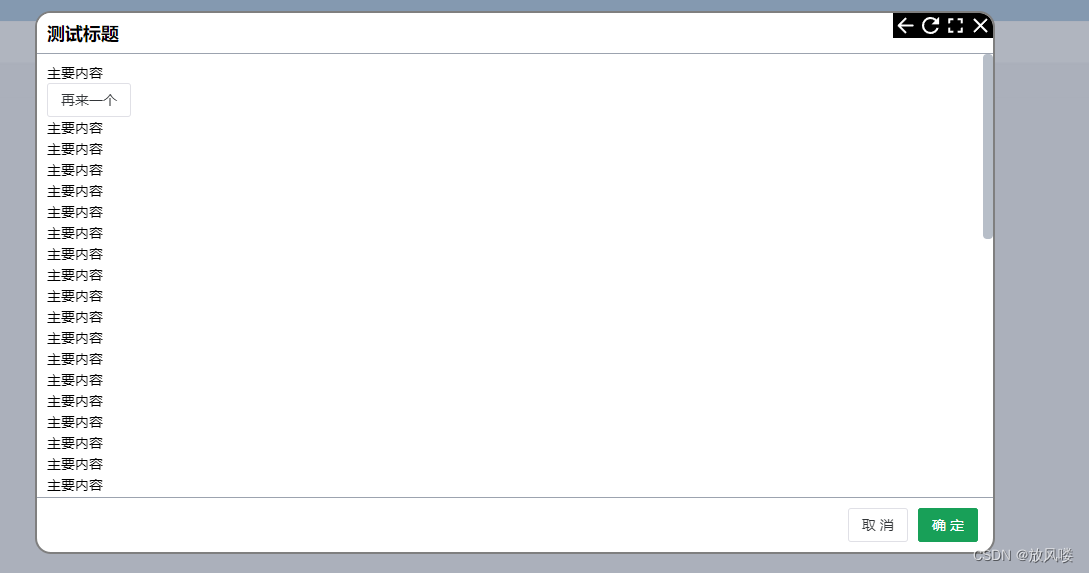
四、图片





 扫一扫
扫一扫


 8066
8066

 被折叠的 条评论
为什么被折叠?
被折叠的 条评论
为什么被折叠?
 到【灌水乐园】发言





