 KendoUI树状图实现





 本文介绍使用KendoUI插件实现树状图的过程,包括自定义样式、禁用文字选择、处理静态数据源及节点事件。文章分享了如何通过JavaScript初始化插件,展示树形结构,并提供获取选中节点数据的方法。
一开始用ZTree.js, 写的这个树状图 , 但是我一直找不到半勾选的状态 , 而且数据结构还不好处理的. 然后在网上找了这个kendo ui 里面tree,但是我在上网上找的都是关于Ztree的文档 很少有关于其他插件的文档,索性自己就写一篇吧. 小白一枚,写的不好还望指教!!!
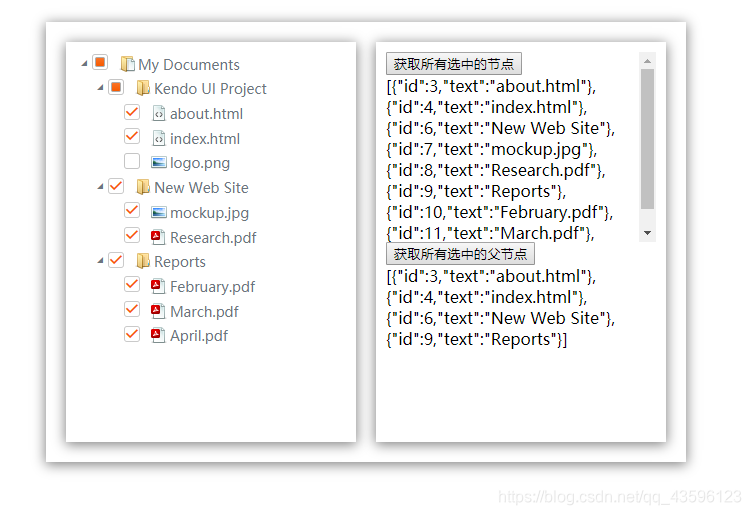
先上一波效果图
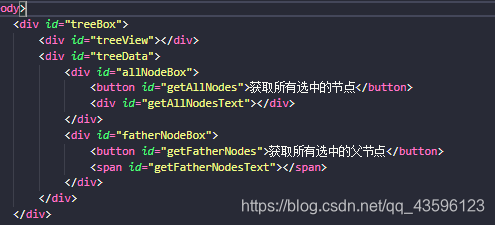
引入插件 css 和 js 里面有我自己写的css (去除了点击切换颜色)
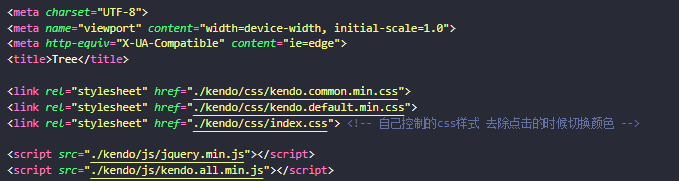
body里面写入html格式
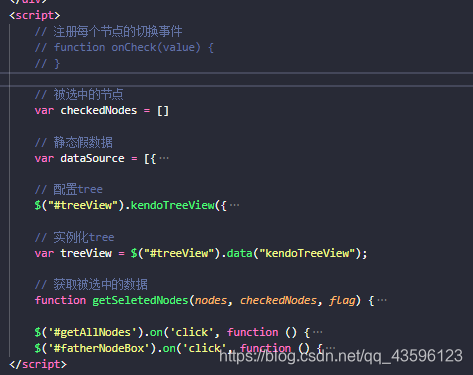
Js初始化
 /* 禁止双击选中文字 */
 * {
     -moz-user-select: -moz-none;
     -moz-user-select: none;
     -o-user-select: none;
     -khtml-user-select: none;
     -webkit-user-select: none;
     -ms-user-select: none;
     user-select: none;
 }

 /* 去除插件原有的样式 */
 .k-in {
     background: #fff !important;
     cursor: pointer !important;
     color: #6c757d !important;
     font-size: 14px !important;
     box-shadow: none !important;

 }

 .k-icon {
     cursor: pointer !important;
     color: #6c757d !important;
     font-size: 16px !important;
 }

 /* 添加图片样式 */
 #treeView .k-sprite {
     background-image: url("../imgs/coloricons-sprite.png") !important;
 }

 .rootfolder {
     background-position: 0 0;
 }

 .folder {
     background-position: 0 -16px;
 }

 .pdf {
     background-position: 0 -32px;
 }

 .html {
     background-position: 0 -48px;
 }

 .image {
     background-position: 0 -64px;
 }

 /* 自定义页面样式 */
 #treeBox {
     width: 600px;
     min-height: 400px;
     box-shadow: 0 2px 12px 0 rgba(0, 0, 0, .5);
     padding: 20px;
     margin: 50px auto;
     display: flex;
     justify-content: space-between;
 }

 #treeView {
     width: 45%;
     padding: 10px;
     min-height: 380px;
     box-shadow: 0 2px 12px 0 rgba(0, 0, 0, .5);
 }

 #treeData {
     width: 45%;
     padding: 10px;
     min-height: 380px;
     box-shadow: 0 2px 12px 0 rgba(0, 0, 0, .5);
 }

 #allNodeBox,
 #fatherNodeBox {
     width: 100%;
     height: 50%;
     overflow-x: auto;
 }

 button {
     cursor: pointer;
     display: block;
 }
<script>
        // 注册每个节点的切换事件
        // function onCheck(value) {
        // }

        // 被选中的节点
        var checkedNodes = []

        // 静态假数据
        var dataSource = [{
            id: 1,
            text: "My Documents",
            expanded: true,
            spriteCssClass: "rootfolder",
            items: [{
                    id: 2,
                    text: "Kendo UI Project",
                    expanded: true,
                    spriteCssClass: "folder",
                    items: [{
                            id: 3,
                            text: "about.html",
                            spriteCssClass: "html"
                        },
                        {
                            id: 4,
                            text: "index.html",
                            spriteCssClass: "html"
                        },
                        {
                            id: 5,
                            text: "logo.png",
                            spriteCssClass: "image"
                        }
                    ]
                },
                {
                    id: 6,
                    text: "New Web Site",
                    expanded: true,
                    spriteCssClass: "folder",
                    items: [{
                            id: 7,
                            text: "mockup.jpg",
                            spriteCssClass: "image"
                        },
                        {
                            id: 8,
                            text: "Research.pdf",
                            spriteCssClass: "pdf"
                        },
                    ]
                },
                {
                    id: 9,
                    text: "Reports",
                    expanded: true,
                    spriteCssClass: "folder",
                    items: [{
                            id: 10,
                            text: "February.pdf",
                            spriteCssClass: "pdf"
                        },
                        {
                            id: 11,
                            text: "March.pdf",
                            spriteCssClass: "pdf"
                        },
                        {
                            id: 12,
                            text: "April.pdf",
                            spriteCssClass: "pdf"
                        }
                    ]
                }
            ]
        }]

        // 配置tree
        $("#treeView").kendoTreeView({
            checkboxes: {
                checkChildren: true
            },
            // 注册每个节点的切换事件
            // check: onCheck,
            dataSource: dataSource
        });

        // 实例化tree
        var treeView = $("#treeView").data("kendoTreeView");

        // 获取被选中的数据
        function getSeletedNodes(nodes, checkedNodes, flag) {
            for (var i = 0; i < nodes.length; i++) {
                if (nodes[i].checked) {
                    checkedNodes.push({
                        id: nodes[i].id,
                        text: nodes[i].text
                    });
                }
                if (nodes[i].hasChildren) {
                    if (!nodes[i].checked && !flag) {
                        getSeletedNodes(nodes[i].children.view(), checkedNodes);
                    }
                    if (flag) {
                        getSeletedNodes(nodes[i].children.view(), checkedNodes, true);
                    }
                }
            }
        }

        $('#getAllNodes').on('click', function () {
            checkedNodes = []
            getSeletedNodes(treeView.dataSource.view(), checkedNodes, true);
            $('#getAllNodesText').text(JSON.stringify(checkedNodes))

        });
        $('#fatherNodeBox').on('click', function () {
            checkedNodes = []
            getSeletedNodes(treeView.dataSource.view(), checkedNodes);
            $('#getFatherNodesText').text(JSON.stringify(checkedNodes))
        });
    </script>
写的不好,希望大家多多包涵,如果有不对的地方还望大佬指出来!!!





 扫一扫
扫一扫


 1万+
1万+

 被折叠的 条评论
为什么被折叠?
被折叠的 条评论
为什么被折叠?
 到【灌水乐园】发言





