


1.linux 系统结构,在x86平台的cpu,是如何执行内核程序和用户程序的
ring0 :与硬件相关或者硬件寄存器,总线控制相关的程序--------内核程序
ring1-2 :驱动程序或者与虚拟化相关的程序
ring3 :用户态的程序
2. /proc
/proc 正在运行的内核信息映射
主要输出: (1)进程信息
(2)内存资源信息
(3)磁盘分区信息等等
3. /sys
/sys 硬件设备的驱动程序信息
[root@CentOS6 ~]# cd /sys
[root@CentOS6 sys]# ls
block  bus  class  dev  devices  firmware  fs  hypervisor  kernel  module  power
[root@CentOS6 sys]# cd /proc
[root@CentOS6 proc]# ls
1     1400  21   33   48   901        execdomains  locks         slabinfo
10    1408  22   34   49   902        fb           mdstat        softirqs
11    1409  23   35   5    903        filesystems  meminfo       stat
113   1413  233  36   50   953        fs           misc          swaps
12    1432  234  37   526  acpi       interrupts   modules       sys
1239  1436  235  38   6    asound     iomem        mounts        sysrq-trigger
1261  1438  24   386  652  buddyinfo  ioports      mpt           sysvipc
13    1459  240  387  7    bus        irq          mtd           timer_list
1351  1465  241  388  8    cgroups    kallsyms     mtrr          timer_stats
1377  15    25   389  80   cmdline    kcore        net           tty
1390  16    26   390  81   cpuinfo    keys         pagetypeinfo  uptime
1392  17    27   4    860  crypto     key-users    partitions    version
1394  18    28   443  861  devices    kmsg         sched_debug   vmallocinfo
1396  19    29   444  862  diskstats  kpagecount   schedstat     vmstat
1398  2     3    45   9    dma        kpageflags   scsi          zoneinfo
14    20    30   46   900  driver     loadavg      self
LVS原理

计算机资源,内核空间,命令解释器(shell),用户空间,
查一下

nginx,httpd,tomcat都是web服务
4. 防火墙的基础
4.1 iptables介绍
从逻辑上分类:
网络防火墙,主机防火墙
从物理上分类:
硬件防火墙:(性能高,成本高)
软件防火墙:(性能低,成本低)
网络安全的知名企业:深信服,思科,天融信
硬件防火墙:思科(AIR-CT5508-300-K9)
华为(USG6670)
iptables并不是真正意义上的防火墙,可以理解为一个客户端工具,用户通过ipatbles这个客户端,将用户的安全设定执行到对应的"安全框架"中,这个"安全框架"才是真正的防火墙,这个框架的名字叫netfilter。
netfilter才是防火墙真正的安全框架,netfilter位于内核空间。
iptables是一个命令行工具,位于用户空间,通过这个命令行工具来操作netfilter。
功能:完成封包过滤、封包重定向和网络地址转换(NAT)等
内核空间:也叫做内核态,操作系统占据的内存区域
用户空间:也叫做用户态,用户进程所在的内存区域
5. iptables四表,五链
防火墙是按照规则办事的,这些规则分别指定了源地址、目的地址、传输协议(如TCP、UDP、ICMP)和服务类型(如HTTP、FTP和SMTP)等。当数据包与规则匹配时,iptables就根据规则所定义的方法来处理这些数据包,如放行(accept)、拒绝(reject)和丢弃(drop)等。配置防火墙的主要工作就是添加、修改和删除这些规则。
如果我们想要防火墙能够达到"防火"的目的,则需要在内核中设置关卡,所有进出的报文都要通过这些关卡,经过检查后,符合放行条件的才能放行,符合阻拦条件的则需要被阻止,于是,就出现了input关卡和output关卡,而这些关卡在iptables中不被称为"关卡",而被称为"链"
除过这两个关卡以外,我们还有其他关卡,也就是其他链,他们就是 “路由前”、“转
发”、“路由后”,对应英文表示为PREROUTING、FORWARD、POSTROUTING。
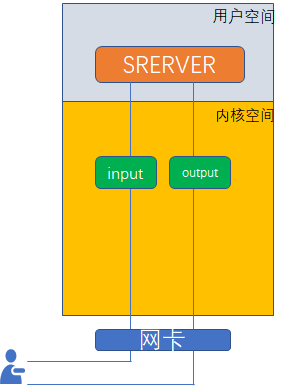
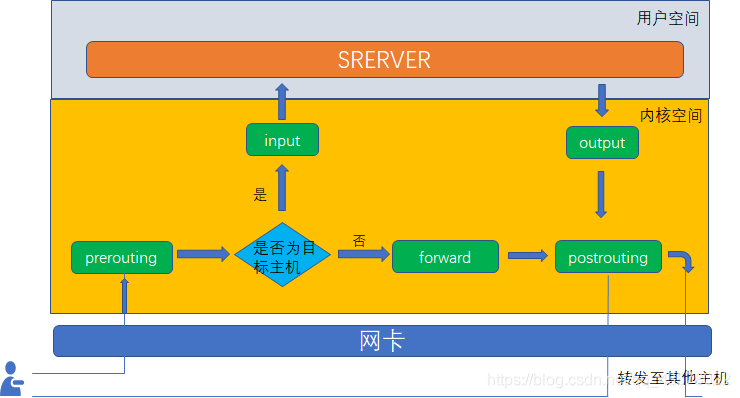
当我们把这些规则串到一个链条上的时候,就形成了"链",
我们把具有相同功能的规则的集合叫做“表”,不同的规则放置于不同的表中工作,在iptables中定义了四种表,
   表                                      说明
filter表          负责过滤功能,防火墙;内核模块:iptables_filter
nat表             network address translation,网络地址转换功能;内核模块:iptable_nat
mangle表          拆解报文,做出修改,并重新封装 的功能;iptable_mangle
raw表             关闭nat表上启用的连接追踪机制;iptable_raw
四表:
filter (INPUT,FORWARD,PUTPUT)
nat (PREROUTING,POSTROUTING,OUTPUT)
raw (PREROUTING,OUTPUT)
mangle (五条)
五链:
INPUT
OUTPUT
FORWARD
PREROUTING
POSTROUTING
优先级次序:
四表在同一个链中有顺序:
raw > mangle > nat > filter
6. 防火墙配置
iptables -L :查看所有规则
iptables -F:清空所有规则
iptables -t filter -D INPUT 1 某一个链的某个规则。
iptables -t tilter -L :查看指定表的规则
iptables -nvL --line-number
-n:转化成数字
-v:显示详细信息
–line-number 显示链下规则的序号
[root@CentOS6 ~]# iptables -L
Chain INPUT (policy ACCEPT)
target     prot opt source               destination
ACCEPT     all  --  anywhere             anywhere            state RELATED,ESTABLISHED
ACCEPT     icmp --  anywhere             anywhere
ACCEPT     all  --  anywhere             anywhere
ACCEPT     tcp  --  anywhere             anywhere            state NEW tcp dpt:ssh
REJECT     all  --  anywhere             anywhere            reject-with icmp-host-prohibited

Chain FORWARD (policy ACCEPT)
target     prot opt source               destination
REJECT     all  --  anywhere             anywhere            reject-with icmp-host-prohibited

Chain OUTPUT (policy ACCEPT)
target     prot opt source               destination
[root@CentOS6 ~]# lsmod |grep iptables*
iptable_filter          2793  1
ip_tables              17831  1 iptable_filter
[root@CentOS6 ~]# modprobe iptable_nat
[root@CentOS6 ~]# lsmod |grep iptables*
iptable_nat             5923  0
nf_nat                 22676  1 iptable_nat
nf_conntrack_ipv4       9186  5 iptable_nat,nf_nat
iptable_filter          2793  1
ip_tables              17831  2 iptable_nat,iptable_filter
nf_conntrack           79537  5 iptable_nat,nf_nat,nf_conntrack_ipv4,nf_conntrack_ipv6,xt_state
[root@CentOS6 ~]# iptables -L
Chain INPUT (policy ACCEPT)
target     prot opt source               destination
ACCEPT     all  --  anywhere             anywhere            state RELATED,ESTABLISHED
ACCEPT     icmp --  anywhere             anywhere
ACCEPT     all  --  anywhere             anywhere
ACCEPT     tcp  --  anywhere             anywhere            state NEW tcp dpt:ssh
REJECT     all  --  anywhere             anywhere            reject-with icmp-host-prohibited

Chain FORWARD (policy ACCEPT)
target     prot opt source               destination
REJECT     all  --  anywhere             anywhere            reject-with icmp-host-prohibited

Chain OUTPUT (policy ACCEPT)
target     prot opt source               destination
[root@CentOS6 ~]# iptables -t mangle -L
Chain PREROUTING (policy ACCEPT)
target     prot opt source               destination

Chain INPUT (policy ACCEPT)
target     prot opt source               destination

Chain FORWARD (policy ACCEPT)
target     prot opt source               destination

Chain OUTPUT (policy ACCEPT)
target     prot opt source               destination

Chain POSTROUTING (policy ACCEPT)
target     prot opt source               destination

[root@CentOS6 ~]# iptables -t nat -L
Chain PREROUTING (policy ACCEPT)
target     prot opt source               destination

Chain POSTROUTING (policy ACCEPT)
target     prot opt source               destination

Chain OUTPUT (policy ACCEPT)
target     prot opt source               destination
[root@CentOS6 ~]# iptables -t raw -L
Chain PREROUTING (policy ACCEPT)
target     prot opt source               destination

Chain OUTPUT (policy ACCEPT)
target     prot opt source               destination
[root@CentOS6 ~]# iptables -t filter -L
Chain INPUT (policy ACCEPT)
target     prot opt source               destination
ACCEPT     all  --  anywhere             anywhere            state RELATED,ESTABLISHED
ACCEPT     icmp --  anywhere             anywhere
ACCEPT     all  --  anywhere             anywhere
ACCEPT     tcp  --  anywhere             anywhere            state NEW tcp dpt:ssh
REJECT     all  --  anywhere             anywhere            reject-with icmp-host-prohibited

Chain FORWARD (policy ACCEPT)
target     prot opt source               destination
REJECT     all  --  anywhere             anywhere            reject-with icmp-host-prohibited

Chain OUTPUT (policy ACCEPT)
target     prot opt source               destination
target:
ACCERT:容许,接收
DROP:丢弃
REJECT:拒绝
增
[root@localhost ~]# iptables -t filter -I INPUT -s 192.168.42.102 -j DROP
[root@localhost ~]# iptables -t filter -I INPUT -s 192.168.42.102 -j REJECT
[root@localhost ~]# iptables -t filter -I OUTPUT -d 192.168.42.102 -j DROP
[root@localhost ~]# iptables -t filter -A INPUT -s 192.168.42.102 -j DROP
[root@localhost ~]# iptables -t filter -I INPUT 2 -s 192.168.42.102 -j ACCEPT #“具体添加到哪一行”
[root@localhost ~]# iptables -t filter -I INPUT -s 192.168.42.102 -p ICMP -j DROP #禁ping。

[root@localhost ~]# iptables -t filter -I INPUT -s 192.168.42.145 -p tcp --dport 80 -j REJECT
[root@localhost ~]# iptables -t filter -I INPUT -p ICMP -s 192.168.42.145,192.168.42.102 -j ACCEPT
[root@localhost ~]# iptables -t filter -I INPUT -p ICMP -s 192.168.42.0/24 -j ACCEPT
[root@localhost ~]# iptables -t filter -I INPUT -p ICMP ! -s 192.168.42.145 -j ACCEPT #在192.168.42.0/24 屏蔽了 192.168.42.145
!排除
[root@localhost ~]# iptables -t filter -I INPUT -p tcp --dport 22 -j ACCEPT
[root@localhost ~]# iptables -t filter -I INPUT -p tcp --sport 22 -j ACCEPT
[root@localhost ~]# iptables -t filter -A INPUT -j REJECT #拒绝所有。
-s 原地址
-d 目的地址
-p 协议
–dport 目标端口
–sport 源端口
-I 添加到第一条
-A追加到最后
[root@CentOS6 proc]# iptables -t filter -I INPUT -s 192.168.26.66 -j DROP
[root@CentOS6 proc]# iptables -nvL
Chain INPUT (policy ACCEPT 6 packets, 384 bytes)
 pkts bytes target     prot opt in     out     source               destination
    3   252 DROP       all  --  *      *       192.168.26.66        0.0.0.0/0

Chain FORWARD (policy ACCEPT 0 packets, 0 bytes)
 pkts bytes target     prot opt in     out     source               destination

Chain OUTPUT (policy ACCEPT 4 packets, 432 bytes)
 pkts bytes target     prot opt in     out     source               destination
[root@CentOS6 proc]# iptables -t filter -I INPUT -s 192.168.26.66 -j REJECT
[root@CentOS6 proc]# iptables -nvL
Chain INPUT (policy ACCEPT 6 packets, 384 bytes)
 pkts bytes target     prot opt in     out     source               destination
    2   168 REJECT     all  --  *      *       192.168.26.66        0.0.0.0/0           reject-with icmp-port-unreachable
  106  8904 DROP       all  --  *      *       192.168.26.66        0.0.0.0/0

Chain FORWARD (policy ACCEPT 0 packets, 0 bytes)
 pkts bytes target     prot opt in     out     source               destination

Chain OUTPUT (policy ACCEPT 6 packets, 544 bytes)
 pkts bytes target     prot opt in     out     source               destination
[root@CentOS6 proc]# iptables -t filter -I INPUT -s 192.168.26.66 -j ACCERT
iptables v1.4.7: Couldn't load target `ACCERT':/lib64/xtables/libipt_ACCERT.so: cannot open shared object file: No such file or directory

Try `iptables -h' or 'iptables --help' for more information.
[root@CentOS6 proc]# iptables -t filter -I INPUT -s 192.168.26.66 -j ACCERT
iptables v1.4.7: Couldn't load target `ACCERT':/lib64/xtables/libipt_ACCERT.so: cannot open shared object file: No such file or directory

Try `iptables -h' or 'iptables --help' for more information.
[root@CentOS6 proc]# iptables -t filter -I OUTPUT -d 192.168.26.66 -j DROP
[root@CentOS6 proc]# iptables -nvL
Chain INPUT (policy ACCEPT 12 packets, 768 bytes)
 pkts bytes target     prot opt in     out     source               destination
  304 25536 REJECT     all  --  *      *       192.168.26.66        0.0.0.0/0           reject-with icmp-port-unreachable
  106  8904 DROP       all  --  *      *       192.168.26.66        0.0.0.0/0

Chain FORWARD (policy ACCEPT 0 packets, 0 bytes)
 pkts bytes target     prot opt in     out     source               destination

Chain OUTPUT (policy ACCEPT 6 packets, 560 bytes)
 pkts bytes target     prot opt in     out     source               destination
    4   448 DROP       all  --  *      *       0.0.0.0/0            192.168.26.66
[root@CentOS6 proc]# ping 192.168.26.66
PING 192.168.26.66 (192.168.26.66) 56(84) bytes of data.
ping: sendmsg: Operation not permitted
ping: sendmsg: Operation not permitted
ping: sendmsg: Operation not permitted
^C
--- 192.168.26.66 ping statistics ---
3 packets transmitted, 0 received, 100% packet loss, time 2953ms
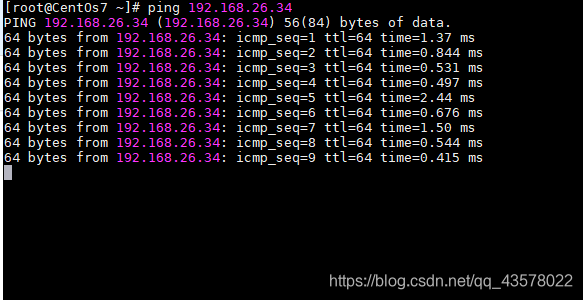
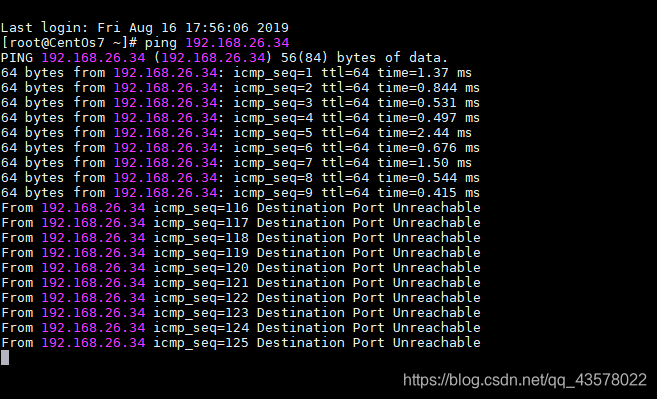
删
[root@localhost ~]# iptables -F
[root@localhost ~]# iptables -t filter -D INPUT 2
[root@localhost ~]# iptables -t filter -D INPUT -p tcp --sport 22 -j ACCEPT
[root@CentOS6 proc]# iptables -t filter -D INPUT 2
[root@CentOS6 proc]# iptables -nvL
Chain INPUT (policy ACCEPT 6 packets, 384 bytes)
 pkts bytes target     prot opt in     out     source               destinati                                                                     on
   69  5796 DROP       icmp --  *      *       192.168.26.66        0.0.0.0/0
  433 36372 REJECT     all  --  *      *       192.168.26.66        0.0.0.0/0                                                                                reject-with icmp-port-unreachable
  106  8904 DROP       all  --  *      *       192.168.26.66        0.0.0.0/0

Chain FORWARD (policy ACCEPT 0 packets, 0 bytes)
 pkts bytes target     prot opt in     out     source               destinati                                                                     on

Chain OUTPUT (policy ACCEPT 3 packets, 296 bytes)
 pkts bytes target     prot opt in     out     source               destinati                                                                     on
  200 20524 DROP       all  --  *      *       0.0.0.0/0            192.168.2                                                                     6.66
[root@CentOS6 proc]#  iptables -t filter -D INPUT -s 192.168.26.66 -p ICMP -j DROP
[root@CentOS6 proc]# iptables -nvL
Chain INPUT (policy ACCEPT 8 packets, 512 bytes)
 pkts bytes target     prot opt in     out     source               destination
  433 36372 REJECT     all  --  *      *       192.168.26.66        0.0.0.0/0           reject-with icmp-port-unreachable
  106  8904 DROP       all  --  *      *       192.168.26.66        0.0.0.0/0

Chain FORWARD (policy ACCEPT 0 packets, 0 bytes)
 pkts bytes target     prot opt in     out     source               destination

Chain OUTPUT (policy ACCEPT 4 packets, 400 bytes)
 pkts bytes target     prot opt in     out     source               destination
  200 20524 DROP       all  --  *      *       0.0.0.0/0            192.168.26.66
改
[root@localhost ~]# iptables -t filter -R INPUT 2 -p tcp --dport 80 -s 192.168.42.102 -j ACCEPT
查
[root@localhost ~]# iptables -nvL --line-number
-n
-v
-L
保存规则:
[root@localhost ~]# service iptables save 保存到文件,/etc/sysconfig/iptables
[root@localhost ~]# iptables-save 输出规则到屏幕
[root@localhost ~]# md5sum /etc/sysconfig/iptables





 扫一扫
扫一扫


 3709
3709

 被折叠的 条评论
为什么被折叠?
被折叠的 条评论
为什么被折叠?
 到【灌水乐园】发言





