


 本文详细介绍HBase在Hadoop生态系统中的作用,提供HBase Shell命令与Java API的实际操作指南,包括表管理、数据操作及MapReduce集成,适用于初学者快速上手。
文章目录
实验目的
- 理解 HBase 在 Hadoop 体系结构中的角色
- 熟练使用 HBase 操作常用的 Shell 命令
- 熟悉 HBase操作常用的 Java API
实验平台
- 操作系统:Ubuntu 16.04
- Hadoop 版本:3.1.3
- HBase 版本:2.2.2
- JDK 版本:1.8
- Java IDE:Eclipse
注:实验需要开启hbase服务,开启顺序为先Hadoop → Hbase,关闭顺序为Hbase → Hadoop
实验内容和要求
1. 编程实现以下指定功能,并用 Hadoop 提供的 HBase Shell 命令完成相同任务:
(1) 列出 HBase 所有的表的相关信息,例如表名
hbase(main):001:0> list
(2) 在终端打印出指定的表的所有记录数据
查看记录数据:
hbase(main):001:0> scan '表名'
查看表的信息:
hbase(main):001:0> describe '表名'
(3) 向已经创建好的表添加和删除指定的列族或列
添加列族或列:
hbase(main):001:0> alter '表名','NAME'=>'列名'
删除列族或列:
hbase(main):001:0> alter '表名','NAME'=>'列名',METHOD=>'delete'
(4) 清空指定的表的所有记录数据
hbase(main):001:0> drop '表名'
(5) 统计表的行数
hbase(main):001:0> count '表名'
2.现有以下关系型数据库中的表和数据,要求将其转换为适合于 HBase 存储的表并插入数据:
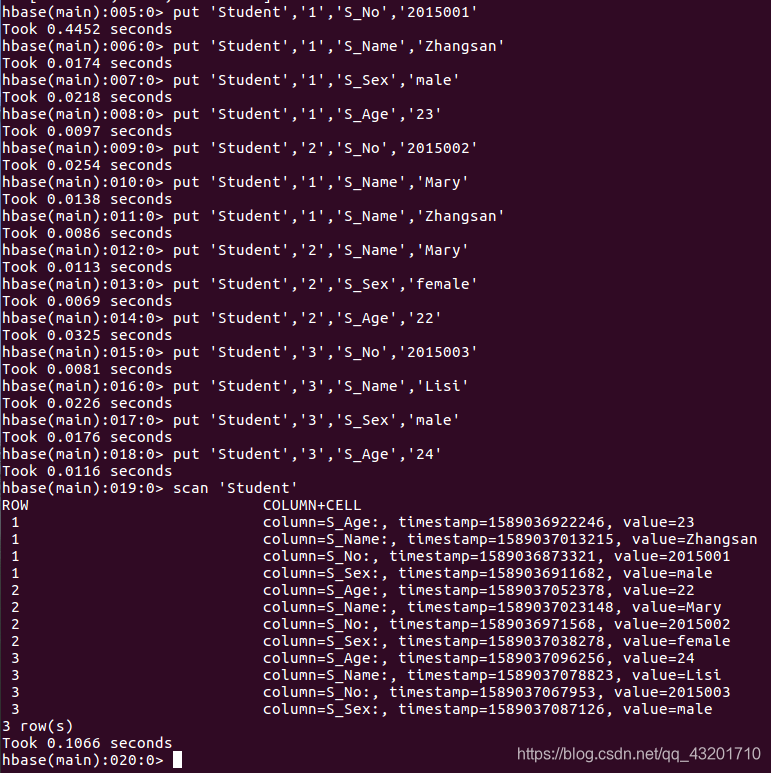
学生表:
| 学号 | 姓名 | 性别 | 年龄 |
|---|---|---|---|
| 2015001 | Zhangsan | male | 23 |
| 2015002 | Mary | female | 22 |
| 2015003 | Lisi | male | 24 |
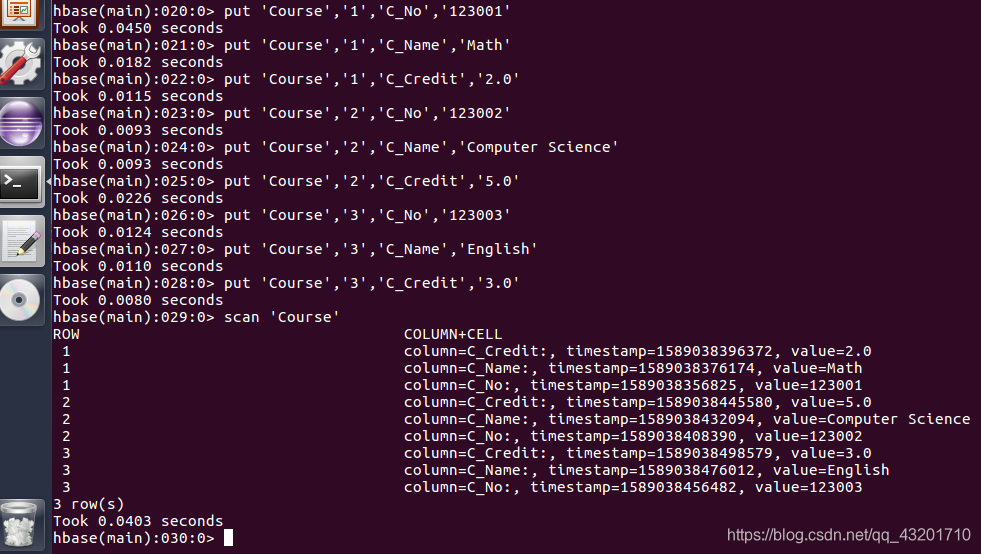
课程表:
| 课程号 | 课程名 | 学分 |
|---|---|---|
| 123001 | Math | 2.0 |
| 123002 | Computer Science | 5.0 |
| 123003 | English | 3.0 |
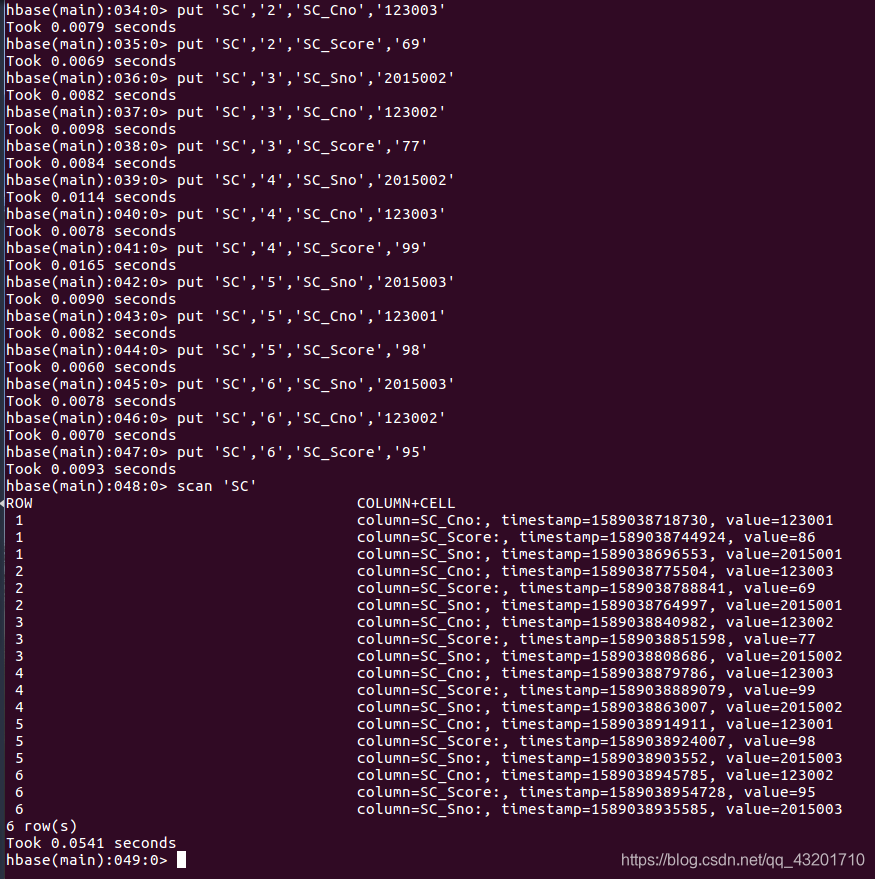
选课表:
| 学号 | 课程号 | 成绩 |
|---|---|---|
| 2015001 | 123001 | 86 |
| 2015001 | 123003 | 69 |
| 2015002 | 123002 | 77 |
| 2015002 | 123003 | 99 |
| 2015003 | 123001 | 98 |
| 2015003 | 123002 | 95 |
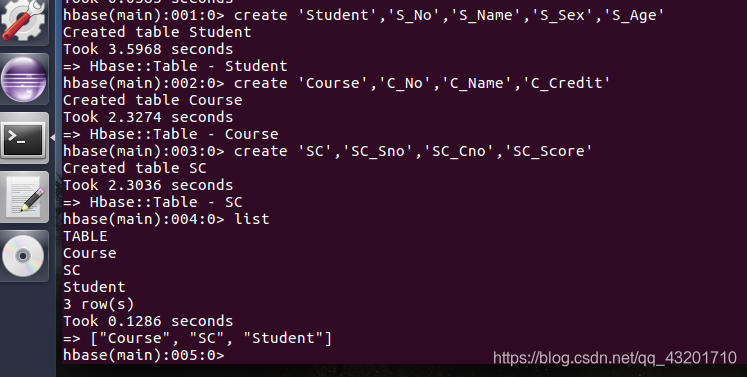
创建三个表格
‘Student’表中添加数据
‘Course’表中添加数据
‘SC’表中添加数据
同时,请编程完成以下指定功能:
(1)createTable(String tableName, String[] fields)
创建表,参数 tableName 为表的名称,字符串数组 fields 为存储记录各个域名称的数组。要求当 HBase 已经存在名为 tableName 的表的时候,先删除原有的表,然后再创建新的表。
import org.apache.hadoop.conf.Configuration;
import org.apache.hadoop.hbase.HBaseConfiguration;
import org.apache.hadoop.hbase.TableName;
import org.apache.hadoop.hbase.client.ColumnFamilyDescriptor;
import org.apache.hadoop.hbase.client.ColumnFamilyDescriptorBuilder;
import org.apache.hadoop.hbase.client.Connection;
import org.apache.hadoop.hbase.client.Admin;
import org.apache.hadoop.hbase.client.ConnectionFactory;
import org.apache.hadoop.hbase.client.TableDescriptorBuilder;
import org.apache.hadoop.hbase.util.Bytes;
import java.io.IOException;
public class CreateTable {
public static Configuration configuration;
public static Connection connection;
public static Admin admin;
public static void init(){
//建立连接
configuration = HBaseConfiguration.create();
configuration.set("hbase.rootdir","hdfs://localhost:9000/hbase");
try{
connection = ConnectionFactory.createConnection(configuration);
admin = connection.getAdmin();
}catch(IOException e){
e.printStackTrace();
}
}
public static void close(){
//关闭连接
try{
if(admin != null){
admin.close();
}
if(connection != null){
connection.close();
}
}catch(IOException e){
e.printStackTrace();
}
}
public static void createTable(String tableName,String[] fields) throws IOException{
init();
TableName tablename = TableName.valueOf(tableName);//定义表名
if(admin.tableExists(tablename)){
System.out.println("table is exists!");
admin.disableTable(tablename);
admin.deleteTable(tablename);
}
TableDescriptorBuilder tableDescriptor = TableDescriptorBuilder.newBuilder(tablename);
for(int i=0;i<fields.length;i++){
ColumnFamilyDescriptor family = ColumnFamilyDescriptorBuilder.newBuilder(Bytes.toBytes(fields[i])).build();
tableDescriptor.setColumnFamily 最低0.47元/天 解锁文章






 扫一扫
扫一扫


 2715
2715

 被折叠的 条评论
为什么被折叠?
被折叠的 条评论
为什么被折叠?
 到【灌水乐园】发言





