



 该代码示例展示了如何通过Controller接口使用EasyExcel库生成并下载带有特定格式和下拉框的Excel文件。接口处理了内容的编码防止乱码,创建了不同的工作表并设置了单元格格式和数据验证。
Controller 接口层
@Log("下载eCRF设计模版")
    @GetMapping("downECRFDesignExcelModel")
    @PreNotAuthorize
    public void downECRFDesignExcelModel(HttpServletResponse response) throws IOException {
        response.setContentType("application/vnd.ms-excel");
        response.setCharacterEncoding("utf-8");
        // 防止中文乱码
        String  sheetFileName="eCRF界面设计";
        String fileName = URLEncoder.encode(sheetFileName, "UTF-8")
                .replaceAll("\\+","%20");
        response.setHeader("Content-disposition", "attachment;filename*=UTF-8''" + fileName + ExcelTypeEnum.XLSX.getValue());
        //响应的输入流
        ServletOutputStream outputStream = response.getOutputStream();
        // workbook
        ExcelWriter writeWorkBook = EasyExcel.write(outputStream)
                .useDefaultStyle(false).build();
        WriteSheet eCRF = EasyExcel.writerSheet(0, "eCRF").head(ECRFExcelImport.class)
                .registerWriteHandler(new CustomSheetWriteHandler())
                .registerWriteHandler(new ECRFCustomSheetWriteStyleHandler()).build();
                // 设置不同sheet的格式
//        WriteSheet general = EasyExcel.writerSheet(1, "一般编码").head(DatabaseGeneralCodeImport.class)
//                .registerWriteHandler(new CustomSheetWriteHandler())
//                .registerWriteHandler(new GeneralCodeCustomSheetWriteStyleHandler()).build();
//
//        WriteSheet EmbedCode = EasyExcel.writerSheet(2, "内嵌表编码").head(DatabaseEmbedCodeImport.class)
//                .registerWriteHandler(new CustomSheetWriteHandler())
//                .registerWriteHandler(new EmbedCodeCustomSheetWriteStyleHandler()).build();
        writeWorkBook.write(new ArrayList<ECRFExcelImport>(),eCRF);
//        writeWorkBook.write(new ArrayList<DatabaseGeneralCodeImport>(),general);
//        writeWorkBook.write(new ArrayList<DatabaseEmbedCodeImport>(),EmbedCode);
        writeWorkBook.close();
        outputStream.close();
    }
设置统一的单元格格式为文本
public class CustomSheetWriteHandler implements SheetWriteHandler {

    @Override
    public void afterSheetCreate(WriteWorkbookHolder writeWorkbookHolder, WriteSheetHolder writeSheetHolder) {
        for (int i = 0; i < 100; i++) {
            // 设置为文本格式
            SXSSFSheet sxssfSheet = (SXSSFSheet) writeSheetHolder.getSheet();
            CellStyle cellStyle = writeWorkbookHolder.getCachedWorkbook().createCellStyle();
            // 49为文本格式
            cellStyle.setDataFormat((short) 49);
            // i为列,一整列设置为文本格式
            sxssfSheet.setDefaultColumnStyle(i, cellStyle);

        }

    }
}
设置某些单元格的样式为下拉框
public class ECRFCustomSheetWriteStyleHandler implements SheetWriteHandler {

    @Override
    public void afterSheetCreate(WriteWorkbookHolder writeWorkbookHolder, WriteSheetHolder writeSheetHolder) {

        // 定义一个Map key 是需要添加下拉框的列的index value是下拉框的数据
        Map<Integer,String[]> mapDropDown=new HashMap<>();
        // 变量类型 单选 多选 日期 时间 日期时间 数值 字符 字符数值 字符日期  字符时间 长字符
        String[] variableType={"单选","多选","日期","时间","日期时间","数值","字符",
                "字符数值","字符日期","字符时间","长字符"};

        // 允许修改录入日期 是否
        String[] modifyEntryDateYesNo={"是","否"};
        //只读 是否
        String[] readOnly={"是","否"};
        // 文本区只读 是否
        String[] textReadOnly={"是","否"};
        //必填项 是否
        String[] require={"是","否"};

        // 精确度 精确到时 精确到分 精确到秒 精确到日 精确到月
        String[] accuracy={"精确到时","精确到分","精确到秒","精确到日","精确到月",};
        //编码排列方式 单行Radio 多行Radio 下拉菜单
        String[] codeArrangement={"单行Radio","多行Radio","下拉菜单"};
        // 是否生效 是否
        String[] operation={"是","否"};

        // 下拉框在excel中对应的值
        mapDropDown.put(9,variableType);
        mapDropDown.put(10,modifyEntryDateYesNo);
        mapDropDown.put(11,readOnly);
        mapDropDown.put(12,textReadOnly);
        mapDropDown.put(13,require);
        mapDropDown.put(17,accuracy);
        mapDropDown.put(20,codeArrangement);
        mapDropDown.put(24,operation);

        //获取工作簿sheet
        Sheet sheet = writeSheetHolder.getSheet();
        // 开始设置下拉框
        DataValidationHelper helper = sheet.getDataValidationHelper();
        //设置下拉框
        for(Map.Entry<Integer,String[]> entry:mapDropDown.entrySet()){
            /*起始行、终止行、起始列、终止列  起始行为1即表示表头不设置**/
            CellRangeAddressList addressList = new CellRangeAddressList(1, 65535, entry.getKey(), entry.getKey());
            /*设置下拉框数据**/
            DataValidationConstraint constraint = helper.createExplicitListConstraint(entry.getValue());
            DataValidation dataValidation = helper.createValidation(constraint, addressList);
            sheet.addValidationData(dataValidation);

        }


    }
}
实体类
@Data
public class ECRFExcelImport {

    @ExcelProperty(value = "编号",index = 0)
    private Integer indexNum;
    /**
     * 表名字
     */
    @ExcelProperty(value = "表名",index = 1)
    private String surfaceName;

    /**
     * 表
     */
    @ExcelProperty(value = "表",index = 2)
    private String surface;

    /**
     * DOMAIN
     */
    @ExcelProperty(value = "DOMAIN",index = 3)
    private String domain;

    /**
     * 分类
     */
    @ExcelProperty(value = "分类",index = 4)
    private String classify;

    /**
     * 列表显示变量
     */
    @ExcelProperty(value = "列表显示变量",index = 5)
    private String showVariable;
    /**
     * 引用表名称
     */
    @ExcelProperty(value = "引用表",index = 6)
    private String quoteCrfName;
    @ExcelProperty(value = "变量名",index = 7)
    private String variableName;
    @ExcelProperty(value = "变量",index = 8)
    private String variable;
    @ExcelProperty(value = "变量类型",index = 9)
    private String variableType;
    @ExcelProperty(value = "允许修改录入日期",index = 10)
    private String modifyEntryDate;
    @ExcelProperty(value = "只读",index = 11)
    private String readOnly;
    @ExcelProperty(value = "文本只读",index = 12)
    private String textReadOnly;
    @ExcelProperty(value = "必填项",index = 13)
    private String required;

    @ExcelProperty(value = "默认值",index = 14)
    private String defaultValue;
    @ExcelProperty(value = "录入说明",index = 15)
    private String entry;
    @ExcelProperty(value = "文本辅助录入设定",index = 16)
    private String auxiliaryEntry;

    @ExcelProperty(value = "精确度",index = 17)
    private String accuracy;
    @ExcelProperty(value = "格式",index = 18)
    private String form;


    @ExcelProperty(value = "编码名称",index = 19)
    private String codeName;
    @ExcelProperty(value = "编码排列方式",index = 20)
    private String codeArrangement;
    @ExcelProperty(value = "每行编码数量",index = 21)
    private Integer number;
    // 字段相关
    @ExcelProperty(value = "正则表达式",index = 22)
    private String regEx;
    @ExcelProperty(value = "SAS导出格式",index = 23)
    private String sasDerive;

    @ExcelProperty(value = "是否生效",index = 24)
    private String operation;


}
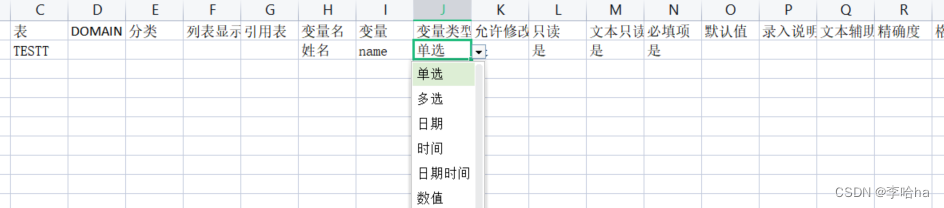
最终样式
参考博文;https://blog.youkuaiyun.com/qq_43419105/article/details/128219049






 扫一扫
扫一扫


 3672
3672


 到【灌水乐园】发言



