



 本文介绍了如何通过Acrobat Pro和iTextPDF库操作PDF,包括文本域、单选/复选框、图片域、条形码、二维码和二维条码的使用。还涵盖了如何根据模板动态生成PDF,以及页码确定和不确定的处理方法。
【一、准备工具】
1、首先安装好acrobat pro,这里提供一个绿色版的
AdobeAcrobatProDC2024 https://pan.baidu.com/s/1mz16ObP2thmZWqIZIUKbuw?pwd=h9c7
2、acrobat的初步使用
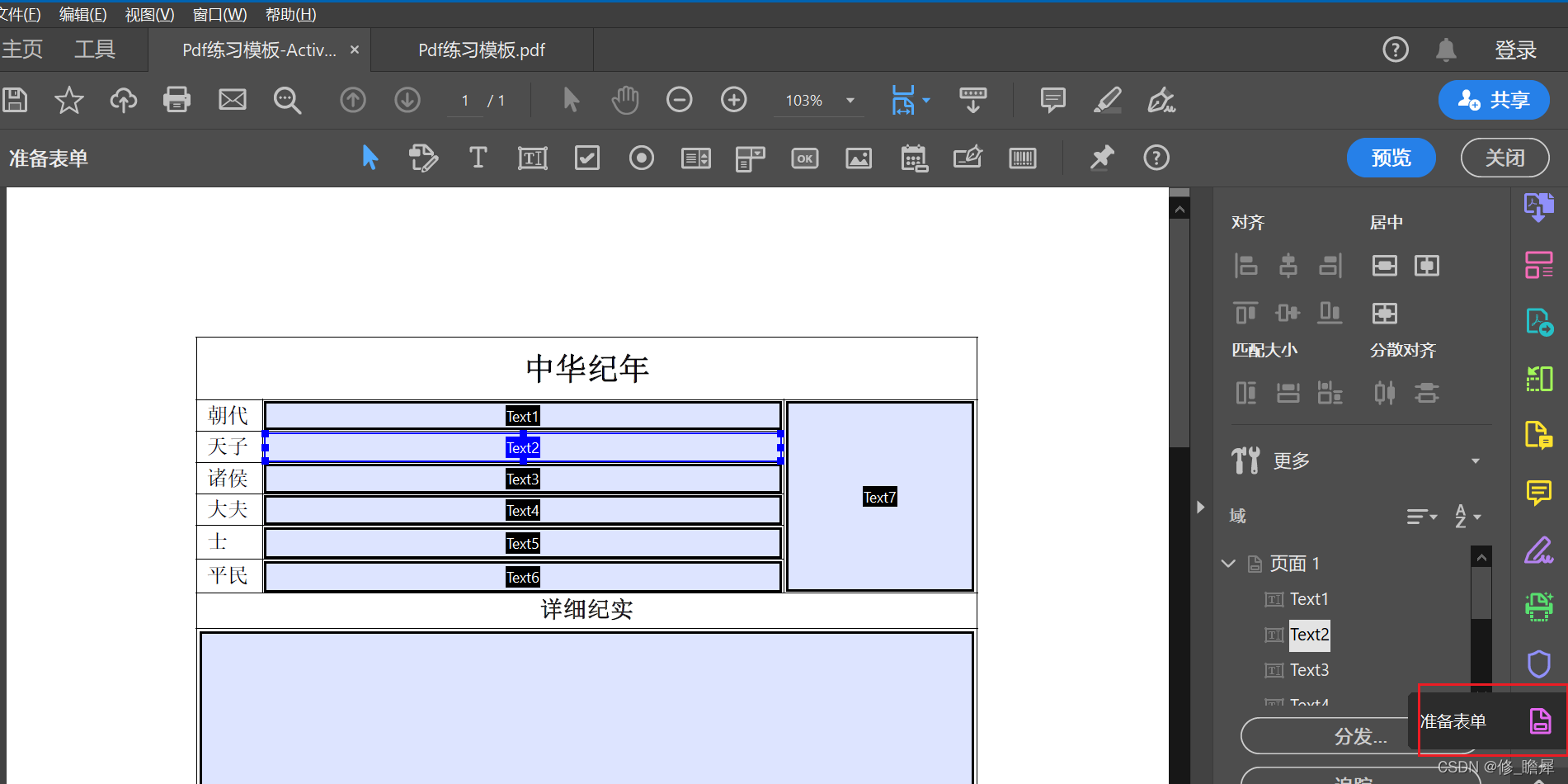
先将一个自定义的word模板转成pdf,然后在“更多工具”里找到并选中“准备表单”。上图的"TextField"为表单框的字段域名,之后将在代码里作为变量赋值使用。

最为常用的有:文本域、复选框、单选框、图片框,参见上图圈红部分。
3、acrobat的一些细节用法
在编辑框的属性中可以进行一些细节设置。
>>>文本框
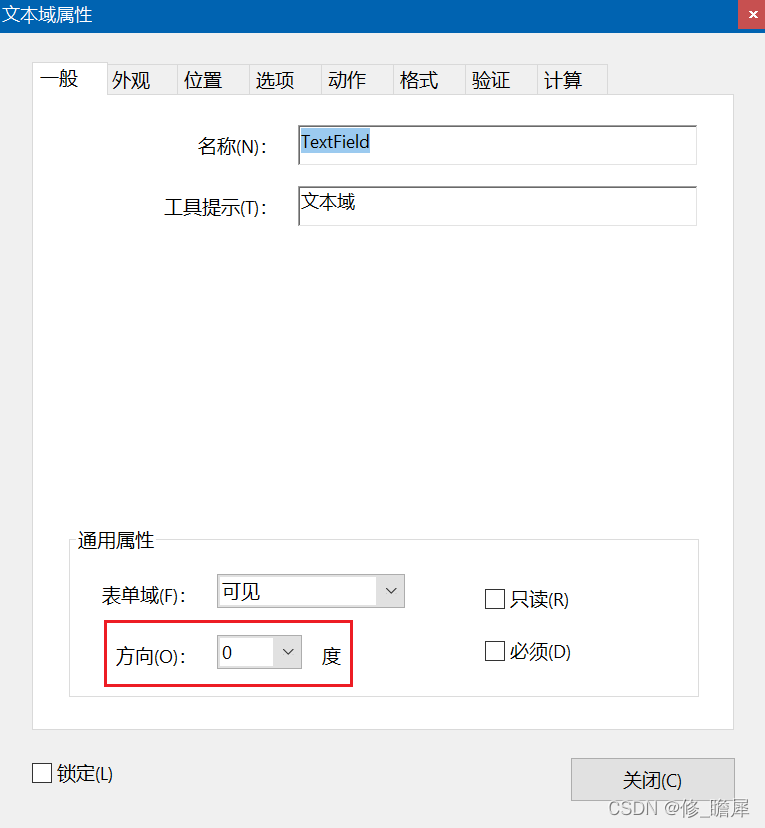 | 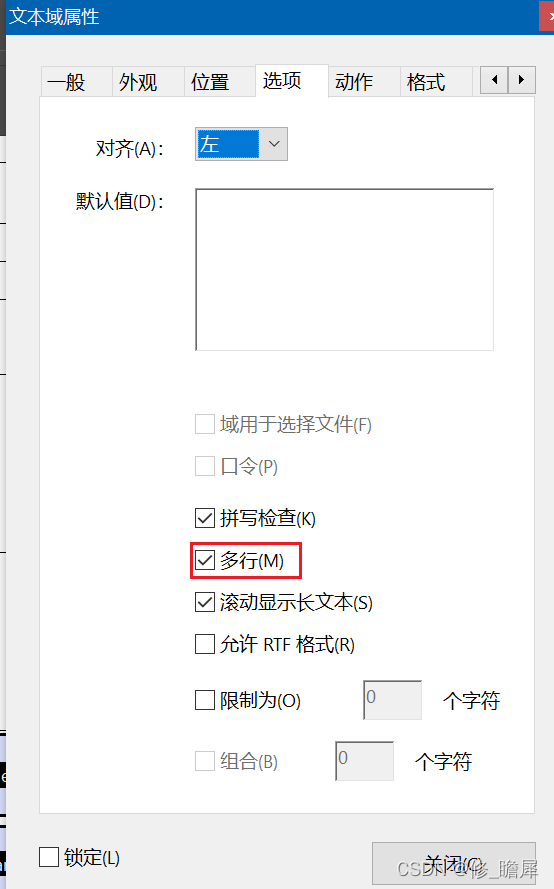 |
| 图3-1 | 图3-2 |
| 文本最终展示方向 | 勾选“多行”后,有内容在一行展示不下时,自动换行,但字体不会自动调节 |
>>>单选框
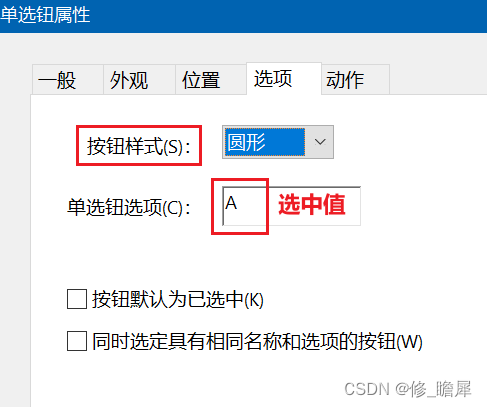
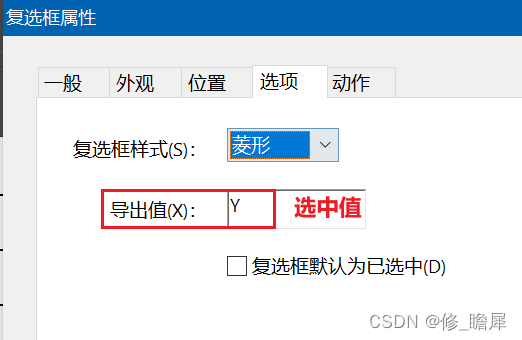
可以调节按钮展示的样式,及设置选中值,选中值将在代码里赋值使用
>>>复选框
同单选框操作。
【二、代码使用环境】
1、maven引入
## itextpdf创建编辑pdf
itext-asian为字体库,这里可能会遇到导包问题,参见
<dependency>
    <groupId>com.itextpdf</groupId>
    <artifactId>itextpdf</artifactId>
    <version>5.5.13.2</version>
</dependency>
<dependency>
    <groupId>com.itextpdf</groupId>
    <artifactId>itext-asian</artifactId>
    <version>5.2.0</version>
</dependency>
## pdf转图片(非必要)
<dependency>
    <groupId>org.apache.pdfbox</groupId>
    <artifactId>fontbox</artifactId>
    <version>2.0.24</version>
</dependency>
<dependency>
    <groupId>org.apache.pdfbox</groupId>
    <artifactId>pdfbox</artifactId>
    <version>2.0.24</version>
</dependency>
<dependency>
    <groupId>org.apache.pdfbox</groupId>
    <artifactId>jbig2-imageio</artifactId>
    <version>3.0.3</version>
</dependency>
【三、模块分析】
1、文本域实现的功能有:
## 文本框
/**
 * 最简字段域赋值
 * @param fieldName 文本域名称
 * @param fieldVal 文本内容
 * @param form AcroFields
 */
public static void setFieldAndFont(String fieldName, String fieldVal,AcroFields form) throws IOException, DocumentException {
    //参数3设置true是针对单选复选框展示
    form.setField(fieldName,fieldVal,true);
}
## 条形码
//绘制条码
Barcode128 barcode128 = new Barcode128();
//字号
barcode128.setSize(6);
//条码高度
barcode128.setBarHeight(12);
//条码与数字间距
barcode128.setBaseline(10);
//条码值
barcode128.setCode("条形码");
barcode128.setStartStopText(false);
barcode128.setExtended(true);
//生成条码图片
PdfStamper ps;
PdfContentByte cb = ps.getOverContent(1);
Image image = barcode128.createImageWithBarcode(cb, null, null);
## 二维码
BarcodeQRCode qrCode = new BarcodeQRCode("二维码", width, height, null);
//生成二维码图像
Image image = qrCode.getImage();
## 二维条码
//绘制二维条码
BarcodePDF417 pdf417 = new BarcodePDF417();
pdf417.setText("二维条码");
Image image = pdf417.getImage();
## 图片填充
URL url = new URL("http://xxx.png");
Image img = Image.getInstance(url);

//图片自适应定义框。与scalePercent(10f)方法(可自行配置缩放)效果类似
img.scaleToFit(width,height);
//定位框左下位置(x,y)
img.setAbsolutePosition(x,y);
//获取字段操作页面
PdfContentByte content = pdfStamper.getOverContent(1);
content.addImage(img);
2、单选按钮域
//假设pdf模板里有名为radioGroup的单选域,其包含A,B,C三个单选按钮
AcroFields form;
form.setField("radioGroup","B",true); //表示选中了B
3、复选按钮域
//假设pdf模板里有名为CheckBox1-5的复选域组,在模板里定义的选中值为Y
AcroFields form;
form.setField("CheckBox1","Y",true); //表示选中了CheckBox1
form.setField("CheckBox3","Y",true); //表示选中了CheckBox3
4、图片域
//从acrobat中看出,图片域实际上是一个button组件
URL url = new URL("http://xxx.png");
Image img = Image.getInstance(url);
//PushbuttonField用来操作button组件
PushbuttonField pushbuttonField = form.getNewPushbuttonFromField("图片域名称");
pushbuttonField.setImage(img);
PdfFormField pdfFormField = pushbuttonField.getField();
form.replacePushbuttonField(fieldName, pdfFormField);
5、文字水印与图片水印
/**
 * 附加文字水印
 * @param showWords 水印内容
 * @param fontSize 字号
 * @param xRepeat 水平重复值
 * @param yRepeat 垂直重复值
 * @param opacity 透明度
 * @param rotation 旋转角度
 */
private static void appendWatermark(String showWords,int fontSize,int xRepeat,int yRepeat,float opacity,float rotation,PdfStamper pdfStamper,BaseFont baseFont,BaseColor baseColor){
    Rectangle pageRect = pdfStamper.getReader().getPageSizeWithRotation(1);
    // 计算水印每个单位步长X,Y
    float x = pageRect.getWidth() / xRepeat;
    float y = pageRect.getHeight() / yRepeat;

    PdfContentByte cb = pdfStamper.getOverContent(1);
    PdfGState gs = new PdfGState();
    // 设置透明度
    gs.setFillOpacity(opacity);
    cb.setGState(gs);
    cb.saveState();

    cb.beginText();
    cb.setColorFill(baseColor);
    cb.setFontAndSize(baseFont, fontSize);

    for (int n = 0; n < xRepeat + 1; n++) {
        for (int m = 0; m < yRepeat + 1; m++) {
            cb.showTextAligned(Element.ALIGN_CENTER, showWords, x * n, y * m, rotation);
        }
    }
    //添加图片水印
    //cb.addImage(image);
    cb.endText();
}
【四、模板页数确定与不确定的用法】
## 页码确定
private static boolean formPdfModelStatic() {
        //模板加载路径(项目目录下)
        String modelPath = "xxx.pdf";
        //文件输出路径
        String outputPath = "yyy.pdf";

        FileOutputStream fos = null;
        ByteArrayOutputStream baos = null;
        PdfReader pdfReader = null;
        PdfStamper pdfStamper = null;
        Document doc = null;
        PdfCopy copy = null;
        ResourceLoader resourceLoader = new DefaultResourceLoader();
        Resource resource = resourceLoader.getResource("classpath:"+ modelPath);
        /*数据源*/
        List<FieldPropertyBind> prepareDataList = prepareDataFill();
        try {
            if(!FileOptUtils.checkFullFileCreate(outputPath)){
                return false;
            }
            fos = new FileOutputStream(outputPath);
            pdfReader = new PdfReader(resource.getURL());
            baos = new ByteArrayOutputStream();
            pdfStamper = new PdfStamper(pdfReader,baos);
            AcroFields form = pdfStamper.getAcroFields();
            BaseFont baseFont = BaseFont.createFont("STSongStd-Light", "UniGB-UCS2-H",BaseFont.NOT_EMBEDDED);
            form.addSubstitutionFont(baseFont);

            /*此块进行内容填充*/


            //true代表生成的PDF文件不可编辑,会清除编辑痕迹的显示
            pdfStamper.setFormFlattening(true);
            pdfStamper.close();
            doc = new Document();
            copy = new PdfCopy(doc,fos);
            //开始文件操作
            doc.open();
            //指定模板第几页
            PdfImportedPage importedPage1 = copy.getImportedPage(new PdfReader(baos.toByteArray()), 1);
//            PdfImportedPage importedPage2 = copy.getImportedPage(new PdfReader(baos.toByteArray()), 2);
            //逐页添加
            copy.addPage(importedPage1);
//            copy.addPage(importedPage2);
        } catch (IOException | DocumentException e) {
            log.error("formPdfModelStatic_error:",e);
            return false;
        }finally {
            if (pdfReader != null){
                pdfReader.close();
            }
            if(doc != null){
                doc.close();
            }
            if (copy != null){
                copy.close();
            }
            IOUtils.closeQuietly(baos);
            IOUtils.closeQuietly(fos);
        }
        return true;
    }
## 页码不确定
public static boolean formPdfModelActive(){
FileOutputStream fos = null;
List<PdfReader> readerList = new ArrayList<>();
Resource resource;
try {
//BaseFont.IDENTITY_V 为文字纵向排列。 IDENTITY_H 横向排列
//STSongStd-Light 参见[itext-asian-5.2.0.jar \com\itextpdf\text\pdf\fonts\cjk_registry.properties] fonts (Adobe_GB1 表示字体排版)
BaseFont baseFont = BaseFont.createFont("STSongStd-Light", "UniGB-UCS2-H",BaseFont.EMBEDDED);
/*动态模板1*/
fos = generateActivePdf(baseFont, readerList);
if (fos == null){
return false;
}
streamListWriteToDoc(fos, readerList);
readerList.clear();
/*动态模板2-写法同动态模板1*/} catch (DocumentException | IOException e) {
log.error("formPdfModelActive_error: ",e);
return false;
}finally {
IOUtils.closeQuietly(fos);
}
return true;
}
/**动态pdf页数*/
private static FileOutputStream generateActivePdf(BaseFont baseFont, List<PdfReader> readerList) throws IOException, DocumentException {
//模板加载路径(项目目录下)
String modelPath = "xxx.pdf";
//文件输出路径
String outputPath = "yyy.pdf";
if(!FileOptUtils.checkFullFileCreate(outputPath)){
return null;
}
ResourceLoader resourceLoader = new DefaultResourceLoader();
Resource resource = resourceLoader.getResource("classpath:"+ modelPath);
ByteArrayOutputStream baos = null;/*数据源*/
List<List<FieldPropertyBind>> wholeInfoList = new ArrayList<>();
try {
for (List<FieldPropertyBind> wholeInfo : wholeInfoList) {
PdfReader sourceReader = new PdfReader(resource.getURL());
PdfReader reader = null;
baos = new ByteArrayOutputStream();
PdfStamper pdfStamper = new PdfStamper(sourceReader,baos);
AcroFields form = pdfStamper.getAcroFields();
form.addSubstitutionFont(baseFont);
/*数据填充*/
pdfStamper.setFormFlattening(true);
pdfStamper.close();
reader = new PdfReader(baos.toByteArray());
readerList.add(reader);
}
} finally {
IOUtils.closeQuietly(baos);
}
return new FileOutputStream(outputPath);
}
【五、资料引用及推荐】
1、纯Java代码实现生成PDF(自定义表格、文本水印、单元格样式)
IText使用(超详解) - sudt - 博客园 (cnblogs.com)https://www.cnblogs.com/fonks/p/15090635.html3、java使用itext(根据一个模板生成多页数据)
(5条消息) java动态生成pdf文件(使用itext编辑pdf)_Aurora_____的博客-优快云博客_动态生成pdf文件https://blog.youkuaiyun.com/Aurora_____/article/details/111209096?utm_medium=distribute.pc_relevant.none-task-blog-2~default~baidujs_title~default-1.no_search_link&spm=1001.2101.3001.4242.2&utm_relevant_index=4
4、java 实现生成公司的电子公章,并且盖章生成电子合同
完整代码地址(master分支)





 扫一扫
扫一扫


 1308
1308

 被折叠的 条评论
为什么被折叠?
被折叠的 条评论
为什么被折叠?
 到【灌水乐园】发言





