



 本文详细介绍了C++中的流操作,包括流的状态管理、输入输出流的通用操作,以及标准IO、缓冲区和文件IO的使用。强调了错误处理、缓冲区刷新和文件模式设置。还探讨了如何通过流对象的rdbuf()函数实现文件内容的重定向。同时,文章讲解了串IO中的字符串流转换和配置,并提供了复制文件的示例代码。
目录:
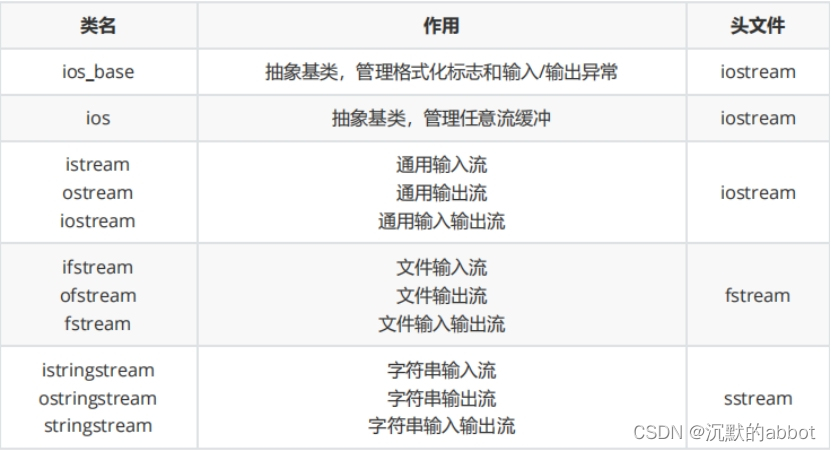
一.流的通用操作
流的状态:
-
badbit表示发生系统级的错误,如不可恢复的读写错误。通常情况下一旦badbit被置位,流就无法再使用了。
-
failbit表示发生可恢复的错误,如期望读取一个数值,却读出一个字符等错误。这种问题通常是可以修改的,流还可以继续使用。
-
当到达文件的结束位置时,eofbit和 failbit都会被置位。
-
goodbit被置位表示流未发生错误。如果badbit、 failbit和eofbit任何一个被置位,则检查流状态的条件会失。
-
管理流的状态:
bool bad() const; //若流的badbit置位,则返回true;否则返回false bool fail() const; //若流的failbit或badbit置位,则返回true; bool eof() const; //若流的eofbit置位,则返回true; bool good() const; //若流处于有效状态,则返回true; iostate rdstate() const; //获取流的状态 void setstate(iostate state); //设置流的状态 //clear的无参版本会复位所有错误标志位*(重置流的状态) void clear(std::ios_base::iostate state = std::ios_base::goodbit); //均是流的成员函数,使用时例如cin.clear() -
清空缓冲区
//读取到前count个字符或在读这count个字符进程中遇到delim字符就停止,并把读取的这些东西丢掉
istream & ignore(std::streamsize count = 1, int_type delim = Traits::eof());
//应用场景:当流的状态是failbit时,往往先clear再ignore,接着再正常操作。 void test() { int number = 10; //CTRL+d 文件终止eof //ctrl + z 程序暂停,可用fg,bg将程序放到前台或者后台执行 //ctrl + c 程序强行终止 while(cin >> number, !cin.eof()) { if(cin.bad()) { return; } else if(cin.fail()) { cin.clear(); //cin.ignore(1024, '\n');//清空缓冲区 cin.ignore(std::numeric_limits<std::streamsize>::max(), '\n');//清空缓冲区 cout << "pls input valid data" << endl; } else { cout << "number = " << number << endl; } } } -
输入输出流的通用操作
//----以下输入流操作----
int_type get();//读取一个字符
istream & get(char_type & ch);
//读取一行数据
istream & getline(char_type * s, std::streamsize count, char_type delim ='\n');
//读取count个字节的数据
istream & read(char_type * s, std::streamsize count);
//最多获取count个字节,返回值为实际获取的字节数
std::streamsize readsome(char_type * s, std::streamsize count);

//读取到前count个字符或在读这count个字符进程中遇到delim字符就停止,并把读取的这些东西丢掉
istream & ignore(std::streamsize count = 1, int_type delim = Traits::eof());

//查看输入流中的下一个字符, 但是并不将该字符从输入流中取走
//不会跳过输入流中的空格、回车符; 在输入流已经结束的情况下,返回 EOF。
int_type peek();

//获取当前流中游标所在的位置
pos_type tellg();

//偏移游标的位置
basic_istream & seekg(pos_type pos);
basic_istream & seekg(off_type off, std::ios::seekdir dir);
//----以下为输出流操作---- //往输出流中写入一个字符 ostream & put(char_type ch); //往输出流中写入count个字符 ostream & write(const char_type * s, std::streamsize count); //获取当前流中游标所在的位置 pos_type tellp(); //刷新缓冲区 ostream & flush(); //偏移游标的位置 ostream & seekp(pos_type pos); ostream & seekp(off_type off, std::ios_base::seekdir dir);//example: char buffer[1024] = {0}; cout << "pls input a line string:" << endl; cin.getline(buffer, 1024); cout << "the line is:" << buffer << endl; cout.put('a'); cout.put('\n'); char str[] = "hello,world"; cout.write(str, sizeof(str)); int x = 0x61626364; cout.write((char*)&x, sizeof(x)) << endl;
二.标准IO
-
cin
-
cout, cerr(带缓冲), clog(不带缓冲)
三.缓冲区
1.缓冲区的类型
-
全缓冲:在这种情况下,当填满标准I/O缓存后才进行实际I/O操作。全缓冲的典型代表是对磁盘文件的读写。
-
行缓冲:在这种情况下,当在输入和输出中遇到换行符时,执行真正的I/O操作。这时,我们输入的字符先存放在缓冲区,等按下回车键换行时才进行实际的I/O操作。典型代表是键盘输入数据。
-
不带缓冲:也就是不进行缓冲,标准出错情况cerr/stderr是典型代表,这使得出错信息可以直接尽快地显示出来。
2.输出缓冲区被刷新的时机:
-
程序正常结束(有一个收尾操作就是清空缓冲区);
-
缓冲区满(包含正常情况和异常情况);
-
使用操纵符显式地刷新输出缓冲区,如:endl、flush(无换行)、ends(没有刷新功能);
3.endl/flush/ends都是函数,可以在/usr/include/c++/7/ostream文件中寻找源码,借助slickedit软件阅读源码。
四.文件IO
ios_base::beg  文件开头
ios_base::cur  当前指针位置
ios_base::end  文件结尾位置
c++流对象函数rdbuf()简介:
    rdbuf()可以实现一个流对象指向的内容用另一个流对象来输出,比如想把一个文件的内容输出到显示器上,我们可以用两行代码完成:
ifstream infie("test.txt");
cout << infile.rdbuf();
-
explicit 防止隐式转换
-
文件IO的构造函数
ifstream(); explicit ifstream(const char *filename, openmode mode = in); explicit ifstream(const string &filename, openmode mode = in); ofstream(); explicit ofstream(const char *filename, openmode mode = out); explicit ofstream(const string &filename, openmode mode = out); fstream(); explicit fstream(const char *filename, openmode mode = in|out); explicit fstream(const string &filename, openmode mode = in|out); -
文件输入流
对于文件输入流而言,当文件不存在的时候,就打开失败,当文件存在的时候,才能进行正常读文件。 对于文件输入流而言,默认情况下都是以空格为分隔符。
读一行:
template< class CharT, class Traits, class Allocator > std::basic_istream<CharT,Traits>& getline( std::basic_istream<CharT,Traits>&& input, std::basic_string<CharT,Traits,Allocator>& str ); std::basic_istream& getline( std::basic_istream&& input, std::basic_string& str ); -
文件输出流
对于文件输出流而言,当文件不存的时候,就创建文件,当文件存在的时候,将文件清空然后在去进行写入。
-
文件输入输出流
对于文件输入输出流而言,当文件不存在的时候,就打开失败,当文件存在的时候,才能进行正常读文件。对于文件输入输出流而言,默认情况下都是以空格为分隔符
判断文件指针的位置:tellp tellg
文件指针的偏移:seekp seekg
basic_istream& seekg(pos_type pos); basic_istream& seekg(off_type off,std::iostream::seekdir dir); -
文件模式
in: 文件 ate :读文件的追加 每次都是到文件尾部;
out:写文件 app :写文件的追加 每次都是到文件尾部;
in:输入,文件将被允许读操作,如果文件不存在,打开失败;
out:输出,文件将允许写操作,如果文件不存在,则创建一个;
app:追加,写入将发生在文件末尾;
ate:读操作发生在文件末尾;
trunc:截断,如果打开的文件存在,其内容将被丢弃,其大小被截断为零;
binary:二进制,读取或写入文件的数据为二进制形式;
-
vector的使用与扩容机制
vector底层的扩容机制:当size() == capacity()的时候,如果还有元素插进来的时候,就会按照2 * size()进行扩容,然后将老的空间中的元素拷贝的新的空间里面来,接着将新的元素插入到新的空间的尾部,最后将老的空间进行回收。
- vs下面的扩容机制是1.5倍;
- 不能直接在老的空间后面直接扩容,这样会可以能会操作不属于老的空间的内存;
- 2倍扩容的机制对于push_back是可以的,但是对于vector中的insert是不行的,因为insert插入的元素个数是不定的,所以有另外一套扩容机制,在STL这一章的学习笔记中记录;
- reserve()函数预先分配vector空间,提高效率。
-
复制文件
/*复制文件应该用ios::binary(二进制模式),原因是使用二进制文件模式时,程序将数据从内存传递给文
件,将不会发生任何隐藏的转换,而默认状态下是文本模式,复制的内容可能会发生改变。*/
void test()
{
    fstream in("a.txt", std::ios::in|std::ios::binary);
    if(!in.is_open()) { cerr << "fstream open file error!\n"; return; }

    fstream out("a.txt", std::ios::out|std::ios::binary);
    if(!out.is_open()) { cerr << "fstream open file error!\n"; return; }

    out << in.rdbuf();//流的重定向
    out.close();
    in.close();
}
五.串IO
-
委托构造函数 委托环 C++11提出的概念
-
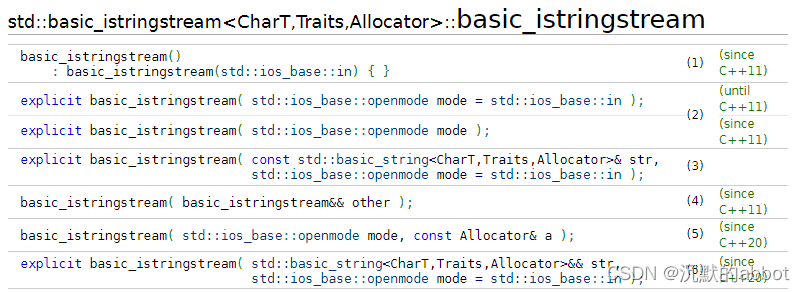
-
example
string int2String(int number)
{
    ostringstream oss;
    oss << number;
    return oss.str();
}

void test()
{
    int number1 = 10;
    int number2 = 30;
    stringstream ss;
    ss << "number1= " << number1 <<
        " ,number2= " << number2 << endl;
    string s1 = ss.str();
    cout << s1;

    string word;
    int number;
    while(ss >> word >> number)
    {
        cout << word << "  " << number << endl;
    }
}

void readConfig(const string &filename)
{
    ifstream ifs(filename);
    if(!ifs)
    {
        std::cerr << "ifstream is not good" << endl;
        return;
    }
    string line;
    while(getline(ifs, line))
    {
        istringstream iss(line);
        string key;
        string value;
        iss >> key >> value;
        cout << key << "   " << value << endl;
    }

    ifs.close();
}





 扫一扫
扫一扫


 765
765

 被折叠的 条评论
为什么被折叠?
被折叠的 条评论
为什么被折叠?
 到【灌水乐园】发言





