


 本文详细介绍了如何在SpringBoot项目中整合MyBatis,并配置Druid数据源进行监控,以及如何实现多数据源的切换。内容包括:SpringBoot启动类中@SpringBootApplication注解的作用,@MapperScan注解的使用,配置Servlet,监听器,以及Druid数据源的配置,包括连接池参数,监控页面,和WebStatFilter的AOP拦截。此外,还涵盖了国际化配置,Thymeleaf模板引擎的使用,以及JDBC和MyBatis的相关配置。
Spring Boot
初始
@SpringBootApplication
public class LearningSpringBootApplication {
    public static void main(String[] args) {
        SpringApplication.run(LearningSpringBootApplication.class,args);
    }
}
注解@SpringBootApplication的作用
在该注解中会出现以下注解,前四个注解为元注解
@Target({ElementType.TYPE})//注解标明该注解在什么时候使用
@Retention(RetentionPolicy.RUNTIME)//该注解标明该注解在什么时候运行
@Documented//标明该注解是否可以打包为文档
@Inherited
/**
* 表示一个类提供 Spring Boot 应用程序@Configuration 。可以用作 Spring 标准@Configuration注释的替代* 品,以便可以自动找到配置
*/
@SpringBootConfiguration
@EnableAutoConfiguration
@ComponentScan(//实现自动扫描
    excludeFilters = {@Filter(
    type = FilterType.CUSTOM,
    classes = {TypeExcludeFilter.class}
), @Filter(//
    type = FilterType.CUSTOM,
    classes = {AutoConfigurationExcludeFilter.class}
)}
)
public @interface SpringBootApplication {
    ...
}
开启组件扫描和自动配置:
开启了Spring的组件扫描和Spring Boot的自动配置功能。实际上,@SpringBootApplication将三个有用的注解组合在了一起。
- Spring的@Configuration:标明该类使用Spring基于Java的配置。
- Spring的@ComponentScan:启用组件扫描,这样你写的Web控制器类和其他组件才能被自动发现并注册为Spring应用程序上下文里的Bean。写一个简单的Spring MVC控制器,使用@Controller进行注解,这样组件扫描才能找到它。
- Spring Boot 的 @EnableAutoConfiguration : 这 个 不 起 眼 的 小 注 解 也 可 以 称 @Abracadabra,就是这一行配置开启了Spring Boot自动配置的魔力,让你不用再写成篇的配置了。
Spring Boot的早期版本中,你需要在启动类LearningSpringBootApplication上同时标上这三个注解,但从Spring Boot 1.2.0开始,有@SpringBootApplication就行了
强制更新maven库
maven缺少依赖包,强制更新依赖命令:
mvn clean install 一e 一U 一Dmaven.test.skip=true
mvn dependency:purge一local一repository
其中,
一e详细异常,一U强制更新
一DskipTests,不执行测试用例,但编译测试用例类生成相应的class文件至target/test一classes下。
一Dmaven.test.skip=true,不执行测试用例,也不编译测试用例类。
使用maven.test.skip,不但跳过单元测试的运行,也跳过测试代码的编译。
mvn package 一Dmaven.test.skip=true
在启动类上添加注解,原因是需要在启动类中添加注解把外部包导入容器中。
热部署
-
开启IDEA的自动编译(静态)
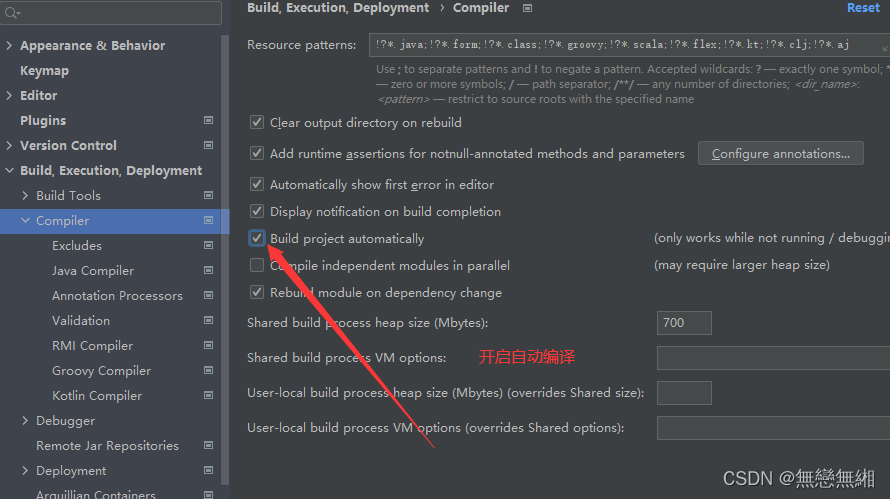
-
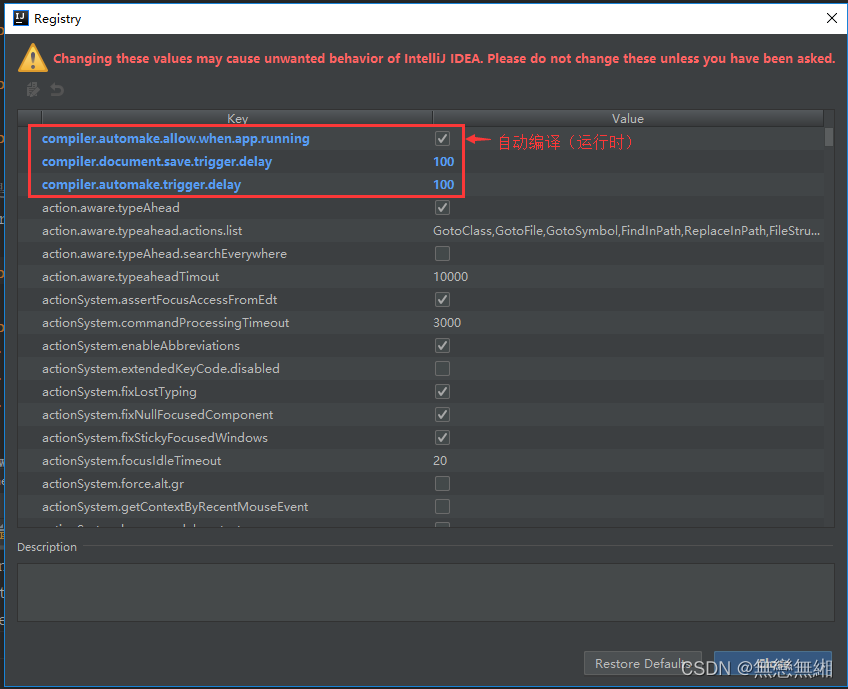
开启IDEA的自动编译(动态)
具体步骤:同时按住 Ctrl + Shift + Alt + / 然后进入Registry ,勾选自动编译并调整延时参数。
- compiler.automake.allow.when.app.running 一> 自动编译
- compile.document.save.trigger.delay 一> 自动更新文件
PS:网上极少有人提到compile.document.save.trigger.delay 它主要是针对静态文件如JS CSS的更新,将延迟时间减少后,直接按F5刷新页面就能看到效果!
-
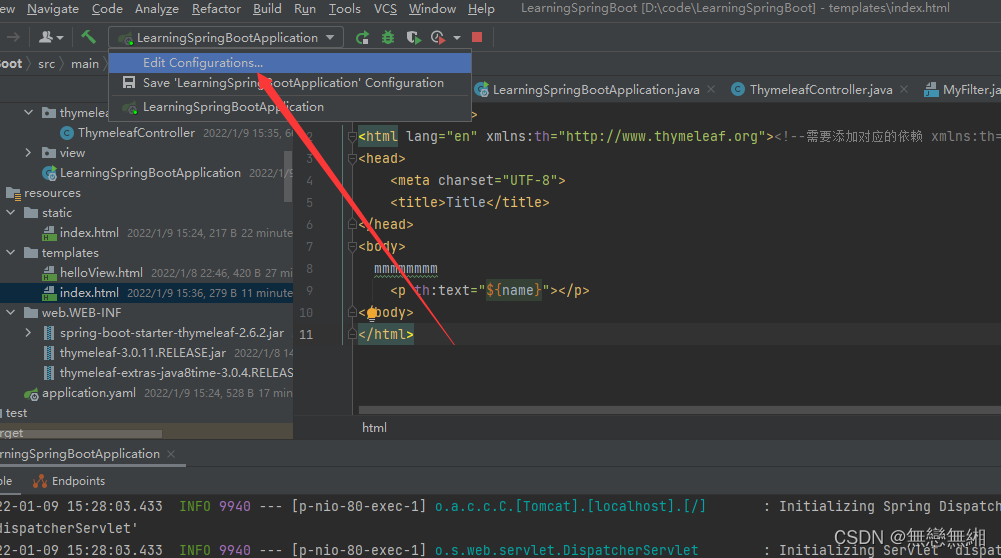
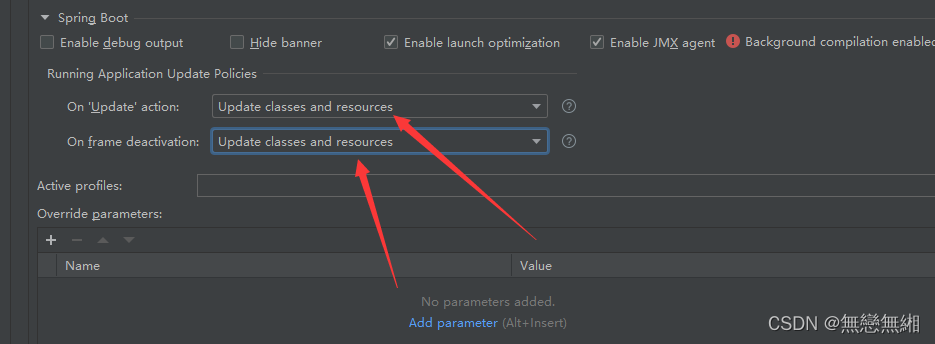
开启IDEA的热部署策略(非常重要)
具体步骤:顶部菜单一 >Edit Configurations一>SpringBoot插件一>目标项目一>勾选热更新。
yaml配置
#sql语句打印  语句打印,添加log4j
logging:
    level:
        com:
            mashibing:
                mapper:
                    common: debug
#配置端口
server:
	port: 端口

#配置spring
spring:
    datasource:
        username: root
        password: mtjlj
        url: jdbc:mysql://120.79.253.99:3306/family_server?useSSL=false&serverTimezone=UTC
        driver一class一name: com.mysql.cj.jdbc.Driver
server:
    port: 8081
#配置mybatis
mybatis:
    mapper一locations:
        classpath: com/mashibing/mapper/common/*.xml #文件扫描路径
    configuration:
        map一underscore一to一camel一case: true
搭建vue框架
开始出现用户登录不成功
将vue项目下的api文件夹下的index.js文件中的users改为user
const api = {
    Login: '/auth/login',
    Logout: '/auth/logout',
    ForgePassword: '/auth/forge一password',
    Register: '/auth/register',
    twoStepCode: '/auth/2step一code',
    SendSms: '/account/sms',
    SendSmsErr: '/account/sms_err',
    // get my info
    #UserInfo: '/users/info' #修改前
    #修改后
    UserInfo: '/user/info'
}
export default api
在SpringBoot启动类中添加@MapperScan就可扫描所有Mapper文件
import org.mybatis.spring.annotation.MapperScan;
import org.springframework.boot.SpringApplication;
import org.springframework.boot.autoconfigure.SpringBootApplication;

@SpringBootApplication
@MapperScan//在mapper中要添加mapper然后才能扫描,但在文件中添加太麻烦,所以在此加上MapperScan能够替代前者
@ComponentScan("top.mataiji")//移动启动文件到其他包后的处理方式
public class FamilyServerPlatformApplication {

	public static void main(String[] args) {
		SpringApplication.run(FamilyServerPlatformApplication.class, args);
	}

}
移动启动文件到其他包后,可以在启动类上将一个注解**@ComponentScan(“top.mataiji”)**
因为启动类默认在top.mataiji目录下的
配置Servlet
第一步创建Servlet类,并继承HttpServlet类
package top.mataiji.integrationservlet.servlet;

import javax.servlet.ServletException;
import javax.servlet.http.HttpServlet;
import javax.servlet.http.HttpServletRequest;
import javax.servlet.http.HttpServletResponse;
import java.io.IOException;

/**
* 描述:配置德鲁伊监控时运用。
* 时间 2022/1/8 10:09 作者 马太吉
*/

@javax.servlet.annotation.WebServlet(name="myServlet", urlPatterns = "/srv")
public class WebServlet extends HttpServlet {

    @Override
    protected void doGet(HttpServletRequest req, HttpServletResponse resp) throws ServletException, IOException {
        System.out.println("hhh");
        super.doGet(req, resp);
    }
}
package top.mataiji;

import org.springframework.boot.SpringApplication;
import org.springframework.boot.autoconfigure.SpringBootApplication;
import org.springframework.boot.web.servlet.ServletComponentScan;
import org.springframework.boot.web.servlet.ServletRegistrationBean;
import org.springframework.context.annotation.Bean;
import top.mataiji.integrationservlet.servlet.WebServlet;

@SpringBootApplication
@ServletComponentScan//配置servlet扫描
public class LearningSpringBootApplication {
    public static void main(String[] args) {
        SpringApplication.run(LearningSpringBootApplication.class,args);
    }

    //将servlet添加到spring boot容器中,当配置urlmapping后,servlet自己的url不会生效
    @Bean
    public ServletRegistrationBean<WebServlet> getServletRegistrationBean(){
        ServletRegistrationBean<WebServlet> bean = new ServletRegistrationBean<>(new WebServlet());
        bean.setLoadOnStartup(1);//设置servlet什么时候启动
        return bean;
    }

    /**
    @Bean
    public ServletRegistrationBean<WebServlet> getServletRegistrationBean(){
        ServletRegistrationBean<WebServlet> bean = new ServletRegistrationBean<>(new WebServlet(), "/s");
        bean.setLoadOnStartup(1);//设置servlet什么时候启动
        return bean;
    }*/
}
配置Filter
package top.mataiji.integrationservlet.filter;

import javax.servlet.*;
import javax.servlet.annotation.WebFilter;
import java.io.IOException;

@Order(1)//配置监听器顺序
@WebFilter(filterName = "myFilter", urlPatterns = "/filter")
public class MyFilter implements Filter {
    @Override
    public void init(FilterConfig filterConfig) throws ServletException {
        System.out.println("init");
    }

    @Override
    public void doFilter(ServletRequest request, ServletResponse response, FilterChain chain) throws IOException, ServletException {
        System.out.println("filter");
        chain.doFilter(request,response);
    }

    @Override
    public void destroy() {
        System.out.println("destroy");
        Filter.super.destroy();
    }
}
配置监听器
编写监听器
listener是servlet规范定义的一种特殊类, 用于监听servlelContexl,HtpSession和ServletRequeg等域对象
的创建和销毁事件。监听域对象的属性发生修改的事件,用于在事件发生前、发生后做一一些必要的处理。可用于以下方面:
- 统计在线人数和在线用户
- 系统启动时加载初始化信息
- 统计网站访问量
- 记录用户访问路径。
编写监听器类
package top.mataiji.integrationservlet.listener;

import javax.servlet.http.HttpSessionEvent;
import javax.servlet.http.HttpSessionListener;

public class MyHttpSessionListener implements HttpSessionListener {

    public static Integer online=0;

    @Override
    public void sessionCreated(HttpSessionEvent se) {
        System.out.println("session");
        online++;
    }

    @Override
    public void sessionDestroyed(HttpSessionEvent se) {
        System.out.println("destroy");
        online一一;
    }
}
package top.mataiji;

import org.springframework.boot.SpringApplication;
import org.springframework.boot.autoconfigure.SpringBootApplication;
import org.springframework.boot.web.servlet.ServletComponentScan;
import org.springframework.boot.web.servlet.ServletListenerRegistrationBean;
import org.springframework.boot.web.servlet.ServletRegistrationBean;
import org.springframework.context.annotation.Bean;
import top.mataiji.integrationservlet.listener.MyHttpSessionListener;
import top.mataiji.integrationservlet.servlet.WebServlet;

import javax.servlet.http.HttpSessionListener;

@SpringBootApplication
@ServletComponentScan//配置servlet扫描
public class LearningSpringBootApplication {
    public static void main(String[] args) {
        SpringApplication.run(LearningSpringBootApplication.class,args);
    }

    @Bean
    public ServletRegistrationBean<WebServlet> getServletRegistrationBean(){
        ServletRegistrationBean<WebServlet> bean = new ServletRegistrationBean<>(new WebServlet(), "/s");
        bean.setLoadOnStartup(1);//设置servlet什么时候启动
        return bean;
    }

	//配置监听器
    @Bean
    public ServletListenerRegistrationBean listenerRegistr(){
        ServletListenerRegistrationBean<MyHttpSessionListener> listenerRegistrationBean = new ServletListenerRegistrationBean(new MyHttpSessionListener());
        System.out.println("listener");
        return listenerRegistrationBean;
    }


}
thymeleaf模板
添加依赖
<dependency>
   <groupId>org.thymeleaf</groupId>
   <artifactId>thymeleaf</artifactId>
   <version>3.0.11.RELEASE</version>
</dependency>

<!一一 https://mvnrepository.com/artifact/org.thymeleaf/thymeleaf一spring5 一一>
<dependency>
   <groupId>org.thymeleaf</groupId>
   <artifactId>thymeleaf一spring5</artifactId>
   <version>3.0.11.RELEASE</version>
</dependency>

<dependency>
   <groupId>org.springframework.boot</groupId>
   <artifactId>spring一boot一starter一thymeleaf</artifactId>
   <version>2.6.1</version>
</dependency>
配置yaml
##############################################
#
# thymeleaf静态资源配置
#
##############################################
# 默认路径

spring:
  thymeleaf:
    #前缀
    prefix: classpath:/static/ #文件所在位置 /templates/
    # 后缀
    suffix: .html #以.html结尾的文件
    # 模板格式
    mode: HTML5 #利用HTML5文件
    encoding: utf一8
    cache: false
    servlet:
      content一type: text/html
entity
package top.mataiji.bean;

public class Person {
    private Integer age;
    private String name;
    private String gender;

    @Override
    public String toString() {
        return "Person{" +
                "age=" + age +
                ", name='" + name + '\'' +
                ", gender='" + gender + '\'' +
                '}';
    }

    public Integer getAge() {
        return age;
    }

    public void setAge(Integer age) {
        this.age = age;
    }

    public String getName() {
        return name;
    }

    public void setName(String name) {
        this.name = name;
    }

    public String getGender() {
        return gender;
    }

    public void setGender(String gender) {
        this.gender = gender;
    }

    public Person(Integer age, String name, String gender) {
        this.age = age;
        this.name = name;
        this.gender = gender;
    }

    public Person() {
    }
}
Controller层代码
package top.mataiji.thymeleaf;

import org.springframework.stereotype.Controller;
import org.springframework.ui.Model;
import org.springframework.ui.ModelMap;
import org.springframework.web.bind.annotation.RequestMapping;
import top.mataiji.bean.Person;

import java.util.ArrayList;

/**
 * 描述: 返回结果不能利用JSON格式返回,需要利用返回对应的请求路径
 * 时间 2022/1/9 15:33 作者 马太吉
 */

@Controller
public class ThymeleafController {

    @RequestMapping("hello")
    public String hello(ModelMap map) {
        ArrayList<Person> list = new ArrayList<>();
        System.out.println("nnnnnn");
        map.addAttribute("name", "mataiji");//返回到前端的值
        map.addAttribute("thText","th:text设置文本内容<b>加粗</b>");
        map.put("thUText","th:utext设置文本内容<b>加粗</b>");
        map.put("thValue", "th:Value设置当前元素的value值");
        map.put("thEach" ,"Arrays.asList(\"th:ea ch\", \"遍历列表\")") ;
        map.put("thIf","nsg is not nul1" );
        map.put("th0bject", new Person( 19, "zhangsan", "男")) ;
        //添加Person类
        Person person0 = new Person(18,"张三","男");
        list.add(person0);
        Person person1 = new Person(18,"李四","男");
        list.add(person1);
        Person person2 = new Person(18,"小芳","女");
        list.add(person2);
        map.addAttribute("list", list);
        return "index";//返回对应的html文件名,这里对应的是index文件
    }
}
html文件
<!DOCTYPE html>
<html lang="en" xmlns:th="http://www.thymeleaf.org/">
<head>
    <meta charset="UTF一8">
    <title>Title</title>
</head>
<body>
mmmmmmmm <p th:text="${name}"></p>

<p th:text="${list}"></p>
<p th:text="${thText}"></p>
<p th:utext="${thUText}"></p>
<input th:value="${thValue}">
<div th:each="message: ${thEach}">
    <p th:text="message"></p>
</div>

<div th:text="${messgae}" th:each="messgae : ${thEach}"></div>
<p th:text="${thIf}" th:if="${not #strings.isEmpty(thIf)}" ></p>
<table>
    <tr>
        <th>姓名</th>
        <th>性别</th>
        <th>年龄</th>
    </tr>
    <tr th:object="${th0bject}">
        <th th:text="*{name}"></th>
        <th th:text="*{age}"></th>
        <th th:text="*{gender}"></th>
    </tr>
    <tr th:each="person : *{list}">
        <th th:text="*{person.name}"></th>
        <th th:text="*{person.age}"></th>
        <th th:text="*{person.gender}"></th>
    </tr>
</table>
</body>
</html>
Eclipse自动提示插件
官方文档
https://www.thymeleaf.org/doc/tutorials/2.1/usingthymeleaf.html#base一objects
安装地址:
http://www.thymeleaf.org/eclipse一plugin一update一site/
Html中添加约束
<html xmlns:th="http://www.thymeleaf.org">
URL地址处理
@{…}
1)@{userList} 相对当前路径结果为:http://localhost/thymeleaf/user/userList
2)@{./userList} 相对当前路径结果为:http://localhost/thymeleaf/user/userList
3)@{…/tiger/home} 相对当前路径结果为:http://localhost/thymeleaf/tiger/home
4)@{/tiger/home} 相对应用根目录结果为:http://localhost/thymeleaf/tiger/home
5)@{https://www.baidu.com/} 绝对路径结果为:https://www.baidu.com
6)<link type="text/css" rel="stylesheet" th:href="@{/css/home.css}">
@ 以 “/” 开头定位到项目根路径,否则使用相对路径
th:href
<body>
<a th:href="@{userList(id=1)}">1、@{userList(id=9527)}</a>
<a th:href="@{userList(id=1,name=华安)}">2、@{userList(id=1,name=yoyo)}</a>
<a th:href="@{userList(id=1,name=${userName})}">3、@{userList(id=1,name=${userName})}</a>
</body>
th:text 文本
空格属于特殊字符,必须使用单引号包含整个字符串
<p class="css1 css2" th:class="'css1 css2'">样式</p>
<p th:text="'Big China'">中国</p>
<p th:text="${userName}">userName</p>
<p th:text="'small smile'+',very good.' + ${userName}">temp</p>
数字计算
<p th:text="80">8</p>
<p th:text="8+8">8 + 8</p>
<p th:text="8+8+' Love '+9+9">8 + 8+' Love '+9+9</p>
<p th:text="8+8+' Love '+(9+9)">8 + 8+' Love '+(9+9)</p>
<p th:text="100一${age}"></p>
Boolean判断
<p th:text="true">布尔</p>
<p th:text="true and false">true and true</p>
<p th:if="${isMarry}">已结婚</p>
<p th:if="${age}>18">已成年</p>
<p th:if="${age}<18">未成年</p>
运算
<p th:text="15 * 4">值为 60 </p>
<p th:text="15 * 4一100/10">值为 50 </p>
<p th:text="100 % 8">值为 4</p>
比较
<p th:if="5>3">5 大于 3</p>
<p th:if="5 >4">5 大于 4</p>
<p th:if="10>=8 and 7 !=8">10大于等于8,且 7 不等于 8 </p>
<p th:if="!${isMarry}">!false</p>
<p th:if="not(${isMarry})">not(false)</p>
三元运算符
<p th:text="7>5?'7大':'5大'">三元运算符</p>
<p th:text="${age}!=null?${age}:'age等于 null'"></p>
<p th:text="${age}!=null?(${age}>=18?'成年':'未成年'):'age等于 null'"></p>
<p th:text="${age2}!=null?${age2}:'age2等于 null'"></p>
<p th:class="${isMarry}?'css2':'css3'">已婚</p>
th:utext转义
map .addAttribute("china", "<b>Chian</b>,USA,UK");
<p th:text="${china}">默认转义</p>
<p th:utext="${china}">不会转义</p>
th:attr 设置属性
HTML5 所有的属性,都可以使用 th:* 的形式进行设置值
<a href="http://baidu.com" th:attr="title='百度'">百度</a>
html属性设置
<a href="" th:attr="title='前往百度',href='http://baidu.com'">前往百度</a>
设置 href 属性
<a href="userList.html" th:attr="href=@{/user/userHome}">用户首页</a>
设置 id 属性,data一target 属性 Html 本身是没有的,但允许用户自定义
<a href="#" th:attr="id='9527',data一target='user'">归海一刀</a>

<p th:abc="9527">th:abc="9527"</p>

<p th:xxoo="yoyo">th:xxoo="yoyo"</p>
Checked selected
Checked
<input type="checkbox" name="option1" checked/><span>是否已婚1?</span>
<input type="checkbox" name="option2" checked="checked"/><span>是否已婚2?</span>


后台传值 : model.addAttribute("isMarry", true);

<input type="checkbox" name="option3" th:checked="${isMarry}"/><span>是否已婚?</span>
<input type="radio" name="option4" th:checked="${isMarry}"/><span>是否已婚?</span>
<input type="radio" name="option5" th:checked="!${isMarry}"/><span>是否已婚?</span>
<!一一option3、option4 会选中;option5 不会选中一一>
select autofocus
<select>
	<option>a</option>
	<option th:selected="${isMarry}">已婚</option>
	<option  th:selected="${!isMarry}">未婚</option>

</select>
<input type="text" th:autofocus="false">
<input type="text" th:autofocus="true">
<input type="text" th:autofocus="false">
日期格式化
<span th:text="${#dates.format(date, 'yyyy一MM一dd HH:mm')}"></span>
循环
JSTL 有一个 c:foreach,同理 Thymeleaf 也有一个 th:each。
作用都是一样的,都是用于遍历数组、List、Set、Map 等数据。
在Select上循环
<option th:each="city : ${list}" th:text="${city.name}" th:selected="${cityName} eq ${city.name}">Peking</option>
状态变量 loopStatus
如果不指定 为变量 Stat
- index: 当前迭代对象的index(从0开始计算)
- count: 当前迭代对象的index(从1开始计算)
- size: 被迭代对象的大小 current:当前迭代变量
- even/odd: 布尔值,当前循环是否是偶数/奇数(从0开始计算)
- first: 布尔值,当前循环是否是第一个
- last: 布尔值,当前循环是否是最后一个
<tr th:each="city,status : ${list}" th:style="${status.odd}?'background一color:#c2c2c2'">
  		<!一一 EL JSTL一一>
  		<td th:text = "${status.count}"></td>
  		<td th:text = "${city.id}"></td>
  		<td th:text = "${city.name}"></td>
  	</tr>
逻辑判断
If/else
<p th:if="${isMarry}">已婚1</p>
<p th:unless="${isMarry}">未婚</p>
Switch/case 多条件判断
<div th:switch="1">
    <p th:case="0">管理员</p>
    <p th:case="1">操作员</p>
    <p th:case="*">未知用户</p>
</div>


<div th:switch="一1">
    <p th:case="0">管理员</p>
    <p th:case="*">操作员</p>
    <p th:case="*">未知用户</p>
</div>

<div th:switch="${isMarry}">
    <p th:case="true">已婚</p>
    <p th:case="true">已成年</p>
    <p th:case="false">未婚</p>
</div>

<div th:switch="'For China'">
    <p th:case="'For USA'">美国</p>
    <p th:case="'For UK'">英国</p>
    <p th:case="'For China'">中国</p>
    <p th:case="*">未知国籍</p>
</div>
内联表达式
[[…]] 等价于 th:text(结果将被 HTML 转义),[(…)] 等价于 th:utext(结果不会执⾏HTML转义)
<p>[[${china}]]</p>
<p>[(${china})]</p>
<p>[[Lo1ve]]</p>
<p>[['I Love You Baby']]</p>
<p>[(9527)]</p>
禁⽤内联th:inline =“none”
内联 JavaScript
<script type="text/javascript" th:inline="javascript">
     var info = [[${info}]];
        var age = [[${age}]];
        var id = [[${id}]];
        var name = [[${name}]];
        console.log(id, name, age, info);
</script>
前后端分离开发
   <script type="text/javascript" th:inline="javascript">
        /**
         * Thymeleaf 将自动忽略掉注释之后 和 分号之前的所有内容,如下为 "前端测试"
         */
        var info = /*[[${info}]]*/ "前端测试";
        console.log(info);
</script>
Servlet作用域中的对象属性
URL/request
<p>${param.size()}=[[${param.size()}]]</p>
<p>${param.id}=[[${param.id}]]</p>
Session
<p>${session.size()}=[[${session.size()}]]</p>
<p>${session.user.id}=[[${session.user.id}]]</p>
配置国际化
配置yaml
  #配置国际化
  messages:
    basename: i18n/login
创建文件
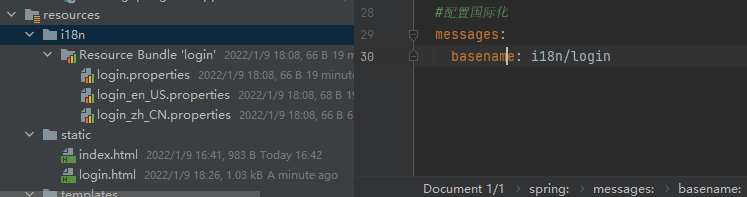
login.properties文件
login=登录
password=密码
register=注册
username=用户名
login_zh_CN.properties文件
login=登录
password=密码
register=注册
username=用户名
login_en_US.properties文件
login=login
password=password
register=register
username=username
添加html文件
<!DOCTYPE html>
<html lang="en" xmlns:th="http://www.thymeleaf.org">
<head>
    <meta charset="UTF一8">
    <title>Title</title>
</head>
<body>
<div id="login">
    <form action="">
        <div>
            <!一一 for="username" th:text="#{login.username}"一一>
            <label th:text="#{username}"></label>
            <input type="text" name="username" id="username" th:placeholder="#{username}">
        </div>
        <div>
            <!一一 for="password" th:text="#{login.password}"一一>
            <label th:text="#{password}"></label>
            <input type="password" name="password" th:placeholder="#{password}">
        </div>

        <div>
            <button type="submit" th:text="#{login}">登录</button>
        </div>
        <div>
            <a href="register.html" th:text="#{register}">注册</a>
            <a th:href="@{/login(language='zh_CN')}">中文</a>
            <a th:href="@{/login(language='en_US')}">English</a>
        </div>
    </form>
</div>


</body>
</html>
package top.mataiji.controller;

import org.springframework.stereotype.Controller;
import org.springframework.web.bind.annotation.RequestMapping;

@Controller
public class UserController {

    @RequestMapping("/login")
    public String login(){
        return "login";
    }
}
自定义视图解析
package top.mataiji.view;

import org.springframework.stereotype.Component;
import org.springframework.web.servlet.LocaleResolver;

import javax.servlet.http.HttpServletRequest;
import javax.servlet.http.HttpServletResponse;
import java.util.Locale;

/**
* 描述: 国际化解析器
* 时间 2022/1/9 18:10 作者 马太吉
*/

public class MyLocaleRelover implements LocaleResolver {
    @Override
    public Locale resolveLocale(HttpServletRequest httpServletRequest) {
        String language = httpServletRequest.getParameter("language");
        Locale locale = Locale.getDefault();
        System.out.println(language);
        if (!(language==null||"".equals(language))){
            String[] split = language.split("_");
            locale = new Locale(split[0], split[1]);
        }

        return locale;
    }

    @Override
    public void setLocale(HttpServletRequest httpServletRequest, HttpServletResponse httpServletResponse, Locale locale) {

    }
}
将配置的视图添加到spring当中
package top.mataiji.view;

import org.springframework.context.annotation.Bean;
import org.springframework.context.annotation.Configuration;
import org.springframework.web.servlet.LocaleResolver;
import org.springframework.web.servlet.config.annotation.WebMvcConfigurer;

//扩展springMVC,将国际化解析器加入到spring当中
@Configuration
public class MyMvcResolver implements WebMvcConfigurer {

    @Bean
    public LocaleResolver localeResolver(){
        return new MyLocaleRelover();
    }

}
整合JDBC
配置maven资源
<dependency>
   <groupId>mysql</groupId>
   <artifactId>mysql一connector一java</artifactId>
   <version>8.0.27</version>
</dependency>

<dependency>
    <groupId>org.springframework.boot</groupId>
    <artifactId>spring一boot一starter一jdbc</artifactId>
</dependency>
配置yaml文件
#配置数据库连接内容
datasource:
  url: jdbc:mysql://120.79.253.99:3306/learning?serverTimezone=UTC&useUnicode=true@characterEncoding=utf一8
  username: root
  password: mtjlj
  driver一class一name: com.mysql.cj.jdbc.Driver
测试数据库连接
@SpringBootTest
class LearningSpringBootApplicationTests {

   @Autowired
   DataSource dataSource;

   @Test
   void testData() throws SQLException {
      System.out.println(dataSource.getClass());
      //获取连接
      Connection connection = dataSource.getConnection();
      System.out.println(connection);
      //关闭连接
      connection.close();
   }
}
配置Druid数据源
添加依赖
<dependency>
   <groupId>mysql</groupId>
   <artifactId>mysql一connector一java</artifactId>
   <version>8.0.27</version>
</dependency>

<dependency>
   <groupId>org.springframework.boot</groupId>
   <artifactId>spring一boot一starter一jdbc</artifactId>
</dependency>
<!一配置Druid数据源一一>
<dependency>
   <groupId>com.alibaba</groupId>
   <artifactId>druid</artifactId>
   <version>1.2.4</version>
</dependency>
配置yaml文件
#配置数据库连接内容
datasource:
  url: jdbc:mysql://120.79.253.99:3306/learning?serverTimezone=UTC&useUnicode=true@characterEncoding=utf一8
  username: root
  password: mtjlj
  driver一class一name: com.mysql.cj.jdbc.Driver
  #配置Druid数据源
  type: com.alibaba.druid.pool.DruidDataSource
测试沿用上述测试代码
查询所有文件
@RestController
public class JDBCController {

    @Autowired
    JdbcTemplate jdbcTemplate;

    @RequestMapping("selectAll")
    public List<Map<String, Object>> selectAlL(){
        String sql = "select * from fc_building";
        return jdbcTemplate.queryForList(sql);
    }
}
配置Druid的参数
添加yaml文件
#配置数据库连接内容
datasource:
  url: jdbc:mysql://120.79.253.99:3306/learning?serverTimezone=UTC&useUnicode=true@characterEncoding=utf一8
  username: root
  password: mtjlj
  driver一class一name: com.mysql.cj.jdbc.Driver
  #配置Druid数据源
  type: com.alibaba.druid.pool.DruidDataSource
  #配置参数
  initialSize: 5
  minIdle: 5
  maxActive: 20
  maxWait: 60000
  timeBetweenEvictionRunsMillis: 60000
  minEvictableIdleTimeMillis: 300000
  validationQuery: SELECT 1 FROM DUAL
  testWhi leIdle: true
  testOnBorrow: false
  testOnReturn: false
  poolPreparedStatements: true
测试连接
@Test
void testData() throws SQLException {
   System.out.println(dataSource.getClass());
   //获取连接
   DruidDataSource druidDataSource = (DruidDataSource) dataSource;
   System.out.println("InitialSiz"+druidDataSource.getInitialSize());
   System.out.println("maxSize" + druidDataSource.getMaxActive());
   Connection connection = dataSource.getConnection();
   System.out.println(connection);
   //关闭连接
   connection.close();
}
但返回结果为
InitialSiz0
maxSize8
发现并没有配置成功,原因是利用原来的Spring中配置的DataSource
需要添加返回DruidDataSource的配置类
@Configuration
public class DruidConfiguration {

    @ConfigurationProperties(prefix = "spring.datasource")

    @Bean
    public DataSource druidDataSource(){
        return new DruidDataSource();
    }
}
配置后发现初始大小为5,说明配置成功
InitialSiz5
maxSize20
配置Druid监控信息
@Configuration
public class DruidConfiguration {

    @ConfigurationProperties(prefix = "spring.datasource")

    /**
     * 设置的访问是数据源为DruidDataSource
     */
    @Bean
    public DataSource druidDataSource(){
        return new DruidDataSource();
    }

    /**
     * Druid监控信息
     * @return
     */
    @Bean
    public ServletRegistrationBean druidServletRegistrationBean(){
        ServletRegistrationBean<Servlet> servletServletRegistrationBean = new ServletRegistrationBean<>(new StatViewServlet(),"/druid/*");
        Map<String,String> initParams = new HashMap<String, String>();
        initParams.put("loginUsername","root");
        initParams.put("loginPassword","mtjlj");
        //后台允许谁可以访问
        //initParams. put("allow”,‘localhost"): 表示只有本机可以访问
        //initParams. put(" allow",” ”):为空或者为nu11时,表示允许所有访问
        initParams.put("allow","") ;
        //deny: Druid 后台拒绝谁访问
        initParams.put("msb","192.168.1.20");//表示禁止此ip访问
        servletServletRegistrationBean.setInitParameters(initParams);
        return servletServletRegistrationBean;
    }
}
在浏览器输入: localhost/druid 出现以下页面
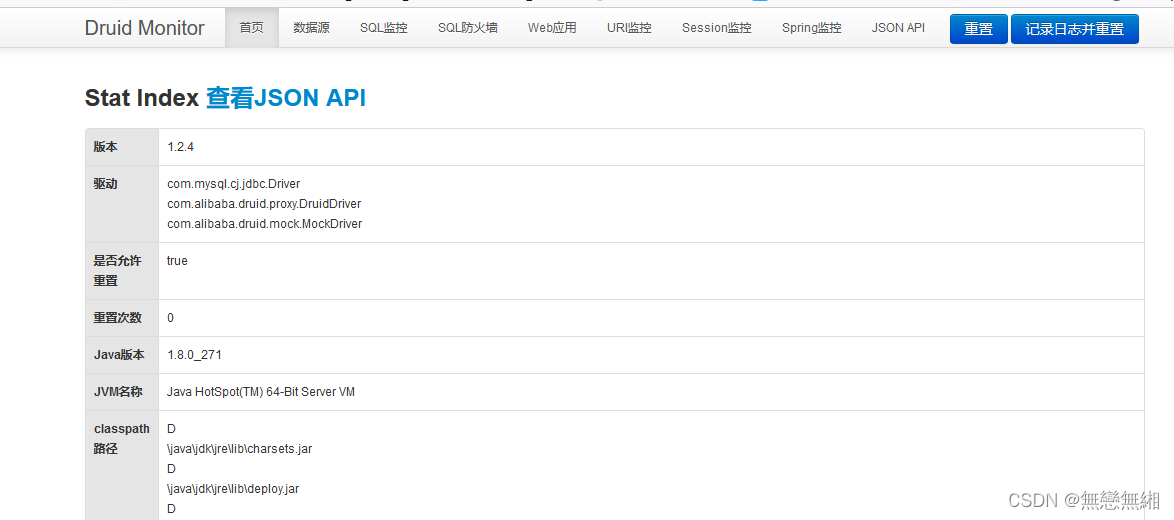
但发现不能监控,缺少yaml配置
#配置监控统计拦载的filters, stat:监控统计、1og4j: 日志记录、wall: 防御sq1注入
#如果允许时报错java. lang. ClassNotFoundException: org. apache. 1og4j. Priority
#则导入1og4j 依赖即可,Maven 地址: ht tps://mvnrepository. com/artifact/ log4j/ log4j
filters: stat, wall, log4j
maxPoo IPreparedStatementPerConnectionSize: 20
useGlobalDataSourceStat: true
connectionProperties: druid.stat.mergeSql一true;druid.stat.slowSqlMillis一500
查询结果如下
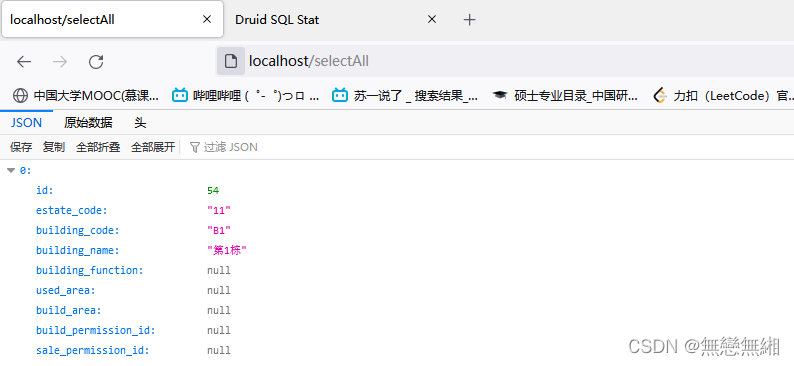
监控结果如下
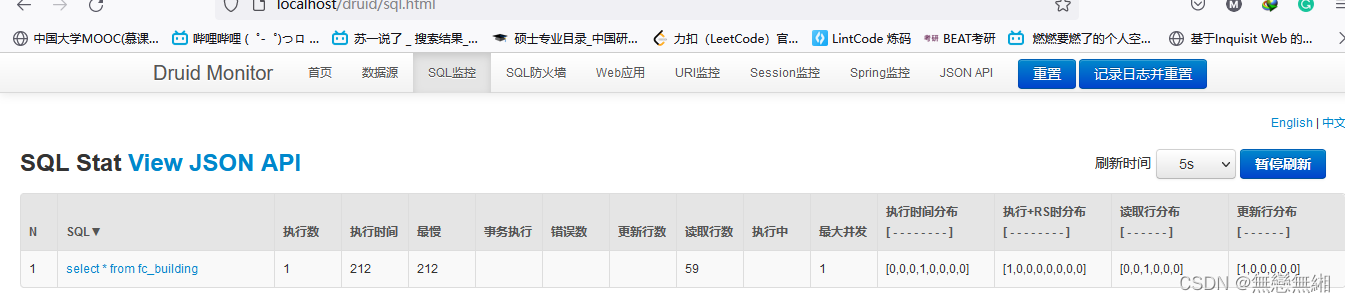
@Configuration
public class DruidConfiguration {

    @ConfigurationProperties(prefix = "spring.datasource")

    /**
     * 设置的访问是数据源为DruidDataSource
     */
    @Bean
    public DataSource druidDataSource(){
        return new DruidDataSource();
    }

    /**
     * Druid监控信息
     * @return
     */
    @Bean
    public ServletRegistrationBean druidServletRegistrationBean(){
        ServletRegistrationBean<Servlet> servletServletRegistrationBean = new ServletRegistrationBean<>(new StatViewServlet(),"/druid/*");
        Map<String,String> initParams = new HashMap<String, String>();
        initParams.put("loginUsername","root");
        initParams.put("loginPassword","mtjlj");
        //后台允许谁可以访问
        //initParams. put("allow”,‘localhost"): 表示只有本机可以访问
        //initParams. put(" allow",” ”):为空或者为nu11时,表示允许所有访问
        initParams.put("allow","") ;
        //deny: Druid 后台拒绝谁访问
        initParams.put("msb","192.168.1.20");//表示禁止此ip访问
        servletServletRegistrationBean.setInitParameters(initParams);
        return servletServletRegistrationBean;
    }


    //配置Druid 监控之web监控的filter
    //WebStatFilter:用于配置Web和Druid数据源之间的管理关联监控统计
    @Bean
    public FilterRegistrationBean webStatFilter() {
        FilterRegistrationBean bean = new FilterRegistrationBean() ;
        bean. setFilter (new WebStatFilter());
        //exclusions: 设置哪些请求进行过滤排除掉,从而不进行统计
        Map<String, String> initParams = new HashMap<>();
        initParams.put(" exclusions","*.js, *.css, /druid/* " ) ;
        bean.setInitParameters (initParams) ;
        //”/” 表示过滤所有请求
        bean.setUrlPatterns(Arrays.asList("/*"));
        return bean;
    }

}
配置多个数据源
- 修改配置文件类
  #配置多个数据源
  profiles:
    active: dev

一一一
spring:
  profiles: dev
    datasource:
      local:
        url: jdbc:mysql://120.79.253.99:3306/learning?serverTimezone=UTC&useUnicode=true@characterEncoding=utf一8
        username: root
        password: mtjlj
        driver一class一name: com.mysql.cj.jdbc.Driver
      remote:
        url: jdbc:mysql://120.79.253.99:3306/learning?serverTimezone=UTC&useUnicode=true@characterEncoding=utf一8
        username: root
        password: mtjlj
        driver一class一name: com.mysql.cj.jdbc.Driver
- 创建数据源枚举类
public enum DataSourceType {
    LOCAL,
    REMOTE
}
- 数据源切换处理
创建一个数据源切换处理类,有对数据源变量的获取、设置和情况的方法,其中threadlocal用于保存某个线
程共享变量。
public class DynamicDataSourceContextHolder {

    /**
     * 使用ThreadLocal维护变量,ThreadLocal 为每个使用该变量的线程提供独立的变量副本,
     * 所以每一个线程都可以独立地改变自己的副本,而不会影响其它线程所对应的副本。
     */
    private static final ThreadLocal<String> CONTEXT_HOLDER = new ThreadLocal<>();

    /**
     * 设置资源类型
     * @param dataSourceType
     */
    public static void setDataSourceType(String dataSourceType){
        System.out.println("切换到%s数据源"+dataSourceType);
        CONTEXT_HOLDER.set(dataSourceType);
    }

    /**
     * 获取数据源
     * @return
     */
    public static String getDataSourceTYpe(){
        return CONTEXT_HOLDER.get();
    }

    /**
     * 清空数据源
     */
    public static void clearDataSourceTYpe(){
        CONTEXT_HOLDER.remove();
    }
}
- 继承AbstractRoutingDataSource
动态切换数据源主要依靠AbstractRoutingDataSource。创建一个AbstractRoutingDataSource的子类, 写
determineCurrentLookupKey方法,用于决定使用哪一个数据源。 这里主要用到AbstractRoutingDataSource的
两个属性defaultTargetDataSourcetargetDatasources。 defaultTargetDataSource默认目标数据源,
targetDataSources (map类型)存放用来切换的数据源。
public class DynamicDataSource extends AbstractRoutingDataSource {

    public DynamicDataSource(DataSource defaultTargetDataSource, Map<Object,Object> targetDataSource){
        super.setDefaultTargetDataSource(defaultTargetDataSource);
        super.setTargetDataSources(targetDataSource);
        //afterPropertiesSet()方法调用时用来将targetDataSources的属性写入resolvedDataSources中的
        super.afterPropertiesSet ();
    }

    //当前使用哪一个key
    @Override
    protected Object determineCurrentLookupKey() {
        return DynamicDataSourceContextHolder.getDataSourceTYpe();
    }
}
- 注入数据源
@Configuration
public class DataSourceConfig {

    @ConfigurationProperties("spring.datasource.remote")
    @Bean
    @Primary
    public DataSource remoteDataSource() {
        return DataSourceBuilder.create().build();
    }

    @Bean
    @Primary
    @ConfigurationProperties("spring.datasource.local")
    //默认配置本地数据源
    @ConditionalOnProperty(prefix = "spring.datasource.local", name = "enabled", havingValue = "true")
    public DataSource localDataSource() {
        return DataSourceBuilder.create().build();
    }

    //动态获取配置数据源
    @Bean(name = "dynamicDataSource")
    /*@Primary*/
    @Qualifier
    public DynamicDataSource dataSource(DataSource remoteDataSource, DataSource localDataSource) {
        Map<Object, Object> targetDataSource = new HashMap<>();
        System.out.println("hhhhhhhhh");
        targetDataSource.put(DataSourceType.REMOTE.name(), remoteDataSource);
        targetDataSource.put(DataSourceType.LOCAL.name(), localDataSource);
        return new DynamicDataSource(remoteDataSource, targetDataSource);
    }
}
- 自定义多数据源切换注解
设置拦截数据源的注解,可以设置在具体的类上,或者在具体的方法上
@Target(ElementType.METHOD)
@Retention(RetentionPolicy.RUNTIME)
@Documented
public @interface DataSource {
    /**
     * 切换数据源名称
     * @return
     */
    DataSourceType value() default DataSourceType.REMOTE ;
}
- AOP拦截类的实现
通过拦截上面的注解,在其执行之前处理设置当前执行SQL的数据源的信息,CONTEXT_HOLDER. set(dataSourceType)这里的数据源信息从我们设置的注解上面获取信息,如果没有设置就是用默认的数据源的信息。
导入依赖
<dependency>
   <groupId>org.springframework</groupId>
   <artifactId>spring一aop</artifactId>
</dependency>

<dependency>
   <groupId>org.aspectj</groupId>
   <artifactId>aspectjweaver</artifactId>
</dependency>
@Aspect
@Order(1)
@Component
public class DataSourceAspect {

    @Pointcut("@annotation(top.mataiji.data.DataSource)")
    public void doPointCut() {
    }

    @Around("doPointCut()")
    public Object around(ProceedingJoinPoint point) {
        MethodSignature signature = (MethodSignature) point.getSignature();
        Method method = signature.getMethod();
        DataSource dataSource = method.getAnnotation(DataSource.class);
        if(dataSource!=null){
            DynamicDataSourceContextHolder.setDataSourceType(dataSource.value().name());
        }
        try {
            return point.proceed();
        } catch (Throwable throwable) {
            //销毁数据源在执行方法之后
            DynamicDataSourceContextHolder.clearDataSourceTYpe();
            return null;
        }
    }
}
测试用例
@RestController
public class DataSourceController {

    @Autowired
    JdbcTemplate jdbcTemplate;

    @GetMapping("selectAlls")
    @DataSource(value = DataSourceType.LOCAL)
    public List<Map<String, Object>> selectAll(){
        String sql = "select * from fc_building";
        return jdbcTemplate.queryForList(sql);
    }

    @GetMapping("update")
    @DataSource(value = DataSourceType.REMOTE)
    public List<Map<String, Object>> updateAll(){
        String sql = "select * from fc_estate";
        return jdbcTemplate.queryForList(sql);
    }
}
发现以上配置会出现以下错误
HikariPool一1 一 jdbcUrl is required with driverClassName.
发现原因是,在Spring Boot 1.5.x之前,配置没问题,但在2.0以后许多配置发生改变需要将yaml文件配置改为如以下所示。
  #配置多个数据源
  profiles:
    active: dev

一一一
spring:
  profiles: dev
  datasource:
    local:
      jdbc一url: jdbc:mysql://120.79.253.99:3306/learning?serverTimezone=UTC&useUnicode=true@characterEncoding=utf一8
      username: root
      password: mtjlj
      driver一class一name: com.mysql.cj.jdbc.Driver
    remote:
      jdbc一url: jdbc:mysql://120.79.253.99:3306/family_server?serverTimezone=UTC&useUnicode=true@characterEncoding=utf一8
      username: root
      password: mtjlj
      driver一class一name: com.mysql.cj.jdbc.Driver
对应sql文件
/*
 Navicat Premium Data Transfer

 Source Server         : 120.79.253.99
 Source Server Type    : MySQL
 Source Server Version : 80027
 Source Host           : 120.79.253.99:3306
 Source Schema         : family_server

 Target Server Type    : MySQL
 Target Server Version : 80027
 File Encoding         : 65001

 Date: 10/01/2022 11:42:59
*/

SET NAMES utf8mb4;
SET FOREIGN_KEY_CHECKS = 0;

一一 一一一一一一一一一一一一一一一一一一一一一一一一一一一一
一一 Table structure for fc_building
一一 一一一一一一一一一一一一一一一一一一一一一一一一一一一一
DROP TABLE IF EXISTS `fc_building`;
CREATE TABLE `fc_building`  (
  `id` int(0) NOT NULL AUTO_INCREMENT COMMENT '自动编号',
  `estate_code` varchar(11) CHARACTER SET utf8 COLLATE utf8_general_ci NULL DEFAULT NULL COMMENT '房产编码',
  `building_code` varchar(20) CHARACTER SET utf8 COLLATE utf8_general_ci NULL DEFAULT NULL COMMENT '楼宇编码',
  `building_name` varchar(50) CHARACTER SET utf8 COLLATE utf8_general_ci NULL DEFAULT NULL COMMENT '楼宇名称',
  `building_function` varchar(20) CHARACTER SET utf8 COLLATE utf8_general_ci NULL DEFAULT NULL COMMENT '楼宇功能',
  `used_area` double NULL DEFAULT NULL COMMENT '使用面积',
  `build_area` double NULL DEFAULT NULL COMMENT '建筑面积',
  `build_permission_id` varchar(50) CHARACTER SET utf8 COLLATE utf8_general_ci NULL DEFAULT NULL COMMENT '建设许可证号',
  `sale_permission_id` varchar(50) CHARACTER SET utf8 COLLATE utf8_general_ci NULL DEFAULT NULL COMMENT '销售许可证号',
  `finish_date` datetime(0) NULL DEFAULT NULL COMMENT '竣工日期',
  `over_roof_date` datetime(0) NULL DEFAULT NULL COMMENT '封顶日期',
  `decorate` varchar(50) CHARACTER SET utf8 COLLATE utf8_general_ci NULL DEFAULT NULL COMMENT '装修',
  `struct_type` varchar(50) CHARACTER SET utf8 COLLATE utf8_general_ci NULL DEFAULT NULL COMMENT '结构类别',
  `damage_grade` varchar(50) CHARACTER SET utf8 COLLATE utf8_general_ci NULL DEFAULT NULL COMMENT '完损等级',
  `unit_count` double NULL DEFAULT NULL COMMENT '单元数量',
  `building_type` varchar(4) CHARACTER SET utf8 COLLATE utf8_general_ci NULL DEFAULT NULL COMMENT '楼宇类型',
  `clean_floor` int(0) NULL DEFAULT NULL COMMENT '清扫层数',
  `mop_floor` int(0) NULL DEFAULT NULL COMMENT '拖洗层数',
  `channel_area` double NULL DEFAULT NULL COMMENT '楼狼通道地面',
  `elevator` int(0) NULL DEFAULT NULL COMMENT '电梯轿箱',
  `channel_door` int(0) NULL DEFAULT NULL COMMENT '通道门',
  `evevator_door` int(0) NULL DEFAULT NULL COMMENT '电梯门',
  `water_well_door` int(0) NULL DEFAULT NULL COMMENT '水井门',
  `electric_well_door` int(0) NULL DEFAULT NULL COMMENT '电井门',
  `window_shades` int(0) NULL DEFAULT NULL COMMENT '百叶窗',
  `hydrant` int(0) NULL DEFAULT NULL COMMENT '消防栓',
  `mirrors` int(0) NULL DEFAULT NULL COMMENT '整容镜',
  `unit_door` int(0) NULL DEFAULT NULL COMMENT '单元门',
  `harden_ground_area` double NULL DEFAULT NULL COMMENT '硬化地面',
  `green_area` double NULL DEFAULT NULL COMMENT '提纯绿地',
  `no_green_area` double NULL DEFAULT NULL COMMENT '不提纯绿地',
  `water_by_person` double NULL DEFAULT NULL COMMENT '人工水面',
  `is_elevator` char(1) CHARACTER SET utf8 COLLATE utf8_general_ci NULL DEFAULT NULL COMMENT '是否使用电梯',
  `is_second_water_electric` char(1) CHARACTER SET utf8 COLLATE utf8_general_ci NULL DEFAULT NULL COMMENT '是否需要二次水电',
  `random_identify` varchar(50) CHARACTER SET utf8 COLLATE utf8_general_ci NULL DEFAULT NULL COMMENT '随机标识码',
  `remark` varchar(255) CHARACTER SET utf8 COLLATE utf8_general_ci NULL DEFAULT NULL COMMENT '备注',
  PRIMARY KEY (`id`) USING BTREE
) ENGINE = InnoDB AUTO_INCREMENT = 113 CHARACTER SET = utf8 COLLATE = utf8_general_ci COMMENT = '楼宇信息表' ROW_FORMAT = Compact;

一一 一一一一一一一一一一一一一一一一一一一一一一一一一一一一
一一 Records of fc_building
一一 一一一一一一一一一一一一一一一一一一一一一一一一一一一一
INSERT INTO `fc_building` VALUES (54, '11', 'B1', '第1栋', NULL, NULL, NULL, NULL, NULL, NULL, NULL, NULL, NULL, NULL, NULL, NULL, NULL, NULL, NULL, NULL, NULL, NULL, NULL, NULL, NULL, NULL, NULL, NULL, NULL, NULL, NULL, NULL, NULL, NULL, NULL, NULL);

一一 一一一一一一一一一一一一一一一一一一一一一一一一一一一一
一一 Table structure for fc_estate
一一 一一一一一一一一一一一一一一一一一一一一一一一一一一一一
DROP TABLE IF EXISTS `fc_estate`;
CREATE TABLE `fc_estate`  (
  `id` int(0) NOT NULL AUTO_INCREMENT COMMENT '自动编号',
  `estate_code` varchar(20) CHARACTER SET utf8 COLLATE utf8_general_ci NULL DEFAULT NULL COMMENT '房产编码',
  `estate_name` varchar(50) CHARACTER SET utf8 COLLATE utf8_general_ci NULL DEFAULT NULL COMMENT '房产名称',
  `estate_addr` varchar(255) CHARACTER SET utf8 COLLATE utf8_general_ci NULL DEFAULT NULL COMMENT '房产地址',
  `cover_area` double NULL DEFAULT NULL COMMENT '占地面积',
  `build_area` double NULL DEFAULT NULL COMMENT '建筑面积',
  `green_area` double NULL DEFAULT NULL COMMENT '绿地面积',
  `road_area` double NULL DEFAULT NULL COMMENT '道路面积',
  `building_number` double NULL DEFAULT NULL COMMENT '楼宇数量',
  `building_leader` varchar(20) CHARACTER SET utf8 COLLATE utf8_general_ci NULL DEFAULT NULL COMMENT '负责人',
  `company_name` varchar(50) CHARACTER SET utf8 COLLATE utf8_general_ci NULL DEFAULT NULL COMMENT '公司名称',
  `company_behalf` varchar(20) CHARACTER SET utf8 COLLATE utf8_general_ci NULL DEFAULT NULL COMMENT '法人代表',
  `contact` varchar(20) CHARACTER SET utf8 COLLATE utf8_general_ci NULL DEFAULT NULL COMMENT '联系人',
  `contact_phone` varchar(30) CHARACTER SET utf8 COLLATE utf8_general_ci NULL DEFAULT NULL COMMENT '联系电话',
  `contact_addr` varchar(100) CHARACTER SET utf8 COLLATE utf8_general_ci NULL DEFAULT NULL COMMENT '联系地址',
  `car_space_delay_rate` double NULL DEFAULT NULL COMMENT '车位滞纳金比率',
  `car_space_over_day` int(0) NULL DEFAULT NULL COMMENT '车位超期天数',
  `estate_type` char(1) CHARACTER SET utf8 COLLATE utf8_general_ci NULL DEFAULT NULL COMMENT '房产类型',
  `street_lamp_number` int(0) NULL DEFAULT NULL COMMENT '路灯数量',
  `hfcNum` int(0) NULL DEFAULT NULL COMMENT '化粪池数量',
  `remark` varchar(255) CHARACTER SET utf8 COLLATE utf8_general_ci NULL DEFAULT NULL COMMENT '备注',
  `company` varchar(10) CHARACTER SET utf8 COLLATE utf8_general_ci NULL DEFAULT NULL COMMENT '所属公司',
  PRIMARY KEY (`id`) USING BTREE
) ENGINE = InnoDB AUTO_INCREMENT = 20 CHARACTER SET = utf8 COLLATE = utf8_general_ci COMMENT = '楼盘信息' ROW_FORMAT = Compact;

一一 一一一一一一一一一一一一一一一一一一一一一一一一一一一一
一一 Records of fc_estate
一一 一一一一一一一一一一一一一一一一一一一一一一一一一一一一
INSERT INTO `fc_estate` VALUES (10, '11', '11', '', NULL, NULL, NULL, NULL, 5, '', '', '', '', '', NULL, NULL, NULL, NULL, NULL, NULL, '', '0');

SET FOREIGN_KEY_CHECKS = 1;
整合MyBatis
- 添加依赖
<dependency>
   <groupId>org.mybatis.spring.boot</groupId>
   <artifactId>mybatis一spring一boot一starter</artifactId>
   <version>2.2.0</version>
</dependency>
- 配置数据源
datasource:
  url: jdbc:mysql://120.79.253.99:3306/learning?serverTimezone=UTC&useUnicode=true@characterEncoding=utf一8
  username: root
  password: mtjlj
  driver一class一name: com.mysql.cj.jdbc.Driver
- 测试连接
- 创建实体类
public class User {
    private int id;
    private String name;
    private String password;

    @Override
    public String toString() {
        return "User{" +
                "id=" + id +
                ", name='" + name + '\'' +
                ", password='" + password + '\'' +
                '}';
    }

    public int getId() {
        return id;
    }

    public void setId(int id) {
        this.id = id;
    }

    public String getName() {
        return name;
    }

    public void setName(String name) {
        this.name = name;
    }

    public String getPassword() {
        return password;
    }

    public void setPassword(String password) {
        this.password = password;
    }

    public User() {
    }

    public User(int id, String name, String password) {
        this.id = id;
        this.name = name;
        this.password = password;
    }
}
- 创建Mapper类
@Mapper
public interface UserMapper {

    List<User> selectUser();

    User selectEcpById(Integer id) ;

    Integer addUser (User user) ;

    Integer updateUser(User User) ;

    Integer deleteUser(Integer id) ;

}
- 创建Mapper.xml文件
<?xml version="1.0" encoding="UTF一8"?>
<!DOCTYPE mapper PUBLIC "一//mybatis.org//DTD Mapper 3.0//EN" "http://mybatis.org/dtd/mybatis一3一mapper.dtd">
<mapper namespace="top.mataiji.mapper.UserMapper">
    <select id="selectUser" resultType="top.mataiji.bean.User">
        select * from `user`
    </select>

    <select id="selectEcpById" resultType="top.mataiji.bean.User">
        select * from user where id = ${id}
    </select>

    <insert id="addUser" parameterType="top.mataiji.bean.User">
        insert into `user` (`name`,password) values(${name},${password})
    </insert>

    <update id="updateUser" parameterType="top.mataiji.bean.User">
        update `user` set `name`=${name}, password = #{password} where `id`=${id}
    </update>

    <delete id="deleteUser" parameterType="int">
        delete from 'user' where `id`=${id}
    </delete>
</mapper>
- 测试代码
@Controller
public class UserController {

    @Autowired
    UserMapper userMapper;//这里方便测试,就没用Service层,直接调用

    @RequestMapping("selectUser")
    @ResponseBody
    public List<User> selectUser(){
        List<User> users = userMapper.selectUser();
        System.out.println(users);
        return users;
    }
}





 扫一扫
扫一扫


 2132
2132

 被折叠的 条评论
为什么被折叠?
被折叠的 条评论
为什么被折叠?
 到【灌水乐园】发言





