


 本文介绍了使用uni-app进行前后端交互,通过uni.request调用SpringBoot后端接口获取数据,并展示了数据在前端页面的渲染。详细讲述了配置过程,包括main.js中的依赖引入,页面结构,以及后端Mapper、Service、Controller的实现。同时,文章还展示了如何使用uView组件库的u-swiper组件进行轮播图展示,以及按需引入iview的方法。
两个部分弄了很久,记录过程:
request前后端交互
1.需要用到uni.request,记得先npm下载request(自己因为一开始没有下载就写代码而折腾了好久也没有成功发送请求)和uview-ui
自己现在下载了的依赖项:
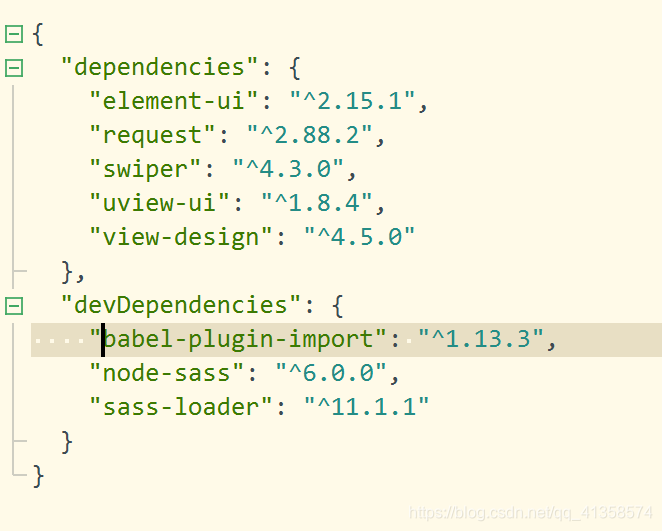
下载了以后main.js:
import uView from “uview-ui”;
Vue.use(uView);
目录:
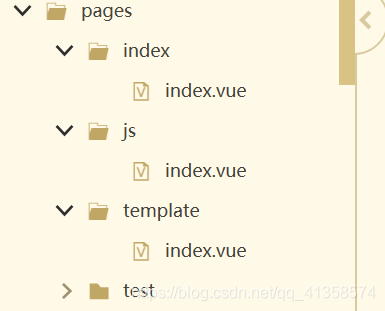
pages:
{


		"easycom": {


			"^u-(.*)": "uview-ui/components/u-$1/u-$1.vue"
		},

	"pages": [ //pages数组中第一项表示应用启动页,参考:https://uniapp.dcloud.io/collocation/pages
		{


			"path": "pages/index/index",
			"style": {


				"navigationBarTitleText": "一键洗涤"
			}
		},
			{


					"path": "pages/js/index",
					"style": {


						"navigationBarTitleText": "设置"
					}
				},
				{


					"path": "pages/template/index",
					"style": {


						"navigationBarTitleText": "数据查看"
					}
				},
				{


					"path": "pages/test/test",
					"style": {


						"navigationBarTitleText": "测试"
					}
				}
	],
	"globalStyle": {


		"navigationBarTextStyle": "black",
		"navigationBarTitleText": "uni-app",
		"navigationBarBackgroundColor": "#F8F8F8",
		"backgroundColor": "#F8F8F8"
	},
	"tabBar": {


			"color": "#909399",
			"selectedColor": "#303133",
			"backgroundColor": "#FFFFFF",
			"borderStyle": "black",
			"list": [{


					"pagePath": "pages/index/index",
					"iconPath": "static/uview/example/component.png",
					"selectedIconPath": "static/uview/example/component_select.png",
					"text": "组件"
				},
				{


					"pagePath": "pages/js/index",
					"iconPath": "static/uview/example/js.png",
					"selectedIconPath": "static/uview/example/js_select.png",
					"text": "工具"
				},
				{


					"pagePath": "pages/template/index",
					"iconPath": "static/uview/example/template.png",
					"selectedIconPath": "static/uview/example/template_select.png",
					"text": "模板"
				}
			]
		}

}
接收后端数据:
<view v-for="(user,index) in users" :key="index">
<view style="color: #71D5A1;"><u-icon name="clock" color="#2979ff" size="28"></u-icon>{
{user.time}}日清洗时长:{
{user.lasttime}}分钟</view>
<view><u-icon name="clock-fill" color="#2979ff" size="28"></u-icon>总清洗时间:{
{user.alltime}}</view>
<hr>
</view>
<image class="logo" src="/static/wa2.png"></image>
<view class="text-area">
<text class="title">{
{title}}</text>
</view>
<script>
export default {
data() {
return {
users:[] 最低0.47元/天 解锁文章






 扫一扫
扫一扫


 1万+
1万+

 被折叠的 条评论
为什么被折叠?
被折叠的 条评论
为什么被折叠?
 到【灌水乐园】发言





