


 本文详细介绍如何在Ubuntu系统中安装和配置Telnet服务。包括使用sudo apt-get install xinetd telnetd命令安装Telnet服务,通过vim编辑器修改/etc/inetd.conf、/etc/xinetd.conf和/etc/xinetd.d/telnet文件来设置Telnet服务参数,以及重启网络服务以使更改生效的具体步骤。
- 在终端输入命令:sudo apt-get install xinetd telnetd
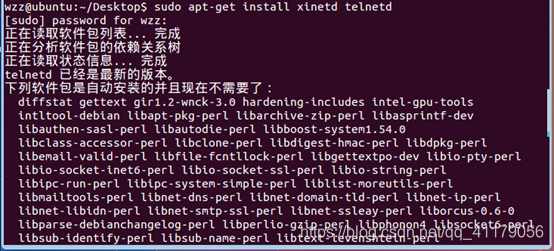
- 使用vim命令模式修改环境变量
(1)输入sudo vi /etc/inetd.conf
加入一行:telnet stream tcp nowait telnetd /usr/sbin/tcpd /usr/sbin/in.telnetd
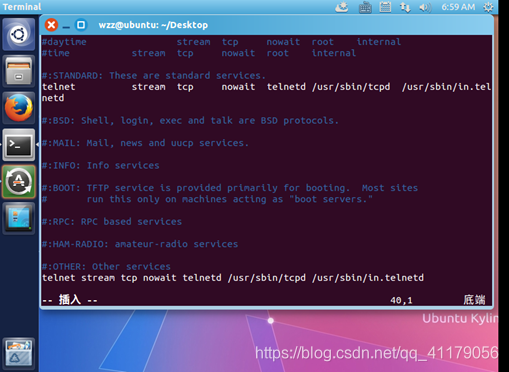
按ESC将回到命令模式。再输入:wq 保存并退出编辑器。
(2)输入sudo vi /etc/xinetd.conf
加入:
#Simple configuration file for xinetd
#Some defaults, and include /etc/xinetd.d/
defaults
{
#Please note that you need a log_type line to be able to use
log_on_success
#and log_on_failure. The default is the following :
#log_type = SYSLOG daemon info
instances = 60
log_type = SYSLOG authpriv
log_on_success = HOST PID
log_on_failure = HOST
cps = 25 30
}
includedir /etc/xinetd.d
按ESC将回到命令模式。再输入:wq 保存并退出编辑器。
(3)输入sudo vi /etc/xinetd.d/telnet
再加入:
#default: on
#description: The telnet server serves telnet sessions; it uses
#unencrypted username/password pairs for authentication.
service telnet
{
disable = no
flags = REUSE
socket_type = stream
wait = no
user = root
server = /usr/sbin/in.telnetd
log_on_failure += USERID
}
按ESC将回到命令模式。再输入:wq 保存并退出编辑器。
3. 重启ubuntu或重启网络服务sudo /etc/init.d/xinetd restart





 扫一扫
扫一扫


 1519
1519

 被折叠的 条评论
为什么被折叠?
被折叠的 条评论
为什么被折叠?
 到【灌水乐园】发言





