


1简单结构
Dao
直连数据库,对应sql语句, @query,返回格式
基本注解
@Mapper
标注于接口的上方,用于框架寻找接口和对应接口的xml文件
对应的xml文件:
Service层
基本注解
@Service
public class UserServiceImp implements UserService {
    @Resource
    private UserDao userDao;
    @Override
    public User queryUser(Integer id) {
        User user = userDao.selectById(id);
        return user;
    }
}
@service
标注于Service接口的实现类上,将当前类自动注入到Spring容器中
@override
重写(覆写,覆盖)注解,可以检查是否正确重写(父中没有对应的函数会报错┗|`O′|┛ 嗷~~)告诉阅读者该函数为重写函数。
What is override?
子类中对父类中存在的函数进行重写,只能重写函数体,参数不变;
私有函数(private)、静态函数(static)、构造函数不能重写,
@overload
重载注解
What is overload ?
一个类中有多个函数名相同,但是入参不同(数量/类型不同)的函数(返回值不同不构成重载)
函数使用
调用dao层函数,进行相关逻辑处理,返回ArrayList
Steam() & conllecter()
作用:将数据进行流化,转化为map,list等需求目标结构或
以以下数据为例,简单介绍conllecter()的使用
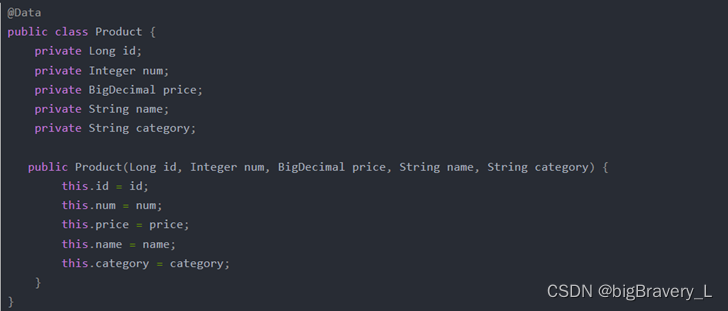
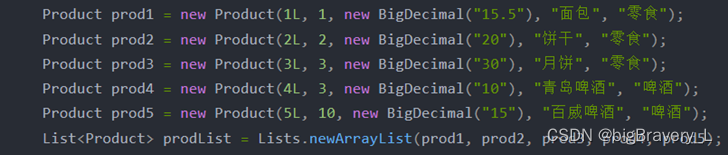
- 转化为list – toList
List<Integer> listAdd = list.stream().map(s -> s + 2).collect(Collectors.toList());
- Steam()将list进行流化;
- Map(): 用于数据进行处理
- (item ->item.getX())将item的X值塞到map中;
- 或者传入函数中map(test::add)
private static int add2(Integer temp){
    return  temp + 2;
}
- collect(Collectors.toList())构建成新的list;
- 转化为Map – toMap
Map<Long, String> idMap = prodList.stream().collect(Collectors.toMap(Product::getId, Product::getName));
- Conllect(Collecter.toMap(key, value, (v1, v2) -> v1)))
第一个参数是map结构的key值;
第二个参数是map结构的value
第三个参数是当多个map出现key值冲突时的解决方法,可以将数据进行合并或者其他解决处理方式……
- 分组-- groupingBy
conllect(conllecter.groupingBy(Product::getCategery))
Map<String,List<Product>> groupListMap = prodList.stream().collect(Collectors.groupingBy(Product::getCategory));
- 拼接 – joining
conllect(conllecter.joining(‘,’));
String nameJoin = prodList.stream().map(Product::getName).collect(Collectors.joining(","));
- 统计集合数量 – counting
Long count = prodList.stream().map(Product::getName).collect(Collectors.counting));
- 忽略空值拼接filter(s->StringUtils.isNotEmpty(s)).conllect(conllecter.joining(“|”));
String useridText = list.stream().map(SysAccount::getQyWechatUserid).filter(s -> StringUtils.isNotEmpty(s)).collect(Collectors.joining("|"));
Controller
调用service层函数返回数据,并抛出接口
基本注解
@Controller

public class UserController {

    @Resource

    private UserService userService;

    @RequestMapping("/user/query")

    @ResponseBody

    public String queryUser(Integer id){

        return "查询用户的id是"+ id + "用户:" + userService.queryUser(id).toString();

    }

}
@Controller
声明某类体为controller
@RequestMapping
标注于方法体,用于指定访问路径 – 接口
@ResponseBody
标注于方法体,返回数据用于<body>标签中
定时器
Spring Task
- 弊端: 默认是单线程的
- 使用步骤:
- Spring启动类添加@EnableScuduling注解
@EnableScheduling

@SpringBootApplication

public class SpringbootApplication {

    public static void main(String[] args) {

        SpringApplication.run(SpringbootApplication.class, args);

    }

}
- 创建定时任务类的bean,使用@Scheduled ,通过corn设置定时器属性
@Component

public class TimerTask {

    @Scheduled(cron = "0 7 2 26 7 *")  // 2022年7月26日02:07:00执行一次定时任务

    public void task() {

        System.out.println("定时任务...");

    }

}
- corn配置
corn(* * * * * ?)
corn表达式 从左到右 依次是 秒 分 时 日期 月份 星期 年份
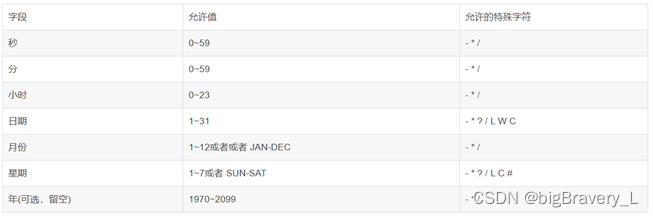
动态改变corn:https://blog.youkuaiyun.com/qq_44421399/article/details/129671454
- 多线程配置:https://blog.youkuaiyun.com/qq825478739/article/details/127804875
- 配置参考:https://blog.youkuaiyun.com/u012060033/article/details/99317111





 扫一扫
扫一扫


 8127
8127


 到【灌水乐园】发言



