






 本文介绍如何使用PyMySQL库连接MySQL数据库并进行基本操作,包括安装PyMySQL、创建连接、执行SQL语句、创建数据表、插入及查询数据。
1.下载PyMySQL
在cmd中执行一下命令:
pip install PyMySQL
2.连接对象
使用数据库之前需要先连接数据库。成功连接数据库后会获得连接对象。
一般连接方式有两种。
(1)
import pymysql #导入库
connection = pymysql.connect(
    host = 'localhost',  #就写这个就好
    user = 'root',   #数据库用户名,可以登录MySQL查看
    password = '******', #密码是数据库的密码
    db = 'test_db',  #数据库的名称
    charset = 'utf8',#不能是 utf-8
    cursorclass = pymysql.cursors.DictCursor #游标类型
    )
(2)
import pymysql #导入库

# 打开数据库连接
connection = pymysql.connect("localhost", "root", "******", "test", charset='utf8' )
在上个例子中connection就是连接对象。
连接对象的方法
一下是常用的方法:
| 方法 | 说明 |
|---|---|
| cursor() | 获取游标对象,操作数据库 |
| commit() | 提交事务(在添加记录时,必须要用上) |
| rollback() | 回滚事务 |
| close() | 关闭数据库连接 |
游标对象
获取游标对象
cursor = connection.cursor() #connection 是上文提到的连接对象
游标对象的常用方法
| 方法 | 说明 |
|---|---|
| execute() | 执行数据库操作,SQL语句 |
| executemany() | 用于批量操作 |
| fetchone() | 获取查询结果集中的下一条 |
| fetchmany (size) | 获取指定数量的记录 |
| fetall() | 获取结构集的所有记录 |
| close() | 关闭当前游标 |
创建数据表
import pymysql

connection = pymysql.connect(
    host = 'localhost',
    user = 'root',
    password = '20205863llc@',
    db = 'test_db',
    charset = 'utf8',#不能是 utf-8
    cursorclass = pymysql.cursors.DictCursor
    )
cursor = connection.cursor()
#SQL 创建数据表语句
sql2 = '''
CREATE TABLE books(
id int NOT NULL AUTO_INCREMENT,
name varchar(255) NOT NULL,
category varchar(50) NOT NULL,
price decimal(10.2) DEFAULT '0',
publish_time date DEFAULT NULL,
PRIMARY KEY(id)
);
'''
#执行该语句
cursor.execute(sql2)
cursor.close()
connection.close()
向数据表中插入数据
相关MySQL语句可以参考这篇文章
MySQL
使用cursor.execute()执行SQL语句后,默认不会提交,需要手动提交。
import pymysql

connection = pymysql.connect(
    host = 'localhost',
    user = 'root',
    password = '****',
    db = 'test_db', #数据库名
    charset = 'utf8',#不能是 utf-8
    cursorclass = pymysql.cursors.DictCursor
    )
cursor = connection.cursor()

#SQL 语句
sql1 ='''
insert into pymysql_1  (id) values (2);
'''
# pymysql_1 是数据库 test_db 的一个数据表
#执行该语句
cursor.execute(sql1)
#提交事务,记得是连接对象
connection.commit()
cursor.close()
connection.close()
插入多条记录:
import pymysql
#打开数据库连接
connection = pymysql.connect(
    host = 'localhost',
    user = 'root',
    password = '*****',
    db = 'test_db',
    charset = 'utf8',#不能是 utf-8
    cursorclass = pymysql.cursors.DictCursor
    )
    #获取操作游标
cursor = connection.cursor()
sql ='''
select * from tmp3;
'''
#数据列表
data = [("零基础学python",'Python','79.80','2021-8-4'),
("零基础学C++",'c++','69.80','2021-8-4'),
("零基础学PHP",'PHP','69.80','2021-8-4'),
("零基础学HTML",'HTNL','79.80','2021-8-4'),
("零基础学Java",'Java','69.80','2021-8-4'),
]


#执行SQL语句
try:
    cursor.executemany("insert into books(name,category,price,publish_time) values(%s,%s,%s,%s)",data)
    connection.commit() #提交记录
except:
    #发生错误时回滚
    connection.rollback()
cursor.close()
connection.close()
查询操作
对于查询操作,执行select 查询SQL语句生成一个结果集,需要使用,
,fetchone()或fetchmany 或fetchall()
import pymysql
#打开数据库连接
connection = pymysql.connect(
    host = 'localhost',
    user = 'root',
    password = '20205863llc@',
    db = 'test_db',
    charset = 'utf8',#不能是 utf-8
    cursorclass = pymysql.cursors.DictCursor
    )

sql ='''
select * from books order by price;
'''

#使用with 方法 在使用后会自动关闭游标对象
with connection.cursor() as cursor:
    cursor.execute(sql)
    data1 =cursor.fetchall() #获取全部数据
#遍历图书数据
for book in data1:
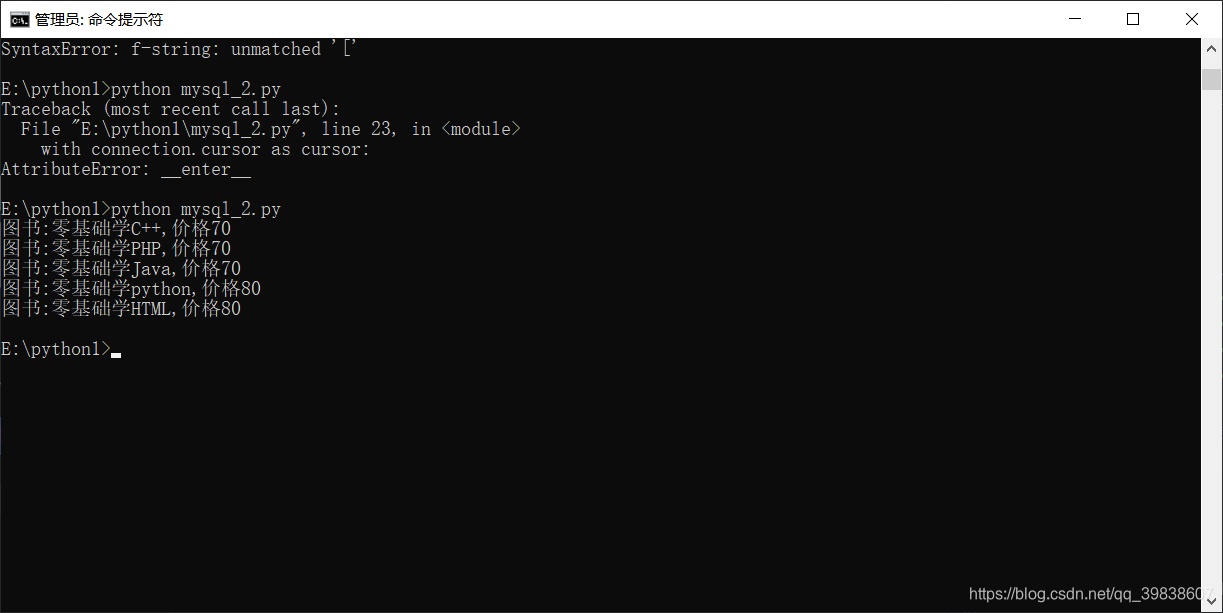
    print(f'图书:{book["name"]},价格{book["price"]}') #列表中的索引记得是双引号

connection.close()





 扫一扫
扫一扫


 被折叠的 条评论
为什么被折叠?
被折叠的 条评论
为什么被折叠?
 到【灌水乐园】发言





