


 文章介绍了在selenium自动化测试中如何处理验证码识别的问题,主要探讨了使用tess4j和tesseract-ocr两个开源库进行验证码识别的方法,包括下载依赖、设置参数以及针对干扰项的图像处理。对于复杂验证码,tesseract-ocr的去噪和二值化操作可提高识别效果,但仍有局限性,而Python的OCR解决方案可能提供更高准确性。
之前在进行selenium自动化测试时需要对项目内的验证码进行识别,通常有三种方法进行验证码处理:
去除验证码
万能验证码
自动识别
但由于部分数据未提供了api,我们只能通过自动识别方式去进行“破解”
鄙人使用两种开源技术进行尝试:tess4j和tesseract-ocr(OCR)
test4J方式识别验证码
1.下载tessdata和各种训练语言包
下载tessdata:
github下载tesseract中的tessdata文件夹即可,
下载地址:https://github.com/tesseract-ocr/tesseract/tree/main
存放位置:
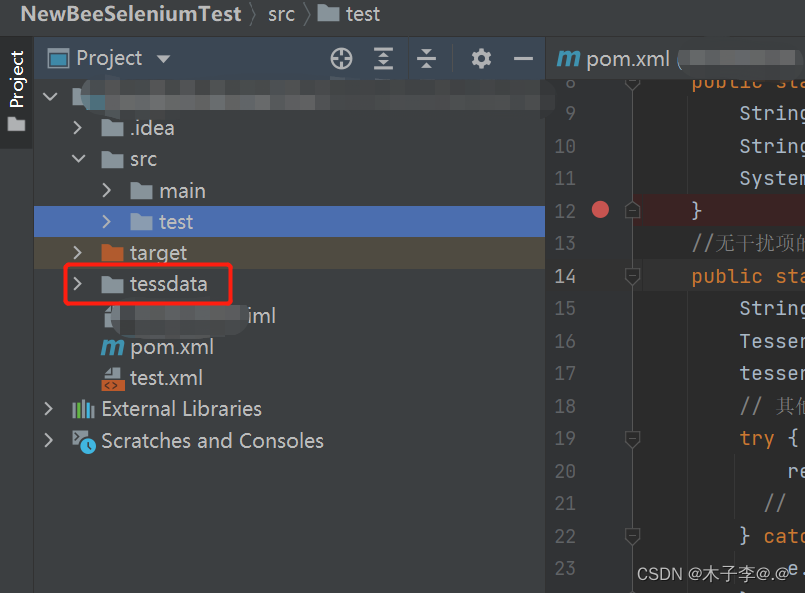 下载训练语言包:
tessdata支持多语言类型的验证码,比如英文数字类型的验证码对应的源程序为eng.traineddata
下载链接:https://github.com/tesseract-ocr/tessdata
存放位置:
放在上面下载的tessdata文件夹中
最快捷的方式,使用鄙人整理好的文件,下载地址:
2.加入maven依赖
<dependency>
            <groupId>net.java.dev.jna</groupId>
            <artifactId>jna</artifactId>
            <version>4.2.1</version>
        </dependency>
    <dependency>
        <groupId>net.sourceforge.tess4j</groupId>
        <artifactId>tess4j</artifactId>
        <version>4.5.1</version>
    </dependency>
3.编写代码
public class TestImgVer {

    public static void main(String[] args) {
        String dataPath = "tessdata";
        String picturePath = "src/test/resources/3esg.png";
        System.out.println(baseVerCode(dataPath,picturePath));
    }
    //无干扰项的字母数字图片验证码识别
    public static String baseVerCode(String dataPath,String picturePath){
        String result = null;
        Tesseract tesseract = new Tesseract();
        tesseract.setDatapath(dataPath); // 设置tessdata文件夹的路径
        // 其他配置,如语言、OCR引擎等
        try {
            result = tesseract.doOCR(new File(picturePath)); // 识别图片
          //  System.out.println(result);
        } catch (TesseractException e) {
            e.printStackTrace();
        }
    return  result;
    }
}
4.结果验证
识别的图片:

运行结果
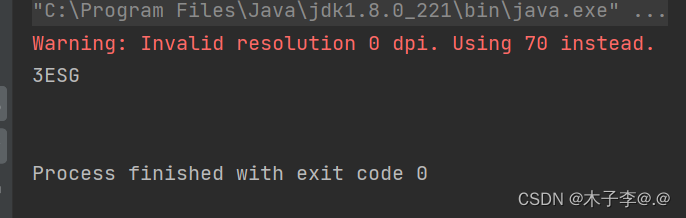
如果使用带有干扰线等干扰项的验证码时进行识别效果如下:

运行结果:
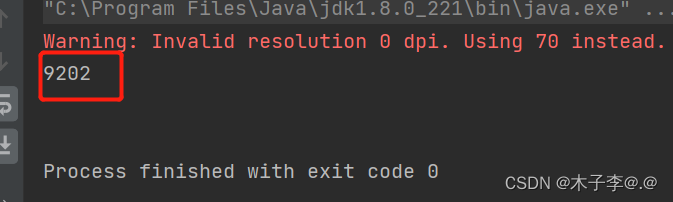
这时我们可以使用第二种方式tesseract-ocr进行识别,tesseract-ocr在tess4j的基础上,增加了对验证码去噪点、二值化等操作
tesseract-ocr方式识别验证码
1.安装tesseract-ocr
2.加入maven依赖
</dependency>
        <dependency>
            <groupId>net.java.dev.jna</groupId>
            <artifactId>jna</artifactId>
            <version>4.2.1</version>
        </dependency>
    <dependency>
        <groupId>net.sourceforge.tess4j</groupId>
        <artifactId>tess4j</artifactId>
        <version>4.5.1</version>
    </dependency>
    <dependency>
        <groupId>org.openpnp</groupId>
        <artifactId>opencv</artifactId>
        <version>3.2.0-1</version>
    </dependency>
3.带干扰项验证码处理(去噪、二值化等操作)
    public static void main(String[] args) throws IOException
   {
       File file = new File("src/test/resources/kaptcha.jpg");
       final String destDir = file.getParent()+"\\tmp";
       cleanLinesInImage(file, destDir);
       cleanLinesInImage(file, destDir);
       cleanLinesInImage(file, destDir);
   }
   /**
    *
    * @param sfile
    *            需要去噪的图像
    * @param destDir
    *            去噪后的图像保存地址
    * @throws IOException
    */
   public static void cleanLinesInImage(File sfile, String destDir)  throws IOException{
       File destF = new File(destDir);
       if (!destF.exists())
       {
           destF.mkdirs();
       }

       BufferedImage bufferedImage = ImageIO.read(sfile);
       int h = bufferedImage.getHeight();
       int w = bufferedImage.getWidth();

       // 灰度化
       int[][] gray = new int[w][h];
       for (int x = 0; x < w; x++)
       {
           for (int y = 0; y < h; y++)
           {
               int argb = bufferedImage.getRGB(x, y);
               // 图像加亮(调整亮度识别率非常高)
               int r = (int) (((argb >> 16) & 0xFF) * 1.1 + 30);
               int g = (int) (((argb >> 8) & 0xFF) * 1.1 + 30);
               int b = (int) (((argb >> 0) & 0xFF) * 1.1 + 30);
               if (r >= 255)
               {
                   r = 255;
               }
               if (g >= 255)
               {
                   g = 255;
               }
               if (b >= 255)
               {
                   b = 255;
               }
               gray[x][y] = (int) Math
                       .pow((Math.pow(r, 2.2) * 0.2973 + Math.pow(g, 2.2)
                               * 0.6274 + Math.pow(b, 2.2) * 0.0753), 1 / 2.2);
           }
       }

       // 二值化
       int threshold = ostu(gray, w, h);
       BufferedImage binaryBufferedImage = new BufferedImage(w, h, BufferedImage.TYPE_BYTE_BINARY);
       for (int x = 0; x < w; x++)
       {
           for (int y = 0; y < h; y++)
           {
               if (gray[x][y] > threshold)
               {
                   gray[x][y] |= 0x00FFFF;
               } else
               {
                   gray[x][y] &= 0xFF0000;
               }
               binaryBufferedImage.setRGB(x, y, gray[x][y]);
           }
       }

       //去除干扰线条
       for(int y = 1; y < h-1; y++){
           for(int x = 1; x < w-1; x++){
               boolean flag = false ;
               if(isBlack(binaryBufferedImage.getRGB(x, y))){
                   //左右均为空时,去掉此点
                   if(isWhite(binaryBufferedImage.getRGB(x-1, y)) && isWhite(binaryBufferedImage.getRGB(x+1, y))){
                       flag = true;
                   }
                   //上下均为空时,去掉此点
                   if(isWhite(binaryBufferedImage.getRGB(x, y+1)) && isWhite(binaryBufferedImage.getRGB(x, y-1))){
                       flag = true;
                   }
                   //斜上下为空时,去掉此点
                   if(isWhite(binaryBufferedImage.getRGB(x-1, y+1)) && isWhite(binaryBufferedImage.getRGB(x+1, y-1))){
                       flag = true;
                   }
                   if(isWhite(binaryBufferedImage.getRGB(x+1, y+1)) && isWhite(binaryBufferedImage.getRGB(x-1, y-1))){
                       flag = true;
                   }
                   if(flag){
                       binaryBufferedImage.setRGB(x,y,-1);
                   }
               }
           }
       }


       // 矩阵打印
       for (int y = 0; y < h; y++)
       {
           for (int x = 0; x < w; x++)
           {
               if (isBlack(binaryBufferedImage.getRGB(x, y)))
               {
                   System.out.print("*");
               } else
               {
                   System.out.print(" ");
               }
           }
           System.out.println();
       }

       ImageIO.write(binaryBufferedImage, "jpg", new File(destDir, sfile
               .getName()));
   }

   public static boolean isBlack(int colorInt)
   {
       Color color = new Color(colorInt);
       if (color.getRed() + color.getGreen() + color.getBlue() <= 300)
       {
           return true;
       }
       return false;
   }

   public static boolean isWhite(int colorInt)
   {
       Color color = new Color(colorInt);
       if (color.getRed() + color.getGreen() + color.getBlue() > 300)
       {
           return true;
       }
       return false;
   }

   public static int isBlackOrWhite(int colorInt)
   {
       if (getColorBright(colorInt) < 30 || getColorBright(colorInt) > 730)
       {
           return 1;
       }
       return 0;
   }

   public static int getColorBright(int colorInt)
   {
       Color color = new Color(colorInt);
       return color.getRed() + color.getGreen() + color.getBlue();
   }

   public static int ostu(int[][] gray, int w, int h)
   {
       int[] histData = new int[w * h];
       // Calculate histogram
       for (int x = 0; x < w; x++)
       {
           for (int y = 0; y < h; y++)
           {
               int red = 0xFF & gray[x][y];
               histData[red]++;
           }
       }

       // Total number of pixels
       int total = w * h;

       float sum = 0;
       for (int t = 0; t < 256; t++)
           sum += t * histData[t];

       float sumB = 0;
       int wB = 0;
       int wF = 0;

       float varMax = 0;
       int threshold = 0;

       for (int t = 0; t < 256; t++)
       {
           wB += histData[t]; // Weight Background
           if (wB == 0)
               continue;

           wF = total - wB; // Weight Foreground
           if (wF == 0)
               break;

           sumB += (float) (t * histData[t]);

           float mB = sumB / wB; // Mean Background
           float mF = (sum - sumB) / wF; // Mean Foreground

           // Calculate Between Class Variance
           float varBetween = (float) wB * (float) wF * (mB - mF) * (mB - mF);

           // Check if new maximum found
           if (varBetween > varMax)
           {
               varMax = varBetween;
               threshold = t;
           }
       }

       return threshold;
   }
tesseract-ocr方式识别存在的问题:若验证码干扰元素过多,则处理后的验证码缺失点过多,导致验证码识别结果存在偏差,查阅其他资料发现使用python脚本进行识别处理结果的可信度远远高于以上两种方法
Python使用OCR技术识别验证码后续更新






 扫一扫
扫一扫


 5778
5778


 到【灌水乐园】发言



