


简介
欢迎来到全世界最大的模拟知识付费平台(bushi)。
你将拥有由 UCASer 自主研发的一只开放价格冒险股票。股票在一个被称作 「A股」 的幻想市场上流通,在这里,被机构选中的题材将被授予 「涨停板」,引导资金抱团。你将扮演一位名为 「韭菜」 的神秘角色,在剧烈的主升浪中邂逅精神失常、频繁操作的散户们,和他们一起被主力收割,见证连板的秘密——同时,逐步发掘 「A股」 的历史低点。
注:以上为虚构背景,如与现实雷同纯属巧合。
戳我试玩!
以及欢迎来github为我送上一颗star谢谢喵
操作说明
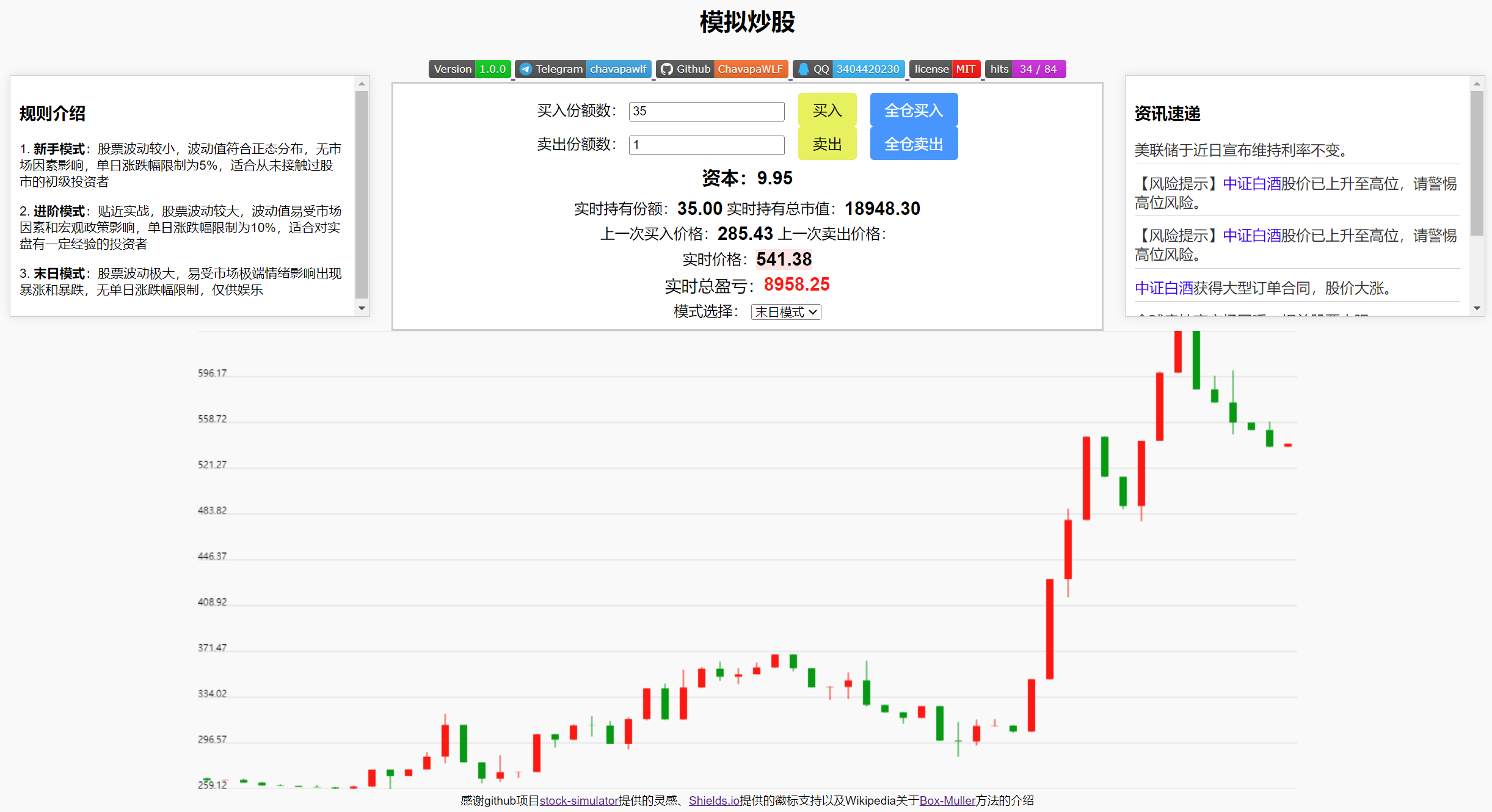
本模拟器1.0.0版本支持三种游戏模式:
-
新手模式:股票波动较小,波动值符合正态分布,无市场因素影响,单日涨跌幅限制为 5 % 5\% 5% ,适合从未接触过股市的初级投资者
-
进阶模式:贴近实战,股票波动较大,波动值易受市场因素和宏观政策影响,单日涨跌幅限制为 10 % 10\% 10% ,适合对实盘有一定经验的投资者
-
末日模式:股票波动极大,易受市场极端情绪影响出现暴涨和暴跌,无单日涨跌幅限制
主页面下方将会显示实时日K线图,在操作面板中输入相应份额进行“买入”或“卖出”操作即可(或直接点击“全仓买入”“全仓卖出”)。
机制说明
在本模拟器的 新手模式 中,每日波动值依据 Box-Muller 方法随机生成,符合正态分布;而在 进阶模式 和 末日模式 中,股价将受随机生成的新闻事件影响而出现异常波动。
若股价超过连续 20 20 20 个交易日低于一元,股票将会被强制退市,游戏结束。
Code(Version 1.0.0)
<!DOCTYPE html>
<html lang="zh-CN">
<head>
<meta charset="UTF-8">
<meta name="viewport" content="width=device-width, initial-scale=1.0">
<title>模拟炒股</title>
<meta name="author" content="Chavapa">
<meta name="description" content="A dynamic webpage for simulating real-time stock trading">
<!--
MIT License
Copyright (c) [2024] [ChavapaWLF]
Permission is hereby granted, free of charge, to any person obtaining a copy
of this software and associated documentation files (the "Software"), to deal
in the Software without restriction, including without limitation the rights
to use, copy, modify, merge, publish, distribute, sublicense, and/or sell
copies of the Software, and to permit persons to whom the Software is
furnished to do so, subject to the following conditions:
The above copyright notice and this permission notice shall be included in all
copies or substantial portions of the Software.
THE SOFTWARE IS PROVIDED "AS IS", WITHOUT WARRANTY OF ANY KIND, EXPRESS OR
IMPLIED, INCLUDING BUT NOT LIMITED TO THE WARRANTIES OF MERCHANTABILITY,
FITNESS FOR A PARTICULAR PURPOSE AND NONINFRINGEMENT. IN NO EVENT SHALL THE
AUTHORS OR COPYRIGHT HOLDERS BE LIABLE FOR ANY CLAIM, DAMAGES OR OTHER
LIABILITY, WHETHER IN AN ACTION OF CONTRACT, TORT OR OTHERWISE, ARISING FROM,
OUT OF OR IN CONNECTION WITH THE SOFTWARE OR THE USE OR OTHER DEALINGS IN THE
SOFTWARE.
-->
<!--
本项目具有的创造性:
1.通过动态网页生成走势图模拟股票交易,为入门投资者掌握股票交易基本规则提供契机的同时,也兼具趣味性与娱乐性;
2.采用严谨的数学计算生成股票数据(例如计算正态分布的Box-Muller方法),尽最大限度还原真实股市;
3.提供多种游戏模式,支持灵活切换,操作简单便捷。
-->
<p style="font-size: 26px; font-weight: bold" align="center">模拟炒股</p>
<div align="center">
<a href="https://github.com/ChavapaWLF/Simulated-stock-trading" target="_blank">
<img src="https://img-home.csdnimg.cn/images/20230724024159.png?origin_url=https%3A%2F%2Fimg.shields.io%2Fbadge%2FVersion-1.0.0-00CC00&pos_id=img-EJqofPyZ-1719417546500)">
</a>
<a href="https://t.me/chavapawlf" target="_blank">
<img src="https://img-home.csdnimg.cn/images/20230724024159.png?origin_url=https%3A%2F%2Fimg.shields.io%2Fbadge%2FTelegram-chavapawlf-26A5E4%3Flogo%3DTelegram&pos_id=img-8ThT6LSb-1719417576513)">
</a>
<a href="https://github.com/ChavapaWLF" target="_blank">
<img src="https://img-home.csdnimg.cn/images/20230724024159.png?origin_url=https%3A%2F%2Fimg.shields.io%2Fbadge%2FGithub-ChavapaWLF-FC6D26%3Flogo%3Dgithub&pos_id=img-7wdaXZ0y-1719417581323)">
</a>
<a href="https://github.com/ChavapaWLF/Simulated-stock-trading" target="_blank">
<img src="https://img-home.csdnimg.cn/images/20230724024159.png?origin_url=https%3A%2F%2Fimg.shields.io%2Fbadge%2FQQ-3404420230-1EBAFC%3Flogo%3Dtencentqq&pos_id=img-YyBMqMmx-1719417585986)">
</a>
<a href="https://github.com/ChavapaWLF/Simulated-stock-trading/blob/main/LICENSE" target="_blank">
<img src="https://img-home.csdnimg.cn/images/20230724024159.png?origin_url=https%3A%2F%2Fimg.shields.io%2Fbadge%2Flicense-MIT-FF0000&pos_id=img-X1NIxANi-1719417592197)">
</a>
<a href="https://github.com/ChavapaWLF/Simulated-stock-trading" target="_blank">
<img src="https://img-home.csdnimg.cn/images/20230724024159.png?origin_url=https%3A%2F%2Fhits.seeyoufarm.com%2Fapi%2Fcount%2Fincr%2Fbadge.svg%3Furl%3Dhttps%253A%252F%252Fgithub.com%252FChavapaWLF%252FSimulated-stock-trading%26count_bg%3D%2523CE2EE1%26title_bg%3D%2523555555%26icon%3D%26icon_color%3D%2523E7E7E7%26title%3Dhits%26edge_flat%3Dfalse&pos_id=img-DlFFTKrL-1719417601390)" alt="点击量">
</a>
</div>
<style>
body {
font-family: Arial, sans-serif;
background-color: #f9f9f9;
}
/* 弹窗的样式 */
.modal {
display: none;
/* 默认隐藏 */
position: fixed;
/* 固定位置 */
z-index: 1;
/* 位于顶部 */
left: 0;
top: 0;
width: 100%;
height: 100%;
overflow: auto;
/* 启用滚动 */
background: linear-gradient(to bottom right, #4CAF50, #2196F3);
/* 渐变背景色 */
}
/* 弹窗内容的样式 */
.modal-content {
background-color: #fefefe;
margin: 2% auto;
padding: 20px;
border: 1px solid transparent;
/* 透明边框 */
border-radius: 10px;
/* 圆角边框 */
box-shadow: 0 0 10px rgba(0, 0, 0, 0.3);
/* 阴影效果 */
border-image: repeating-linear-gradient(45deg, transparent, transparent 10px, #888 10px, #888 20px);
/* 边框图案 */
width: 80%;
}
.close {
color: #aaa;
float: right;
font-size: 22px;
font-weight: bold;
}
.close:hover,
.close:focus {
color: black;
text-decoration: none;
cursor: pointer;
}
.rules-container {
position: fixed;
top: 90px;
left: 40px;
width: 22%;
max-height: 27vh;
/* 设置最大高度不超过页面高度的四分之一 */
overflow-y: auto;
/* 添加垂直滚动条 */
background-color: #fff;
border: 1px solid #ccc;
padding: 10px;
box-shadow: 0 0 10px rgba(0, 0, 0, 0.1);
}
#news-container {
position: fixed;
top: 90px;
right: 40px;
width: 22%;
max-height: 27vh;
/* 设置最大高度不超过页面高度的四分之一 */
overflow-y: auto;
/* 添加垂直滚动条 */
background-color: #fff;
border: 1px solid #ccc;
padding: 10px;
box-shadow: 0 0 10px rgba(0, 0, 0, 0.1);
}
.news-item {
margin-bottom: 10px;
border-bottom: 1px solid #ccc;
padding-bottom: 5px;
color: #333;
}
.company-name {
color: blue;
}
#operations {
border: 2px solid #ccc;
background-color: #ffffff;
padding: 10px;
width: 45%;
margin: auto;
text-align: center;
font-size: 16px;
}
#operations p {
margin: 5px 0;
white-space: nowrap;
}
#buyButton,
#sellButton {
font-size: 16px;
padding: 8px 16px;
background-color: #eaef56;
color: #000000;
border: none;
cursor: pointer;
border-radius: 4px;
margin-left: 10px;
}
#fullBuyButton,
#fullSellButton {
font-size: 16px;
padding: 8px 16px;
background-color: #3399FF;
color: #fff;
border: none;
cursor: pointer;
border-radius: 4px;
margin-left: 10px;
}
#buyButton:hover,
#sellButton:hover {
background-color: #809520;
}
#fullBuyButton:hover,
#fullSellButton:hover {
background-color: #052c96;
}
#capital,
#price,
#holding,
#holdingValue,
#buyprice,
#sellprice,
#totalProfitLoss {
font-size: 20px;
font-weight: bold;
display: inline-block;
/* 确保上下对齐 */
vertical-align: top;
/* 垂直对齐顶部 */
white-space: nowrap;
}
#wiener_process_container {
text-align: center;
}
#wiener_process {
margin: auto;
}
.thanks {
font-size: 0.8em;
margin-bottom: 10px;
}
</style>
</head>
<body>
<!-- 初始弹窗 -->
<div id="myModal" class="modal">
<div class="modal-content">
<span class="close">Start now!</span>
<p style="font-size: 26px; font-weight: bold" align="center">README</p>
<div align="center">
<a href="https://github.com/ChavapaWLF/Simulated-stock-trading" target="_blank">
<img src="https://img-home.csdnimg.cn/images/20230724024159.png?origin_url=https%3A%2F%2Fimg.shields.io%2Fbadge%2FVersion-1.0.0-00CC00&pos_id=img-EJqofPyZ-1719417546500)">
</a>
<a href="https://t.me/chavapawlf" target="_blank">
<img src="https://img-home.csdnimg.cn/images/20230724024159.png?origin_url=https%3A%2F%2Fimg.shields.io%2Fbadge%2FTelegram-chavapawlf-26A5E4%3Flogo%3DTelegram&pos_id=img-8ThT6LSb-1719417576513)">
</a>
<a href="https://github.com/ChavapaWLF" target="_blank">
<img src="https://img-home.csdnimg.cn/images/20230724024159.png?origin_url=https%3A%2F%2Fimg.shields.io%2Fbadge%2FGithub-ChavapaWLF-FC6D26%3Flogo%3Dgithub&pos_id=img-7wdaXZ0y-1719417581323)">
</a>
<a href="https://github.com/ChavapaWLF/Simulated-stock-trading 最低0.47元/天 解锁文章






 扫一扫
扫一扫


 272
272

 被折叠的 条评论
为什么被折叠?
被折叠的 条评论
为什么被折叠?
 到【灌水乐园】发言





