



 本文探讨Vue项目npm run dev的内部执行流程。拿到Vue项目,先npm install加载依赖,再npm run dev执行项目。npm run dev时先执行build/webpack.dev.conf.js文件,该文件是webpack打包总体配置,引入了util、conf和webpack.base.conf文件,各有不同配置作用。
每次我们拿到vue的项目,第一步都是先npm install加载其依赖,其然后是npm run dev执行这个项目,我很好奇其内部的怎样执行的,就把这大概的流程走一走,以供参考。
我们先来看一下package.json的目录
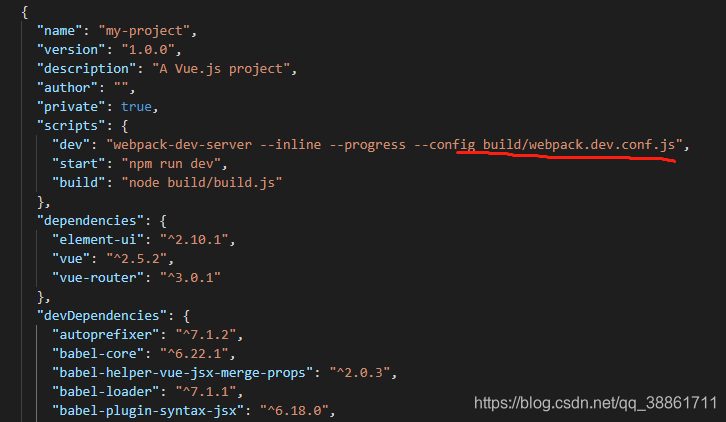
每次当我们npm run dev的时候,其首先执行的是build/webpack.dev.conf.js的文件,我们进到这文件里面接着看:
'use strict'
const utils = require('./utils')  //引入utils文件
const webpack = require('webpack')   //引入webpack内置插件
const config = require('../config')  //引入config文件
const merge = require('webpack-merge')  //引入webpack-merge合并webpack配置对象
const path = require('path')  //引入路径解析插件
const baseWebpackConfig = require('./webpack.base.conf')  //引入基本配置文件
const CopyWebpackPlugin = require('copy-webpack-plugin')  //引入拷贝文件插件
//引入自动生成html模板插件
const HtmlWebpackPlugin = require('html-webpack-plugin')
//引入自动识别webpack错误类型插件
const FriendlyErrorsPlugin = require('friendly-errors-webpack-plugin')
//查看端口工具
const portfinder = require('portfinder')

//获取到全局环境变量
const HOST = process.env.HOST
const PORT = process.env.PORT && Number(process.env.PORT)

//合并配置对象
//合并当前模块和baseWebpackConfig模块
const devWebpackConfig = merge(baseWebpackConfig, {
  module: {
    rules: utils.styleLoaders({ sourceMap: config.dev.cssSourceMap, usePostCSS: true })
  },
  //配置开发映射
  //开发环境建议使用映射cheap-module-eval-source-map
  //生产环境建议使用映射cheap-module-source-map
  // cheap-module-eval-source-map is faster for development
  devtool: config.dev.devtool,

  // these devServer options should be customized in /config/index.js
  //根据生产和开发环境定制devserver的配置
  devServer: {
    clientLogLevel: 'warning',
    historyApiFallback: {   //如果找不到界面就返回设置的默认首页
      rewrites: [
        { from: /.*/, to: path.posix.join(config.dev.assetsPublicPath, 'index.html') },
      ],
    },
    hot: true,      //是否热更新
    contentBase: false, // since we use CopyWebpackPlugin.
    compress: true,   //压缩文件
    host: HOST || config.dev.host,   //启动服务ip地址
    port: PORT || config.dev.port,     //启动端口号
    open: config.dev.autoOpenBrowser,
    overlay: config.dev.errorOverlay
      ? { warnings: false, errors: true }
      : false,
    publicPath: config.dev.assetsPublicPath,
    proxy: config.dev.proxyTable,  //代理服务
    quiet: true, // necessary for FriendlyErrorsPlugin
    watchOptions: {   //watch监听配置
      poll: config.dev.poll,
    }
  },
  plugins: [     //引用到的插件
    new webpack.DefinePlugin({
      'process.env': require('../config/dev.env')
    }),
    new webpack.HotModuleReplacementPlugin(),   //实现模块热替换
    //直接返回更新模块热替换的文件名
    new webpack.NamedModulesPlugin(), // HMR shows correct file names in console on update.
    new webpack.NoEmitOnErrorsPlugin(),
    // https://github.com/ampedandwired/html-webpack-plugin
    new HtmlWebpackPlugin({   //配置打包后生成的模板文件
      filename: 'index.html',
      template: 'index.html',
      inject: true
    }),
    // copy custom static assets复制静态资源
    new CopyWebpackPlugin([
      {
        from: path.resolve(__dirname, '../static'),
        to: config.dev.assetsSubDirectory,
        ignore: ['.*']
      }
    ])
  ]
})
//暴露一个promise
module.exports = new Promise((resolve, reject) => {
  portfinder.basePort = process.env.PORT || config.dev.port  //环境端口复制
  portfinder.getPort((err, port) => {
    if (err) {
      reject(err)
    } else {
      // publish the new Port, necessary for e2e tests
      //发布E2E测试所需的新端口
      process.env.PORT = port
      // add port to devServer config
      devWebpackConfig.devServer.port = port

      // Add FriendlyErrorsPlugin

      devWebpackConfig.plugins.push(new FriendlyErrorsPlugin({
        compilationSuccessInfo: {      //启动成功返回信息
          messages: [`Your application is running here: http://${devWebpackConfig.devServer.host}:${port}`],
        },
        onErrors: config.dev.notifyOnErrors
        ? utils.createNotifierCallback()
        : undefined
      }))

      resolve(devWebpackConfig)//返回该实例
    }
  })
})
这个文件主要是webpack打包的总体配置,我们可以看到这里引入了util、conf、和webpack.base.conf文件。
其中util用来用来配置解析css 、scss等样式的插件。
而conf文件夹下则使用来配置根据不同生产环境配置不同映射,端口,打包出口文件路径等内容。
webpack.base.conf算是webpack的主要配置文件之一,用来配置出入口文件,loader,路径解析的作用。





 扫一扫
扫一扫


 1442
1442

 被折叠的 条评论
为什么被折叠?
被折叠的 条评论
为什么被折叠?
 到【灌水乐园】发言





