



 本文详细介绍了在CentOS7.6环境下从源码编译安装Nginx的过程,包括必要的前置软件如GCC、Perl、pcre、openssl和zlib的安装步骤,以及配置、编译、链接和启动Nginx的方法。
[学习笔记]CentOS 7.6 安装Nginx
0、编译的前提条件:
1)参考上一篇“CentOS/RedHat 搭建本地yum源”安装gcc与gcc-c++。
2)安装perl(需要链接外网)—openssl需要perl来编译
下载:http://mirrors.163.com/.help/CentOS7-Base-163.repo
放到/etc/yum.repos.d/目录下。
yum -y install perl
1、软件准备:
http://jaist.dl.sourceforge.net/project/pcre/pcre/8.43/pcre-8.43.tar.gz
https://www.openssl.org/source/openssl-1.1.1d.tar.gz
http://zlib.net/zlib-1.2.11.tar.gz
http://nginx.org/download/nginx-1.17.5.tar.gz
2、将以上软件上传到/usr/local/目录下,解压并编译以上软件。
1)编译安装pcre
cd /usr/local
tar -xzvf pcre-8.43.tar.gz
cd pcre-8.43
./configure
make&&make install
2)编译安装openssl
cd /usr/local
tar -xzvf openssl-1.1.1d.tar.gz
cd openssl-1.1.1d
./config
make&&make install
3)编译安装zlib
cd /usr/local
tar -xzvf zlib-1.2.11.tar.gz
cd zlib-1.2.11
./configure
make&&make install
4)编译Nginx
cd /usr/local
tar -xzvf nginx-1.17.5.tar.gz
cd nginx-1.17.5
./configure --user=nobody --group=nobody --prefix=/usr/local/nginx --with-http_stub_status_module --with-http_gzip_static_module --with-http_realip_module --with-http_sub_module --with-http_ssl_module
make&&make install
5)链接libssl,否则Nginx启动报错:libssl.so.1.1: cannot open shared object file: No such file or directory
ln -s /usr/local/lib64/libssl.so.1.1 /usr/lib64/libssl.so.1.1
ln -s /usr/local/lib64/libcrypto.so.1.1 /usr/lib64/libcrypto.so.1.1
6)关闭防火墙
systemctl stop firewalld
systemctl disable firewalld
7)启动Nginx
cd /usr/local/nginx/sbin
./nginx
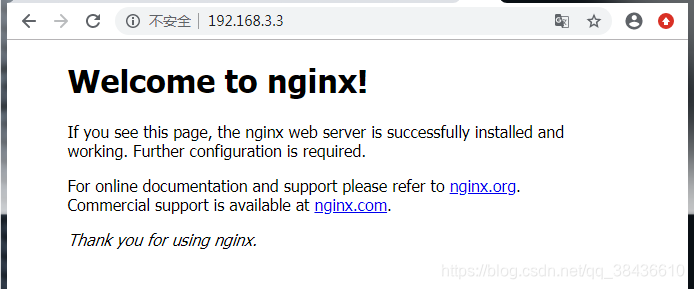
8)访问URL
http://192.168.3.3/
正常截图如下:





 扫一扫
扫一扫


 780
780

 被折叠的 条评论
为什么被折叠?
被折叠的 条评论
为什么被折叠?
 到【灌水乐园】发言





