





 本文详细介绍了如何使用XTuner在InternLM2_Chat_1.8B模型基础上进行多模态微调,通过LLaVA方案训练ImageProjector,包括Pretrain阶段理解和处理图像特征,以及Finetune阶段结合复杂文本数据提高模型的视觉理解和问答能力。
本文主要介绍使用XTuner进行多模态微调训练。
一. 给LLM装上电子眼:多模态LLM原理简介
1. 文本单模态

2. 文本+图像多模态
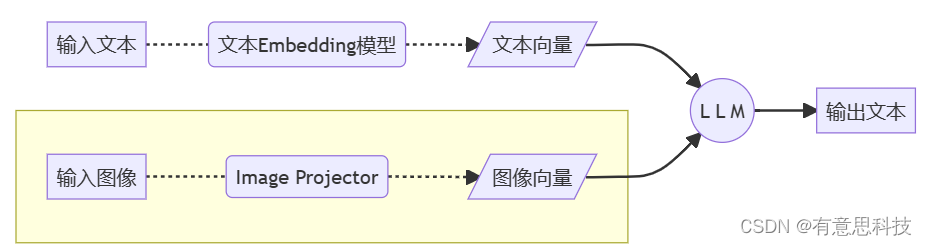
二. LLaVA方案简介
Haotian Liu等使用GPT-4V对图像数据生成描述,以此构建出大量<question text><image> -- <answer text>的数据对。利用这些数据对,配合文本单模态LLM,训练出一个Image Projector。
所使用的文本单模型LLM和训练出来的Image Projector,统称为LLaVA模型。
1. LLaVA训练阶段示意图
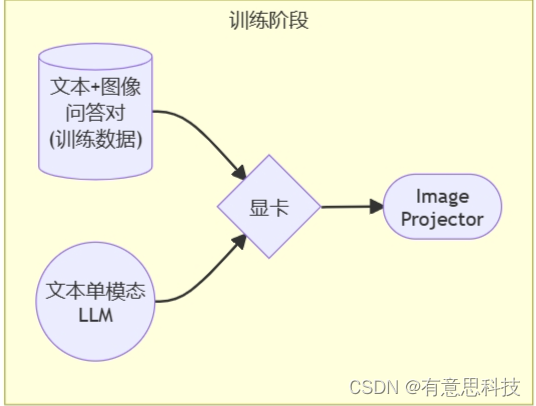
2. LLaVA测试阶段示意图
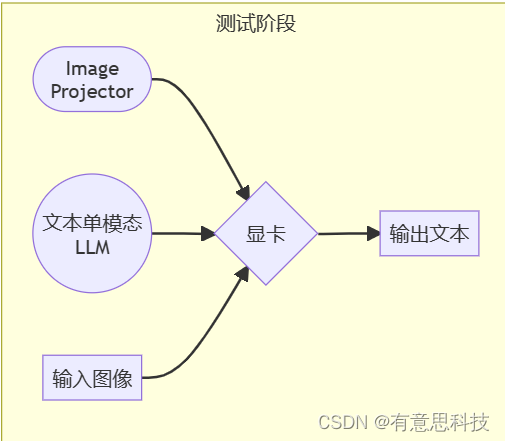
Image Projector的训练和测试,有点类似之前我们讲过的LoRA微调方案。
二者都是在已有LLM的基础上,用新的数据训练一个新的小文件。
只不过,LLM套上LoRA之后,有了新的灵魂(角色);而LLM套上Image Projector之后,才有了眼睛。
三. 环境准备
开发机,以及conda 环境配置可以参考上一篇:http://t.csdnimg.cn/5EdO5 http://t.csdnimg.cn/5EdO5
四. 微调训练
在本节中,我们将 自己构造
<question text><image>--<answer text>数据对,基于InternLM2_Chat_1.8B这个文本单模态模型,使用LLaVA方案,训练一个给InternLM2_Chat_1.8B使用的Image Projector文件。
LLaVA方案中,给LLM增加视觉能力的过程,即是训练Image Projector文件的过程。 该过程分为2个阶段:Pretrain和Finetune。
1. Pretrain阶段
在Pretrain阶段,我们会使用大量的图片+简单文本(caption, 即图片标题)数据对,使LLM理解图像中的普遍特征。即,对大量的图片进行粗看。
Pretrain阶段训练完成后,此时的模型已经有视觉能力了!但是由于训练数据中都是图片+图片标题,所以此时的模型虽然有视觉能力,但无论用户问它什么,它都只会回答输入图片的标题。即,此时的模型只会给输入图像“写标题”。
Pretrain阶段相当于是开发LLM时预训练工作,对硬件要求非常高,有8卡的学有余力同学可以自行尝试。详见XTuner-LLaVA和LLaVA。
NPROC_PER_NODE=8 xtuner train llava_internlm2_chat_1_8b_clip_vit_large_p14_336_e1_gpu8_pretrain --deepspeed deepspeed_zero2

NPROC_PER_NODE=8 xtuner train llava_internlm2_chat_1_8b_qlora_clip_vit_large_p14_336_lora_e1_gpu8_finetune --deepspeed deepspeed_zero2
在本次实战营中,我们已经为大家提供了Pretrain阶段的产物——iter_2181.pth文件。它就是幼稚园阶段的Image Projector!大家带着iter_2181.pth文件继续进入下一阶段进行Finetune即可。
2. Finetune阶段
在Finetune阶段,我们会使用图片+复杂文本数据对,来对Pretrain得到的Image Projector即iter_2181.pth进行进一步的训练。
2.1. 训练数据构建
2.1.1. 格式
[
    {
        "id": "随便什么字符串",
        "image": "图片文件的相对位置。相对谁?相对你后面config文件里指定的image_folder参数的路径。",
        "conversation": [
            {
                "from": "human",
                "value": "<image>\n第1个问题。"
            },
            {
                "from": "gpt",
                "value": "第1个回答"
            },
            {
                "from": "human",
                "value": "第2个问题。"
            },
            {
                "from": "gpt",
                "value": "第2个回答"
            },
            # ......
            {
                "from": "human",
                "value": "第n个问题。"
            },
            {
                "from": "gpt",
                "value": "第n个回答"
            },
        ]
    },

    # 下面是第2组训练数据了。

    {
        "id": "随便什么字符串",
        "image": "图片文件的相对位置。相对谁?相对你后面config文件里指定的image_folder参数的路径。",
        "conversation": [
            {
                "from": "human",
                "value": "<image>\n第1个问题。"
            },
            # ......
            {
                "from": "gpt",
                "value": "第n个回答"
            }
        ]
    }
]
注意:每组训练数据的第1个来自human的问题前,要加上图片占位符,即
<image>
示例
[
  {
    "id": "000000033471",
    "image": "coco/train2017/000000033471.jpg",
    "conversations": [
      {
        "from": "human",
        "value": "<image>\nWhat are the colors of the bus in the image?"
      },
      {
        "from": "gpt",
        "value": "The bus in the image is white and red."
      },
      {
        "from": "human",
        "value": "What feature can be seen on the back of the bus?"
      },
      {
        "from": "gpt",
        "value": "The back of the bus features an advertisement."
      },
      {
        "from": "human",
        "value": "Is the bus driving down the street or pulled off to the side?"
      },
      {
        "from": "gpt",
        "value": "The bus is driving down the street, which is crowded with people and other vehicles."
      }
    ]
  },
  {
    "id": "000000052846",
    "image": "coco/train2017/000000052846.jpg",
    "conversations": [
      {
        "from": "human",
        "value": "<image>\nWhere is the cat positioned in the image?"
      },
      {
        "from": "gpt",
        "value": "The cat is positioned on top of the back of the couch in the living room."
      }
    ]
  }
 ]
2.1.2. 制作
我们可以效法LLaVA作者的做法,将自己的图片发送给GPT,要求其按照上述格式生成若干条问答对。
prompts
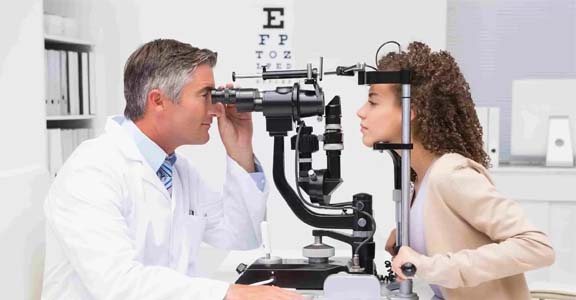
[
  {
    "id": "<random_number_string>",
    "image": "test_img/oph.jpg",
    "conversations": [
      {
        "from": "human",
        "value": "<image>\nDescribe this image."
      },
      {
        "from": "gpt",
        "value": "<answer1>"
      },
      {
        "from": "human",
        "value": "<question2>"
      },
      {
        "from": "gpt",
        "value": "<answer2>"
      },
      {
        "from": "human",
        "value": "<question3>"
      },
      {
        "from": "gpt",
        "value": "<answer3>"
      }
    ]
  }
]
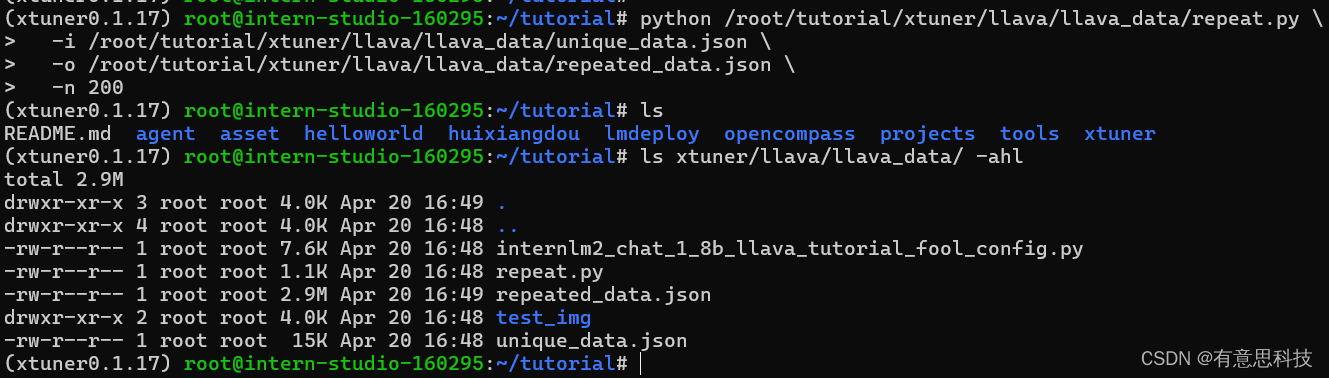
为了方便大家跟随课程,针对这张示例图片的问答对数据(repeat_data.json),大家按照下面的脚本运行就可以生成啦~(重复200次)
cd ~ && git clone https://github.com/InternLM/tutorial -b camp2 && conda activate xtuner0.1.17 && cd tutorial

python /root/tutorial/xtuner/llava/llava_data/repeat.py \
  -i /root/tutorial/xtuner/llava/llava_data/unique_data.json \
  -o /root/tutorial/xtuner/llava/llava_data/repeated_data.json \
  -n 200
2.2. 准备配置文件
如果你懒到不想自己改配置文件,或者怎么改都失败。我们准备了一个fool_config文件在仓库里。运行:
cp /root/tutorial/xtuner/llava/llava_data/internlm2_chat_1_8b_llava_tutorial_fool_config.py /root/tutorial/xtuner/llava/llava_internlm2_chat_1_8b_qlora_clip_vit_large_p14_336_lora_e1_gpu8_finetune_copy.py
2.2.1 创建配置文件
# 查询xtuner内置配置文件
xtuner list-cfg -p llava_internlm2_chat_1_8b

# 拷贝配置文件到当前目录
xtuner copy-cfg \
  llava_internlm2_chat_1_8b_qlora_clip_vit_large_p14_336_lora_e1_gpu8_finetune \
  /root/tutorial/xtuner/llava
当前你的/root/tutorial/xtuner/llava/目录下的文件结构应该是这样: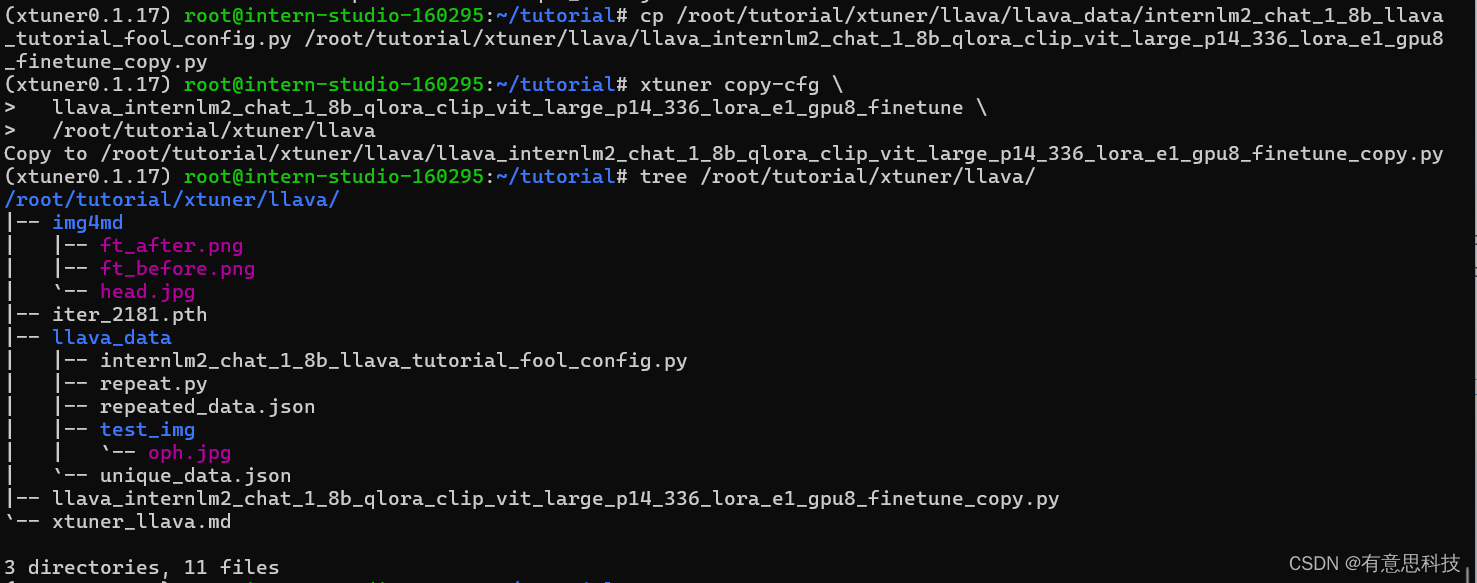
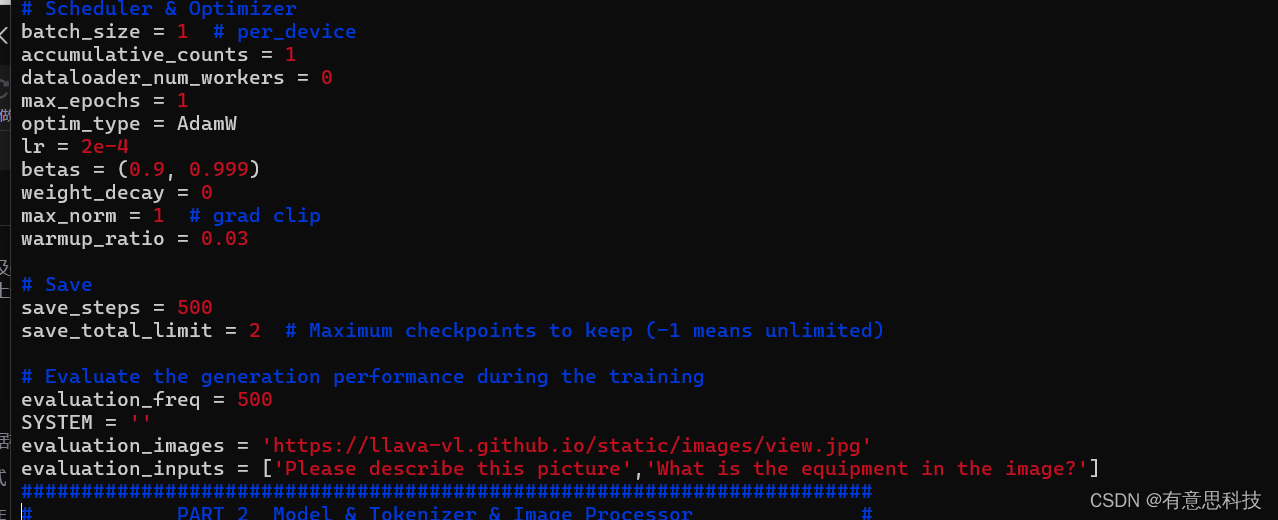
2.2.2 修改配置文件
修改llava_internlm2_chat_1_8b_qlora_clip_vit_large_p14_336_lora_e1_gpu8_finetune_copy.py文件中的:
- pretrained_pth
- llm_name_or_path
- visual_encoder_name_or_path
- data_root
- data_path
- image_folder
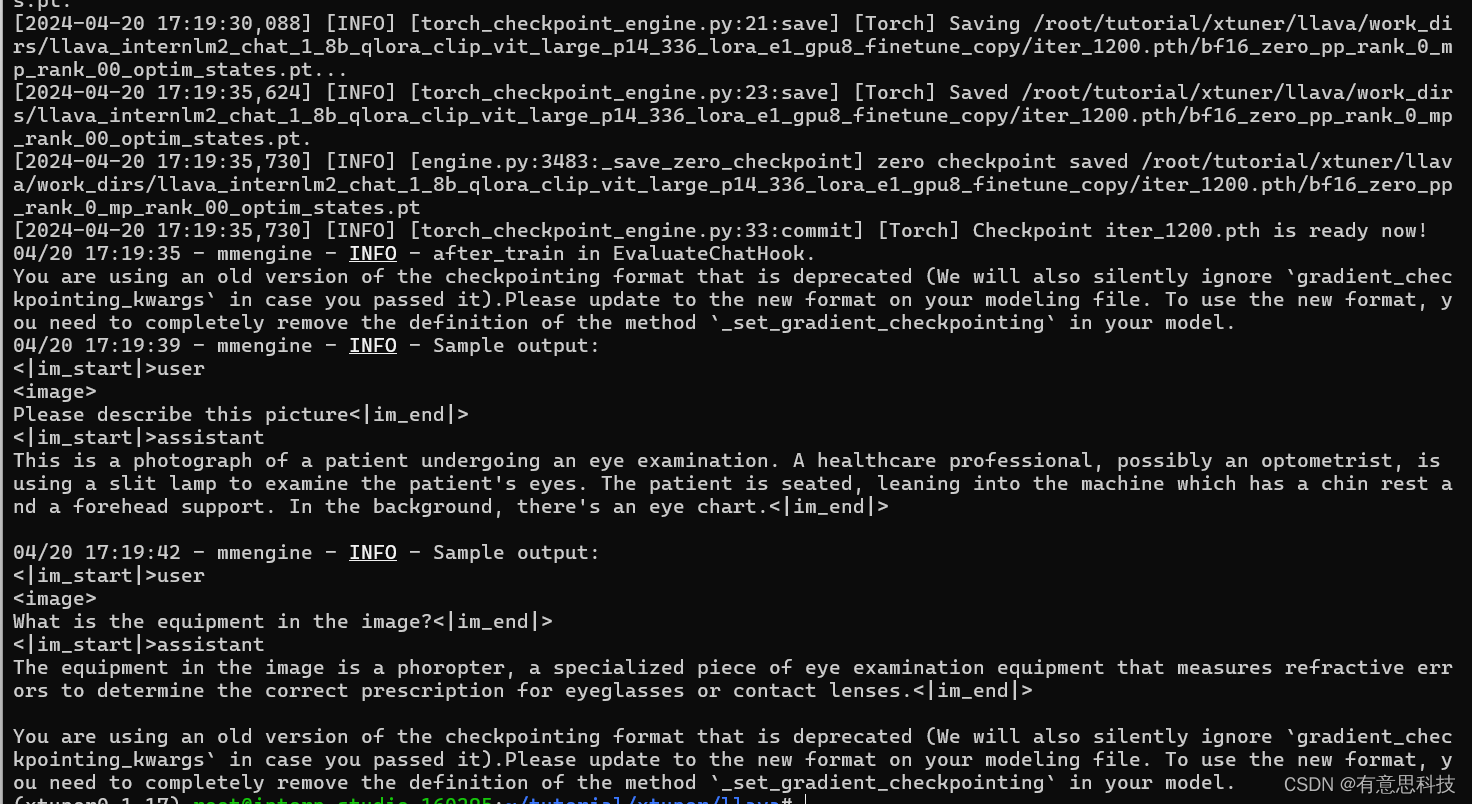
2.3 开始Finetune
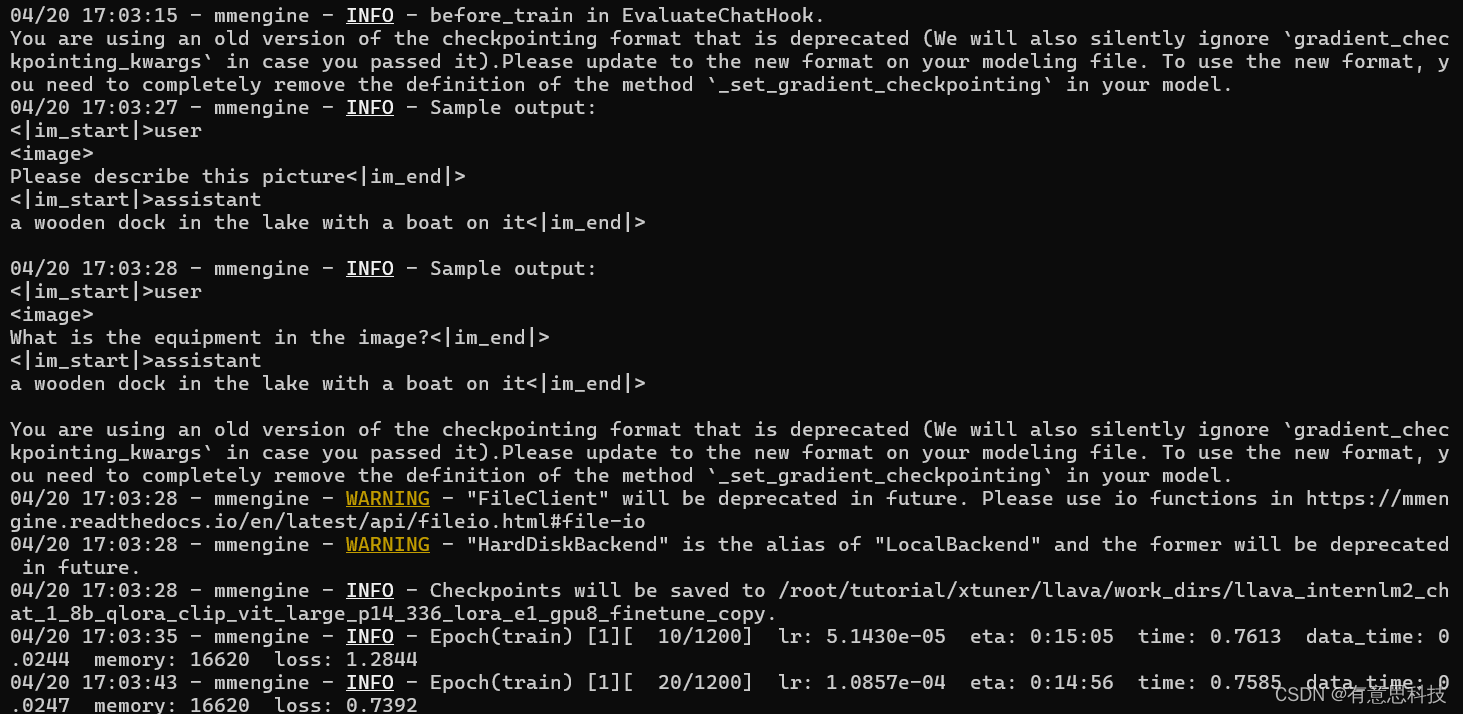
cd /root/tutorial/xtuner/llava/
xtuner train /root/tutorial/xtuner/llava/llava_internlm2_chat_1_8b_qlora_clip_vit_large_p14_336_lora_e1_gpu8_finetune_copy.py --deepspeed deepspeed_zero2
3. 对比Finetune前后的性能差异
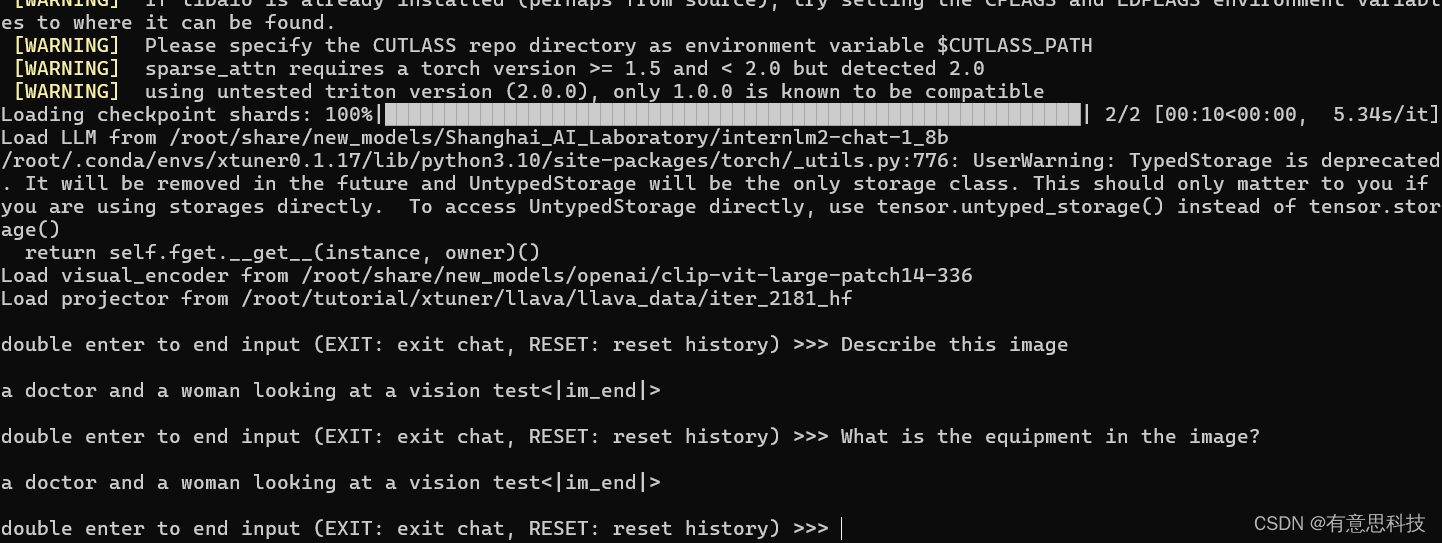
3.1. Finetune前
即:加载 1.8B 和 Pretrain阶段产物(iter_2181) 到显存。
# 解决小bug
export MKL_SERVICE_FORCE_INTEL=1
export MKL_THREADING_LAYER=GNU

# pth转huggingface
xtuner convert pth_to_hf \
  llava_internlm2_chat_1_8b_clip_vit_large_p14_336_e1_gpu8_pretrain \
  /root/share/new_models/xtuner/iter_2181.pth \
  /root/tutorial/xtuner/llava/llava_data/iter_2181_hf


# 启动!
xtuner chat /root/share/new_models/Shanghai_AI_Laboratory/internlm2-chat-1_8b \
  --visual-encoder /root/share/new_models/openai/clip-vit-large-patch14-336 \
  --llava /root/tutorial/xtuner/llava/llava_data/iter_2181_hf \
  --prompt-template internlm2_chat \
  --image /root/tutorial/xtuner/llava/llava_data/test_img/oph.jpg
Q1: Describe this image.
Q2: What is the equipment in the image?
3.2. Finetune后
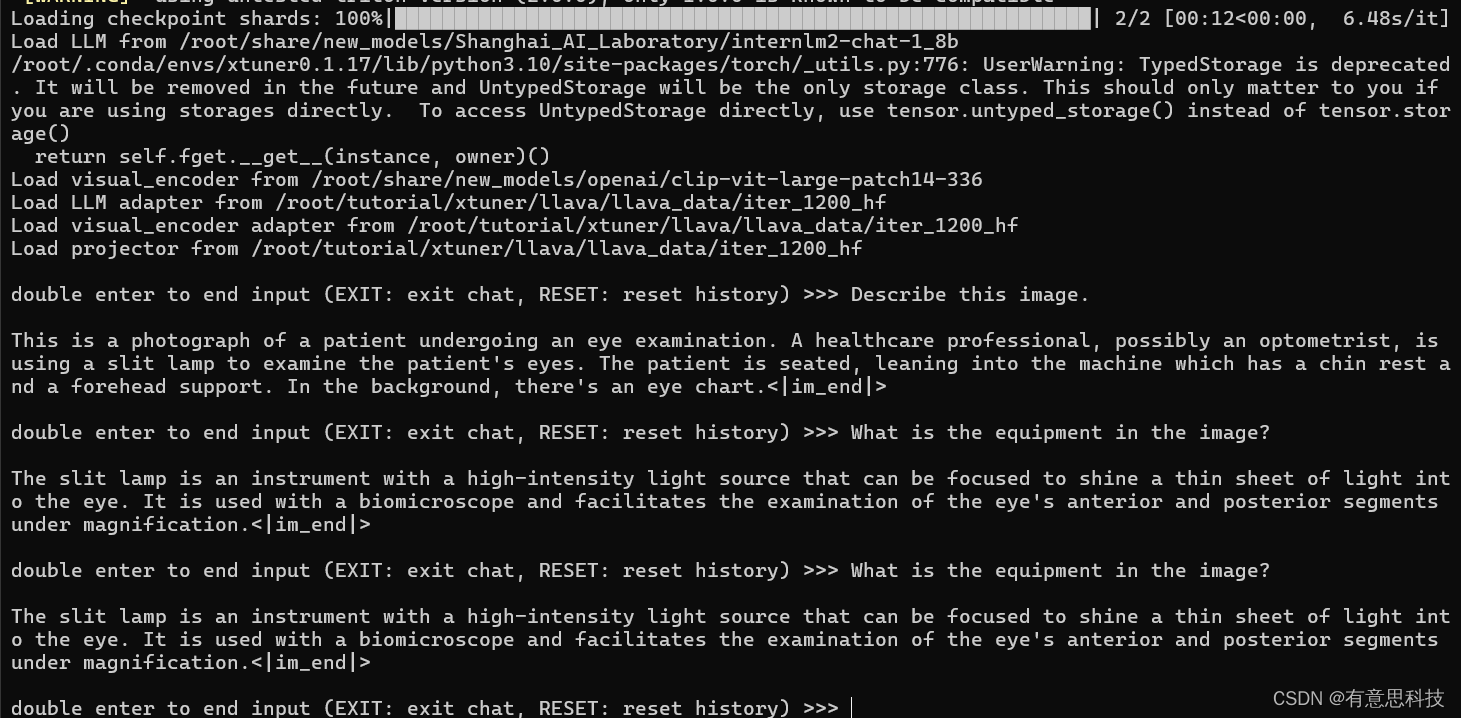
即:加载 1.8B 和 Fintune阶段产物 到显存。
# 解决小bug
export MKL_SERVICE_FORCE_INTEL=1
export MKL_THREADING_LAYER=GNU

# pth转huggingface
xtuner convert pth_to_hf \
/root/tutorial/xtuner/llava/llava_internlm2_chat_1_8b_qlora_clip_vit_large_p14_336_lora_e1_gpu8_finetune_copy.py \
/root/tutorial/xtuner/llava/work_dirs/llava_internlm2_chat_1_8b_qlora_clip_vit_large_p14_336_lora_e1_gpu8_finetune_copy/iter_1200.pth \
  /root/tutorial/xtuner/llava/llava_data/iter_1200_hf


# 启动!
xtuner chat /root/share/new_models/Shanghai_AI_Laboratory/internlm2-chat-1_8b \
  --visual-encoder /root/share/new_models/openai/clip-vit-large-patch14-336 \
  --llava /root/tutorial/xtuner/llava/llava_data/iter_1200_hf \
  --prompt-template internlm2_chat \
  --image /root/tutorial/xtuner/llava/llava_data/test_img/oph.jp
Q1: Describe this image.
Q2: What is the equipment in the image?
Finetune前后效果对比:
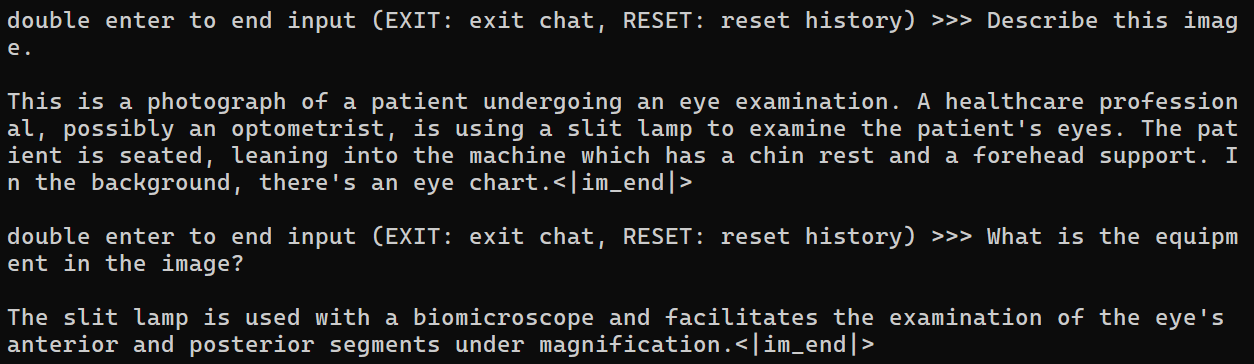
Finetune前:只会打标题

Finetune后:会回答问题了






 扫一扫
扫一扫


 868
868

 被折叠的 条评论
为什么被折叠?
被折叠的 条评论
为什么被折叠?
 到【灌水乐园】发言





