


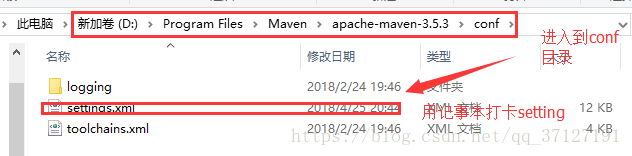
1.首先进入你的maven目录文件夹

2.进入到conf目录,打开setting文件
3.更改setting文件

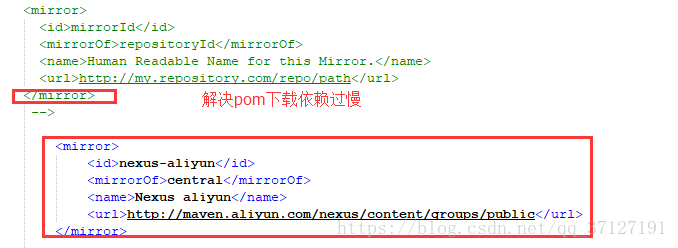
<mirror>
<id>nexus-aliyun</id>
<mirrorOf>central</mirrorOf>
<name>Nexus aliyun</name>
<url>http://maven.aliyun.com/nexus/content/groups/public</url>
</mirror>
保存之后在下载,速度会变得超快
 通过修改Maven的settings.xml文件,配置阿里云Nexus镜像作为中央仓库的镜像,可以显著加快Idea下载依赖的速度。具体步骤包括进入maven目录的conf文件夹,编辑settings.xml文件,添加nexus-aliyun镜像配置。
1.首先进入你的maven目录文件夹
2.进入到conf目录,打开setting文件
3.更改setting文件
<mirror>
<id>nexus-aliyun</id>
<mirrorOf>central</mirrorOf>
<name>Nexus aliyun</name>
<url>http://maven.aliyun.com/nexus/content/groups/public</url>
</mirror>
保存之后在下载,速度会变得超快

 被折叠的 条评论
为什么被折叠?
被折叠的 条评论
为什么被折叠?
 到【灌水乐园】发言




 最低0.47元/天 解锁文章






 扫一扫
扫一扫


 840
840


